Why LangChain Docs Drive Away Beginners: The Pain of Local Models and Product Promotion

A beginner exposes four LangChain doc failures: hidden local model support, forced LangSmith promotion, cloud-only examples, and missing conceptual explanations.
A Reddit user documented their frustrating experience learning LangChain, identifying four concrete problems: local model (Ollama, llama.cpp) integration docs exist but are effectively unreachable due to poor navigation; the getting-started guide inserts LangSmith commercial setup before users make their first call; nearly all examples assume cloud APIs; and there's a lack of architecture diagrams to help beginners understand core abstractions like Chains and Agents. The post also raises a broader industry observation: the rise of AI coding assistants is quietly masking the decline in documentation quality.
One Beginner's Frustration: What's Wrong with LangChain's Documentation?
For developers just stepping into the world of Agentic AI, official documentation is often the first hurdle. Recently, a Reddit user posted a candid critique expressing deep disappointment with LangChain's docs. Their complaints weren't an emotional outburst — they identified several pain points that are surprisingly common among beginners: missing information on local model integration, product promotion cluttering the docs, and a lack of beginner-friendly conceptual explanations.
These criticisms raise a question worth pondering: as an open-source framework rapidly iterates and its feature set explodes, can its documentation still serve the beginners who need it most?
Local Model Integration: An Island of Information Buried in the Docs
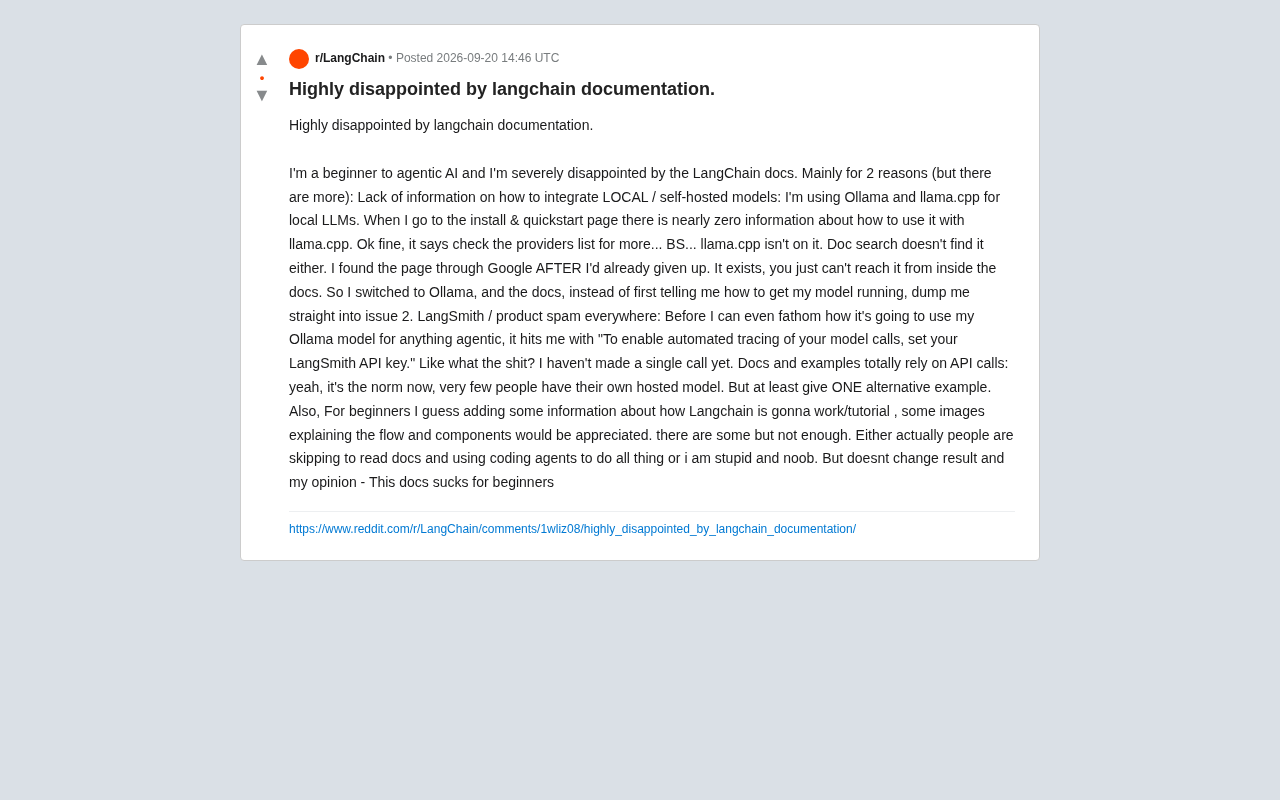
The developer's first and most fundamental complaint was about severely inadequate support for local/self-hosted model integration. They were using Ollama and llama.cpp to run local LLMs — a choice increasingly popular among developers who prioritize privacy, cost control, and offline capability.
Yet on the installation and quickstart pages, they could barely find any information about llama.cpp. The docs pointed them to a "providers list," but llama.cpp wasn't there, and the in-site search couldn't locate the relevant page either. Ironically, the documentation page actually existed — they only found it through Google, and only after they had already given up.
"It does exist, you just can't find it from within the documentation."
This "information island" phenomenon is common in large open-source projects. The page was written, but the in-site navigation, search indexing, and cross-linking never caught up — leaving the content in a state of "exists but unreachable." For beginners, if they can't find it, it might as well not exist.
Ollama is a tool that lets users download and run mainstream open-source LLMs (like Llama 3, Mistral, Gemma, etc.) locally with a single command. Its goal is to replicate the cloud API experience in a local environment, exposing a standard REST interface. llama.cpp, on the other hand, is a low-level C++ inference library that uses quantization techniques to dramatically reduce model size and memory usage, enabling consumer hardware to run multi-billion parameter models. The two represent the two main paths for local LLM deployment: Ollama prioritizes out-of-the-box convenience, while llama.cpp is closer to the metal and highly customizable. LangChain theoretically supports both through its ChatOllama and LlamaCpp integration components — but as this user experienced, there's a clear disconnect between these integrations' documentation entry points and the main navigation, effectively making them "hidden features."
LangSmith Promotion Everywhere: Asked to Configure Before Running Anything
After switching to Ollama, the user hit a second obstacle: instead of prioritizing how to get a model up and running, the documentation immediately presented a LangSmith configuration prompt.
"Before I even understand what it's going to do with my Ollama model for any agentic stuff, it throws at me: 'To enable automatic tracing of model calls, set your LangSmith API key.' I haven't made a single goddamn call yet."
LangSmith is LangChain's official commercial observability and debugging product. Embedding it deeply in introductory documentation is understandable from a business perspective — it's a common strategy for converting open-source traffic into commercial value. But from a beginner's UX standpoint, asking users to configure an optional commercial service before they've even run their first "Hello World" adds cognitive overhead and can easily trigger a "I'm being sold to" reaction.
The golden rule of getting-started documentation should be: get users to their first success via the shortest possible path. Any non-essential configuration steps should be pushed further back.
LangSmith is a commercial SaaS platform from LangChain that provides tracing, evaluation, and monitoring features to help developers debug complex Agent behavior and multi-step Chain execution. For production-grade applications, it's genuinely valuable as an observability tool. However, LangChain embeds LangSmith initialization code (setting the LANGCHAIN_TRACING_V2 and LANGCHAIN_API_KEY environment variables) at the top of nearly all official examples, making it look like a prerequisite for running the framework rather than an optional enhancement. This "promotion-on-by-default" documentation strategy isn't uncommon among developer tool companies like Stripe or MongoDB — it's essentially a funnel design that converts open-source learning traffic into commercial product sign-ups. The issue is one of degree: when commercial guidance appears before users complete their first successful call, it transforms from a value-add into a roadblock.
The Problem with Cloud-Only Examples
The third issue flows naturally from the first two: the documentation and examples are built almost entirely on the assumption that users are calling cloud APIs.
The user acknowledged that using hosted model APIs is the mainstream approach and that people who truly self-host models are a minority. But they made a reasonable request — provide at least one alternative example using a local model.
This reflects a real divergence in the developer community. As tools like Ollama and llama.cpp have dramatically lowered the barrier to local deployment, a growing number of developers are choosing local setups for data privacy, cost control, or purely for learning purposes. Documentation that only demonstrates the OpenAI API effectively shuts these users out, forcing them to figure out on their own how to "translate" the sample code into a local model equivalent.
The Missing Conceptual Map: Beginners Need More Than Code Snippets
Finally, the user wished the documentation offered beginners more explanation of how LangChain actually works — using flowcharts and component diagrams to explain how the pieces fit together. While acknowledging that some visuals exist in the docs, they felt there were "nowhere near enough."
This is a fundamentally important observation. LangChain involves a range of abstract concepts — Chains, Agents, Tools, Memory, and more — whose relationships are obvious to experienced developers but deeply opaque to newcomers. Simply listing APIs and code snippets cannot help beginners build a coherent mental model. Visual architecture diagrams and data flow illustrations are often far more effective than paragraphs of text.
LangChain's core abstraction system underwent a major restructuring over the past two years: the original LangChain package was split into langchain-core (defining base interfaces and the LCEL expression language), langchain (general-purpose chains and Agent logic), and a large number of langchain-<provider> integration packages. LCEL (LangChain Expression Language) introduced a declarative composition paradigm that lets developers chain together Prompts, Models, OutputParsers, and other components using the pipe operator (|). While this architectural change improved modularity, it also left the documentation in a state where old and new content coexist with blurry conceptual boundaries — some tutorials still use the older LLMChain syntax while others have switched to LCEL style, with no clear migration guidance. Without an overall architecture diagram, it's genuinely hard for beginners to tell which era a given example belongs to, or whether it still reflects recommended practice.
Reflection: Is It a Documentation Problem, or Has the Way We Learn Changed?
At the end of their post, the user offered a self-aware observation worth thinking about:
"Either everyone just skips reading the docs and uses an AI coding assistant to figure everything out, or I'm just dumb and inexperienced. Either way, the result and my opinion don't change — this documentation is terrible for beginners."
This actually identifies a real industry shift: more and more developers rely on AI coding assistants like Cursor, Claude, or Copilot to generate LangChain code, rather than reading the official docs word for word. In a sense, this masks the underlying documentation problems — when an AI can spit out working code directly, the onboarding experience in the docs feels less critical.
But that can't serve as an excuse for declining documentation quality. For learners who want to genuinely understand the framework — not just get code to run — clear, navigable documentation that covers local deployment scenarios remains irreplaceable.
As a fast-moving, high-profile open-source project, the challenge LangChain faces is typical: feature iteration speed far outpaces documentation maintenance, and commercial interests need to be balanced against community experience. This user's critique may well be a mirror that every rapidly growing open-source tool should hold up to itself.
Related articles

5 Practical Ways Real Estate Agents Can Use AI to Boost Efficiency (2026 Edition)
How can real estate agents use AI to boost efficiency? Based on a YouTube walkthrough, this breaks down five methods — ChatGPT for listing descriptions, Canva for marketing materials, forms for open house leads, Zapier for automated follow-up, and seller meeting prep — and flags risk boundaries like fair housing laws, photo authenticity, and price verification.

Grok Bot vs ChatGPT Agent: Which AI Agent Is More Powerful?
How does Grok Bot differ from ChatGPT Agent? This comparison examines how they work: Grok Bot has a cloud computer and runs persistently inside tools to execute multi-step tasks automatically; ChatGPT Agent operates web pages in a browser and is more mature at general tasks. Includes selection advice.

Walmart Agent Gateway: AI Shops for You Automatically—Why Is Amazon Going the Opposite Way?
Walmart's Agent Gateway lets ChatGPT, Gemini and other AI assistants access its product catalog to search, compare and add to cart, with spending limits and per-purchase approval. Amazon blocks external AI agents—two retail giants, opposite paths. Currently US-only, India may follow.