Windows-MCP Deep Dive: How UIA Gives AI Agents Full Control of the Local Desktop
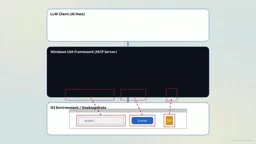
Windows-MCP uses UIA semantic trees instead of screenshots to let AI control Windows desktops in milliseconds — but privilege inheritance and prompt injection pose serious risks.
Windows-MCP is an open-source local server that uses the Windows UI Automation framework to parse desktop GUIs into structured semantic trees, bypassing the expensive and hallucination-prone computer vision approach used by early AI desktop automation tools and reducing action latency to 0.2–0.5 seconds. It launches a Python server as a child process via STDIO pipe, passing tool calls over JSON-RPC 2.0 in a zero-port closed loop, with agents completing mouse and keyboard operations through a snapshot-click-verify feedback loop that simulates Win32 hardware interrupts. However, child processes inherit the host's full privileges, and the default toolset includes PowerShell and registry access — a combination that, layered with prompt injection attack surfaces, creates serious risk. Secure deployment requires manually stripping high-risk tools, enabling human-in-the-loop approval, and running the environment in a sandbox or rollback-capable VM.
Large language models can write working code and analyze vast datasets, but they remain fundamentally text-bound engines. By default, they are completely isolated from your digital environment, incapable of any physical interaction. The graphical interface of an operating system is a deterministic pixel grid designed for human visual perception — there is a fundamental mismatch between the way AI parses semantic data and the hand-eye coordination required to move a mouse, click on coordinates, and operate the OS shell. The open-source project CursorTouch Windows-MCP attempts to solve this problem at the architectural level.
From Visual Guessing to Semantic Parsing: A Fundamental Architectural Shift
Early attempts to bridge this gap relied heavily on computer vision: developers would have agents analyze static screenshots and try to estimate the spatial coordinates of target buttons. Visual reasoning is computationally expensive — every high-resolution frame must be encoded into thousands of tokens — and models frequently hallucinate the moment a user changes display scaling or the UI theme. Traditional coordinate-based macro automation tools are equally brittle in dynamic environments: a software update that shifts a menu element by 10 pixels is enough to break an entire script.

Windows-MCP's solution is to bypass probabilistic visual guessing and translate the interface directly into a programmatic structure. It runs as a local server, acting as a dedicated translation layer between the language model and the operating system's internal architecture. The core dependency is the Windows UI Automation (UIA) framework. Rather than taking screenshots for a vision model to analyze, the server hooks directly into the native Windows accessibility layer, translating the visual desktop into a structured, hierarchical text document — extracting metadata and coordinates for every button and window, building a semantic tree analogous to a browser's DOM.
Stripping out image encoding and the transmission overhead of cloud-based inference delivers a dramatic performance improvement: latency per discrete action drops to between 0.2 and 0.5 seconds.
Windows UI Automation (UIA) is an accessibility framework built into Windows since Vista, originally designed to allow assistive technologies like screen readers to programmatically access UI elements. UIA operates on a provider-client model: every GUI control (button, text box, menu item) registers with the system as a "provider," exposing standardized properties including ControlType, localized Name, actionable Patterns (such as InvokePattern and ValuePattern), and precise screen bounding rectangles. Any process can act as a "client" and query this property tree via a COM interface. This is highly analogous to a browser's DOM tree — HTML elements correspond to UIA control nodes, CSS selectors correspond to UIA property filters, and JavaScript events correspond to UIA Pattern calls. This is precisely why Windows-MCP can translate a desktop GUI into a tree-shaped semantic structure that language models are familiar with, without any visual reasoning. It is worth noting that UIA data quality depends entirely on how well an application implements accessibility standards — native Win32 and WPF apps that follow accessibility guidelines expose the richest metadata, while some apps built on custom rendering engines or Electron may have incomplete UIA support.
Local STDIO Pipes: Zero-Port Closed-Loop Communication
To understand how the translation mechanism turns into physical action, we can break down a strictly scoped desktop task and observe the real-time feedback loop. Imagine a controlled desktop environment: we instruct an AI agent to organize three project files into a Q3 archive folder, then open a text editor to write a confirmation note.
The key point is that the AI client does not connect to an external server over the internet to execute commands. The host application uses a local STDIO pipe to launch the Windows-MCP Python executable as a direct child process on the same machine. The client and server communicate solely through standard input/output streams, with zero TCP ports exposed to the local network or the public internet.
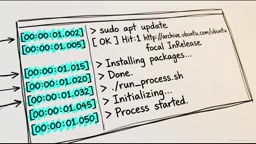
Every capability discovery request, tool call, and status report flows through this closed loop in standardized JSON-RPC 2.0 message format. Bypassing external routing eliminates network latency overhead, making successive coordinate coordination and click execution nearly instantaneous. This configuration is also an absolute security necessity: isolating system commands from external network access forms the first security boundary.
The Model Context Protocol (MCP) is an open standard proposed by Anthropic to define a unified tool-calling interface for large language models. Its core abstraction is: a Host application manages one or more MCP servers, each of which exposes a set of named Tools, Resources, and Prompt templates to the model. The communication layer supports two transport modes: the STDIO pipe described here, which launches the server as a local child process with all messages exchanged via standard I/O streams in JSON-RPC 2.0 format; and an HTTP-based SSE (Server-Sent Events) mode for cross-machine or cross-network deployments. The security advantage of STDIO mode is that inter-process communication is completed entirely within kernel-scheduled pipe buffers, with no network stack involvement — the attack surface is limited to the local process permission boundary. This also means the core security risk shifts from the network layer to the process privilege layer, which is the institutional context for the privilege inheritance discussion later in this article.
The Perception-to-Execution Feedback Loop
The workflow begins the moment a user submits a natural language instruction. The agent immediately stops generating text and calls the snapshot tool via a JSON request. Rather than taking a static screenshot, it performs an unbounded depth-first traversal of the OS's active window hierarchy, querying active elements and compiling unique control labels, localized names, and precise screen bounding box coordinates for the target documents and folder. This highly structured spatial data is serialized as text and returned to the waiting model via the STDIO pipe.
The context window consumed by transmitting a few kilobytes of text data is a tiny fraction of what it would cost to feed millions of encoded pixels to a multimodal vision model. This direct programmatic extraction guarantees absolute spatial precision — the language model receives exact pixel mappings from the rendering engine itself, with no need to guess icon positions.
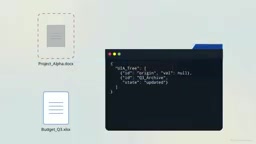
With precise coordinates in hand, the agent shifts from perception to execution, calling the click tool to instruct the server to press the virtual mouse button, drag to the folder coordinates, and release. The Python server executes this by triggering Win32 hardware interrupts, tricking the operating system into believing a real physical mouse is moving. The loop demands strict verification: the agent immediately issues a new snapshot command to confirm the icon has disappeared from its original location and moved to the archive folder, before calculating the coordinates for the next file. Once the organization is confirmed, the agent uses the app tool to launch the text editor, then uses the type tool to bypass standard keystroke scan simulation and inject a continuous stream of keystrokes directly into the active application's buffer.
This low-level hardware simulation is fast, but by design it is extremely fragile: if a human operator physically moves the mouse while the agent is simulating hardware interrupts, the real signal will collide with the synthetic signal, deflecting the programmatic cursor from its intended path and clicking the wrong UIA element. When the expected UI state fails to update, the client triggers a target resolution timeout, interrupting the execution loop and halting the agent entirely. This fragility is actually a deliberately hardcoded failsafe — the user always retains ultimate override power simply by touching the hardware.
Privilege Inheritance: The Overlooked Critical Attack Surface
Automation in a simulated environment is harmless, but deploying this local STDIO architecture on a real machine exposes serious vulnerabilities. Child processes run completely outside any restrictive container. Because the Python server is launched locally, it inherits the full privilege level of the host application that launched it. The default Windows-MCP toolset includes system administration capabilities, granting the language model unrestricted access to deep OS internals.
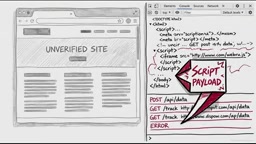
Equipping an autonomous agent with PowerShell execution tools and Windows registry editing tools is functionally equivalent to granting it omnipotence over the entire machine. This lack of isolation opens a massive attack surface for prompt injection. Consider an agent instructed to scrape a local HTML document or website: if the target content contains a maliciously crafted text prompt, the situation changes instantly. A language model cannot reliably distinguish a legitimate command from a user from a hidden payload buried in a document, instructing it to quietly execute a cryptographic script in the background. When the agent can physically interact, execute shell scripts, and modify the system registry, a theoretical injection becomes an immediate operational disaster.
Prompt Injection is a class of attack against large language models analogous to SQL injection: an attacker embeds carefully crafted instructions into external content the model will process (web pages, documents, email bodies, etc.), attempting to override or subvert the legitimate instructions in the system prompt. Indirect Prompt Injection specifically refers to malicious instructions that originate from third-party data sources the model actively fetches or reads, rather than directly from user input — this makes the attack surface nearly impossible to close through input filtering alone. When a language model simultaneously has the ability to perceive its environment and execute actions, prompt injection escalates from "making the model say the wrong thing" to "making the model do the wrong thing" — in an embodied AI agent scenario, this means an attacker can induce an agent to delete files, exfiltrate data, or modify system configuration by hiding instructions in a PDF or web page, all without the user's knowledge. Current large language models lack a reliable "instruction source verification" mechanism at the semantic level, which is why there is no fundamental technical solution to this attack type.
Practices for Building a Security Boundary
Operators must actively strip capabilities through command-line configuration to neutralize risk. This requires manually editing the host client's execution parameters — typically in the claude_desktop_config.json file — to pass explicit exclude tools flags at initialization. Revoking access to PowerShell and registry modification plugs the highest-risk attack vectors at the transport layer, constraining the agent to standard, benign UI automation: it can still navigate interfaces and enter text, but loses the ability to make deep system changes.
Organizations must also strictly enforce human-in-the-loop operational protocols for all consequential tasks. Disabling the global auto-approve setting ensures that a manual prompt interrupts the flow before tool execution, forming the last line of defense against irreversible damage. For fully autonomous or highly complex workflows, the best practice is to deploy the entire environment strictly within an isolated Windows sandbox or a disposable virtual machine with rollback capability.
Given how rapidly this type of software evolves, any implementer should reference the official open-source documentation directly to keep deployment governance current. Deterministic UI parsing gives AI models the "hands" they need to operate complex desktop environments, but safely extracting that value requires treating local AI control as a highly privileged layer — one that must be approached with an uncompromising security architecture.
Related articles

CSS Anchor Positioning: A New UI Positioning Approach Without JavaScript
A deep dive into CSS Anchor Positioning: from anchor-name and position-anchor to the anchor() function, position-area shorthand, position-try-fallbacks, anchor-size, and upcoming anchor queries.

New AI Chart Interaction: Continuous Follow-up Questions and Visualization in Conversation
Explore a new AI interaction method for continuously generating charts in conversation. Use the /visualize command to ask follow-up questions and visualize answers in the same chat window, improving data analysis efficiency.

Cursor Merges Into X Subscription: Paid Plans Share Unified Usage Pool, Grok Model Coding Usage Doubled
Cursor joins The X Subscription with a unified usage pool and doubled Grok coding quota. Third-party models shift to API pricing. Existing users can keep or migrate plans.