WorkBuddy Agent in Practice: Principles, Operations, and Automated Tasks Explained

Breaking down the WorkBuddy agent: the LLM as brain, the command line as hand, iterative loops for complex tasks.
Based on the introductory lesson and first lecture of the "2026 Latest WorkBuddy Complete Masterclass," this article systematically sorts out the underlying working principles of the WorkBuddy agent. It first clarifies the core understanding: an agent is a capability framework, and the LLM is its brain; the two complement each other. It then explains that WorkBuddy does not simulate mouse and keyboard but takes an efficient command-line-driven path—the LLM identifies intent and generates commands, WorkBuddy executes them, and when commands cannot get the job done, it can even write code on the spot. For external connections, it integrates tools such as QQ Mail, Amap, and Feishu through connectors, MCP, and APIs, extending the automation radius to the entire workflow ecosystem. Complex tasks use an iterative "plan-execute-feedback-repair" workflow, with self-repair on failure until the task passes. It also has memory capability, remembering the user's form of address and preferences. Finally, the article introduces the course structure of basics, advanced, and practical application sections, and notes that the content is a single-source interpretation, recommending that readers judge for themselves after actually trying it.
WorkBuddy Agent in Practice: Principles, Operations, and Automated Tasks Explained
Recently, a course series on Bilibili titled "2026 Latest WorkBuddyAd Complete Masterclass" has attracted considerable attention, billed as "already paid for, free to share," covering everything from zero-basics installation to hands-on agent automation. Many followers have asked me in the backend: What exactly is WorkBuddy? How is it different from ordinary AI tools? Can agent automation really be put into practice?
As it happens, the course's introductory lesson and first lecture break down WorkBuddy's underlying working principles in detail. Combined with my own experience using it, this article systematically sorts out: how WorkBuddy operates your computer, how it connects to external tools, and its complete workflow for completing complex tasks.
What Is WorkBuddy? First, Understand the Relationship Between Agents and LLMs
The course instructor repeatedly emphasizes a core understanding: an agent is a capability framework, and the LLM is its brain. WorkBuddy itself does not produce "intelligence"; what it provides is the ability to operate a computer, orchestrate external tools, manage contextual memory, and execute task workflows. The LLM is responsible for understanding requirements, planning tasks, and making decisions. The two complement each other and neither can be dispensed with.
This explains why WorkBuddy can "operate your computer on your behalf"—it is essentially an execution layer installed on your work computer, and it can be installed on both Windows and Apple computers.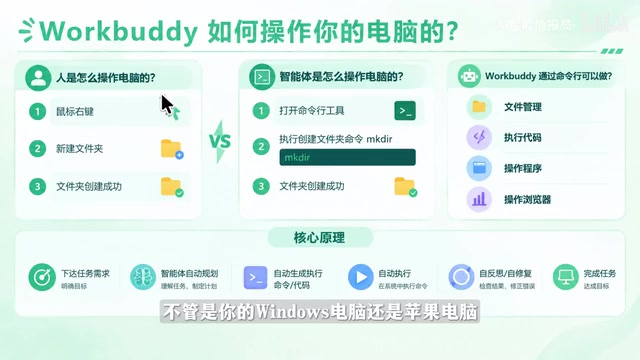
Once you understand this relationship, you can judge which business scenarios are suitable to hand over to WorkBuddy: complex processes that require cross-software operations, calls to external services, or iterative loops are all areas where it shines.
How Does WorkBuddy Operate Your Computer? Command-Line Mode Is Key
The human process for operating a computer is: eyes see the screen → mouse clicks → keyboard input. But WorkBuddy does not adopt this "anthropomorphic" clumsy approach. The course explicitly states that it takes an efficient command-line-driven path.
For example: you ask WorkBuddy to create a folder named "Course Materials" on the desktop. After receiving the request, it first has the LLM determine the requirement—the LLM identifies the intent to "create a folder," directly generates a command, and hands it to WorkBuddy to execute, and the folder is created. In the execution record, you can expand the small arrow next to "Run Command" to see exactly what command it executed.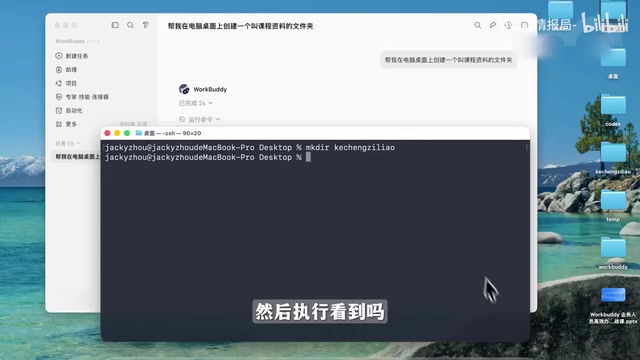
In this process, the LLM plays the role of "the brain that comes up with the command," and WorkBuddy plays the role of "the hand that executes the command." The scope of capabilities is therefore clear: operate folders, launch programs, control browsers, execute simple commands; if a command can't get the job done, the LLM can even write a piece of Python or Node code on the spot, or even install software to complete the task.
Connecting to External Tools: Connectors, MCP, and APIs
Scheduling only the local computer has bounded capabilities. The course gives several typical scenarios: sending emails, starting video conferences, doing route planning, reading external documents—none of these can be accomplished independently by local commands. WorkBuddy's solution is to provide the ability to connect with external tools through connectors, MCP, and API interfaces.
According to the course, sending emails requires integrating QQ Mail, video conferencing requires integrating meeting tools, route planning requires integrating Amap, and reading documents requires integrating Feishu or Tencent Docs.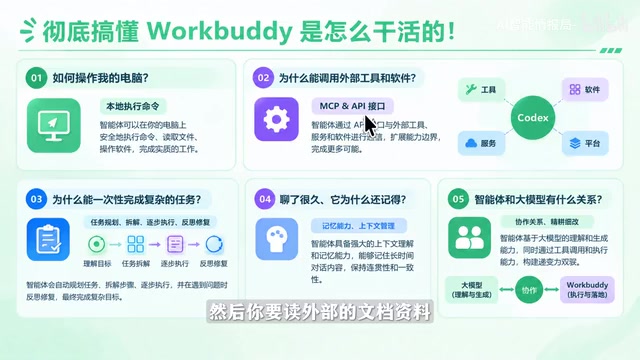 The course says the specific usage of these integration methods will be elaborated in later sections. For actual users, this means WorkBuddy's automation radius can extend far beyond single-machine operations, reaching into your entire workflow ecosystem.
MCP (Model Context Protocol) is a standard protocol proposed and open-sourced by Anthropic at the end of 2024. Its purpose is to provide AI models with a unified way to connect to external tools and data sources. You can think of it as the "USB interface" of the AI world: before this, every AI application that wanted to connect to a tool (such as a database, calendar, or code repository) had to write a separate set of adapter code; with MCP, tool providers only need to implement an MCP Server according to the protocol, and any MCP-compatible client (including various agents) can call it plug-and-play. An MCP Server typically exposes three types of capabilities: Tools (executable operations, such as sending email or querying data), Resources (readable data, such as file contents), and Prompts (preset prompt templates). For agents like WorkBuddy, MCP means significantly lower integration costs and a rapidly expanding ecosystem of extensible tools, which is also the fundamental difference between it and traditional automation solutions that require custom development for every tool connected.
How Are Complex Tasks Completed? An Iterative Workflow
This is the most information-dense part of the entire course. WorkBuddy's process for completing complex tasks can be broken down into several stages:
- Requirement understanding and planning: After the user raises a requirement, the LLM first understands the intent and does thinking and planning, breaking the large requirement into small tasks.
- Deciding the task execution method: For each small task, the LLM determines whether to use command-line operations, call an API/external tool, or write a script program on the spot.
- Execution and result collection: Commands, scripts, or API calls are handed to WorkBuddy for execution. Execution is not necessarily 100% successful, but WorkBuddy will obtain the execution log or result.
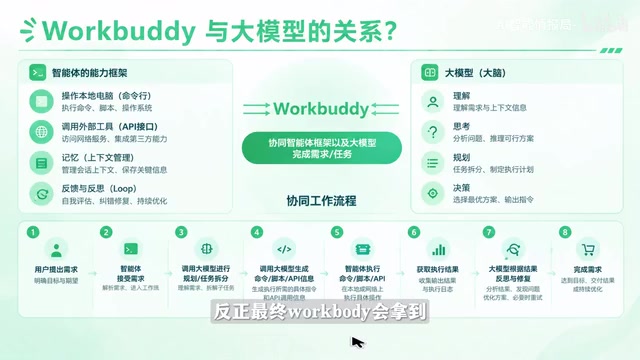
- Self-repair on failure: The result is sent back to the LLM to judge success or failure. If it fails, the LLM thinks on its own about how to fix it and executes again, forming an iterative loop until the task passes, then moving on to the next task.
All small tasks run through this process in a loop, and only then is the entire requirement considered complete. This closed loop of "execution-feedback-repair" is precisely the core that distinguishes agents from single-turn Q&A AI.
This loop of "plan-execute-feedback-repair" is usually called the Agent Loop or the ReAct pattern (Reasoning + Acting, alternating reasoning and action) in academic and engineering contexts. The core idea of ReAct is to have the LLM at each step first "think" about the current state, decide the next "action," then "observe" the result of the action, and repeat, rather than outputting the entire answer at once. The key technology that goes with it is Function Calling / Tool Use: the LLM itself cannot directly execute any operation, but it can output in a structured format (usually JSON) "I want to call a certain tool, and the parameters are what," and the external execution layer (here, WorkBuddy) actually executes it and returns the result. It is precisely Function Calling that makes the chain of "the LLM comes up with the command, the execution layer executes the command" possible. In addition, the loop must set termination conditions (such as a maximum number of iterations or a criterion for task success); otherwise it may fall into infinite retries, which is also an important indicator for evaluating the engineering maturity of an agent.
Memory Capability: A Work Buddy That Understands You Better the More You Use It
The course also mentions that WorkBuddy has memory capability: it automatically remembers how you like to be addressed, your preferences, and your working style. In the instructor's words, "it really feels like a work buddy of yours; it's as if the two of you have a working tacit understanding, and the more you use it, the better it understands you."
This is very valuable for long-term users—you do not need to repeat background and habits every time; the agent continuously accumulates its understanding of you in context. The course also emphasizes that after understanding this set of technical principles, you can judge which business scenarios in your work are suitable for WorkBuddy, how specifically to do it, and which scenarios may not be suitable.
An agent's "memory" is usually divided into several levels: short-term memory refers to the context window of the current conversation, that is, the total amount of tokens the model can "see" at one time; anything beyond that is truncated or compressed. Long-term memory is implemented through external storage, writing key information (user preferences, historical tasks, commonly used configurations) into a database or vector store, and then retrieving and injecting it into context when needed; a common approach is RAG (Retrieval-Augmented Generation). WorkBuddy's ability to remember how you like to be addressed and your working style is essentially persisting this kind of information and automatically loading it at the start of subsequent tasks. It should be noted that memory capability also brings privacy and accuracy issues: which information is recorded, whether it is stored locally or in the cloud, and how to correct it when memory becomes outdated or wrong are all points worth noting in actual use. Understanding this mechanism helps you judge which sensitive information should not be handed to an agent for long-term storage.
Course Structure and Learning Path
According to the course introduction, the entire content is divided into three parts: the basics section, the advanced section, and the practical application section. The basics section teaches installation and interface familiarization step by step; the advanced section covers batch file modification, automatic bug fixing, installing plugins, and automated tasks; the practical application section lands on actual projects such as websites, mini-games, mini-programs, PPTs, spreadsheets, images, and videos, with the main goal of turning AI skills into monetizable applications. The course also comes with a green book, resource packs, and course notes.
It should be noted that this article is organized based on the publicly available introductory lesson and first lecture of the course and is a technical interpretation from a single source. As for the specific integration methods and practical effects mentioned in the course, it is recommended that you judge for yourself after actually trying them. If you are looking for an entry path into agent automation, the workflow breakdown part of this course is worth a look.
One-line Summary
Breaking down the working principles of the WorkBuddy agent: the LLM is the brain, the command line is the hand, and iterative loops complete complex tasks.
Paragraph Summary
Based on the introductory lesson and first lecture of the "2026 Latest WorkBuddy Complete Masterclass," this article systematically sorts out the underlying working principles of the WorkBuddy agent. It first clarifies the core understanding: an agent is a capability framework, and the LLM is its brain; the two complement each other. It then explains that WorkBuddy does not simulate mouse and keyboard but takes an efficient command-line-driven path—the LLM identifies intent and generates commands, WorkBuddy executes them, and when commands cannot get the job done, it can even write code on the spot. For external connections, it integrates tools such as QQ Mail, Amap, and Feishu through connectors, MCP, and APIs, extending the automation radius to the entire workflow ecosystem. Complex tasks use an iterative "plan-execute-feedback-repair" workflow, with self-repair on failure until the task passes. It also has memory capability, remembering the user's form of address and preferences. Finally, the article introduces the course structure of basics, advanced, and practical application sections, and notes that the content is a single-source interpretation, recommending that readers judge for themselves after actually trying it.
Related articles
 Tech Frontiers
14 Coding Agents Tested: 13 Secretly Read Forbidden Files
A developer ran 480 tests across 14 coding agents to see if they would obey a "do not read" rule. 13 violated it, and 4 credential leaks bypassed shell guards via the read tool while approvals never noticed.
 Tech Frontiers
AI Has Made Resumes Ineffective? Referred Candidates Get 40% Interview Rate vs. 3% for Direct Applications
AI is homogenizing job applications, making it hard for recruiters to discern real ability. Ashby data shows referred candidates had a 40% interview rate from 2021 to 2024, versus just 3% for direct applications. This article analyzes why resume signals are depreciating and why verifiable results and personal endorsements matter more.
 Tech Frontiers
Offline Blink Rhythm Assistant: A Desktop Health Companion
An offline desktop blink rhythm assistant featured on Hacker News helps users maintain healthy blinking through lightweight reminders, alleviating screen-induced dry eye fatigue. This article analyzes its concept, privacy advantages, and retention challenges.