WorkBuddy Beginner's Guide: Build an AI Workspace and Say Goodbye to Repetitive Work

WorkBuddy is an AI workspace that takes action—this guide shows you how to hand off repetitive work.
This article introduces Tencent WorkBuddy's positioning and usage, noting it's not an ordinary chat tool but an AI agent that can operate local files, plan multi-step tasks, and run scheduled background jobs. It contrasts WorkBuddy with traditional Q&A AI: the latter tells you how to do something, while the former does it for you and delivers finished Word, Excel, and other files. Aimed at zero-foundation users, the course has four modules with 28 knowledge points, emphasizing specific requirements and the desktop-dependent nature of scheduled tasks, and warning that the biggest mistake is treating WorkBuddy as a chat window.
Many people open WorkBuddy and treat it as just another chat window—they ask a few simple questions and then close it. The tool can clearly operate a computer, read files, and generate reports, yet it ends up being used only for casual conversation, which is a real shame. This hands-on course for beginners was created to solve exactly that problem—it doesn't teach you how to "chat," but how to hand off repetitive work.
What Is WorkBuddy: An AI Workspace That Takes Action
According to Tencent's official positioning, WorkBuddyAd is a "full-scenario workplace AI assistant"—in plain terms, it gives AI a brain, a pair of hands, and an automation engine. The brain understands requirements and plans steps; the hands read and write files locally and operate on Word, Excel, PDF, and images; the automation engine turns fixed workflows into scheduled tasks, such as automatically compiling a weekly report and sending it to you every week.
This is fundamentally different from ordinary Q&A-style AI tools. With tools like ChatGPT, Doubao, or Qwen, if you ask "how do I extract information from 80 resumes and make a table," they'll give you a Python script and step-by-step instructions—and you'll have to carry out the remaining steps yourself on your computer. WorkBuddy is different: you simply say "read the resume PDFs in this folder, extract name, education, years of experience, core skills, and salary expectations, then generate an Excel summary table and save it to the specified directory," and it will read the data and generate the file on its own. By the time you come back with a glass of water, the table is already sitting on your local disk.
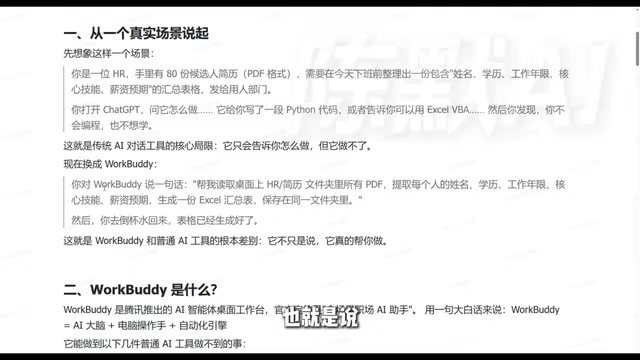
One tells you "how to do it," the other directly does it for you—this is the most fundamental dividing line between the two.
AI Agent is the key concept for understanding WorkBuddy's positioning. Unlike traditional Q&A AI, an agent emphasizes a "perceive—plan—execute" loop: it can perceive the environment (such as reading local files), break down goals and formulate steps, call tools to execute operations, and adjust its approach when it encounters obstacles. WorkBuddy is a typical desktop-level agent that combines the reasoning capabilities of large models with operating permissions on the local system, thereby completing the entire process from "understanding requirements" to "delivering results." This paradigm also explains why it needs to run on a computer—only in the local environment can the agent gain execution capabilities such as file read/write and software invocation.
Why Beginners Can Get Started: Low Barriers to Environment and Cost
According to a Bilibili creator in the tutorial, WorkBuddy can be seen as a domestic alternative to Codex—no complex configuration, low device requirements, free quota, and compatibility with commonly used domestic office software. This means you don't need a computer science background or AI project experience; you can gradually get up to speed by following the course and practicing hands-on.
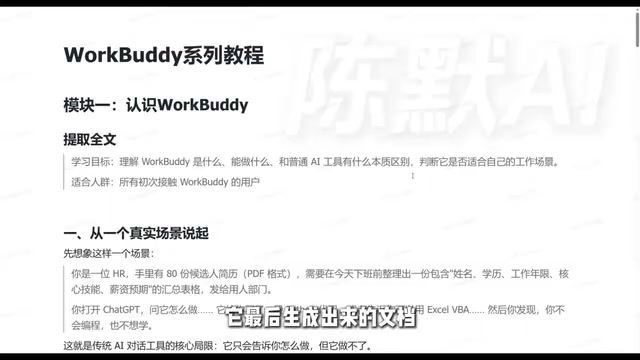
The course itself is divided into four modules: Introduction, Recommendation, Advanced, and Industry Applications, with a total of 28 knowledge points, taking you from basic operations all the way to real office scenarios. The creator says it took nearly three months to compile, and the accompanying setup process and resource packs are provided as documents. For users with zero foundation, this "step-by-step" structure is friendlier than watching scattered videos.
What WorkBuddy Can Do: From Local Files to Remote Control
Its capabilities can be broken down into several layers. The most basic is local file operations: reading and writing Word, Excel, PDF, and image files on your computer, and uniformly processing materials scattered across folders. The next layer is multi-step tasks: you give a requirement, and it automatically plans an execution path and completes complex work step by step; if something goes wrong at a certain step, it can redesign the path and continue. The next layer is unattended operation: after setting up scheduled tasks, as long as WorkBuddy is running on your computer, it can run automatically in the background at set times without you having to watch it constantly.
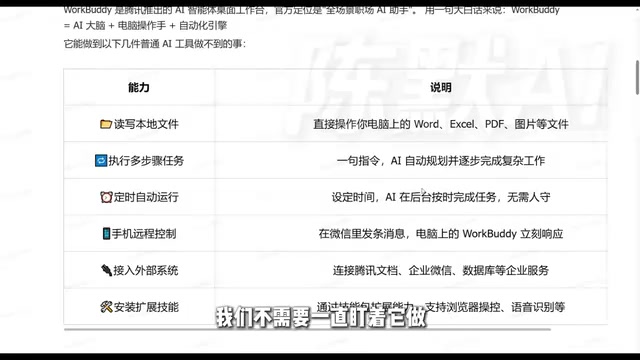
Remote control is another practical capability. Through the WorkBuddy mini-program on your phone or the WeChat client, you send a command and WorkBuddy on your computer executes it; results can be saved on the computer or sent to your phone. External system integration is also supported: searching data in Tencent Docs, connecting to WeCom, and connecting to databases—once data sources are connected, there's even more you can do. In addition, you can install Skill packs to extend capabilities, such as browser data browsing and speech recognition—sending a recording and having it organize it into summary text falls into this category.
Skill packs can be understood as WorkBuddy's "plugin system." Each Skill encapsulates a specific type of capability, such as browser automation, speech-to-text, or image processing. After installing a Skill, the agent can include these capabilities in its toolset when planning tasks, thereby breaking through the boundaries of basic functions. This design borrows from the "tool calling" idea in the agent field: the large model itself is only responsible for decision-making, while specific execution is handed off to external tools. For beginners, the value of Skills lies in on-demand expansion—you don't need to master all functions at once; instead, install the corresponding skill packs based on actual scenarios (such as needing to process recordings or scrape web data), lowering the learning burden.
How It Differs from Traditional AI Tools
The creator compared them across several dimensions. In terms of core positioning, traditional chat tools are "smart advisors" that engage in one-question-one-answer exchanges, while WorkBuddy is a "capable employee" that both understands and does. In terms of file operations, the former cannot read or write local files, while the latter can. In terms of multi-step tasks, the former usually handles only single-step information queries and output, while the latter can break down steps, complete complex tasks, and re-plan when errors occur. In terms of unattended operation, the former requires someone online to issue commands, while the latter runs in the background via scheduled tasks. In terms of output, the former mainly replies with text, while the latter directly delivers final files such as Word, Excel, and PDF, and even supports format conversion.
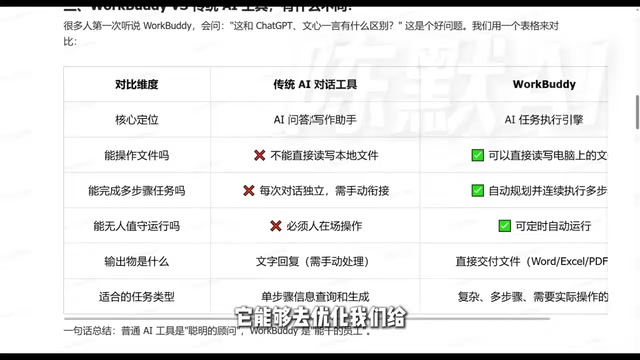
The types of tasks suited to each are therefore different: simple information queries are fine with ordinary chat tools, while scenarios involving batch file processing, cross-software workflows, and scheduled repetitive jobs are where WorkBuddy shows its value. The criterion is simple—if a task requires you to repeatedly switch software and manually move data around, it's worth trying to hand it over.
The Pitfalls Beginners Fall Into Most Easily
The biggest pitfall isn't not knowing how to use it—it's using it the wrong way. Treating WorkBuddy as a chat window is like buying an automatic cooking machine and using it only to heat milk. Another pitfall is describing requirements too vaguely—it can plan, but planning requires you to clearly state "which directory to read, which fields to extract, and where to save." The more specific the instruction, the closer the delivered quality is to your expectations. One more thing that's easily overlooked: scheduled tasks and remote control both depend on the desktop app staying running—close the software and background tasks stop too.
From the cases in the tutorial, the benefits of office automation are tangible. The creator mentions taking on office automation gigs with WorkBuddy and earning an extra 9,000 per month (original wording). That number may not be replicable for everyone, but the direction is worth considering: packaging repetitive work into deliverable automation workflows is itself a monetizable skill.
Scheduled tasks (Cron Job) are the core mechanism of the automation engine, referring to automatically triggering task execution according to preset time rules (such as 9 a.m. daily or Monday mornings). In WorkBuddy, scheduled tasks depend on the desktop software running continuously, because the task scheduler resides in the local process; once the software is closed or the computer goes to sleep, scheduling is interrupted. This also explains why "unattended" isn't completely unattended—it requires the device to stay powered on and WorkBuddy to be running. Understanding this helps beginners plan automation scenarios reasonably and avoid missed tasks due to the device being shut down.
One-line Summary
WorkBuddy is an AI workspace that takes action—the course teaches you to hand repetitive work over to it.
Paragraph Summary
This article introduces the positioning and usage of Tencent WorkBuddy, pointing out that it's not an ordinary chat tool but an AI agent that can operate local files, plan multi-step tasks, and run scheduled background jobs. It contrasts its essential difference with traditional Q&A AI: the latter tells you how to do it, while the former directly does it for you and delivers finished files such as Word and Excel. The course targets zero-foundation users and is divided into four modules—Introduction, Recommendation, Advanced, and Industry Applications—with 28 knowledge points. It emphasizes that requirements should be described specifically and that scheduled tasks depend on the desktop app running, and warns that the biggest mistake is using WorkBuddy as a chat window.
Related articles

T3 Code: The Open-Source AI Coding Assistant's Comeback Story
T3 Code is an open-source AI coding assistant that unifies subscriptions like Codex and Claude, with powerful remote control and parallel task management.

Never Elected, Yet Ruled New York for 30 Years: The Ultimate Case Study in the Mechanics of Power
Robert Caro's biographies reveal how unelected Robert Moses ruled New York for 30 years through legal drafting and public authorities, and how Lyndon Johnson built leverage as a "powerless" Senate Majority Leader. Unpacking the underlying logic of accumulating and sustaining power.

The CPython 3.10 Recursion Trap and Synthetic Recovery in TokenGuard, an LLM Circuit Breaker
TokenGuard's author recounts a recursion crash caused by OrderedDict.pop in CPython 3.10 and introduces v0.3.0's Loop Nudge synthetic recovery, inline DLP scanning, and other new LLM agent circuit-breaker capabilities.