WorkBuddy Beginner's Guide: Building Your Own AI Workstation with a Desktop-Level AI Agent

Web-based chat AI only handles generation, causing fake productivity; AI Agents can take over the full workflow, and WorkBuddy aims to lower the barrier to using them.
The article points out that the root cause of professionals feeling more exhausted the more they use AI is that web-based conversational models can only provide textual suggestions — they can't read local files, operate software, or produce deliverable finished products. Verification, cleanup, formatting, and pasting all rely on manual effort, creating a "30 seconds of AI generation, two hours of human tinkering" fake productivity cycle. The real divide is upgrading from chatbots to AI Agents: the latter can read files, execute operations, and output results — taking over the entire task workflow rather than just answering questions. However, existing open-source Agents have excessively high barriers for non-technical users, requiring Python knowledge, overseas API-K configuration, and connecting dozens of nodes on flowcharts. WorkBuddy's positioning is precisely to eliminate these barriers — pre-built role skills, plain-language interaction, and a desktop application form that directly operates local documents and spreadsheets — transforming Agents from "requires a technical background" to "open it and use it."
Open your computer, tweak prompts over and over on a web-based AI, and you end up with a pile of empty filler — then you still have to copy, paste, clean up the formatting, and stuff it into Excel and PowerPoint yourself. You spend two or three hours tinkering, while the AI's actual generation took just 30 seconds. This is the "fake productivity boost" many professionals are living through right now.
This WorkBuddyAd tutorial on Bilibili points out a fact most people overlook: the problem isn't your ability to learn — it's that the tool's form factor is still stuck in the previous generation.
Why Does Using AI Leave You More Exhausted the More You Use It?
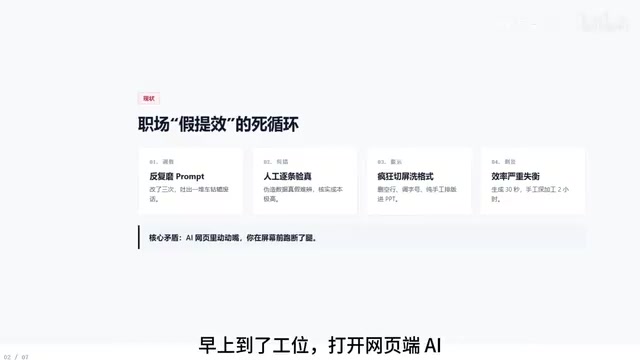
The root of the problem is the one-way nature of web-based conversational models. It's like a strategist — you push, it moves; ask a slightly off question and everything goes haywire. What's worse, it only "talks," while you're the one "running your legs off" in front of the screen — verifying fabricated data, cleaning up extra blank lines, adjusting font styles, pasting cell by cell into spreadsheets.
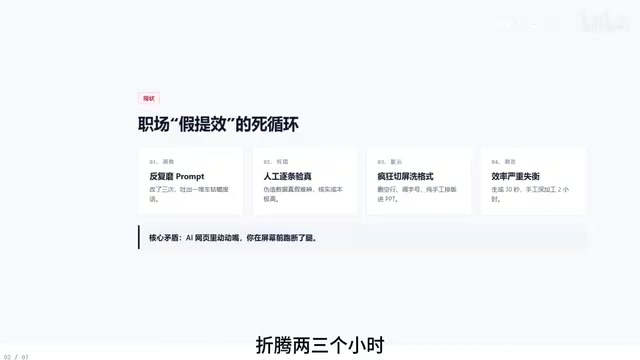
The fundamental flaw of this model is that the AI's output is "textual suggestions," not "completed work." It can't read your local files, can't operate your software, can't turn results directly into deliverable finished products. All the connective work falls entirely on human hands.
What truly creates the efficiency gap is upgrading from conversational models to AI Agents.
Prompt Engineering refers to designing input instructions to guide large models toward outputs that better match expectations. The reason it's exhausting is that large models are fundamentally probabilistic generation systems — the same prompt can yield different answers across different rounds, and it can't access your local files or historical work environment.
This brings two structural limitations: first, context fragmentation — every time you start a new conversation, all previously accumulated background, formatting preferences, and data sources must be re-explained; second, uncontrollable formatting — the model's output often includes blank lines, headers, and hierarchy levels that don't meet the requirements of downstream tools (Excel, PowerPoint), requiring manual secondary cleanup.
Understanding this makes it clear: spending time repeatedly tweaking prompts has a ceiling on returns. What really needs optimizing is the workflow format — let tools read files and execute operations, rather than having humans do the manual hauling between model output and finished products.
The Essential Difference Between Agents and Chatbots
In one sentence: an Agent doesn't just answer questions — it takes over tasks.
The workflow chain of traditional chat models is "you ask → it answers → you process." An Agent's workflow chain is "you assign a task → it reads files → it executes operations → it outputs results." The difference is that an Agent has operational permissions over the local environment — it can truly "take action" rather than just "talk."
This difference sounds simple, but it determines whether you treat AI as an advisor or as an employee.
AI Agent is a class of systems that use large language models as their reasoning core and can autonomously plan and invoke external tools to complete multi-step tasks. Its core capabilities typically include: task decomposition (breaking user instructions into sub-steps), tool invocation (reading/writing files, executing code, calling APIs, operating software interfaces), memory and state management (preserving context across steps), and a degree of self-correction (retrying or switching approaches after errors are detected).
To judge whether a system is a true Agent, the key is whether it has an autonomous action loop: can it complete the "perceive — decide — execute — feedback" cycle without relying on step-by-step user instructions? Something that only does single-turn Q&A is a chatbot; something that can continuously invoke tools to advance tasks is an Agent. This is also why an Agent's operational permissions over the local environment are so critical — without the ability to take action, even the strongest reasoning can only remain at the suggestion level.
Why Ordinary People Can't Use Open-Source Agents
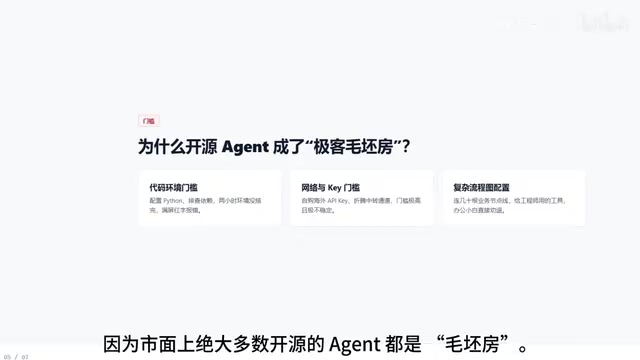
There's no shortage of open-source Agent tools on the market, but the vast majority are extremely unfriendly to office workers. The video lists several hard barriers: needing to understand Python code, needing to configure overseas API-Ks yourself, needing to connect dozens of logic nodes on complex flowcharts.
The result: you excitedly spend two hours on environment configuration, run it for five minutes, and it's all red error text. Efficiency doesn't improve — you break down first. This isn't a capability problem; it's choosing the wrong tool.
API-K (API Key) is an identity credential for calling cloud-based large model capabilities, typically generated after registering an account on the model vendor's official website and binding a payment method. Many mainstream model services have regional restrictions for domestic users, which has spawned two types of workarounds: first, "magic internet access" to change the network exit point; second, purchasing third-party "relay services" that resell quota. Both carry cost, stability, and compliance risks.
For open-source Agents, the API-K is often just the first barrier. Users also need to configure a local Python runtime environment, install dependency packages, edit YAML or JSON configuration files, and manually connect trigger nodes, condition judgment nodes, and output nodes in a visual flow editor. If any step goes wrong, the browser console or terminal floods with red error messages — and the debugging experience needed to troubleshoot these errors is precisely what ordinary office users lack.
Therefore, the "free" aspect of open-source Agents actually shifts the cost from money to learning and maintenance time. For professionals who just want to get the work done, this time investment is usually not worth it.
What Barriers WorkBuddy Has Eliminated
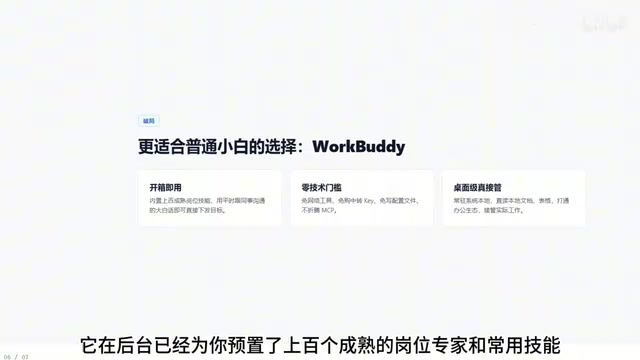
Based on the tutorial's description, WorkBuddy has made several key simplifications for beginners:
Ready to use out of the box — the backend comes pre-loaded with hundreds of mature role experts and commonly used skills. No magic internet access needed, no relay service purchases, no configuration files to write. Just assign tasks in plain language, the way you'd talk to a colleague.
Desktop-level tool — it's not a tab in your browser, but an application installed on your computer that can directly read local documents and spreadsheets, integrate with the office ecosystem, and truly take over actual work.
Together, these two points solve the same problem: transforming the Agent from "requires a technical background to get running" to "open it and use it."
Key Takeaways
- Web-based conversational AI only handles the generation step. The subsequent verification, cleanup, formatting, and pasting still require substantial manual intervention — this is the root cause of "fake productivity."
- The core difference between an AI Agent and a chat model is that an Agent can take over the entire task workflow, rather than just providing textual suggestions.
- Open-source Agent tools have excessively high barriers for non-technical users — code, API configuration, and flowchart nodes are all stumbling blocks.
- WorkBuddy's positioning is to lower the barrier to using Agents: pre-built skills + plain-language interaction + desktop-level local file operation capabilities.
Related articles

How Big Can Stars Really Get? The Physical Limits of the Largest Stars
Red supergiants are the largest stars by volume, with radii up to 2,000 times the Sun, engulfing the inner solar system. But there is no precise upper limit on stellar size—models predict up to 15,000 solar radii. The most massive blue stars are far smaller than red supergiants—biggest and heaviest are two different things.

Apple HomeView Smart Display Full Feature Breakdown: Wall-Mount or Desktop, $299
Apple launches HomeView, a $299 smart display with wall-mount and desktop options, 12MP camera for facial recognition, smart home control, music playback, and recipe step-by-step cooking. Full breakdown of watch faces, apps, privacy, and cooking integration.

Where Did the Promised New Studio Go? Craft Computing Answers After Five Years
Craft Computing's host responds to viewer questions: the new studio promised five years ago was shelved as construction costs soared from $30,000 to $75,000, and was replaced by a 168-square-foot garage conversion.