WorkBuddy Beginner's Guide: How This Domestic AI Agent Gets Work Done for You

WorkBuddy is a beginner-friendly domestic AI Agent that actually executes tasks, not just answers questions.
This article introduces WorkBuddy, positioning it as a domestic alternative to OpenAI's Codex — similar in logic but easier to deploy, compatible with Chinese office software, and free to start. The core argument: unlike traditional LLMs that only offer advice, AI Agents like WorkBuddy can directly operate your computer and complete tasks within authorized boundaries. The author demonstrates this with a real document-formatting example and recommends WorkBuddy to beginners based on its low setup barrier, domestic compatibility, cost control, and built-in Skill marketplace. A companion 28-lesson course requires zero coding experience.
What Is WorkBuddy: A Domestic Alternative to Codex
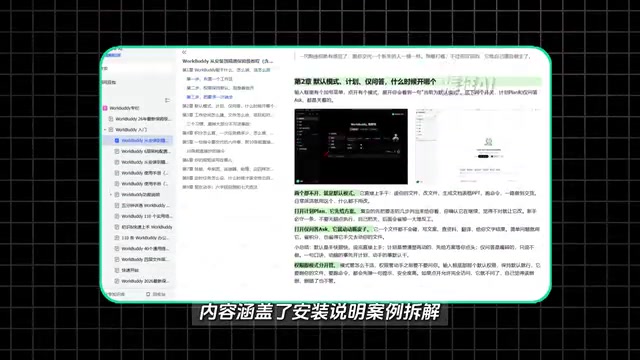
If you're serious about exploring one AI tool this year, WorkBuddyAd deserves to be at the top of your list. In a nutshell, it can be understood as a domestic alternative to Codex — the interface and operating logic are largely the same, but it's far more accessible for users in China: no complex setup required, low hardware demands, and a free usage tier included.
The biggest difference between WorkBuddy and traditional chat-based AI comes down to one question: can it actually get things done? In the past, using AI meant a back-and-forth exchange — you asked, it answered, offering suggestions but never taking action. WorkBuddy and tools like it can, within the scope of your authorization, directly operate your computer, call on tools, and drive tasks through to completion. It functions more like a digital employee managing your affairs than a simple chat window.
Many people open tools like this and still use them just to ask basic questions — treating a powerful AI Agent like an ordinary chatbot. That's a real shame. Understanding what it's actually designed to do is the first step toward unlocking its value.
The Fundamental Difference Between AI Agents and Traditional LLMs
The author demonstrated this distinction using a real-world scenario: given a document with inconsistent punctuation and messy formatting, a traditional LLM would respond to your request with a paragraph of advice on how to fix the formatting — but you'd still have to do the actual work yourself.
With WorkBuddy, sending the same request and hitting execute causes the tool to automatically locate the target document on your desktop and handle all the formatting — headings, body text, everything — while you simply wait. If there are multiple files, give it a standard to follow and it can process them in batch.
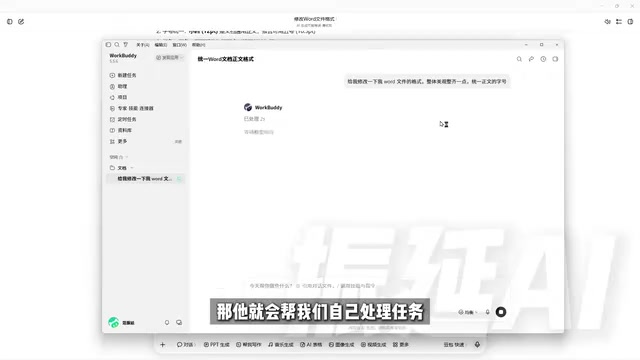
This is the core dividing line between the two types of AI:
- Traditional LLMs: Excel at Q&A, analysis, and providing recommendations — but stop at telling you what to do.
- AI Agents: Can directly call on tools to get things done, within the boundaries you've confirmed and authorized.
Beyond document formatting, the author also noted that a PowerPoint deck — including animations — was completed with AI assistance during the demo. Similar tools include Codex and other workflow-capable agents, all sharing one defining trait: they can roll up their sleeves and actually operate.
From a technical standpoint, AI Agents can "take action" because they rely on a perceive–plan–execute loop. They can call external tools (such as file systems, browsers, and APIs), break a complex goal into subtasks, and decide on the next action based on feedback from each step. This is fundamentally different from the question-and-answer inference of traditional LLMs — at their core, LLMs are text prediction systems whose output ends at language itself, while an Agent's output is an actual operation performed on a real environment.
OpenAI's Codex is currently one of the most well-known code Agents, capable of autonomously reading and writing files, running commands, and completing the full pipeline from a natural language description to delivered code — all within a sandboxed environment. The rise of tools like this marks a pivotal moment in AI's evolution from "language intelligence" to "action intelligence."
Why Beginners Should Start with WorkBuddy
The author compared WorkBuddy with tools like Codex across four dimensions and offered concrete reasons why beginners are better served starting with WorkBuddy.
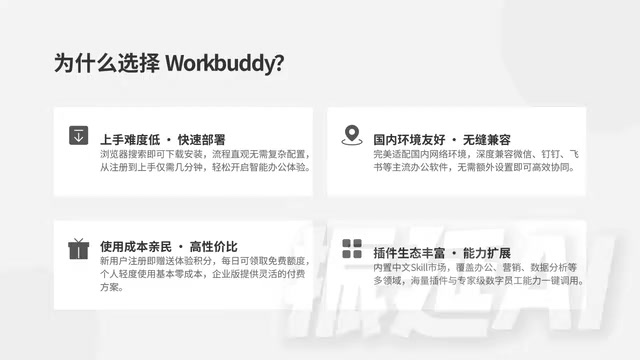
Low Barrier to Entry
Just search for the product name in your browser, download it, and deploy it locally. The entire process is straightforward — no coding knowledge or environment configuration required.
Compatible with Domestic Office Workflows
This is arguably its most practical advantage. Through "connectors," you can authorize the AI to integrate with popular Chinese office software. For example, after connecting WeCom (企业微信), the AI can help draft replies and compile chat records into documents — all within your authorized scope. The value of connectors lies in letting AI not just know how to help, but actually participate in end-to-end workflows.
Controllable Costs
New users receive a credit allocation upon registration, with additional daily quotas available. For light users, this is generally sufficient for everyday experimentation and basic tasks. By contrast, many overseas products require paid subscriptions that only become cost-effective at higher usage volumes.
Skills and Plugins: Install and Use Immediately
WorkBuddy includes a built-in Chinese-language Skill marketplace where common capabilities can be installed with a single click. Think of a Skill as a pre-trained, specialized tool or work capability. The platform also features "Experts" — the equivalent of digital employees for specific roles. If your team needs a senior development engineer to build a workflow from scratch, for instance, you can find the corresponding Expert and deploy them with one click.
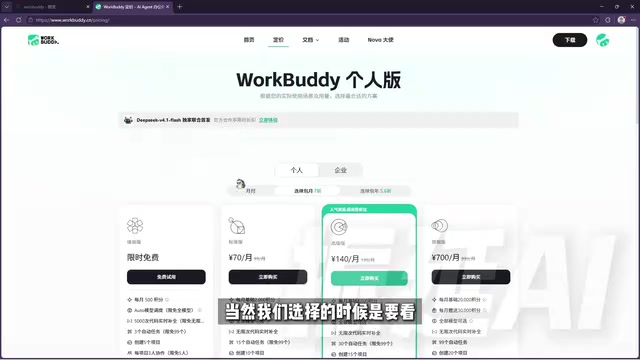
By comparison, tools like Codex offer greater flexibility but require a stronger technical foundation — understanding code, configuring environments, and orchestrating workflows. For most beginners, an AI Agent that is easier to deploy, compatible with domestic office software, and cost-controllable is a far more practical starting point.
In the AI Agent ecosystem, the concept of a "Skill" is analogous to an app in an app store — each Skill encapsulates the tool-calling logic and prompt engineering for a specific scenario, so users don't need to understand the underlying implementation. Once installed, the Agent gains the corresponding capability. This modular design lowers the bar for customization: organizations or individuals can package their own workflows as Skills, or reuse those built and refined by others.
The concept of "Experts" or "digital employees" goes a step further — bundling role definitions, tool permissions, and processing logic into a pre-configured Agent, essentially an out-of-the-box virtual position. For small and medium-sized teams, this means no prompt engineering from scratch; you simply "hire" an AI role that already understands the specific domain.
Learning Resources and Course Structure
The author spent nearly three months developing a hands-on beginner course organized into four modules: Fundamentals, Case Studies, Advanced Topics, and Industry Applications — covering 28 knowledge points in total, from basic operations through real-world office scenarios. The course emphasizes that neither coding experience nor prior AI knowledge is required; just follow along and practice.
A companion blue book is also included, covering four key areas: installation instructions, case breakdowns, Skill customization, and industry applications — plus 12 commonly used Skills and practice materials you can work through right away.
Final Thoughts
WorkBuddy represents the direction AI applications are heading: from "conversational assistant" to "digital employee." For everyday office users, its value isn't in how clever its answers are — it's in whether it can genuinely take over the repetitive, time-consuming work: gathering materials, formatting documents, analyzing spreadsheets. No tool is worth anything sitting untouched in your bookmarks. The key is to learn by doing, and let it actually run.
Related articles

Chain of Thought Isn't Just for AI: How Humans Can Use CoT to Improve Thinking Quality
Chain of Thought isn't just a prompt trick for large models. Starting from a Hacker News discussion, this article analyzes why CoT works for human thinking too, breaks down actionable ways to transfer it, and highlights the key differences between human CoT and machine CoT.
Cloudflare Teams Up with OpenAI: Closi…
Cloudflare Teams Up with OpenAI: Closing the Loop from Vulnerability Discovery to Defense with AI
Cloudflare uses OpenAI Daybreak to investigate security vulnerabilities and generate reviewable remediation plans, while developers use Codex to boost coding efficiency and quality.

Orca Multi-Agent Orchestration in Practice: A Guide to Parallel Collaboration with Claude and Codex
Orca is Stable AI's free open-source agent workbench supporting 34 agents like Claude Code and Codex in parallel. Learn its Git worktree isolation, multi-model orchestration, and mobile management.