WorkBuddy Complete Guide: Hands-On Analysis of AI Agent Workflows

WorkBuddy completes the execution loop traditional conversational AI lacks, letting zero-background users drive their computer with natural language.
Starting from the limitations of conversational AI like Doubao, which can generate solutions but can't operate your computer, the article introduces WorkBuddy as an AI Agent that handles task understanding, direct file operations, and automatic tool invocation. It breaks down the full workflow from setup to batch conversion and conditional logic, comparing table highlights its advantages for non-programmers. Includes free access to 10 previously paid lessons.
Why You Need WorkBuddy: Starting with the Limits of Doubao
I believe many people, like me, first encountered AI through conversational large models like Doubao, DeepSeekAd, and Tongyi Qianwen. They can understand requirements, analyze problems, and propose solutions, but the moment you want them to actually "do" something on your computer, you run into an awkward reality — they have brains but no hands or feet.
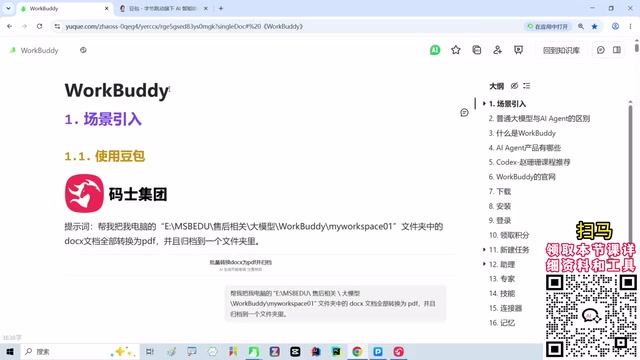
In his latest comprehensive tutorial, a Bilibili creator opens with a very intuitive scenario: imagine you have a folder full of docx documents that you want to batch-convert to PDF. The old approach was either paying for WPS conversion or manually saving each file one by one — tedious and time-consuming. Now with Doubao, you eagerly type your request: "Convert all docx files in this D drive directory to PDF and archive them to the specified folder."
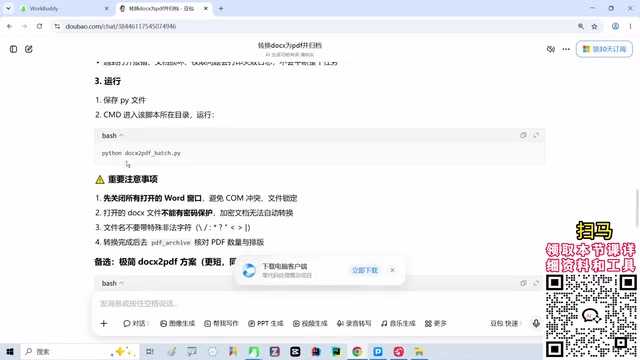
Doubao does understand your needs. It will tell you to first install dependencies, then open a terminal and run a Python script, and it may even thoughtfully provide alternative approaches. But here's the problem — it can give you code, but it can't run the code for you. For people without a computer science background, seeing commands like "pip install" and "python script.py" is enough to make their head spin.
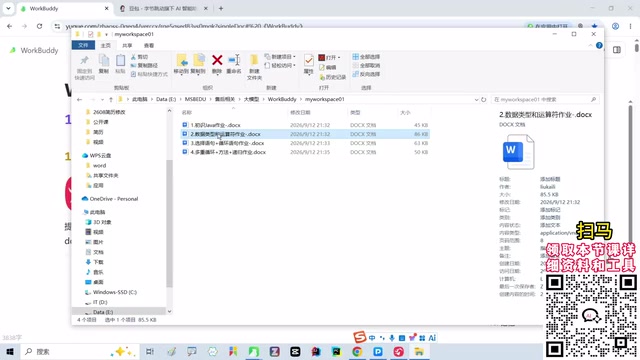
This is the boundary of traditional conversational AI: it can generate solutions, but it cannot directly operate your computer. You need to copy the code yourself, open the command line, handle errors — and if you get stuck at any step, the whole process breaks down.

The emergence of AI Agent tools like WorkBuddyAd is precisely meant to solve this "last mile" problem. It doesn't just understand your needs — it can directly read files, invoke software, and execute commands, truly connecting "saying" with "doing."
WorkBuddy's Core Capabilities: From Conversation to Execution
Task Understanding and Planning
WorkBuddy is first and foremost a powerful task understanding engine. When you input "convert all docx files in the D drive workspace to PDF," it automatically parses out several key pieces of information: source directory path, file type filter, target format, output location. This is far more intuitive than simply being handed a Python snippet, because it maps "intent" directly to "operation."
Direct File System Operations
Unlike Doubao, which can only suggest you "open a certain directory," WorkBuddy has the authority to directly read and write to the file system. With your authorization, it can scan folders, identify file types, perform batch renaming, format conversion, content extraction, and more. This means you don't need to manually open File Explorer or remember complex paths.
Tool Invocation and Automation
More critically, WorkBuddy can invoke external tools. For example, when converting PDFs, it might call LibreOffice or a specialized conversion library; when processing spreadsheets, it might launch Excel or a Python script. The entire process is transparent to the user — you just describe the goal, and it handles the orchestration.
What is an "AI Agent"?
AI Agent is a conceptual upgrade relative to traditional "conversational large models." If tools like Doubao and DeepSeek are advisors that "only talk but don't act," then an AI Agent is an executor that "both talks and acts." Its core architecture typically consists of four modules: Perception (reading user instructions and environmental state), Planning (breaking vague goals into executable steps), Tool Invocation (calling external capabilities like the file system, terminal, and third-party software), and Reflection (determining success based on execution results and adjusting strategy on failure).
The biggest difference from conversational AI is that an Agent has an "action space." It doesn't just output text — within authorized boundaries, it can genuinely change the state of your computer: creating files, running scripts, launching programs. This is the technical foundation that enables WorkBuddy's "you say it, I do it" capability. Understanding these four modules helps you diagnose where things go wrong when you get stuck using WorkBuddy: did it fail to understand (Perception), break down the steps incorrectly (Planning), or invoke the wrong tool (Invocation)?
Complete Workflow Breakdown: Get Started in One Hour with Zero Background
Environment Setup and Authorization
When using WorkBuddy for the first time, you need to complete basic configuration: specify a working directory, authorize file access permissions, and select a default toolchain. The creator emphasizes that while this step seems simple, it directly determines whether subsequent tasks can execute smoothly. It's recommended to create a separate "AI Workspace" folder to avoid accidental operations affecting system files.
Why do you need to specifically set up a "working directory" and "file access permissions"?
The reason an AI Agent can operate your computer on your behalf is that it's been granted read-write access to the file system. This is both the source of its power and the source of risk — if it can access the entire C drive, a single misjudgment could delete or modify your system files or personal data. That's why mainstream Agent tools adopt a "least privilege" principle: you designate a specific folder as the workspace, and the Agent can only operate within that sandbox.
The recommendation to create a separate "AI Workspace" folder is essentially drawing a safety boundary for the Agent. This offers three benefits: failed tasks won't affect unrelated files; the Agent scans directories faster and gets cleaner results; and when problems arise, you only need to check that one folder to locate them. When configuring for the first time, setting permissions too broadly or too narrowly is neither appropriate — in practice, start with a medium-scope directory and gradually tighten or expand as you become more experienced.
Your First Automation Task: Batch Format Conversion
The tutorial demonstrates the most classic beginner task: docx to PDF. In the WorkBuddy interface, you simply describe your requirement, and it automatically generates an execution plan: scan directory → filter docx → invoke conversion engine → output to target folder → generate execution report. The entire process requires no manual coding and no opening the command line.
Advanced Techniques: Conditional Logic and Exception Handling
In real work, files are rarely that well-organized. WorkBuddy supports conditional logic: for example, "if the filename contains 'contract,' convert to PDF and encrypt; otherwise, just convert the format." It can also handle exceptions: automatically skip corrupted files and log them rather than crashing the entire task.
Why are "conditional logic" and "exception handling" the dividing line between automation tasks that merely work and those that work well?
What batch processing scripts fear most isn't task complexity — it's messy real-world data. A simple docx-to-PDF task can encounter all sorts of situations during actual execution: filenames with special characters, files locked by other programs, corrupted documents, insufficient disk space. Without exception handling, the task often halts entirely at the first error file, and previously converted results may even be rolled back.
Conditional logic solves the "categorized processing" problem: files with different characteristics take different branches — for example, keywords containing "contract" follow an encryption path while regular documents follow the standard path. Exception handling solves the "fault-tolerant continuation" problem: when encountering a bad file, log it and skip it, then continue processing subsequent files. Combined, these two capabilities constitute true "unattended automation" — you can hand the task to WorkBuddy and go do something else, then come back to an execution report listing successes, skips, and failures.
Comparing with Traditional AI Tools: WorkBuddy's Differentiated Advantages
| Capability Dimension | Doubao/DeepSeek | WorkBuddy |
|---|---|---|
| Requirement Understanding | ✅ Strong | ✅ Strong |
| Solution Generation | ✅ Strong | ✅ Strong |
| Direct Computer Operation | ❌ Not supported | ✅ Supported |
| File Read/Write | ❌ Suggestions only | ✅ Direct execution |
| Tool Invocation | ❌ Manual | ✅ Automatic orchestration |
| Target Audience | Developers/willing tinkerers | Zero-background regular users |
As the table shows, WorkBuddy isn't meant to replace Doubao — it fills in the "execution" gap. For users unfamiliar with programming, this "you say it, I do it" experience is where the real efficiency gains lie.
Learning Path and Resource Recommendations
The creator publicly released 10 previously paid course lessons in the video, covering the complete path from environment setup to complex workflow design. The recommended learning order is: first get single-file conversion working, then try batch processing, and finally combine multiple tasks into an automated pipeline. The accompanying materials include configuration file templates for common tasks that can be imported directly.
For users who want to go deeper, you can further explore WorkBuddy's plugin mechanism to package repetitive work into custom skills. This way, whether it's document processing, data cleaning, or report generation, everything can be triggered with a single natural language command.
One-line Summary
WorkBuddy completes the execution loop that traditional conversational AI lacks, letting zero-background users drive their computer with natural language.
Paragraph Summary
The article starts from the limitations of conversational large models like Doubao: they can understand requirements and generate solutions but cannot directly operate the user's computer, creating a "last mile" gap where they can give you code but can't run it for you. WorkBuddy, as an AI Agent tool, excels at task understanding and planning, direct file system operations, and automatic external tool invocation, translating natural language instructions into real execution. The article breaks down the complete workflow from environment setup, authorization, and batch format conversion to conditional logic and exception handling, emphasizing that zero-background users can get started within an hour. A comparison table shows that WorkBuddy doesn't replace Doubao but fills in the "execution" gap, making it especially suitable for regular users unfamiliar with programming. The creator also released 10 previously paid course lessons and configuration templates, recommending a progressive learning order of "single file — batch — pipeline."
Related articles

How Big Can Stars Really Get? The Physical Limits of the Largest Stars
Red supergiants are the largest stars by volume, with radii up to 2,000 times the Sun, engulfing the inner solar system. But there is no precise upper limit on stellar size—models predict up to 15,000 solar radii. The most massive blue stars are far smaller than red supergiants—biggest and heaviest are two different things.

Apple HomeView Smart Display Full Feature Breakdown: Wall-Mount or Desktop, $299
Apple launches HomeView, a $299 smart display with wall-mount and desktop options, 12MP camera for facial recognition, smart home control, music playback, and recipe step-by-step cooking. Full breakdown of watch faces, apps, privacy, and cooking integration.

Where Did the Promised New Studio Go? Craft Computing Answers After Five Years
Craft Computing's host responds to viewer questions: the new studio promised five years ago was shelved as construction costs soared from $30,000 to $75,000, and was replaced by a 168-square-foot garage conversion.