WorkBuddy Complete Guide: Hands-On with AI Agent Batch File Processing

A hands-on comparison using batch PDF conversion to show how AI Agents differ from ordinary large models.
The article uses a comparison experiment by Bilibili creator Ms. Shanyao to show the essential difference between ordinary large models and AI Agents. For the same request—batch converting Word files in a directory on the D drive to PDF and archiving them—Doubao provides a complete Python script and instructions but leaves the local files unchanged, showing its limits are understanding and suggestions. WorkBuddy autonomously scans the directory, checks the environment, installs dependencies, performs conversion, and retries on errors, completing four files in about 7 minutes while consuming 6.55 credits.
What exactly is the difference between a regular large model and an AI Agent? Bilibili creator Ms. Shanyao ran a straightforward comparison experiment using the request "batch convert Word files to PDF," and the conclusion is clearer than any conceptual explanation.
Large Models Can Produce a Plan, But They Won't Do the Work for You
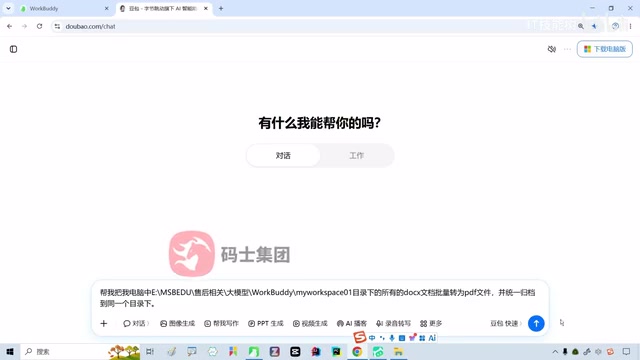
Ms. Shanyao set up a very specific scenario: a directory on the D drive contains a pile of Word documents that need to be batch converted to PDF and archived together into a single folder. She first handed this request to Doubao.
Doubao's answer wasn't bad at all—a complete Python script, dependency installation commands, code explanations, and instructions for creating new files. A full solution. But the problem was: the files in the directory didn't move an inch. The plan was given, but you have to do the work yourself.
According to Ms. Shanyao's analysis, the capability boundary of ordinary large model products lies here: they have understanding and reasoning abilities, can analyze problems and generate solutions, but cannot enter your computer environment, access local files, invoke software, or execute commands. In her metaphor, it's like a consultant—it knows how to do it and can tell you how to do it, but ultimately you're the one who has to act.
What is an AI Agent? In the context of large models, an Agent typically refers to an autonomous action system formed by using a large language model as the "brain" and layering on three core capabilities: planning, memory, and tool calling. Unlike conversational models that only generate text, an Agent breaks a goal down into sub-steps, decides "what to do next" step by step, and grounds its decisions by calling external tools (reading/writing files, executing Shell commands, accessing the network, operating a browser, etc.). The whole loop is usually "observe environment → reason and plan → take action → check results → correct and retry," which is why it can complete tasks without step-by-step human direction. To judge whether a product is an Agent, the key is whether it can execute in a closed loop and take responsibility for results—not just whether it can explain the steps clearly.
How AI Agents Differ: From Understanding to Execution
Paste the same prompt into WorkBuddyAd, and the situation changes.
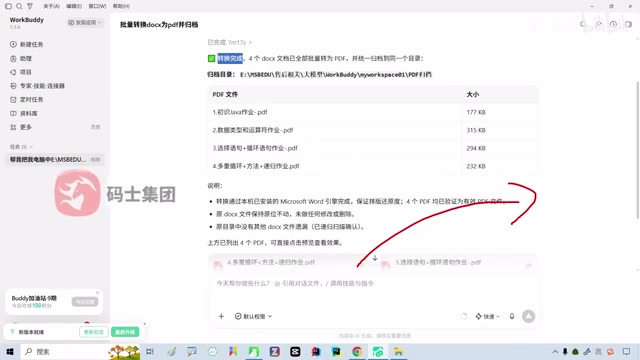
WorkBuddy first autonomously scanned the target directory, reviewed the file list and runtime environment, then automatically executed the conversion and archiving operations. The whole process took about seven minutes, going through environment checks, dependency installation, error capture, and retries, and finally four PDF files were successfully generated and archived in place.
Throughout the process, WorkBuddy consumed 6.55 credits. New users receive 2,000 credits upon login, and at this consumption rate, it's basically enough for a while of light everyday tasks.
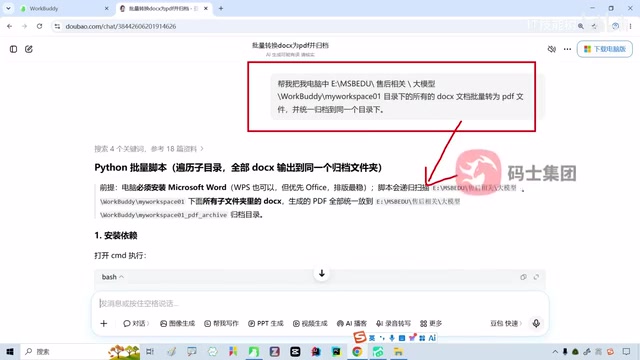
Tool calling (Function Calling) and local sandboxing are the technical foundation that enables an Agent to "take action." The model itself cannot directly touch your hard drive—it outputs structured call requests, which are actually executed by an execution layer running on the user's device or a cloud sandbox, and then the results are returned to the model. This explains why the authorization step cannot be skipped: permissions determine which directories the Agent can access and which commands it can run. To control risk, mature Agent products generally set up operation scope whitelists, dangerous command interception, and human confirmation checkpoints. When batch converting files, WorkBuddy first scans the directory, then installs dependencies, and finally validates outputs—essentially a complete run of this "model decision + execution layer implementation + result feedback" loop in a real environment.
WorkBuddy's Core Differences
From this hands-on case, we can distill the essential differences between AI Agent tools and traditional large model products:
From answering questions to executing tasks. Large models output text suggestions; Agents output actual results. After obtaining user authorization, WorkBuddy can operate local folders, find files, call system tools, and check execution results.
Built-in error correction. If there's a problem with the environment or a step fails during execution, WorkBuddy catches the error itself and attempts to reprocess, without requiring the user to troubleshoot step by step.
Delivers results, not plans. Ms. Shanyao emphasized that after completing the task, WorkBuddy directly provided a PDF preview, and users can click in to verify conversion quality—once confirmed, it's done.
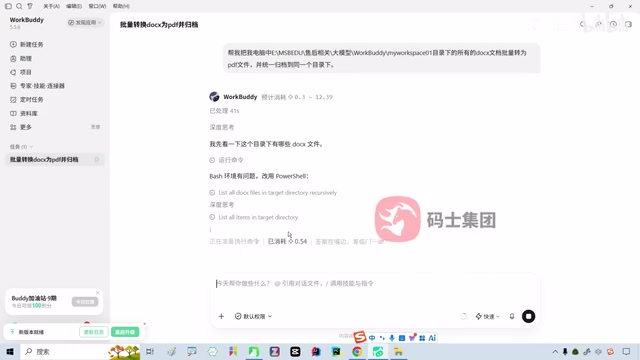
The credit system is a common billing method for such Agent products, usually calculated based on the model calls and tool executions consumed by a task. Compared to monthly subscriptions, the credit system is closer to actual compute costs: simple tasks only invoke a few rounds of the model, so consumption is low; complex tasks require repeated planning, trial and error, and retries, driving up tokens and execution counts, which in turn increases credit consumption. Understanding this helps set reasonable expectations—the same prompt may trigger completely different execution paths in different environments, so consumption isn't fixed. For medium tasks like batch file processing, a range from single digits to the teens in credits is normal.
Usage Tips and Precautions
Ms. Shanyao mentioned several practical tips in the video:
Authorization is a prerequisite. WorkBuddy needs the user to grant default permissions before it can access local files and directories. Without authorization, it's no different from a regular large model.
Credit consumption is controllable. Simple tasks usually consume single-digit credits, while complex tasks consume more. Users can also top up to get more credits.
Products iterate quickly. By the time she recorded the video, WorkBuddy had already pushed a new version, and the interface and features may be adjusted at any time. It's recommended to explore the latest version as needed.
What Scenarios It Suits, and What It Doesn't
Ms. Shanyao's attitude is pragmatic. She believes WorkBuddy is suited for medium-complexity work scenarios, such as batch file processing, format conversion, and archiving/organizing tasks, where it's already quite handy.
But if the work scenario is very complex, WorkBuddy may not be the end point. There are other more advanced AI Agent products on the market, and users should choose based on their own needs rather than treating any single tool as the only answer.
Judging from the social spread she observed, WorkBuddy's usage rate is already very high, with many people sharing recommendations on WeChat Moments—referring new users to sign up earns a 650-credit reward, which also reflects the product's growth momentum.
Getting Started Advice
If you haven't tried AI Agent tools yet, Ms. Shanyao's recommended entry path is straightforward: first download WorkBuddy and use "batch file processing" as your first hands-on scenario. This request is simple enough and the results are intuitive enough to let you feel the gap between an Agent and an ordinary large model within minutes.
Zero-experience users can complete the full process from installation to running their first task in about an hour. The key is to take the first step—hand the request to it and let it actually do something for you.
One-line Summary
Using batch PDF conversion as an example, this article intuitively compares the capability differences between an ordinary large model and an AI Agent.
Paragraph Summary
The article uses a comparison experiment by Bilibili creator Ms. Shanyao to demonstrate the essential difference between ordinary large models and AI Agents. For the same request—"batch convert Word files in a directory on the D drive to PDF and archive them"—Doubao can provide a complete Python script and instructions, but the local files remain unchanged, showing that its capability boundary is limited to understanding and suggestions. Switching to WorkBuddy, it autonomously scans the directory, checks the environment, installs dependencies, performs conversion, and catches errors to retry, completing the conversion and archiving of four files in about 7 minutes while consuming 6.55 credits. From this, the author distills three core differences: shifting from answering questions to executing tasks, having autonomous error correction, and delivering actual results rather than plans. It also provides usage precautions such as the prerequisite of authorization, credit consumption, and rapid product iteration, and recommends that zero-experience users start with the simple scenario of batch file processing.
Related articles

How Big Can Stars Really Get? The Physical Limits of the Largest Stars
Red supergiants are the largest stars by volume, with radii up to 2,000 times the Sun, engulfing the inner solar system. But there is no precise upper limit on stellar size—models predict up to 15,000 solar radii. The most massive blue stars are far smaller than red supergiants—biggest and heaviest are two different things.

Apple HomeView Smart Display Full Feature Breakdown: Wall-Mount or Desktop, $299
Apple launches HomeView, a $299 smart display with wall-mount and desktop options, 12MP camera for facial recognition, smart home control, music playback, and recipe step-by-step cooking. Full breakdown of watch faces, apps, privacy, and cooking integration.

Where Did the Promised New Studio Go? Craft Computing Answers After Five Years
Craft Computing's host responds to viewer questions: the new studio promised five years ago was shelved as construction costs soared from $30,000 to $75,000, and was replaced by a 168-square-foot garage conversion.