WorkBuddy Deep Dive: Skills, Experts, and Connectors — The Three Ecosystems Explained

WorkBuddy's three ecosystems — Skills, Experts, and Connectors — transform AI from a chatbot into a local task-executing digital employee.
WorkBuddy is a local AI "digital employee" tool often described as a domestic alternative to Codex. Its core philosophy goes beyond prompt engineering to actually execute tasks. The platform offers three ecosystems: Skills for single-domain capabilities (e.g., PDF extraction), Experts as domain specialists that can collaborate on complex problems, and Connectors for integrating external productivity software. A hands-on demo building a personal website highlights the key advice: use Plan mode for complex tasks — let the AI draft a proposal for review before execution — and choose GLM-5.3 or GLM-5.2 over Auto mode. The full site was generated in ~10 minutes for just 70 credits, demonstrating that non-technical users can complete professional-grade tasks with AI Agent tools.
WorkBuddy has earned a reputation as a "domestic Codex alternative" — an AI tool that can autonomously handle tasks right on your local machine. The barrier to entry is relatively low, with no complex network configuration required. From drafting proposals and building spreadsheets to data analysis, poster design, writing code, and even taking over your browser to control software, it can deliver finished outputs with a single instruction. Based on a comprehensive tutorial from a Bilibili creator, this article breaks down WorkBuddy's core ecosystems and practical usage, helping you understand how it evolves from a "chat tool" into a "digital employee."
Why Execution Beats Prompt Engineering
The tutorial opens with a pointed question: after all this time playing with AI and memorizing prompts, has your salary actually gone up?
For most people, the answer is no. The reason: prompts are ultimately just ideas and suggestions, and suggestions alone aren't worth much. What actually has value is execution. That's precisely where WorkBuddyAd positions itself — it turns your ideas into real actions, rather than leaving everything as text in a chat window.
This observation captures a fundamental shift in how AI tools are being applied: moving from "generating content" to "automatically executing tasks." When AI gains the ability to access local files, control software, and complete multi-step workflows, it starts to genuinely replace repetitive labor.
What's described here as "automatically executing tasks" is known in the AI field as the AI Agent paradigm. Unlike the traditional "ask a question → get a text answer" conversation model, an Agent-mode AI breaks a complex goal down into sub-steps and autonomously decides which tools to invoke at each step — reading and writing local files, controlling a browser, running code, calling external APIs — forming a closed loop of "perceive → plan → execute → reflect." OpenAI's Codex, Anthropic's Claude Computer Use, and WorkBuddy in this article are all real-world implementations of this paradigm. The core challenge lies in fault tolerance and planning across long task chains: a single-step failure can derail the entire task, which is the fundamental reason the article later emphasizes "using Plan mode to generate a proposal first, then execute."
The Three Ecosystems: Skills, Experts, and Connectors
WorkBuddy's core is built around three ecosystems, each representing a different path to transforming a "generalist college-graduate digital employee" into an "experienced specialist."
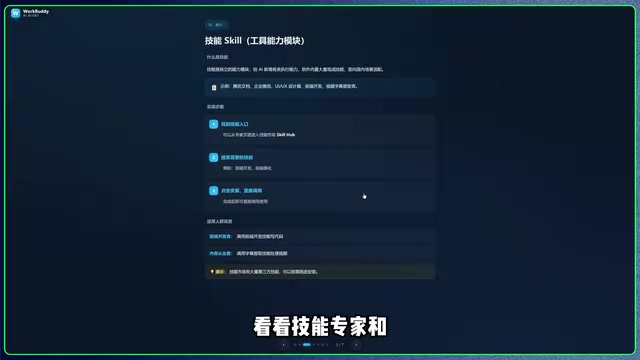
Skills: Specialized Single Abilities
Skills are like abilities a character learns when leveling up in a game — they give an otherwise generalist AI mastery over a specific capability, enabling it to handle particular problems more effectively. Unlike grinding for levels in a game, WorkBuddy requires no effort: the platform provides a large library of ready-made skills that you can add with a single click.
For example, the tutorial demonstrates a "PDF Image Text Extraction" skill. Once added, you simply select a workspace or upload a file containing text, state your specific requirements (how to extract it and where to put the results), and the AI takes care of the rest.
Experts: Domain-Level Specialists
We often face not a single isolated problem, but a complex challenge spanning an entire domain. In those cases, rather than having the AI learn skills one by one, you're better off bringing in an "expert" directly. Experts function like outside domain specialists hired by a digital company.
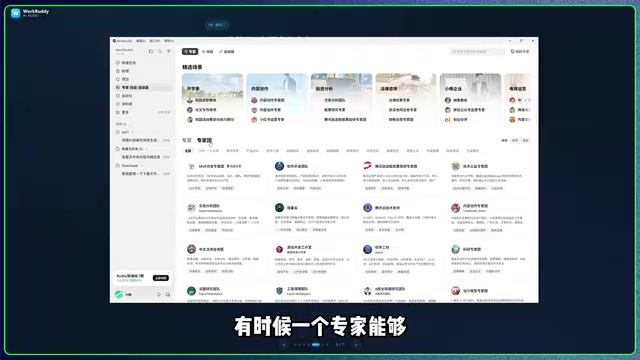
The tutorial also mentions the "Expert Team" option — the idea being that multiple specialists collaborating can handle more complex problems. Keep in mind, however, that invoking an Expert Team consumes more credits, so you'll want to weigh your current credit balance against your actual needs. The platform offers free daily credits, so don't forget to check in.
Connectors: Bridging External Software
Connectors play the role of a company's "business development department." WorkBuddy can access local files, but it hits a wall when dealing with online software that requires account logins and has security mechanisms in place. Connectors solve this by establishing trust between WorkBuddy and those applications upfront, enabling smooth operation.
Usage is straightforward: click "Connect" and log in to the relevant account. The connector list contains real, recognizable productivity tools — not abstract skills or problem domains.
The relationship between the three can be summarized as follows: Skills provide single-domain capabilities, Experts offer domain-level solutions, and Connectors handle integration with external systems. Equip Skills, bring in Experts, connect external systems — and the AI transforms from a chat tool into a genuine digital employee.
The technology behind Connectors typically relies on OAuth authorization or pre-built API integrations. OAuth is the standard authorization protocol used by mainstream productivity software (Google Workspace, Notion, GitHub, etc.): when a user clicks "Connect" and logs in, the platform receives an Access Token that allows it to call the corresponding software's API on the user's behalf — without ever storing the user's credentials. This mechanism ensures security and also explains why websites that require bypassing login or have anti-scraping defenses remain difficult to control directly. The scope of what Connectors can reach is fundamentally determined by whether the target application exposes a standardized API. For software not on the list, WorkBuddy typically falls back to controlling a local browser and simulating clicks to complete the task.
Hands-On: Building a Personal Website with Plan Mode
The earlier examples in the tutorial involve quick tasks that wrap up in a few minutes. The tutorial then demonstrates something more ambitious — having the AI build a personal website that includes a biography and a portfolio.
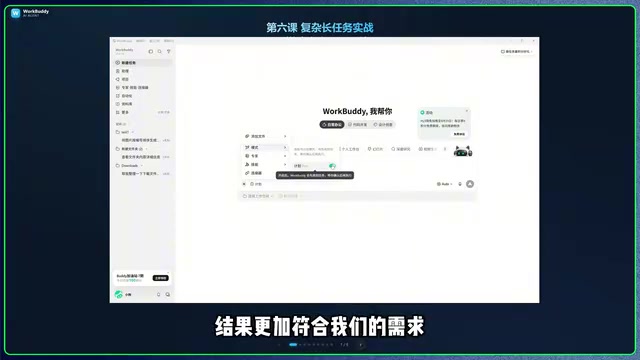
Why Use Plan Mode
The key lesson here: for complex tasks, don't let the AI jump straight into execution. Instead, use Plan mode to have it draft a plan first. Most people aren't frontend developers and don't know how to specify their requirements precisely. Plan mode lets the AI show you its approach before it acts, giving you a chance to request changes — leading to a final result that's much closer to what you actually wanted.
Choosing the Right Model
Model selection has a direct impact on output quality. The tutorial's recommendations are worth taking note of:
- GLM-5.3: Best results for multi-page websites with interactive effects, but marked "subscribers first" — non-members may face longer queues
- GLM-5.2: A solid second choice with stable overall performance
- HY3: Suitable for simple web pages
- Auto (default): Not recommended — it may pick the wrong model and produce inconsistent quality
The Execution Flow
After entering your requirements (e.g., "Build a personal website with a bio section and portfolio, clean and modern style") and sending them, WorkBuddy will confirm key details in sequence:
- Which tech stack to use (the tutorial goes with plain HTML + CSS + JS)
- Whether to use real personal information or placeholder content
- Visual style (light / dark / neutral gray-white)
- Cloud deployment or local (local was chosen for easier future edits)
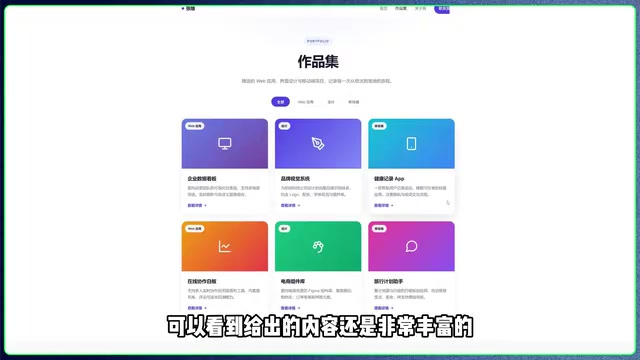
After confirming the plan and clicking Execute, the site is ready in about 10 minutes, consuming just over 70 credits (well within the 100 free daily credits). The generated pages are clean and modern, with well-structured layouts and interaction logic across sections like Home, Portfolio, About Me, and Contact.
The "sandbox isolation" mentioned in the article is an important safety mechanism in modern AI Agent tools. A sandbox is a controlled execution environment isolated from the host operating system: when AI writes files, runs scripts, or starts processes inside the sandbox, the effects are contained by default and won't spill into critical system directories. It's similar to working on a "temporary virtual computer" — if something goes wrong, you can discard it and start over without damaging the real system. For locally running AI Agents, the sandbox is the central mechanism for balancing the tension between "needing sufficient system permissions to complete tasks" and "not letting AI arbitrarily modify system files." The "sandbox administrative permission" users grant is not unlimited administrator access — it's operational authority within a clearly bounded, isolated space.
Efficiency Tips and Things to Watch Out For
The tutorial wraps up with a few practical recommendations:
Run tasks in parallel: While waiting for one task to finish, click "New Task" to start submitting another request. Existing tasks stay accessible in the left-side menu and can be switched to at any time. When juggling multiple projects, this noticeably boosts efficiency.
Sandbox isolation: When creating web pages or programs, a "sandbox administrative permission" prompt will appear on your computer. This isolates the environment as a protective measure, preventing the build process from interfering with your local system.
Give large projects room to breathe — avoid frequent interruptions. Beginners should prioritize Plan mode: review the proposal before confirming execution to save both time and credits.
The complete AI delivery logic roughly follows this sequence: output an overall framework → plan gets approved → create directory structure → write data sources → write styles and interactions → develop each page in turn → verify file integrity → execute deployment. All of these steps are visible in WorkBuddy's output messages.
Closing Thoughts
WorkBuddy has a clear product philosophy: through its three ecosystems of Skills, Experts, and Connectors, it arms a general-purpose AI with specialized capabilities, domain expertise, and external integration — turning it into a true "digital employee." Combined with Plan mode and thoughtful model selection, ordinary users can accomplish tasks like frontend development that previously required professional skills, all through natural language. For anyone looking to push AI beyond "chatting" into "actually getting things done," this tool's approach to execution is well worth trying.
Related articles

Chain of Thought Isn't Just for AI: How Humans Can Use CoT to Improve Thinking Quality
Chain of Thought isn't just a prompt trick for large models. Starting from a Hacker News discussion, this article analyzes why CoT works for human thinking too, breaks down actionable ways to transfer it, and highlights the key differences between human CoT and machine CoT.
Cloudflare Teams Up with OpenAI: Closi…
Cloudflare Teams Up with OpenAI: Closing the Loop from Vulnerability Discovery to Defense with AI
Cloudflare uses OpenAI Daybreak to investigate security vulnerabilities and generate reviewable remediation plans, while developers use Codex to boost coding efficiency and quality.

Orca Multi-Agent Orchestration in Practice: A Guide to Parallel Collaboration with Claude and Codex
Orca is Stable AI's free open-source agent workbench supporting 34 agents like Claude Code and Codex in parallel. Learn its Git worktree isolation, multi-model orchestration, and mobile management.