WorkBuddy Financial Automation in Practice: A Digital Employee That Does the Books in Seconds

Tencent's WorkBuddy local AI agent takes over repetitive financial work with a single instruction.
Based on a Bilibili creator's WorkBuddy financial automation course, this article introduces Tencent's desktop AI agent built on the OpenClaw ecosystem. It uses local deployment for secure, controllable data and connects to common tools like WeCom, Feishu, email, and cloud storage, supporting remote task execution from a phone. It compares WorkBuddy with ByteDance's Coze and highlights three key installation decisions: avoid the C drive, use WeChat login to unify devices, and choose modes carefully. Reconciliation, tax filing, reimbursements, and reporting are identified as core scenarios.
80% of the overtime finance staff work goes into repetitive tasks that can be automated—reconciliation, creating spreadsheets, expense reimbursements, and generating reports. These tasks are now being taken over by AI digital employees. According to a hands-on WorkBuddy financial automation course shared by a Bilibili creator, a single instruction is all it takes to have WorkBuddy automatically process financial data and generate dashboards, completing half a day's work in minutes. This article breaks down WorkBuddy's core capabilities, how it differs from similar products, and the key points for deployment in financial scenarios based on that tutorial.
What Is WorkBuddy: A 24/7 Digital Employee Installed on Your Computer
WorkBuddyAd is a desktop AI agent launched by Tencent based on the OpenClawAd ecosystem. Unlike the purely cloud-based "lobster," it uses local deployment—it lives on your computer and can directly read and process local files without uploading them. Every file it generates—Excel spreadsheets, Word reports, PPTs—is saved directly to your local machine, keeping data secure and controllable.
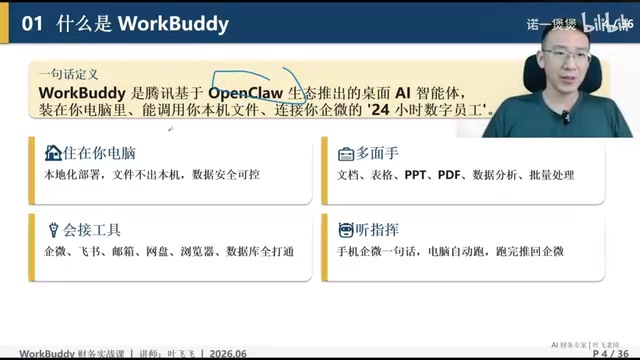
Course instructor Ye Hui compares it to "the WeChat of AI": through its connector feature, WorkBuddy connects to virtually all commonly used tools on the market, including WeCom, Feishu, email, cloud storage, browsers, and various databases—connect it to anything and it can call on it. This approach continues WeChat's product philosophy of "one app that takes you everywhere."
Remote Command: One Sentence on Your Phone Gets Your Computer Working
WorkBuddy supports cross-device integration. After logging in by scanning a QR code with your personal WeChat, the desktop client, WeChat mini-program, and mobile app all share a single account. Whether you're at home after work or traveling on business, you can send a single message through WeCom or the WorkBuddy mini-program on your phone to remotely command the desktop client to execute tasks. This is the key capability that sets it apart from ordinary AI chat tools—it doesn't just give suggestions; it actually delivers results.
OpenClaw Ecosystem: OpenClaw is an open-source AI agent framework/project (the article refers to its creator as Peter). Its core idea is to enable large language models not only to converse but also to call tools, manipulate files, and execute multi-step tasks—essentially an "executable AI agent" runtime. "Lobster" is the community nickname for this type of agent. Because it's open source, various vendors can build their own distributions on top of it, hence terms like "Tencent's lobster" and "Kimi's lobster." This is important to understand: WorkBuddy is not a conversational model built from scratch but a productized wrapper around an open-source agent framework, with its differentiation mainly at the engineering level—security policies, system connectors, local file permissions, and billing models.
Local Deployment: This means the AI program is installed and runs on the user's own computer rather than uploading files to cloud servers for processing. The advantage is that data never leaves the local machine and can directly read/write the local disk; the trade-off is that it's limited by local performance and whether the computer is powered on—tasks cannot execute when the computer is off or asleep.
Why Tencent Adapted OpenClaw
OpenClaw is the lobster project created by Peter. The initial version can be downloaded from GitHub, but it's not very usable for everyday work. The course points out two major flaws: first, it's unsafe—it may accidentally delete system files or local files; second, token consumption is uncontrollable, and it doesn't support subscriptions—completing a single task can cost hundreds or even thousands of yuan.
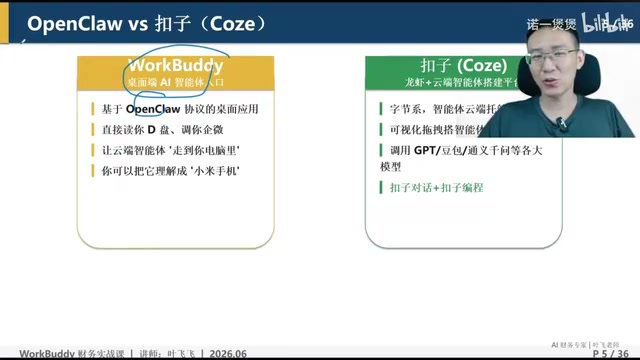
Tencent's approach was to take OpenClaw and heavily modify it to suit Chinese user habits—a path that echoes how QQ adapted foreign products back in the day. The modified WorkBuddy solves the two core pain points of security and cost, making it genuinely usable for everyday office work.
Tokens and Subscriptions: A token is the unit of measurement for how large language models process text—one Chinese character is roughly equivalent to 1–2 tokens. When an agent executes complex tasks, it needs to repeatedly "think—call tools—read results," consuming tokens at every step. Over a long task, consumption can reach dozens of times that of an ordinary conversation. Under pay-as-you-go billing, a single complex task might cost anywhere from a few yuan to over a hundred yuan, with unpredictable total costs—this is the key reason the open-source version of OpenClaw is hard to use day to day. Subscriptions, by contrast, charge a fixed monthly/annual fee with unlimited use within a quota, turning uncontrollable costs into a predictable fixed expense—especially important for enterprise office scenarios.
Accidental Deletion Risk: Agents have permissions to read/write local files and execute commands. If planning goes wrong, they may delete or overwrite files unrelated to the task. Vendors typically mitigate this through sandbox isolation, operation confirmation, permission whitelists, and similar mechanisms.
Key Differences Between WorkBuddy and Coze
The course repeatedly compares Tencent's WorkBuddy with ByteDance's Coze, which is crucial for product selection. According to the instructor, Coze consists of two parts: Coze Chat and Coze Programming. Coze Chat is essentially also a lobster, while Coze Programming is an agent development platform—the two combined, available on both web and desktop.
The strengths and weaknesses of the two can be summarized as follows:
- Depth of capability: WorkBuddy's lobster capabilities are generally stronger than Coze's lobster, especially in third-party system integration—the strongest among all Chinese lobsters, surpassing 360 Security Lobster, Kimi's Lobster, MiniMax's Lobster, Zhipu AutoClaw, ByteDance ArgoClaw, and others.
- Speed: Coze is noticeably faster; the instructor often uses Coze first for everyday tasks.
- Agent quality: Agents built on Coze's agent development platform are higher quality and more stable, outperforming the experts on WorkBuddy.
- Local file operations: WorkBuddy is stronger at manipulating local files.
The selection advice is straightforward: use Coze for speed, choose WorkBuddy for deep system integration and localized operations. Traditional AI chat tools like Doubao, Qwen, and DeepSeek can basically only offer suggestions—the gap in actual execution capability is significant.
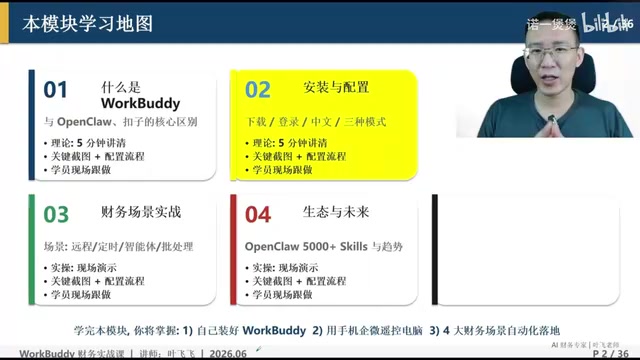
Three Key Decisions for Installation and Configuration
The course calls installation and configuration "a very major focus of this module"—once you understand it thoroughly, you can use it effectively regardless of your profession.
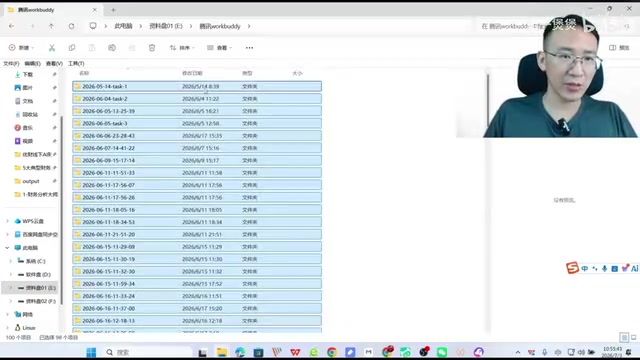
Download and Installation: Never Install to the C Drive
Search for WorkBuddy on Baidu and make sure you find the official website—note it's not CodeBuddy (that one is specifically for programming). The official site automatically detects your system version and recommends an installer, about 400+ MB in size. There's an iron rule for installation: never install to the C drive. This is because WorkBuddy's generated local files are stored by default in the installation directory, with each task creating a folder named by date and time. The instructor found that after using it for a while, the directory had accumulated 1,522 files and 427 folders, the vast majority newly generated by the program. Installing to the C drive will inevitably cause lag.
Login: Prefer Personal WeChat
Only two login methods are recommended: personal WeChat QR code scan or phone number verification code. WeChat is preferred because after logging in with WeChat, you can find the WorkBuddy mini-program within WeChat, and the desktop client, mini-program, and app all share one account—remote control works smoothly only this way. Phone number works too, but be sure to use the same phone number linked to your WeChat; otherwise, the three devices won't be unified.
Mode Selection: A Hidden Switch That Affects Everything
After enabling the assistant feature, you'll see mode options like Craft, Ask, and Plan. The course specifically emphasizes that this choice is "super important"—if you don't understand it and choose poorly, everything downstream falls apart. The specific use cases for each mode are covered in later modules of the tutorial.
General meanings of Craft / Ask / Plan modes (naming varies slightly across products; refer to the actual WorkBuddy version): Ask mode leans toward Q&A—it only answers without executing, safe but produces no deliverables; Craft mode leans toward direct execution, autonomously calling tools to produce output—efficient but requires trusting its operations; Plan mode first presents a step-by-step plan and executes only after user confirmation, suitable for complex or high-risk tasks. For finance scenarios with low tolerance for error, it's recommended to first use Plan mode to review the execution path, then switch to Craft mode for batch processing once confirmed—this balances efficiency and controllability.
The Five Core Capability Matrix
The course summarizes WorkBuddy's capabilities into five dimensions: natural language understanding (all AI products have this), autonomous planning and execution (Coze also has this), local file operations (Coze has this but weaker), third-party system integration (WorkBuddy is strongest; other Chinese lobsters don't match up), and versatile tool invocation. It's the combination of the last two that creates a moat in finance scenarios requiring cross-system data retrieval and cross-file processing.
For finance personnel, this means high-frequency repetitive tasks—reconciliation, tax filing, expense reimbursement, report generation, financial analysis, budgeting, and consolidated statements—can all potentially be handed off to digital employees. The tutorial positions itself as "all financial hands-on scenarios, implemented step by step," suitable for those who want to systematically learn how to truly apply AI in financial work.
It should be noted that this article is based on a single video tutorial source, and the judgments about product comparisons carry the instructor's subjective experience. When selecting products, it's advisable to verify through actual testing against your own business needs.
One-line Summary
Tencent's WorkBuddy local AI agent takes over repetitive financial work with a single instruction.
Paragraph Summary
The article is based on a Bilibili creator's hands-on WorkBuddy financial automation course, introducing Tencent's desktop AI agent WorkBuddy built on the OpenClaw ecosystem. It uses local deployment with files stored on the local machine for secure, controllable data, and connects to common tools like WeCom, Feishu, email, and cloud storage through connectors, supporting remote control of the computer from a phone to execute tasks and deliver results. The article compares it with ByteDance's Coze: WorkBuddy is stronger in third-party system integration and local file operations, while Coze is faster with higher-quality agents. Three key installation points are emphasized: don't install to the C drive, prefer WeChat login to unify all three devices, and carefully choose Craft/Ask/Plan modes. Finally, it identifies reconciliation, tax filing, expense reimbursement, and report generation as core deployment scenarios, while noting that product comparison conclusions carry the instructor's subjective perspective.
Related articles

The Truth Behind Titanic's Sinking: Key Decisions and Communication Failures in the National Geographic Documentary
National Geographic's The Unsinkable Ship uses survivor testimony to reconstruct Titanic's fatal decisions—from the missing MSG telegram prefix and the broken boiler-room-to-bridge link to how 'unsinkable' thinking delayed damage control and evacuation.

74M-Parameter Open-Source Model Partially Outperforms Jev AI in Testing
Fastino AI's Glider 2.5 models, with just 74M–300M parameters, reportedly outperform Jev AI in some guardrail benchmarks per YouTube testing, run on consumer hardware, and even play Doom. We analyze small models' competitiveness and deployment value on specific tasks.

Gemini 4 Argon Hands-On: Aggressive Pricing, 3D Capabilities Need Coaching
Gemini 4 Argon hands-on: limited-time $2/$10 pricing, million-token output, strong 3D and reverse-engineering work, but weak front-end aesthetics and zero-shot ability need coaching.