WorkBuddy for Absolute Beginners: How a Desktop Agent Turns AI into an Executor

WorkBuddy is a desktop AI agent that can directly operate local files and has a lower barrier to entry than Codex.
The article introduces the positioning and usage of the desktop AI agent WorkBuddy: traditional web AI can only answer questions, leaving actual actions to humans, whereas WorkBuddy accepts natural-language tasks and directly operates the local computer to complete office deliverables. Compared with Codex, which is more capable but requires programming basics and a paid subscription, WorkBuddy works out of the box, integrates with domestic office ecosystems like Feishu and DingTalk, and offers daily free credits, making it better suited for ordinary office workers to start with. The article also clarifies three misconceptions and emphasizes shifting from an AI question-asker to an AI manager.
From Q&A to Execution: What Exactly Is WorkBuddy
Most people who have used AI have been through this: open a chat box, ask a question, copy the answer, and manually paste it into a local file. According to a Bilibili creator's observations in a tutorial, this approach isn't really "using AI" — it's "working for AI" — because traditional web-based AI is just a Q&A tool with no permission to operate local files, so every actual action still has to be done by a human with a mouse and keyboard.
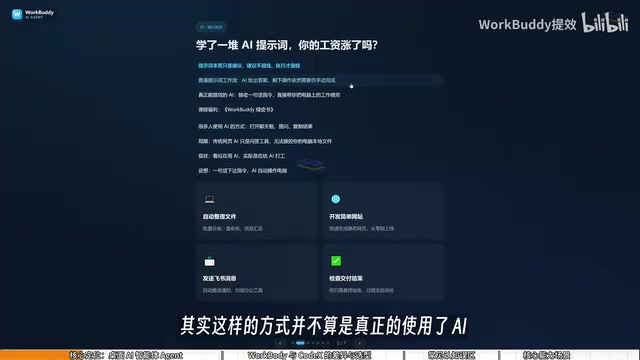
WorkBuddyAd is positioned precisely to break through this layer. It is a desktop AI agent: after the user issues a task in natural language, it automatically dispatches research, execution, and delivery, directly operating the local computer to complete real office tasks. The creator used a rather persuasive analogy: Codex is special forces, requiring a commander to draw up a detailed battle plan; WorkBuddy is an obedient college student who shows up whenever you call for simple tasks. For office workers with no programming background, such a "college student" is already good enough.
AI agents differ from traditional chatbots in their "agentic execution" capability: the large language model handles understanding and planning, while the agent framework breaks the plan into callable tool steps — reading and writing local files, running scripts, calling external APIs — and decides on its own when to call them and how to adjust based on results. The industry often summarizes this structure as a "plan — tool call — reflect" loop (such as the ReAct pattern). Therefore an agent's reliability depends not only on model capability but also heavily on tool permission boundaries and execution feedback mechanisms; for a desktop agent, read/write access to the local file system is precisely the precondition for "landing and delivering" work, while also meaning users need to pay attention to the scope of authorization and how sensitive data is handled.
Why Learn WorkBuddy Before Codex
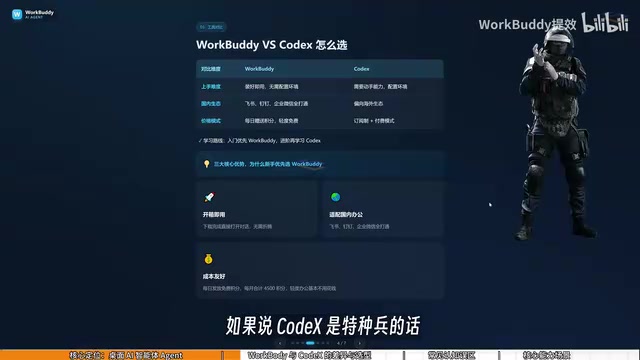
The tutorial explicitly contrasts the two in terms of scope. Codex is more powerful but has a higher barrier to entry, requiring you to specify filenames, directories, and execution parameters, making it suitable for people with a programming background. WorkBuddy, by contrast, works right out of the box — no environment configuration, no command line.
Ecosystem fit is another dividing line. WorkBuddy is deeply integrated with Feishu, DingTalk, WeCom, and Tencent Docs, while Codex leans toward overseas ecosystems and has limited support for domestic office software. On cost, WorkBuddy gives away daily credits and offers extra credits during promotions; the creator mentioned that consistently claiming for a month can accumulate at least three thousand credits. Codex, meanwhile, is subscription-based, requiring real money during the learning phase. This also explains why the tutorial recommends "first use WorkBuddy to get work done, and only learn Codex once you feel it's not enough."
Codex-style coding agents first emerged in the form of code completion and code generation, with the code repository and command line as their interface. Their advantage lies in reproducible, version-controllable engineering workflows, at the cost of users having to understand directory structure, dependency environments, and execution parameters. By contrast, "out-of-the-box agents" encapsulate the toolchain into a graphical interface, replacing commands with natural language and trading some controllability for speed of onboarding. Choosing between the two is essentially a trade-off between controllability and ease of use: the more standardized a task and the more it needs auditing and reuse, the more it favors coding-style tools; the more fragmented a task and the closer to daily office work, the more it suits encapsulated agents.
Three Common Misconceptions
Misconception 1: WorkBuddy Is Just a Wrapper Around a Chat Tool
The creator corrects this judgment: WorkBuddy can not only converse and offer suggestions like GPT, but also read local files and call tools to execute tasks automatically. Users need to shift their mindset from "asking AI questions" to "managing AI at work" — you are the manager, WorkBuddy is the employee, and the computer is the company.
Misconception 2: If Codex Is Stronger, You Should Learn It Directly
The tutorial considers this a typical mistake in choosing a learning path. For ordinary office workers, WorkBuddy is enough to cover most work scenarios, and getting results first before advancing minimizes learning costs.
Misconception 3: More Features Must Mean Harder to Learn
WorkBuddy's interface is similar to common large language models, and the learning focus isn't on the interface features themselves but on the shift in questioning mindset — from asking questions to issuing executable commands. The creator suggests following along with the video to get started.
Credit Check-ins and Cost Control
After logging into WorkBuddy, you can find the "Buddy Gas Station" option at the avatar in the lower-left corner; click to check in and claim credits, and unused credits accumulate to the next day. The tutorial calls this out separately as a money-saving tip — a routine action for long-term users to reduce costs.

Pay-as-you-go billing and credit systems in large model applications are the foundation for understanding an agent's cost structure. Model inference is billed by input and output tokens, and because agents require multiple rounds of planning and tool calls, a single task often consumes several times the tokens of a simple Q&A, naturally costing more. Vendors typically combine pricing as "daily free quota + credit accumulation + subscription packages": the free quota lowers the trial barrier, while credit validity periods and accumulation rules affect the actual usable amount. For users, evaluating cost shouldn't look only at unit price but also at the number of call rounds a task requires — breaking complex tasks into clear instructions is often cheaper than repeated trial and error.
What Scenarios Can Actually Be Implemented
The tutorial lists several typical tasks, none of them theoretical: batch classification and batch renaming of local files, information aggregation across multiple documents, Excel spreadsheet and weekly report processing, simple website development, as well as collaborative operations on Feishu and DingTalk and periodic work report generation.

The creator used their own course-recording experience as an example: folders were named 01, 02, 03, and when a certain lesson was too short and needed to be merged into the previous one, the original ordering was disrupted, making manual renaming one by one extremely tedious — but WorkBuddy can handle the batch renaming directly. These "small but annoying" tasks are exactly where an agent best demonstrates its value.
Batch file operations (batch renaming, rule-based classification and archiving) are a typical scenario for testing the practicality of a desktop agent, because such tasks have clear rules but are tedious in volume — manual execution is error-prone and time-consuming. Technically, this relies on the agent's ability to call file system APIs and to parse naming rules — the user describes the rules in natural language, and the model converts them into executable matching and replacement logic. The practical risks lie in rule ambiguity and irreversible operations; the safe approach is to first have the agent output a preview list of operations, confirm it, and only then execute, while keeping backups of important directories.
One-Sentence Summary
The core point the tutorial repeatedly emphasizes: prompts are merely suggestions, suggestions aren't valuable, execution is what's valuable. WorkBuddy's significance lies in turning scattered AI Q&A into reusable work methods — evolving from an AI question-asker into an AI manager. For office workers who want to try desktop agents at low cost, this is a gentler starting point than tackling Codex directly.
Related articles

The Truth Behind Titanic's Sinking: Key Decisions and Communication Failures in the National Geographic Documentary
National Geographic's The Unsinkable Ship uses survivor testimony to reconstruct Titanic's fatal decisions—from the missing MSG telegram prefix and the broken boiler-room-to-bridge link to how 'unsinkable' thinking delayed damage control and evacuation.

74M-Parameter Open-Source Model Partially Outperforms Jev AI in Testing
Fastino AI's Glider 2.5 models, with just 74M–300M parameters, reportedly outperform Jev AI in some guardrail benchmarks per YouTube testing, run on consumer hardware, and even play Doom. We analyze small models' competitiveness and deployment value on specific tasks.

Gemini 4 Argon Hands-On: Aggressive Pricing, 3D Capabilities Need Coaching
Gemini 4 Argon hands-on: limited-time $2/$10 pricing, million-token output, strong 3D and reverse-engineering work, but weak front-end aesthetics and zero-shot ability need coaching.