WorkBuddy for Absolute Beginners: How Desktop Agents Work and How to Build One

Desktop Agent WorkBuddy drives the local machine via command line, completing real tasks through a large-model planning and execution loop.
Based on the first lesson of a Bilibili WorkBuddy tutorial, this article outlines the working principles and onboarding path of this desktop-level Agent. WorkBuddy operates the computer through the command line, with the large model understanding requirements, planning tasks, and generating commands, forming a "brain and hands" division of labor. The workflow follows a plan-execute-feedback-fix loop, and connectors, MCP, and APIs extend its capabilities. It also covers memory, the agent-model relationship, and a three-tier learning path.
WorkBuddy for Absolute Beginners: How Desktop Agents Work and How to Build One
Starting from a Bilibili Tutorial
A so-called "nanny-level" WorkBuddyAd tutorial recently appeared on Bilibili. The creator spent a month researching existing tutorials on the market and three months refining the course, aiming to solve a pain point: absolute beginners have no idea where to start amid a flood of mixed-quality teaching content. The course progresses through three layers—basics, advanced, and hands-on practice—covering UI orientation, batch file processing, automatic bug fixing, plugin extensions, automation tasks, and real-world scenarios such as website mini-games, mini-programs, and PPT, spreadsheet, image, and video outputs.
Setting aside the marketing language, the course happens to pinpoint the cognitive barrier of desktop agents like WorkBuddy: many people don't understand how it differs from a chatbot on first contact, nor where its capability boundaries lie. This article, based on the core explanations in that course and cross-referenced with public information, sorts out WorkBuddy's operating logic and onboarding path.
What WorkBuddy Is: An Executor Installed on Your Computer
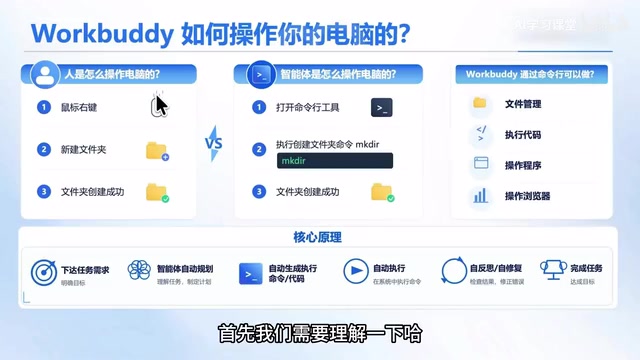
According to the Bilibili creator's definition in the course, WorkBuddy is a desktop-level Agent that can be installed on Windows or Apple computers to operate the local machine on the user's behalf and complete various tasks. This positioning is the premise for understanding all of its behavior—it is not a conversational assistant answering questions in a web page, but an executor with local operating permissions.
Why emphasize "desktop-level"? Because once an Agent resides locally, it can reach the browser, the file system, installed software, and even the command line—resources that pure cloud-based conversational products struggle to access directly. In the course, the creator repeatedly reminds learners to establish this understanding first before discussing specific features; otherwise, it's easy to mistake it for an advanced search box.
How It Operates a Computer: Command Line, Not Simulated Mouse
Many people imagine an Agent as "AI watching the screen and clicking a mouse," but the creator explicitly rejects this path: real-time screenshot recognition of the interface is too inefficient and cannot reliably reproduce human operations. WorkBuddy adopts a command-line-driven model.
Take creating a "Course Materials" folder as an example: after the user makes a request, the large model first determines the intent and generates the corresponding command, WorkBuddy executes it, and the folder immediately appears on the desktop. Users can expand a small arrow in the interface to see which command was actually executed.
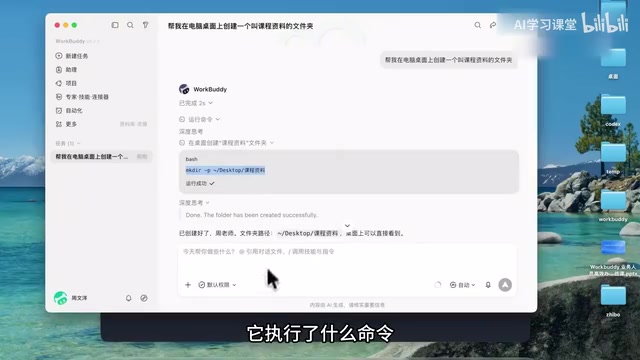
This example reveals the division of labor: the large model plays the role of "thinking up commands," and WorkBuddy plays the role of "executing commands," corresponding exactly to the human brain and hands. The creator uses this to explain that once you understand this chain, you can infer the scope of capabilities—file and folder operations, program invocation, and basic browser operations are all within range; for tasks that simple commands can't handle, the large model can even write Python or Node scripts on the fly, or even install software and orchestrate it to complete the task.
External Integration: Extending the Capability Boundary
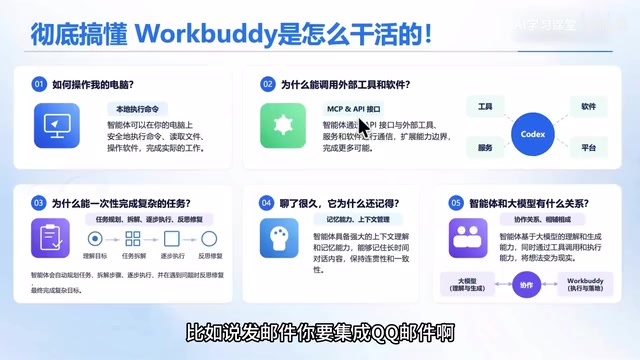
Relying solely on local machine orchestration, an Agent can hardly cover real business needs. Sending email requires connecting to QQ Mail, booking meetings requires a meeting system, route planning requires map services, and reading materials requires an online document platform. The creator points out that WorkBuddy provides the ability to connect external tools through connectors, the MCP protocol, and API interfaces; the specific differences are left to later chapters of the course.
This point is crucial for selection decisions: if a task happens entirely at the local file level, WorkBuddy can handle it directly; if it involves third-party systems, it depends on whether the corresponding platform provides connectors or APIs. Cross-referencing multiple sources, the dual-layer capability of "local execution + external integration" is the core competitiveness that distinguishes this type of desktop Agent from pure conversational products.
MCP (Model Context Protocol) is an open protocol proposed by Anthropic at the end of 2024, aimed at standardizing how large models connect to external data sources and tools. You can think of it as "the USB-C interface of the AI world": before this, every external service (such as email, databases, maps) required separately developed adapter code; with MCP, as long as the service provider offers a protocol-compliant Server, the Agent can discover and invoke its capabilities in a unified way. For desktop Agents like WorkBuddy, MCP means users can expand the tool ecosystem at low cost without waiting for official one-by-one adaptation. Compared with traditional API integration, MCP emphasizes context passing and machine-readable tool descriptions, allowing large models to autonomously decide when to call which tool—this is also the third integration path beyond "connectors" and "APIs."
How Complex Tasks Form a Closed Loop: Plan, Execute, Feedback, Fix
The most valuable part of the course is the breakdown of the task workflow. After the user makes a request, the large model first understands the intent, makes a plan, and breaks the requirement into several small tasks; then it determines how to complete each one—whether by executing a command, calling an API, or writing a script on the spot; finally it hands them to WorkBuddy for execution.
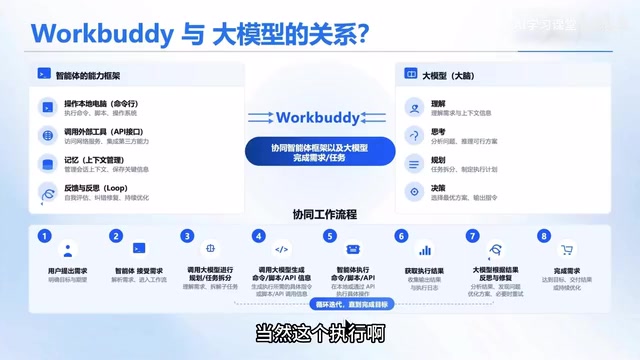
Execution is not necessarily successful on the first try. The creator admits that the result may be success or failure; WorkBuddy sends the execution log or result back to the large model, which judges the status; if it fails, it autonomously thinks, fixes, and re-executes, forming an iterative loop until that task passes and then moves on to the next. Only after all tasks are completed is the overall requirement considered delivered.
This closed loop of "plan—execute—feedback—fix" explains a common question: why an Agent can sometimes recover from errors on its own. It also hints at the risk—loop-based fixing depends on the quality of the large model's judgment, and in complex scenarios key steps still require human review.
Agent Loop is a core concept for understanding how autonomous agents operate. Unlike single-turn Q&A, an Agent continuously iterates through "observe—think—act": reading the current state, letting the large model decide the next action, executing and obtaining results, then deciding whether to continue, correct, or terminate based on the results. In academia, this pattern is often called the ReAct (Reasoning + Acting) framework, i.e., reasoning and acting alternate. WorkBuddy's "plan—execute—feedback—fix" is precisely the engineering implementation of the Agent Loop: planning corresponds to reasoning, execution corresponds to action, and log feedback corresponds to observation. The termination condition of the loop is usually determined by whether the task is achieved or whether the maximum number of iterations is reached. Understanding this helps predict risks—the more iterations, the greater the accumulated error and token consumption, so complex tasks still require human checkpoints.
Memory Capabilities and the Agent's Positioning
The creator mentions that WorkBuddy has memory capabilities, automatically remembering the user's name, preferences, and work style, becoming more attuned to personal habits over time and forming a rapport similar to a work buddy. This falls under context memory management and is a direction that Agent products have generally strengthened in recent years.
Regarding the relationship between agents and large models, the framework given in the course is clear: the agent is the capability framework, responsible for operating the computer, orchestrating external tools, managing context, and executing workflows; the large model is the brain, responsible for requirement understanding, task planning, decomposition, and decision-making. The two complement each other and neither can be omitted. Understanding this relationship allows learners to judge whether their business scenarios are suitable for WorkBuddy or whether they should look for another solution.
Learning Path and Hands-on Directions
According to the course design, getting started follows three steps: the basics section covers installation, UI orientation, and basic operations; the advanced section covers batch file modification, automatic bug fixing, installing plugins, and automation tasks; the hands-on application section lands on website mini-games, mini-programs, and PPT, spreadsheet, image, and video outputs, pointing toward monetizing skills. The course also comes with a resource pack, courseware, and notes.
It should be noted that this content comes from a single creator's course promotion and first-lesson explanation; the specific quality of the advanced and hands-on sections cannot be judged from the available material. Learners are advised to clarify their high-frequency scenarios before starting, use the methods from the basics section to verify whether WorkBuddy can handle them reliably, and then decide whether to go deeper into advanced content.
Frequently Asked Questions
Does WorkBuddy require programming knowledge? Not for getting started—commands are generated by the large model; but when reading execution commands and troubleshooting failures, basic command-line knowledge will noticeably improve efficiency.
How is it different from a chatbot? A chatbot outputs text; WorkBuddy executes operations on the local machine and can connect to external systems, producing actual results rather than suggestions.
What tasks are not suitable for it? Scenarios involving high-privilege system changes, irreversible operations, or strong compliance requirements should retain a human confirmation step.
One-line Summary
Desktop Agent WorkBuddy drives the local machine via command line, completing real tasks through a large-model planning and execution loop.
Paragraph Summary
Based on the first lesson of a Bilibili WorkBuddy tutorial, this article outlines the working principles and onboarding path of this desktop-level Agent. WorkBuddy is installed on a Windows or Mac local machine and operates the computer through the command line rather than a simulated mouse; the large model understands requirements, plans tasks, and generates commands or scripts, while WorkBuddy executes them, forming a "brain and hands" division of labor. The task workflow follows a "plan—execute—feedback—fix" loop, with the large model autonomously diagnosing and retrying on failure. Through connectors, the MCP protocol, and APIs, it can connect to external services such as email, maps, and online documents, breaking through the local machine's capability boundaries. The article also introduces memory capabilities, the relationship between agents and large models, and a three-tier learning path of basics, advanced, and hands-on practice, while noting that the quality of advanced content still lacks multi-source verification and recommending starting with high-frequency scenarios and small-step trial and error.
Related articles

AI Comic Drama with WorkBuddy from Scratch: A Step-by-Step Skill Pack Installation Guide
Learn how to create AI comic dramas with WorkBuddy from scratch. This guide covers installation, Skill pack import and invocation, plus a script generation demo with manual revision tips to get you through the first step from script to storyboard.

WorkBuddy Agent Runs the Entire GEO Database Mining Pipeline with a Single Prompt
WorkBuddy agent automates GEO database mining: from data search and curation to batch correction, differential analysis, co-expression networks, feature gene screening, and immune infiltration—a single prompt generates a complete bioinformatics report, greatly lowering the barrier to bioinformatics analysis.

PC Memory Wasted? Hacker News Debates Centralized Data Centers
Hacker News users argue that personal computer memory is wasted and should be centralized in data centers, sparking debate on centralized vs. distributed computing resource allocation. This article analyzes the logic behind the claim, the costs of centralization, and new tensions in memory resource allocation in the AI era.