WorkBuddy for Beginners: How AI Agents Take Over Your Computer to Get Work Done

AI Agents can operate your computer to get work done — WorkBuddy is the beginner-friendly choice for Chinese users.
This article explores the fundamental difference between AI Agents and traditional chat assistants, using WorkBuddy as a case study of how AI evolves from "advisor" to true "executor." A PPT batch-to-PDF comparison vividly shows the capability gap. The piece analyzes WorkBuddy's four key beginner advantages over Codex — no environment setup, compatibility with Chinese office tools, free credits, and a ready-to-use plugin and persona system — while reminding readers to stay grounded: AI Agents require local file and permission access, so privacy and security deserve careful consideration before use.
From "AI Advisor" to "AI Employee"
Anyone who has used AI chat assistants like Doubao or ERNIE Bot shares a common frustration: they can answer questions and offer suggestions, but they can't actually get work done for you. It's a back-and-forth — you ask, it answers, and you still have to do the work yourself. AI Agents like WorkBuddyAd are breaking through this "question-and-answer" limitation.
One Bilibili creator demonstrated the difference with a simple, hands-on comparison: a work folder on the desktop needed all its PowerPoint files converted to PDF and archived. Given the same prompt, Doubao could only explain how to do it — because it has no way to access your computer remotely. WorkBuddy, on the other hand, ran the task directly and finished the conversion and archiving in the time it takes to brew a cup of coffee.

This seemingly simple scenario reveals the fundamental difference between two generations of AI tools: traditional chat assistants are "advisors" who can only tell you what to do; AI Agents are "employees" who can directly take over your computer and execute tasks. File processing, data analysis, spreadsheet work, drafting proposals, generating posters — even taking control of a browser or operating software — can all be handed off for a finished result.
What Exactly Is an AI Agent?
An AI Agent is essentially a "digital employee" that understands your instructions, operates your computer directly, and completes tasks on your behalf. It upgrades the way you use AI from "Q&A mode" to "management mode" — instead of doing things yourself, you issue commands like a manager and let the AI do the work.

WorkBuddy isn't alone in this space. The video also mentions products like OpenAI's Codex as part of the same category. What they all share is the ability to act, not just talk. For users accustomed to traditional AI chat tools, this represents a fundamental shift in how AI is used — from retrieving information to delegating work.
On a technical level, AI Agents can "get things done" because they rely on a perceive–decide–execute loop: they read the current state of the screen or files, use a large language model to determine the next step, then carry out actions by simulating mouse clicks, keyboard input, or calling system APIs — feeding results back for the next round of decisions. The key difference from a traditional chat assistant is that the latter only generates text, while an AI Agent also has "hands and feet" — it can genuinely interact with the operating system, browser, and local applications. OpenAI's Codex focuses on code generation and debugging, primarily targeting developers; office-oriented Agents like WorkBuddy rely more on GUI automation (RPA) and pre-built software connectors to control everyday applications. Understanding this underlying mechanism helps you judge what an AI Agent can do and where its limits lie — in principle, any repetitive task that requires "looking at the screen and moving the mouse" falls within its capabilities.
Why Start with WorkBuddy Instead of Codex?
Given that there are quite a few products in this space, why recommend beginners start with WorkBuddy? The video offers four reasons, all centered on one core idea: a lower barrier to entry.
Ready to Use Out of the Box — No Setup Hassle
WorkBuddy only requires a quick search, a download click, and a one-click deployment to your computer. No VPN needed, no complex environment configuration. Codex, by contrast, requires a workaround for network access, some technical know-how, and manual environment setup — none of which is beginner-friendly.

A Strong Domestic Office Ecosystem
The video creator calls this WorkBuddy's "killer feature." It comes with built-in "connectors" that integrate directly with popular Chinese office tools. For example, after authorizing a connection to WeCom (Enterprise WeChat), it can reply to messages on your behalf and even automatically compile last week's client conversations into a weekly report. Codex, built around a Western ecosystem, offers comparatively limited support for Chinese office tools.
Budget-Friendly Pricing
You receive credits upon registration, and additional free credits are available to claim daily — enough for light use. Codex, on the other hand, starts at $20/month and only becomes cost-effective with heavy usage. For individual users and people just exploring, the cost difference is significant.
Convenient Plugins and a "Expert" System
WorkBuddy supports one-click plugin installation (referred to as "skills" in the video) — no manual deployment required. There's also an "Expert" feature, essentially pre-configured personas. Need a "Xiaohongshu operations expert"? Just summon one with a single click, saving you the effort of repeatedly fine-tuning your own prompts.
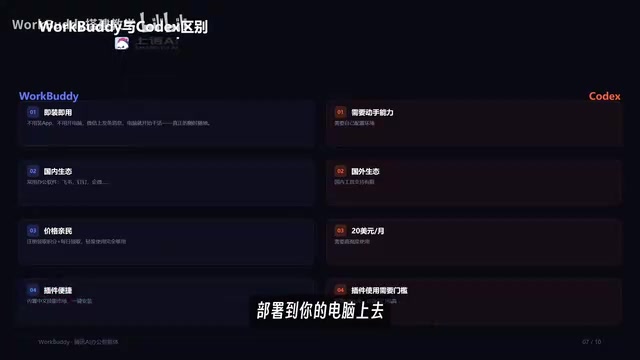
As an open-source project on GitHub, Codex offers a high degree of flexibility — but open source also means a certain coding barrier. For everyday office users who want something ready to go, WorkBuddy's out-of-the-box packaging is genuinely more accessible.
A Few Grounded Observations
It's worth noting that this material comes from the introductory episode of a tutorial series, primarily aimed at building awareness and introducing the tool — with hands-on details saved for later lessons. The video's overall take on WorkBuddy skews positive and carries some promotional overtones, so readers should approach it with a degree of healthy skepticism.
A few things worth keeping in mind: First, AI Agents that operate directly on your local machine — reading and writing files and requesting software permissions — raise privacy and security questions you should think through before using them. Second, claims like "ready to use out of the box" and "free credits are enough" may vary depending on your actual usage intensity. Third, framing Codex and WorkBuddy as direct opposites isn't entirely fair — they target different users to begin with. Codex is for developers; WorkBuddy is for office workers.
On the topic of privacy and security, it's worth saying a bit more. When running locally, AI Agents typically need permission to take screenshots, read and write the file system, and sometimes even access Accessibility features in order to simulate user actions. This means that during task execution, the Agent can theoretically "see" everything on your screen — passwords, private messages, unpublished files, and more. Cloud-based Agents may also upload screenshots or operation logs to servers for model inference. Before using tools like these, it's advisable to review their data handling policies: Are operation records uploaded? Are they used to train models? Is local data encrypted? For workflows involving trade secrets or personal privacy, opting for a solution that supports fully local inference and does not send data back to the cloud is the safer choice.
Closing Thoughts
Setting aside the promotional angle, this content does highlight a real and ongoing trend: AI is evolving from a conversational tool into an execution tool. When AI can genuinely take over your computer and handle repetitive office tasks on your behalf, the human role shifts from "operator" to "manager." For anyone bogged down by spreadsheets, file conversions, and weekly reports, AI Agents are worth paying attention to and trying out. Which product to choose depends on your technical background and specific use case — lower-barrier options are great for getting started, while open-source, flexible tools are better for those who like to tinker.
Related articles

FastAPI: A High-Performance Python Framework and a Production-Ready API Development Powerhouse
FastAPI is a high-performance web framework based on Python type hints, supporting async and automatic OpenAPI docs. With over 100k GitHub stars, this article analyzes its core strengths, production readiness, and selection advice.

Tesla Optimus Begins Mass Production: Can the Goal of 20,000 Units Per Week Be Achieved?
Tesla Optimus officially begins mass production as Musk sets a target of 20,000 units per week. This article analyzes the supply chain challenges behind mass production, the real gap in capacity ramp-up, and the competitive landscape for humanoid robots.

PCL: A Minecraft Launcher with 8.5k Stars — Why Was It Written in VB.NET?
An in-depth analysis of PCL, the GitHub Minecraft launcher with 8,500+ stars: why it chose VB.NET, its features and China network advantages, and the limits of Windows-only.