WorkBuddy Full Walkthrough: From Chat to AI Agent-Powered Smart Office Work

Conversational AI only gives plans, while AI Agents like WorkBuddy operate local files and deliver results.
By comparing Doubao and WorkBuddy on the same task, the article reveals the core difference between conversational LLMs and AI Agents: the former only offers a plan, while the latter executes in a real environment. In a test of batch Word-to-PDF conversion and archiving, WorkBuddy automatically scanned the directory, probed the environment, converted formats, and archived results—4 files took about 7 minutes and 6.55 credits, with 2,000 credits gifted to new users. WorkBuddy suits rule-clear, repetitive office automation without coding, while complex multi-system or browser/database workflows require more advanced Agent products. In fast-iterating AI tools, understanding Agent logic matters more than memorizing steps.
The Ceiling of Ordinary LLMs: They Can Answer, But They Can't Act
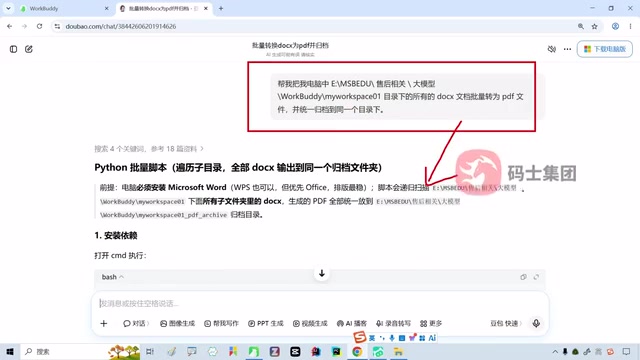
Anyone who has used Doubao, ChatGPT, or DeepSeekAd has probably had the same experience: no matter how clearly you describe your needs, the best it can do is hand you a plan. Bilibili creator Ms. Shanyao illustrated this with a very typical scenario—asking Doubao to batch-convert all Word documents in a directory into PDFs and archive them into a single folder. Doubao picked up the request and smoothly produced a Python script, dependency installation steps, complete code, and even thoughtfully included instructions for creating new files. Every step was correct, and the logic held up.
But when you open that directory, the files are still the original files—not a single PDF has been generated. Doubao's role is more like a consultant: it knows what to do and can explain it clearly, but the person actually doing the work is still you. This "brain without hands" form is the common boundary of all conversational LLMs—they cannot access your local disk, cannot invoke Word or conversion tools on your computer, and certainly cannot perform the archiving for you.
AI Agents Enter: WorkBuddy's Direct Execution Capability
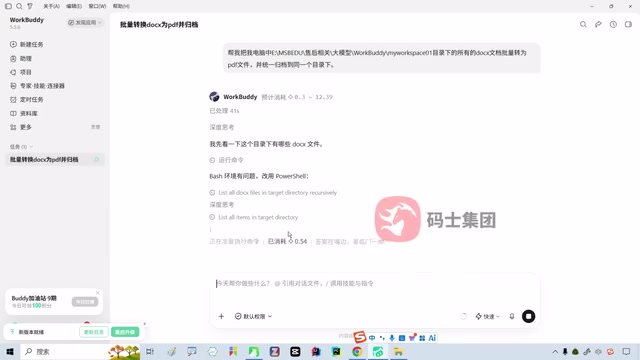
The leap from conversational AI to AI Agent comes down to one core change: execution. According to Ms. Shanyao's demonstration in the tutorial, moving the exact same prompt from Doubao to WorkBuddyAd delivers a completely different experience. As soon as the request is sent, WorkBuddy doesn't generate a lengthy plan—it immediately starts reading the target directory, scanning files, and checking the environment.
The entire process requires no terminal, no Python installation, no script running. It discovers files on its own, invokes tools on its own, handles conversion on its own, and even catches environment issues and retries automatically. This closed loop of "understand the task → enter the real working environment → invoke tools → check results → deliver output" is the fundamental difference between an AI Agent and a conversational LLM. In Ms. Shanyao's words, this is the shift from "answering questions" to "executing tasks," from "giving suggestions" to "delivering results."
One detail worth noting: WorkBuddy's operations are based on user authorization. On first use, the software requests permission to access specific directories; once default permissions are granted, it can operate on local files within the authorized scope.
An AI Agent is a type of application that has emerged in recent years on top of large language models. Unlike conversational LLMs that only "generate text," an Agent typically consists of four parts: an LLM responsible for planning and decision-making as the "brain," a set of callable external tools (such as file I/O, command line, browser, and database interfaces), a memory that records task progress and context, and a "perceive–act–observe" loop control mechanism. It breaks down the goal described by the user into executable steps, progressively invokes tools, observes returned results, and adjusts the plan when necessary until the task is complete or deemed infeasible. The industry often refers to this capability as "tool calling" or "function calling," and vendors such as OpenAI and Anthropic all provide standardized calling interfaces for LLMs. It is precisely this ability to operate on external environments that allows Agents to break through the "all talk, no action" ceiling of conversational models.
Hands-On Breakdown: Batch Word-to-PDF Conversion and Archiving
Task Setup
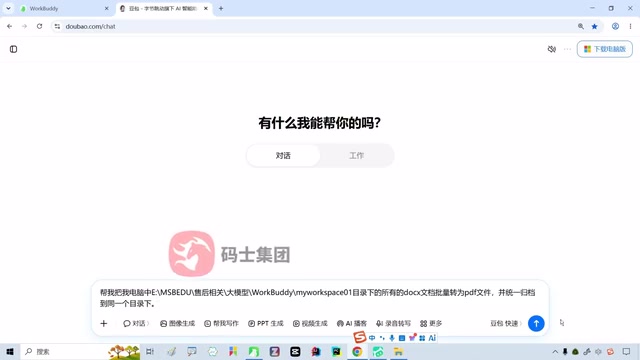
The barrier to entry for the entire operation is extremely low. After opening WorkBuddy, there is an obvious input box on the interface—similar in layout to AI coding tools like Cursor and Windsurf—asking "What can I help you with today?" Paste in the same request that Doubao received earlier:
Please batch-convert all DOC/DOCX documents in [specified directory] on my computer to PDF files, and archive them all into the same directory.
After confirming and sending, the first run will pop up an authorization window. Click to allow access, and leave the rest to WorkBuddy.
Execution and Results
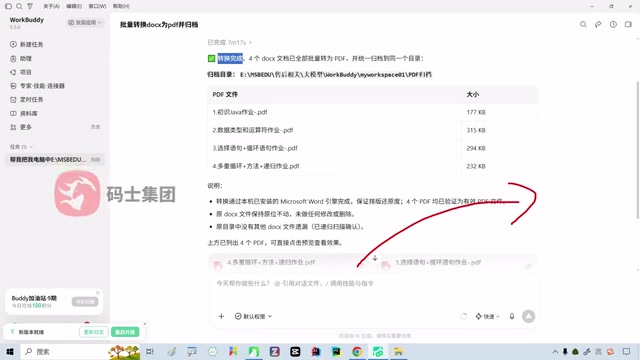
WorkBuddy's workflow roughly divides into three stages. First is environment probing: scanning the file list in the target directory, confirming file count and format, and detecting whether a usable conversion tool exists locally. Then comes task execution: processing documents one by one, which may involve calling local Word components or third-party conversion libraries. Finally, result validation and archiving: placing the generated PDFs into the specified folder and displaying the conversion results in a preview.
The actual test data Ms. Shanyao showed in the video: all 4 DOCX files were successfully converted and archived, with the process taking about 7 minutes. During execution, WorkBuddy collapses its thinking and execution steps for display, and reports the results all at once at the end.
Credit Consumption
WorkBuddy uses a credit system. New users receive 2,000 credits upon login, and this batch conversion task consumed about 6.55 credits. At this rate, the free credits are enough to support a substantial number of daily office tasks. For high-frequency, rule-clear scenarios like document processing, batch renaming, and file archiving, the cost is almost negligible.
Batch Word-to-PDF conversion fundamentally relies on two types of underlying capabilities. The first is document parsing and rendering: elements such as paragraphs, styles, images, headers, and footers in DOC/DOCX files need to be reproduced as fixed-layout PDFs. Common implementation paths include calling the COM automation interface of local Microsoft Word or WPS, using LibreOffice's headless mode for batch conversion, or rendering manually with libraries like python-docx and reportlab—though fidelity under complex layouts often falls short of the first two. The second is file system traversal: filtering target files in a directory by extension, handling edge cases such as duplicate names, temporary files, and paths containing Chinese characters or spaces, and then writing the output uniformly into the archive directory. The value of an Agent like WorkBuddy is precisely that it automatically completes tool detection, format judgment, and batch scheduling without the user writing a single line of code.
AI Agent products generally adopt a "pay-per-use" model, with costs mainly coming from two sources: first, the tokens consumed by LLM inference itself, and second, the additional overhead introduced by each tool call, environment probe, and result validation. The more complex the task, the more steps involved, and the more retries needed, the higher the credit consumption. Compared with per-seat subscriptions or fixed monthly fees, the advantage of a credit system is that users pay for actual consumption, and light users don't pay for idle quota; the trade-off is that costs aren't intuitive, and users need a few tasks to develop a feel for them. The 6.55 credits to convert 4 files in this article can serve as a rough benchmark for estimating the cost magnitude of similar batch office tasks.
WorkBuddy and the Applicability Boundaries of AI Agents
What Scenarios Suit WorkBuddy
From this hands-on exercise, we can distill a typical profile of WorkBuddy's applicability: tasks are rule-clear repetitive operations, involve reading and writing to the local file system and simple tool calls, and have low requirements for real-time responsiveness and complex decision-making. Batch format conversion, file archiving, directory organization, data cleaning—these things traditionally done in office work by manual clicking and dragging are exactly WorkBuddy's comfort zone.
Ms. Shanyao also noted in the video that WorkBuddy's usage rate is currently rising rapidly, with referral campaigns even circulating on social media where recommending new users earns credits. This indirectly shows that its barrier to entry is low enough for ordinary office users and that it genuinely solves a real efficiency pain point.
What Scenarios Require a More Advanced Agent
WorkBuddy is not a universal solution. If your workflow involves multi-system coordination, complex conditional logic, deep cross-application integration, or requires operating external environments like browsers and databases, WorkBuddy's capability boundaries will become apparent. There are more advanced AI Agent products on the market that can cover these complex scenarios; which one to choose depends on the actual complexity of your work.
Another thing to watch for is the pace of product iteration. While recording the video, Ms. Shanyao encountered WorkBuddy pushing a new version—this is almost the norm in today's AI tool landscape. The interface layout you learn today may be adjusted tomorrow. What matters is not memorizing specific button locations, but understanding the general working logic of an AI Agent: you describe the goal, it plans the path, you authorize execution, and it delivers results.
"More advanced Agents" usually refer to products with multi-tool orchestration, long-term memory, cross-application collaboration, and even multi-agent cooperation capabilities. They may simultaneously integrate browser automation, API calls, database queries, code execution sandboxes, and other capabilities, and can handle complex workflows with conditional branches, such as "scrape web data → clean → write to spreadsheet → generate charts → send emails." Such products have higher requirements for model planning capability, tool reliability, and error recovery mechanisms, and their deployment and usage costs rise accordingly. For ordinary office users, the judgment criterion is simple: if a task can be completed in a rule-based way within a single piece of software, a lightweight Agent is sufficient; once it requires chaining multiple systems or depends on real-time decisions, consider a more capable solution rather than forcing a simple tool to handle it.
Key Takeaways
- The essential difference between conversational AI and Agents: The former gives a plan; the latter enters the working environment to execute tasks and deliver results. The difference lies not in model strength, but in whether it has the ability to operate on local environments.
- WorkBuddy's actual test performance: Batch conversion and archiving of 4 Word files to PDF took about 7 minutes and consumed about 6.55 credits; new users receive 2,000 credits.
- Suitable scenarios: Office automation tasks that are rule-clear, highly repetitive, and involve the local file system—low barrier to entry, no programming background required.
- Capability boundaries: Workflows involving complex multi-system integration or deep external operations require more advanced AI Agent products.
- Product iteration pace: AI tool versions update frequently; mastering the general working logic of Agents is more important than memorizing specific operational steps.
One-line Summary
Conversational AI only gives plans, while AI Agents like WorkBuddy can directly operate on local files, complete tasks, and deliver results.
Paragraph Summary
By comparing how Doubao and WorkBuddy handle the same task, the article reveals the essential difference between conversational LLMs and AI Agents: the former can only give a plan, while the latter can enter a real environment to execute tasks. Using "batch convert Word to PDF and archive" as an example, the author tested WorkBuddy automatically completing directory scanning, environment probing, format conversion, and result archiving—4 files took about 7 minutes and consumed about 6.55 credits, with new users receiving 2,000 credits. The article further points out that WorkBuddy is suited for rule-clear, repetitive office automation tasks without requiring a programming background, while complex scenarios involving multi-system coordination, browser or database operations require more advanced Agent products. Given the rapid iteration of AI tools, mastering the general working logic of Agents is more important than memorizing specific steps.
Related articles

Chain of Thought Isn't Just for AI: How Humans Can Use CoT to Improve Thinking Quality
Chain of Thought isn't just a prompt trick for large models. Starting from a Hacker News discussion, this article analyzes why CoT works for human thinking too, breaks down actionable ways to transfer it, and highlights the key differences between human CoT and machine CoT.
Cloudflare Teams Up with OpenAI: Closi…
Cloudflare Teams Up with OpenAI: Closing the Loop from Vulnerability Discovery to Defense with AI
Cloudflare uses OpenAI Daybreak to investigate security vulnerabilities and generate reviewable remediation plans, while developers use Codex to boost coding efficiency and quality.

Orca Multi-Agent Orchestration in Practice: A Guide to Parallel Collaboration with Claude and Codex
Orca is Stable AI's free open-source agent workbench supporting 34 agents like Claude Code and Codex in parallel. Learn its Git worktree isolation, multi-model orchestration, and mobile management.