WorkBuddy Getting Started Guide: How to Use a Chinese AI Agent That Actually Gets Things Done

WorkBuddy is a Chinese AI Agent that delivers usable outputs by autonomously planning and executing tasks, not just giving advice.
WorkBuddy is a Chinese-made AI Agent often described as a domestic alternative to OpenAI Codex. It addresses the core limitation of conversational AI — giving advice without taking action — by autonomously breaking down tasks and delivering usable outputs. It offers Chat, Plan, and Agent modes, and its ecosystem includes Experts, Skills, Connectors, and Automation modules that integrate with tools like WeCom, Feishu, and Tencent Docs. Compared to tools like Doubao, it excels in deliverable quality, persistent context memory, and reusable Skill packaging.
What Is WorkBuddy: From Chat Tool to a Real Working Assistant
Many people have tried AI tools like Doubao or DeepSeekAd, but after a while, a common frustration emerges — they feel more like advisors who give suggestions than employees who actually do the work. WorkBuddyAd (also called OkBuddy in the video) aims to solve exactly this problem. As the creator puts it, think of it as a domestic alternative to Codex: the interface and interaction logic are similar, but it's more accessible for Chinese users — no complex setup, low hardware requirements, a free tier, and native compatibility with popular Chinese office software.
Its core positioning is an AI Agent: you describe what you need, it independently breaks down the task, plans the steps, executes them, and delivers a verifiable output file — not just a paragraph of text advice. The presenter demonstrated this by having WorkBuddy produce an entire slide deck from scratch. All they had to do was state the requirements and provide feedback; WorkBuddy handled the layout to a practically usable standard and allowed one-click export to PDF for sharing.
AI Agents represent the central evolutionary direction of AI over the past two years, and their fundamental difference from traditional conversational AI lies in autonomous action capability. Traditional large language models only generate text responses — users must translate advice into action themselves. The Agent architecture introduces a "plan → tool call → feedback loop" mechanism: the model breaks a goal into a sequence of subtasks, progressively calls external tools (file read/write, web search, code execution, etc.), and adjusts subsequent actions based on each step's result until the final goal is achieved. OpenAI's Codex is the flagship example of this category, primarily targeting programming scenarios — autonomously writing code, running tests, and fixing errors in a sandboxed environment. WorkBuddy targets this same "perceive → plan → execute → verify" closed-loop logic, extending its use cases from coding to general workplace scenarios like office documents, data processing, and presentation creation.
The Four Ceilings of Traditional AI
The video summarizes the limitations of traditional AI tools into four points. Understanding these is key to appreciating the value of Agent-based tools.
Advice only, no action. Tools like Doubao and DeepSeek largely provide answers and emotional support — the actual work still falls on you.
Single-turn conversations can't handle multi-step workflows. A complete task often involves many stages, and traditional tools may have forgotten your requirements from two steps ago by the time you reach step ten.
No access to local software. Wanting AI to interact with WeChat, QQ, or office apps is simply beyond most traditional tools.
Text output, not deliverable output. What you want is a finished PPT or an organized spreadsheet — not a paragraph explaining "here's how you could do it."
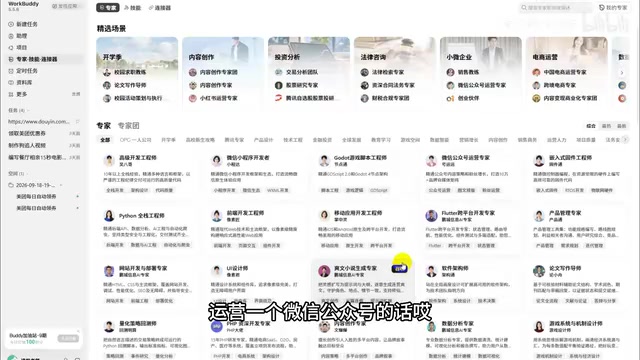
In response to these limitations, WorkBuddy's core value proposition can be summarized in three points: understands you (accepts tasks in natural language), thinks clearly (autonomously plans and breaks down steps), and gets to work (calls tools, reads and writes authorized files, and produces usable deliverables).
The Workspace and Three Modes: How Beginners Should Start
WorkBuddy's interface is divided into three sections: a left sidebar (tasks, spaces, experts, skills, connectors, scheduled tasks), a central conversation area, and a right-side results panel. Once you submit a task, the completed output appears in the results panel on the right.
It offers three working modes — this is the most important thing for beginners to understand first:
- Chat (talk only, no action): Explore and converse without executing any operations.
- Plan (think before acting): Have it map out the steps.
- Agent (take action): Let it execute and deliver autonomously.
The recommended beginner path is: Chat to explore → Plan to strategize → Agent to deliver.
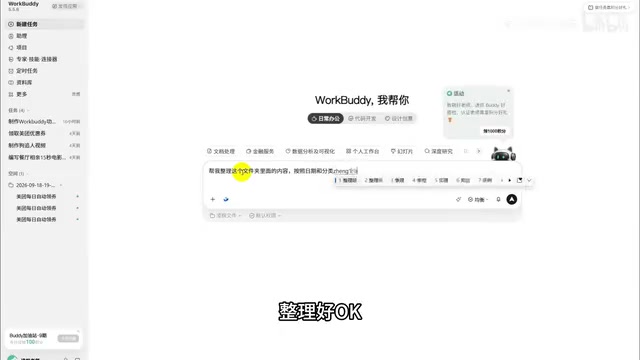
The presenter demonstrated a very relatable scenario — organizing a messy desktop folder. After creating a new task and selecting a workspace, they opened the local folder and typed: "Help me organize this folder, sorted by date and category." They selected the balanced mode and sent the request. The system first performed a read-only scan and presented a proposed plan; only after confirmation did it take action. The result: 57 files organized into categories like Course Materials, Career Development, Freelance Projects, Design Case Studies, and Creative Assets — all without any manual intervention, consuming just over 4 credits.
One safety note worth remembering: by default, every operation requires a second confirmation. The presenter advises against enabling "Full Allow" mode, which could allow the AI to modify files without explicit consent.
Six Application Scenarios: What Can It Actually Do?
WorkBuddy's four core capabilities are: natural language understanding, autonomous planning and execution, authorized file access, and persistent context memory. In practice, the presenter identified six key use cases.
Documents and Reports: Connect to WeCom or Feishu to automatically extract data from chat logs and work records to generate weekly reports; feed in code requirements to generate technical documentation; transcribe meeting recordings into minutes with extracted action items; convert web content into structured reports.
Data Analysis and Visualization: Monthly reading summaries, data reports — just provide the raw data and it generates bar charts, line charts, and pie charts, including month-over-month comparisons and deduplication.
PPT and Presentation Materials: The key is being specific about topic, purpose, audience, source materials, and style. It will output a complete slide deck along with a shareable online version.
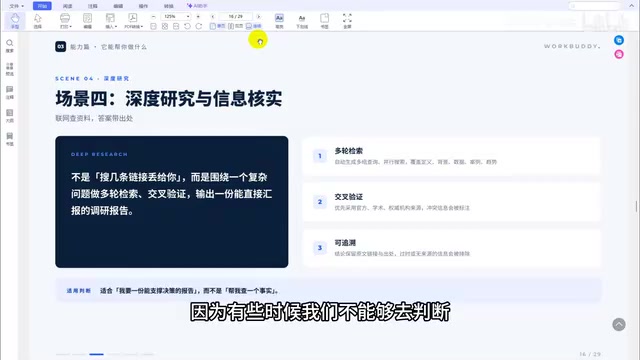
Deep Research and Fact-Checking: Multi-round search, cross-verification, and traceable sourcing — you can even specify that it prioritize official or academic sources to filter out online noise.
Batch File Processing: Sort and organize files by size, date, or even visual style.
Code and Projects: Coding assistance, project comprehension, script automation, and web app development.
Four Ecosystem Levers: Experts, Skills, Connectors, and Automation
The video frames WorkBuddy's ecosystem capabilities as "four levers" — the core idea being to amplify capability rather than repeat effort.
Experts: Package domain knowledge and output standards into a callable role. Want to grow a TikTok or Xiaohongshu account? Summon an operations expert. Roles span writing, coding, finance, design, law, data analysis, and more.
Skills: Encapsulate fixed operational steps into reusable workflows — such as Excel processing, PPT generation, short-drama storyboarding, or prompt writing. You can use built-in skills or install custom local ones.
Connectors: Link to external software systems like Tencent Docs, WeCom, Feishu, and email. Once authorized, a single conversation can run a complete "read → organize → write" pipeline — though users must scan a QR code to grant access.
Automation: Schedule recurring daily or weekly tasks. The presenter showed an example of automatically claiming Meituan coupons — once configured, the system claims available coupons on a timer every day, no manual action needed.
The Connectors feature is built on MCP (Model Context Protocol) or a similar tool-integration protocol concept — standardized interfaces that allow AI models to "handshake" with external systems and gain authorized read/write data channels. This is conceptually similar to browser extensions or Zapier automation flows, but with a key distinction: traditional automation tools rely on fixed rules triggering fixed actions, while Agent-style connectors allow the model to dynamically decide which system to call, at which step, and what data to retrieve based on task context. The Skills concept is closer to "packaged prompt engineering" — mature instruction templates, operational steps, and output formats solidified into reusable units. This lowers the barrier for general users while also forming a foundation for community sharing and distribution, analogous in spirit to custom GPTs in the GPT Store or Bot templates on the Coze platform.
Comparing with Traditional Tools: Where's the Gap?
The presenter tested both Doubao and WorkBuddy with the same request — "help me grow a social media account" — to directly illustrate the difference.
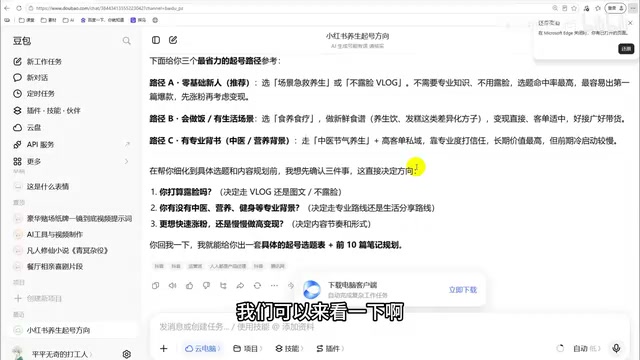
Doubao provided simple categorization and a few generic tips, responding one question at a time with no actionable plan. WorkBuddy delivered a comprehensive strategy: eight niche tracks, personal brand building, content topic selection, headline copywriting, platform guidelines, and a phased execution timeline covering days one through three and days four through ten — moving seamlessly from advice to strategy to implementation.
The key differences between the two can be summarized as: deliverables (directly usable vs. just suggestions), depth of reasoning, context memory (full in-task memory vs. prone to loss across multiple turns), tool ecosystem (supports expert roles and skills vs. closed chat box), and reusability (can be packaged as a shareable Skill vs. difficult to reuse).
Limits and Safety: What It Shouldn't Do
WorkBuddy is well-suited for taking over multi-step, verifiable tasks with clearly defined output formats. However, it's not appropriate for strategic judgment calls or value-laden decisions that require accountability — it will offer A/B options, but it won't make the final call for you. Any content involving money, external publication, or payment still requires human review.
On safety, the presenter emphasized three points: tasks are processed locally by default to reduce data exposure risk; data is not used to train the model; and access is user-controlled — it only accesses files in the workspace you explicitly select.
Common Beginner Mistakes
Finally, here are the pitfalls new users tend to fall into:
- Don't pile on a bunch of unrelated skills at once — they interfere with each other, like asking a group of people with conflicting opinions to work on the same project. The result is chaos.
- Don't write vague prompts like "make me a PPT" — specify the audience, format, and style. Use the four-element method: goal, input, output, constraints.
- Don't let it act directly on files — stick to "scan first, then execute."
- Always manually review externally published content — AI can make small textual or factual errors.
For everyday office users, WorkBuddy's value lies in handing off repetitive, time-consuming fixed workflows to AI — and then packaging what works into a Skill for reuse or sharing. The only way to get real value is to actually try it hands-on; otherwise it'll just sit untouched in your bookmarks.
The four-element prompting method (goal, input, output, constraints) is essentially a simplified version of structured instruction in prompt engineering. Research shows that large language models are highly sensitive to the granularity of task descriptions: vague requests cause the model to "guess" user intent in semantic space, increasing output variance; explicit constraints (such as target audience, word count limits, or prohibited expressions) significantly narrow the candidate output space, making results more stable and predictable. For Agent-based tools, the quality of the initial prompt also directly affects planning precision during the task decomposition stage — once the planned steps go off track, execution errors compound at each subsequent step, and the final deliverable can diverge from expectations far more than in a single-turn conversation. "Stating your requirements clearly" isn't just good practice — it's the critical variable that determines the quality of the entire task pipeline.
Related articles

ChatGPT Space Launches: Team Collaboration and New Pages Features Explained
ChatGPT Space is OpenAI's new team collaboration feature with Pages, real-time collaboration, and Slack/Google Drive sync. We break down its privacy design, multi-platform integration, and the full workflow from conversation to document.

Migrating Apache Spark UDFs to GPU Acceleration with AI Agents
NVIDIA developer blog explains how AI Agents rewrite Apache Spark UDFs for GPU acceleration, covering migration criteria, agent rewriting and verification workflows, plus pitfalls like result consistency and CPU-GPU transfer overhead.

Zed Editor v0.40.4-rc2 Released: Usage Credits Now Available Without Upgrading
Zed editor releases v0.40.4-rc2, allowing users to use usage credits for AI features without upgrading to a paid plan, lowering the trial barrier.