WorkBuddy Getting Started Guide: The Desktop AI Agent That Actually Does Your Work
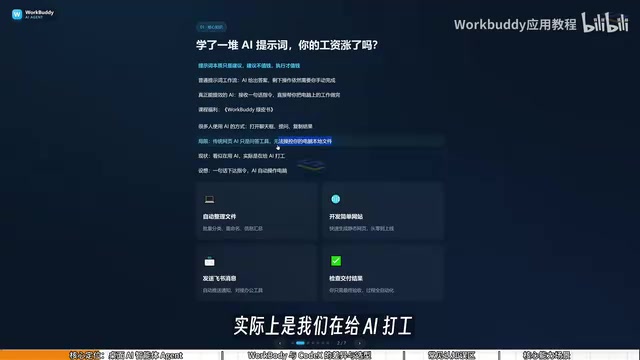
WorkBuddy is a desktop AI agent for everyday office workers — it executes tasks on your computer so you can manage instead of prompt.
WorkBuddy is a desktop AI agent whose key distinction from ordinary web-based AI is the ability to operate your local computer — reading and writing files, calling tools, and integrating with Chinese workplace platforms like Feishu and DingTalk to actually execute tasks rather than just offer advice. Compared to the higher-barrier CodeX, WorkBuddy requires no command-line knowledge, offers daily free credits, and is designed for non-technical office workers. The article also clears up three common misconceptions and argues that the real learning challenge isn't the interface — it's shifting your mindset from "how do I ask AI" to "how do I delegate to AI."
You've been using AI for a while now — learned a bunch of prompts — but has your paycheck gone up? That's a pointed question, and it cuts right to the core of how most people are stuck with AI today: prompts are essentially suggestions, and suggestions don't pay the bills. What actually creates value is execution. WorkBuddy is a tool that turns "suggestions" into "execution." Based on a systematic tutorial from a Bilibili creator, this article breaks down what this desktop AI agent is, where its boundaries lie, and how it differs from CodeX — helping you evolve from an "AI questioner" into an "AI manager."
What WorkBuddy Is: Not a Chatbot, But a Digital Employee
Most people use AI in the same rigid way: open a chat window, ask a question, copy the result. But that's not really "using" AI in any meaningful sense. Traditional web-based AI is just a Q&A tool — no matter how many features it has (music generation, video, images) — it has no permission to touch the files on your local computer. We think we're using AI, but really we're the ones doing the work for it, because all the actual execution still requires us to move the mouse and type on the keyboard.
WorkBuddy occupies a completely different category. It's a desktop AI Agent whose core value is the ability to directly operate your local computer and complete real office tasks. You simply give it instructions in natural language — just like talking to a real person — and it will automatically plan, research, execute, and deliver results. Your only job is to review the final output.
Think of it this way: WorkBuddy is your AI employee, and your computer is your company. Your role shifts from "asking AI questions" to "managing AI to do the work." That mental shift is the real key to learning tools like this.
The fundamental difference between a Desktop AI Agent and a web-based AI assistant comes down to "tool-call permissions." Ordinary chat AI runs inside a cloud sandbox — isolated for security reasons — so it can't access your local disk, call system APIs, or click buttons on your desktop. An Agent is different. By installing a local client, it gains OS-level authorization: it can read and write files, launch local applications, simulate mouse and keyboard input, and even run scheduled tasks silently in the background. This architectural difference is what allows an Agent to "do the work for you" rather than just "tell you how to do it." Understanding this helps you judge which tasks are suitable for WorkBuddy and which still require manual effort.
WorkBuddy vs. CodeX: Special Forces vs. Fresh-Graduate Special Forces
Many people hear about the more powerful CodeX before they ever encounter WorkBuddy, which raises a natural question: if a stronger tool already exists, why bother learning WorkBuddy?
The Bilibili creator offers a vivid analogy: if CodeX is a special forces soldier, then WorkBuddy is a "fresh-graduate special forces soldier." CodeX is capable, but it needs a commanding officer who can draft a detailed battle plan — you have to specify the exact file, directory, and execution parameters, which requires a fair amount of expertise. WorkBuddy is more like a diligent new hire: maybe it can't handle extremely complex missions, but simple tasks like "send this file to someone" or "organize these records" are well within its wheelhouse.
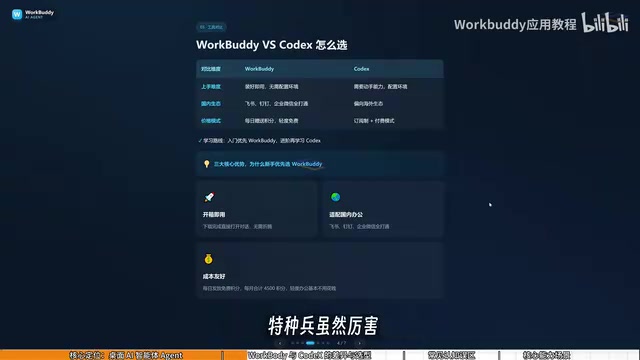
For most office workers, commanding CodeX may not yet be feasible, but directing a "new hire" is entirely manageable. The differences between the two break down across three dimensions:
- Learning curve: WorkBuddy is ready to use right after installation — no environment setup, no command-line knowledge required. CodeX demands stronger technical ability and some programming background.
- Ecosystem fit: WorkBuddy is deeply integrated with Chinese workplace tools like Feishu, DingTalk, WeCom, and Tencent Docs. CodeX is more oriented toward international ecosystems and has limited support for domestic office software.
- Cost: WorkBuddy gives you free credits every day, and during promotional events you can collect thousands more. Claiming credits daily adds up to at least 3,000 credits over a month. CodeX uses a subscription model, so you're paying real money even during the learning phase.
After logging into WorkBuddy, make it a habit to click your avatar in the bottom-left corner each day and find the "Buddy Charging Station" to check in and collect daily credits. Credits accumulate — if you don't use them today, they'll still be there tomorrow.
OpenAI CodeX (now integrated into ChatGPT and the Codex CLI) is a code generation and execution tool aimed at developers. It excels at generating, debugging, and running code from natural language descriptions — but it demands very precise task descriptions: you need to know the project directory structure, runtime dependencies, and specific file paths, otherwise generated scripts will often fail due to path errors or missing dependencies. This is a high barrier for users without programming experience. WorkBuddy, by contrast, abstracts away all the underlying complexity for non-technical users. An instruction like "find the sales report folder on the D drive and rename all the xlsx files by month" gets executed without the user ever needing to think about the file-operation logic underneath. Both are fundamentally AI Agents; the difference lies in the degree of abstraction and the target user.
Three Common Misconceptions
When first learning WorkBuddy or CodeX, beginners frequently fall into a few misconceptions. Clearing them up early saves a lot of time.
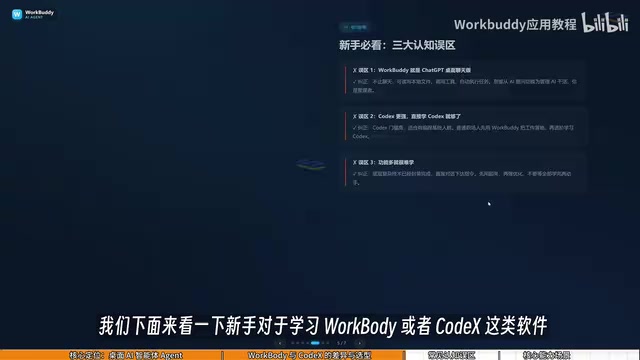
Misconception #1: WorkBuddy is just a dressed-up desktop chat panel. This undersells it significantly. WorkBuddy isn't limited to conversation. Beyond offering guidance and suggestions like GPT, it can read local files, call tools, and automatically execute tasks. The mindset has to shift from "asking AI questions" to "managing AI to do the work."
Misconception #2: CodeX is more powerful, so I should jump straight to CodeX. CodeX has a steeper learning curve and is better suited to people with a programming background. For most office workers, the right move is to use WorkBuddy to get things done first. For the vast majority of work tasks, WorkBuddy alone is more than sufficient — and you can always level up to CodeX once you genuinely hit its limits. That learning path minimizes unnecessary cost.
Misconception #3: It has so many features, it must be hard to learn. In practice, WorkBuddy's interface is very similar to familiar large language model tools like Doubao or GPT. The real learning focus isn't the interface — it's the shift in how you frame your requests, moving from asking questions to issuing commands that make it operate your computer. You can absolutely learn it by following along with a tutorial and trying things hands-on at the same time.
What WorkBuddy Can Do: From File Management to Collaborative Office Work
WorkBuddy's capabilities cover a wide range of everyday office scenarios — and none of this is theoretical. Give it clear instructions, and it executes.
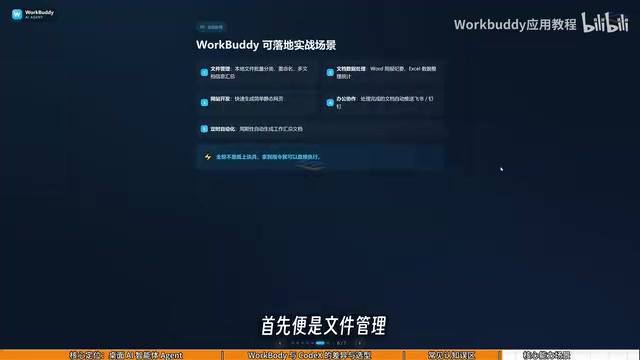
File management is the most typical use case. Batch sorting, bulk renaming, and consolidating information from multiple documents are all handled with ease. The creator cites a real pain point: when recording tutorial videos, files are named 01, 02, 03, 04 — but if one lesson is too short and gets merged into the previous one, the sequence becomes 1, 3, 4. Renaming folders one by one manually is a pain. Just tell WorkBuddy to re-sequence the names and the problem disappears.
Beyond that, it can handle document data (weekly reports, Excel spreadsheets), website development, Feishu and DingTalk collaboration, and periodically generating work summaries. Give it a clear instruction for any of these, and WorkBuddy can execute and deliver directly.
WorkBuddy's support for Feishu, DingTalk, and WeCom depends on the open API interfaces or automation workflow protocols exposed by those platforms. Take Feishu as an example: its open platform provides APIs for document read/write, message sending, and multi-dimensional table operations. WorkBuddy calls these interfaces to complete tasks like "sync local Excel data to a Feishu bitable" or "push a weekly report to a specified group on a schedule" — all without requiring the user to manually log in. This also means that to use these features, you'll need to complete the relevant authorization binding inside WorkBuddy, granting it permission to act on your behalf within those services. By comparison, international tools tend to have stronger support for Notion and Google Workspace but often fall short on domestic Chinese collaboration platforms — which is exactly where WorkBuddy's differentiated advantage in the Chinese workplace lies.
Evolving from Questioner to Manager
Understanding WorkBuddy is ultimately about understanding the difference between ordinary AI chat and a desktop AI Agent. The former outputs text-based advice; the latter delivers executed results. For office workers perpetually buried in Excel sheets, reports, and copywriting, a "digital worker" that can plug into your workflow and automatically break down tasks is worth far more than yet another chat window.
The real barrier isn't the software itself — it's the mental model. When you stop obsessing over "how should I phrase this prompt" and start thinking "how do I delegate this task," you've made the crucial leap from AI questioner to AI manager. For anyone looking to reduce their learning overhead and quickly get office automation off the ground, WorkBuddy is a starting point well worth trying first.
Related articles

LynnReal-Omni: 32B Unified Video Diffusion Model Goes Open Source with Multi-Task Coverage in Four Steps
LynnReal-Omni is a 32B unified video diffusion model on MiniMax H3, covering text-to-video, pose guidance, style transfer, restoration in 4 steps. Flash version generates 540p video in 377ms on one H100.

Anthropic Co-Founder: AI 'Kill Switch' May Need to Be Mandatory by Law
Anthropic's co-founder tells the BBC that AI 'kill switches' may need to be legally mandated. We analyze the industry logic, technical challenges, and the tension between regulation and innovation.

The AI Data Center Boom Is Colliding With Cities Scarred by Heavy Industry
The AI data center boom is clashing with post-industrial communities. Philadelphia's case reveals structural conflicts between AI growth, energy use, water, and environmental justice.