WorkBuddy Hands-On Guide: How This Domestic Codex Alternative Can Actually Do Your Work

A hands-on look at WorkBuddy, a domestic AI Agent that goes beyond chat to actually do your work.
WorkBuddy is a Chinese AI Agent tool positioned as a domestic alternative to OpenAI's Codex. This article walks through a real-world comparison with Doubao, demonstrating how WorkBuddy can directly operate your computer — converting files, connecting to domestic office tools like WeCom, and deploying plugins with one click. It covers WorkBuddy's four core advantages while offering a balanced perspective on capability limits, data privacy, and free tier constraints.
From Chatting to Working: A Paradigm Shift in AI Tools
If the biggest promise AI has offered over the past two years was "you ask, I answer," then with the rise of AI Agents, that promise is being pushed to the next stage — AI is no longer just an advisor, but a digital employee that can directly operate your computer and do real work for you.
The reason AI Agents have become the most important evolutionary direction in AI today is that they possess three key capabilities that traditional chat-based AI lacks: Perception, Planning, and Action. Traditional large language models are essentially "text in, text out" pipelines — they can't perceive the user's computing environment, nor can they perform any OS-level actions. AI Agents, through tool use, environment interaction, and task decomposition mechanisms, can break down a high-level instruction into multiple executable steps and complete them one by one. The technical exploration of this paradigm can be traced back to the open-source agent frenzy sparked by AutoGPT in 2023, followed by projects like BabyAGI and MetaGPT. The launch of multiple commercial Agent products in 2025 marks the point where this technical path has officially gone mainstream.
WorkBuddyAd is exactly this kind of AI Agent product. According to a hands-on tutorial by a Bilibili content creator, you can think of it as a domestic alternative to Codex: the interface layout and operational logic are essentially the same as Codex, but it's better suited for Chinese users — no VPN needed, no complex configuration required, and it can be used for free.
More importantly, WorkBuddy deeply integrates with mainstream domestic office software. Tasks that previously required switching between multiple applications — organizing materials, generating documents, analyzing spreadsheets, executing repetitive tasks — can now be handed off to WorkBuddy for unified processing. It doesn't just chat with you; it actually gets things done.
Real-World Comparison: Doubao vs WorkBuddy — Where's the Gap?
To clearly illustrate the fundamental difference between traditional AI assistants and AI Agents, the content creator designed a very practical test scenario: there's a work folder on the desktop, and the task is to convert all PPT files inside it to PDF and archive them.
Traditional AI Assistant Doubao: Can Only Teach You How
First, testing with Doubao. After entering the prompt "Convert all PPT files in the work folder on my desktop to PDF," the result was — failure. Doubao cannot remotely access your computer. It can only walk you through the steps; you still have to do the actual work yourself.
This is the ceiling of LLM-based chat assistants: they play the role of "advisor" — they can only offer suggestions but can't operate your computer to solve real problems. From a technical architecture perspective, the way LLMs work is to receive text input and generate text output, with the entire process happening on cloud servers. There is no interaction channel between them and the user's local operating system. They can neither read the file directories on your hard drive nor invoke locally installed applications — they can't even upload files or manipulate the local file system. This isn't a matter of insufficient capability; the architecture simply wasn't designed with that pathway.
WorkBuddy: Actually Gets It Done
Paste the same prompt into WorkBuddy and run it, and it immediately starts preparing to execute the task. By the time you've gone to grab a coffee and use the restroom, the work folder already has a new "Archive" folder, with the task perfectly completed.
The significance of this comparison is: WorkBuddy can directly operate your computer, like an employee you've hired, getting things done for you. And the archiving function is just the tip of the iceberg of its capabilities — even the PPT files used in the course demo were auto-generated after giving it a folder location.
What Is an AI Agent, and Why Start with WorkBuddy?
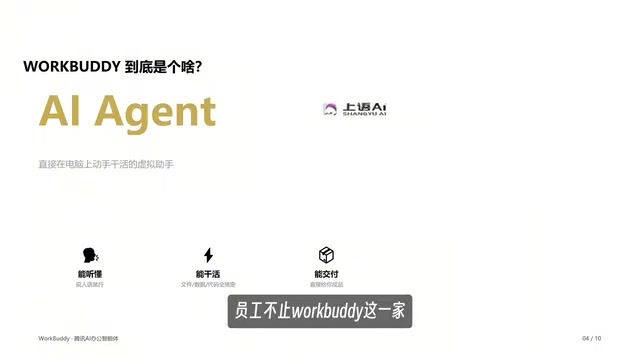
Software like this — capable of taking your instructions, operating your computer, and directly completing tasks — is collectively known as AI Agent (Artificial Intelligence Agent). In this new era, AI users have upgraded their role from "questioners" to "managers" — you're managing a digital employee.
WorkBuddy isn't the only product in this category. Codex is OpenAI's coding and task automation agent, built on their latest reasoning models. It was originally known for its code generation capabilities (earlier versions served as the underlying engine for GitHub Copilot), but the 2025 version of Codex has evolved into an AI Agent capable of executing complete tasks in cloud sandbox environments — creating isolated cloud computing environments for each task, where it performs code modifications, testing, and commits. Because it's deeply tied to the GitHub ecosystem, it presents multiple barriers for domestic users, including network access, account systems, and localization. So the question is: Why is it recommended to start with WorkBuddy rather than jumping straight into Codex?
WorkBuddy's Four Core Advantages
1. Install and Go, Zero-Barrier Deployment
Open a browser, search for WorkBuddy, click download, and you can deploy it to your computer with one click — extremely convenient. By contrast, Codex requires a VPN, some technical know-how, and manual environment configuration, making the onboarding threshold significantly higher.
2. Deep Integration with Domestic Office Ecosystems (The Killer Feature)
This is what the content creator considers the hardest thing for other agents to replicate. WorkBuddy has built-in "connectors" that let you directly authorize it to use your frequently used office software. From a technical perspective, this connector mechanism has close ties to traditional RPA (Robotic Process Automation), but the implementation is more advanced. Traditional RPA tools like UiPath simulate mouse clicks and keyboard inputs to manipulate software interfaces — once the UI layout changes, the automation scripts can break. The new generation of AI Agents instead connects directly to the target software's data layer through API authorization (OAuth protocol). When WorkBuddy connects to WeCom (Enterprise WeChat), it reads messages and sends replies through WeCom's open platform API rather than simulating clicks on the screen, resulting in significantly improved stability and efficiency.
For example, once connected to WeCom, it can reply to messages on your behalf, and even automatically summarize your work from the past week along with client conversations into a weekly report. Codex, being built on a foreign ecosystem, has very limited support for domestic tools.
3. Affordable Pricing, Free Tier Sufficient for Light Use
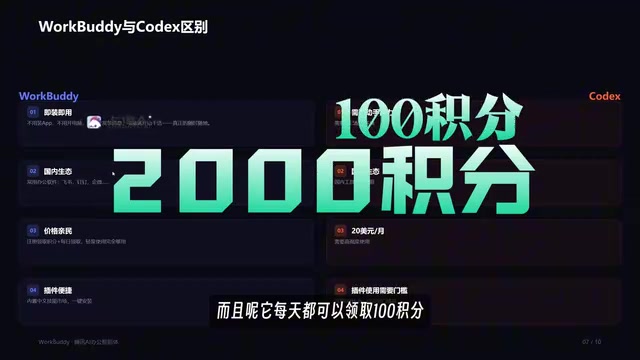
You get 2,000 credits upon registration, plus 100 free credits to claim daily. For light users, this is more than enough. Meanwhile, Codex has a minimum threshold of $20/month and only becomes worthwhile with heavy use.
4. One-Click Plugin and Skill Pack Installation
WorkBuddy supports one-click plugin deployment — for example, a Chinese language skill pack can be installed with a single click. Here are two key concepts to understand:
- Experts: These are essentially pre-configured role personas. If your company needs a "Xiaohongshu (RED) marketing expert," there's no need to hire one — just summon one with a single click in the interface. At its core, each "expert" is a set of carefully designed system prompts plus a pre-configured collection of tools, defining the Agent's behavior patterns, professional knowledge boundaries, and callable skill scope.
- Skills: These are essentially various tools, available in large quantities, all supporting one-click deployment. Each Skill corresponds to a specific capability module — it could be file format conversion, data scraping, text analysis, or a specific API integration.
As an open-source agent built on GitHub, Codex offers high flexibility, but that also means a higher programming threshold and usage cost.
Staying Rational Amid the Hype
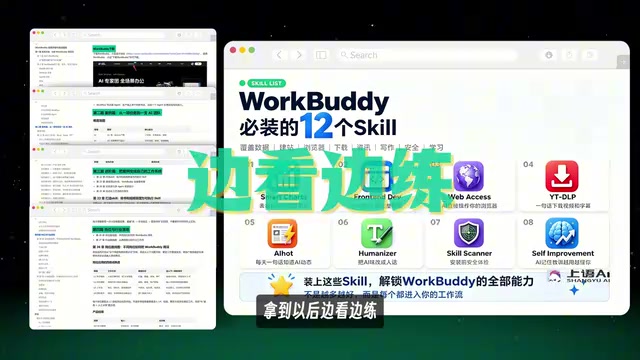
It's clear from the content that this is a paid hands-on course designed for beginners (divided into introductory, advanced, and industry sections, covering 28 knowledge points), accompanied by a "WorkBuddy Blue Book" and resources for 12 commonly used Skills. The value of such tutorials lies in lowering the barrier to getting started with AI Agents, but readers should also maintain some critical judgment:
- Capability Boundaries: An AI Agent's ability to manipulate local files and invoke software is indeed a qualitative leap, but the stability and accuracy of complex tasks still need to be validated through actual use. Current AI Agents still face the "error accumulation" problem when handling multi-step, multi-dependency workflows — if any intermediate step is misunderstood or incorrectly executed, all subsequent steps may deviate from expectations. This is why the industry generally recommends maintaining a Human-in-the-Loop oversight mechanism for critical tasks.
- Data Authorization: Connector authorization means letting the software access your work data (such as WeCom messages), which involves privacy and security concerns. Enterprise users especially need to carefully evaluate this. Under the requirements of China's Personal Information Protection Law and Data Security Law, any third-party software accessing enterprise communication records requires explicit user authorization, and data processing methods must comply with regulatory requirements. Before authorizing, users should clearly understand: Is the data processed locally or uploaded to the cloud? Can the authorization scope be precisely controlled to specific folders or applications? Are there risks of data retention and secondary use?
- Free Quota: 100 daily credits are suitable for light exploration; the real cost of heavy usage still needs to be tested in practice.
Regardless, the shift from "Q&A-style" to "management-style" AI is a clear trend. Rather than letting powerful tools gather dust in your bookmarks, it's better to run through a complete workflow hands-on and truly hand off repetitive work. This is perhaps the single most worthwhile thing to learn right now.
Related articles

Chain of Thought Isn't Just for AI: How Humans Can Use CoT to Improve Thinking Quality
Chain of Thought isn't just a prompt trick for large models. Starting from a Hacker News discussion, this article analyzes why CoT works for human thinking too, breaks down actionable ways to transfer it, and highlights the key differences between human CoT and machine CoT.
Cloudflare Teams Up with OpenAI: Closi…
Cloudflare Teams Up with OpenAI: Closing the Loop from Vulnerability Discovery to Defense with AI
Cloudflare uses OpenAI Daybreak to investigate security vulnerabilities and generate reviewable remediation plans, while developers use Codex to boost coding efficiency and quality.

Orca Multi-Agent Orchestration in Practice: A Guide to Parallel Collaboration with Claude and Codex
Orca is Stable AI's free open-source agent workbench supporting 34 agents like Claude Code and Codex in parallel. Learn its Git worktree isolation, multi-model orchestration, and mobile management.