WorkBuddy Hands-On Tutorial: From Download and Installation to AI Agent Automated File Processing

As a low-barrier domestic AI Agent, WorkBuddy uses points to actually finish the work that chat models can only "think" about.
The article compares the essential difference between chat LLMs and AI Agents: Doubao, DeepSeek, and others can only understand requirements and provide solutions, and cannot directly operate a local computer; while WorkBuddy, as a domestic AI Agent, can truly execute tasks such as batch Word-to-PDF conversion and archiving after obtaining file authorization. It gives 2,000 points at registration and 100 points per day, and one batch conversion costs about 1.55 points and takes three minutes. Compared with overseas tools such as Codex, WorkBuddy is slightly weaker on complex tasks and takes longer, but it requires no payment and no VPN, making it suitable as an entry choice for users with limited budgets who are willing to iterate through multiple rounds.
Why Ordinary Chat LLMs Can't Solve Your File Problems
Many people are already used to using chat LLMs like Doubao, DeepSeekAd, and Qwen to solve problems in daily life. When facing a task, their first instinct is to throw it at them. For example, you have a folder with a bunch of Word documents, and you want to convert them all to PDF and archive them into a new folder—this seems like an incredibly simple request.
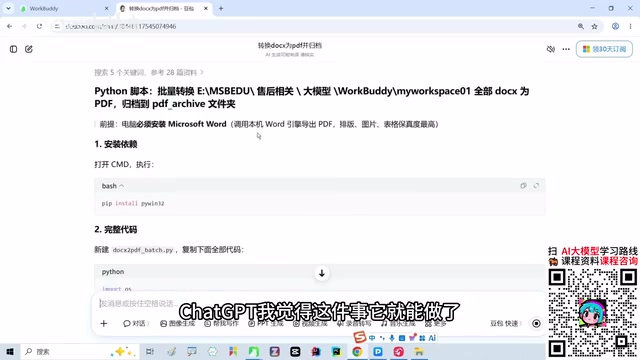
You copy the directory path and send it to Doubao, and it can indeed understand your intent, and it can give a solution that looks reasonable: install some dependency, write a Python script, execute it in the command line, note one two three, and even attach alternatives. But the problem is—it can only "think," not "do." If you ask it to operate your computer, read local files, or call software to execute commands, it simply can't do any of it. What it gives you is a manual, not the finished work.
This is the most fundamental dividing line between chat LLMs and AI Agents: from "answering questions" to "executing tasks," from "giving suggestions" to "delivering results." WorkBuddyAd is a tool that stands right on this dividing line.
Why can chat LLMs only "think" and not "do"?
Chat LLMs (such as Doubao and DeepSeek) are essentially "text generators": their capability boundary is limited to predicting output text based on input, and they cannot directly call operating system interfaces, read or write local files, or execute command lines. This is not product laziness, but determined by architecture—they are usually deployed in the cloud and run in isolated server environments. For security and privacy reasons, they cannot and should not directly access the user's local file system.
To make them "take action," an additional layer of "executor" is needed—what we commonly call an Agent framework. The Agent adds modules such as tool calling, task planning, and environment interaction on top of the model. The model is responsible for "thinking," and the Agent is responsible for "doing." So when you hand a file operation requirement to a pure chat model, all you get is an operation guide, not a completed folder. WorkBuddy's difference comes precisely from its built-in execution capability.
WorkBuddy Installation and Getting-Started Barrier
WorkBuddy is a domestic AI Agent tool. Downloading and installing it does not require a VPN, and you can use it directly after registering an account. For domestic users, this alone reduces a lot of friction.
The points mechanism is a core design of WorkBuddy. After registration, you get 2,000 points, and afterward you can actively claim 100 points per day. Note that it is "actively claim"—they will not arrive automatically. If you skip a few days, the points will not accumulate if you do not claim them. However, even with intermittent use, the points during the learning stage are basically enough.
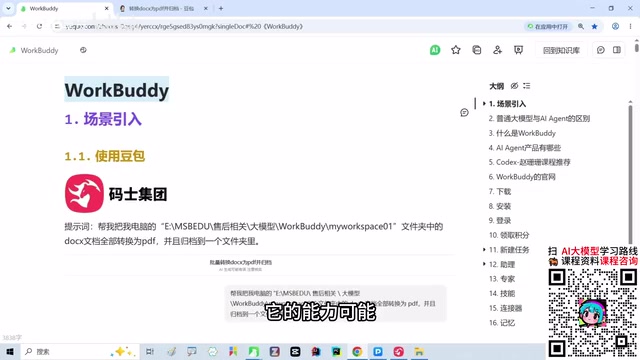
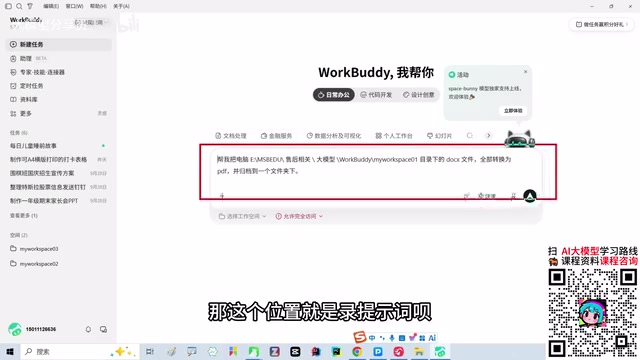
The usage flow is straightforward: open WorkBuddy, enter a natural language instruction in the dialog box, such as "help me convert all docx files in a certain directory on my computer to PDF and archive them into a folder." After sending, it starts working, and the whole process consumes points in real time. A task to batch convert a dozen or so files costs about 1.55 points and takes about three minutes.
What needs authorization is file access permission. After choosing "allow full access," WorkBuddy can read local folders, view all documents, and perform batch conversion and archiving operations. After completion, you can also preview the results in the interface. If you do not need to preview, just close it.
What is the "points system" and what does it mean?
WorkBuddy uses a pay-per-task consumption model rather than a monthly subscription. Each task execution consumes corresponding points based on the computing power of the invoked model, task complexity, and time consumed. The 2,000 points given at registration are equivalent to giving new users an "experience budget," while the daily 100 points are similar to a "daily check-in reward," encouraging users to develop a daily usage habit.
The advantage of this mechanism is a low usage barrier—you can run small tasks without spending money; the disadvantage is that you have to claim actively, they do not accumulate, and intermittent use will lose some quota. Looking at the article's example where batch Word-to-PDF conversion costs about 1.55 points, 100 points per day is theoretically enough to support dozens of small and medium tasks, and daily file processing basically does not require extra top-ups. Understanding this helps determine whether it suits your usage frequency.
Hands-On Test: The Whole Process of Batch Word-to-PDF Conversion
Hand the exact same requirement previously sent to Doubao to WorkBuddy, and the feeling is completely different.
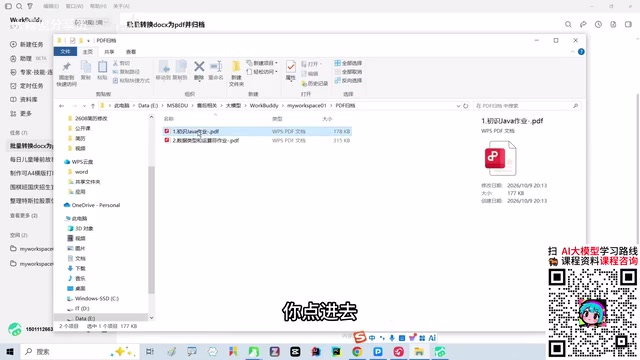
It will automatically scan the docx files in the specified directory, convert them one by one to PDF format, and then archive them into a newly created folder. From the actual test results, the converted format is complete, and the layout is not noticeably messed up. Even the Java homework documents previously prepared for students were handled very cleanly.
The whole process consumes very few points: a batch task completed in three minutes costs about 1.55 points. Based on 100 points given per day, this kind of small task is fully covered by the free quota.
The core difference in this experience is: a chat LLM tells you "you should do it this way," while WorkBuddy tells you "I have already done it for you." After obtaining authorization, it directly accesses the local file system, calls tools to execute commands, and finally places usable results in front of you.
The Real Gap with Codex: The Trade-Off Between Capability and Cost
Honestly speaking, WorkBuddy does have a capability gap compared with tools such as Codex and Claude. In one actual test, for the same task of "designing an Excel file based on an image format," WorkBuddy took 23 minutes, and the result was unsatisfactory and did not achieve the expected effect; Codex completed it in only two or three minutes, and the effect was also satisfactory.
But this comparison cannot look only at capability. The usage cost of Codex is about 200 RMB per month, including membership fees and VPN expenses. WorkBuddy, on the other hand, can be used entirely relying on the points claimed for free every day. If you do not want to pay a relatively high monthly fee for AI tools, WorkBuddy provides a low-barrier alternative.
What you need to accept is: it may be slower, and a single attempt may be worse, but you can repeatedly adjust through multiple rounds of dialogue and still ultimately achieve the goal. This is not a "perfect in one shot" tool, but a tool that "can still get it done through repeated iteration."
From a broader perspective, domestic Agent tools and overseas products do currently have a gap, but feature alignment is the trend. When all competitors are evolving in the same direction, comprehension, reasoning, and hands-on capability will sooner or later converge. Choosing WorkBuddy now is essentially exchanging a little time cost for zero monetary cost and a low usage barrier.
What is Codex, and why is it more expensive?
Codex here broadly refers to top overseas AI Agent/coding assistant tools represented by OpenAI Codex and the Anthropic Claude series. Their underlying models have larger parameter counts and stronger reasoning and coding capabilities, so they perform faster and more accurately on complex tasks (such as designing an Excel file based on an image format). But using them usually requires a subscription membership (around the level of 20 USD per month), plus additional network access costs.
The essence of the capability gap is the gap in model scale, training data, and engineering tuning, plus the fact that these tools have accumulated longer in the Agent framework toolchain. The advantages of domestic tools lie in: localized services, no network barrier, points/free mechanisms, and understanding of the Chinese context. Therefore, in "lightweight local file task" scenarios, the cost-effectiveness of domestic tools may actually be higher—they do not lose in positioning, but win by being sufficient and cheap.
Daily Usage Suggestions and Applicable Scenarios
The scenarios WorkBuddy is best at are those local file operation tasks that "chat LLMs can understand but cannot do": batch format conversion, file archiving and organization, rule-based renaming, simple data processing, and so on.
There are several practical principles when using it. First, remember to actively claim points every day. Second, do not expect complex tasks to succeed in one attempt; be prepared to have multiple rounds of dialogue with it and correct step by step. Third, grant sufficient file access permissions, otherwise many operations cannot be executed. Fourth, for particularly complex tasks, evaluate whether it is worth investing time in repeated debugging; sometimes switching tools is also a reasonable choice.
WorkBuddy's positioning is very clear: it is not the strongest AI Agent, but it is one of the easiest to get started with. For users who have just encountered the concept of AI Agents and want to experience what it feels like when "AI truly helps me get work done," it is a suitable starting point.
One-line Summary
As a low-barrier domestic AI Agent, WorkBuddy uses a points system to actually finish the work that chat models can only "think" about.
Paragraph Summary
The article compares the essential difference between chat LLMs and AI Agents: Doubao, DeepSeek, and others can only understand requirements and provide solutions, and cannot directly operate a local computer; while WorkBuddy, as a domestic AI Agent, can truly execute tasks such as batch Word-to-PDF conversion and archiving after obtaining file authorization. It gives 2,000 points at registration and 100 points per day, and one batch conversion costs about 1.55 points and takes three minutes. Compared with overseas tools such as Codex, WorkBuddy is slightly weaker on complex tasks and takes longer, but it requires no payment and no VPN, making it suitable as an entry choice for users with limited budgets who are willing to iterate through multiple rounds.
Related articles

Chain of Thought Isn't Just for AI: How Humans Can Use CoT to Improve Thinking Quality
Chain of Thought isn't just a prompt trick for large models. Starting from a Hacker News discussion, this article analyzes why CoT works for human thinking too, breaks down actionable ways to transfer it, and highlights the key differences between human CoT and machine CoT.
Cloudflare Teams Up with OpenAI: Closi…
Cloudflare Teams Up with OpenAI: Closing the Loop from Vulnerability Discovery to Defense with AI
Cloudflare uses OpenAI Daybreak to investigate security vulnerabilities and generate reviewable remediation plans, while developers use Codex to boost coding efficiency and quality.

Orca Multi-Agent Orchestration in Practice: A Guide to Parallel Collaboration with Claude and Codex
Orca is Stable AI's free open-source agent workbench supporting 34 agents like Claude Code and Codex in parallel. Learn its Git worktree isolation, multi-model orchestration, and mobile management.