WorkBuddy Hands-On Tutorial: How a Domestic AI Agent Actually Gets Work Done

How WorkBuddy, a domestic AI Agent, goes beyond chat LLMs to actually execute tasks like batch document conversion.
Using a batch DOCX-to-PDF conversion task as a throughline, this article exposes the fundamental limitation of chat-based LLMs like Doubao — they can plan but can't act — and introduces AI Agents as the solution. WorkBuddy is highlighted for its easy setup, no-VPN-required access, and free daily credits, with an honest comparison against Codex on speed and quality. The key takeaway: master the habit of iterative, multi-round conversation to get results from today's generation of AI Agents.
From Chatting to Executing: Why Ordinary LLMs Fall Short
Most people's first encounter with AI comes through conversational models like Doubao, DeepSeekAd, or Tongyi Qianwen. These tools excel at understanding questions, analyzing requirements, and generating solutions — but they all share an unavoidable limitation: they can talk, but they can't act.
The instructor opens the course with a relatable scenario: you have a folder full of .docx files on your computer, and you want to batch-convert them all to PDF and archive them in a single folder. A few years ago, you might have turned to WPS for this — only to hit the free page limit and get asked to pay.
So he hands the task directly to Doubao: "Help me convert all the docx files in this directory on my computer to PDF and archive them in one folder." Doubao understands perfectly and even delivers a complete solution — install the Python dependencies, run the generated Python script, with setup instructions, caveats, and alternative approaches included.
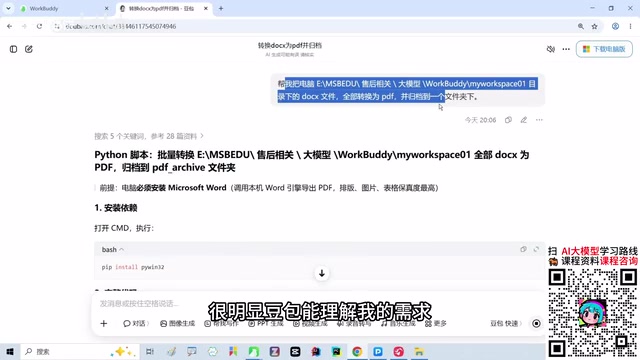
The problem: for anyone without a computer science or Python background, those dependency installation steps and code execution instructions are essentially unreadable. More importantly, Doubao can only hand you a plan — it can't actually read your files, invoke applications, or execute commands. That's the ceiling of an ordinary chat-based LLM: a brain with no hands.
Enter AI Agents: Where WorkBuddy Fits In
When you need a tool that can not only understand your requirements but also directly read files, call applications, execute commands, and deliver results, you've entered the territory of AI Agents. WorkBuddyAd is one representative product in this space.
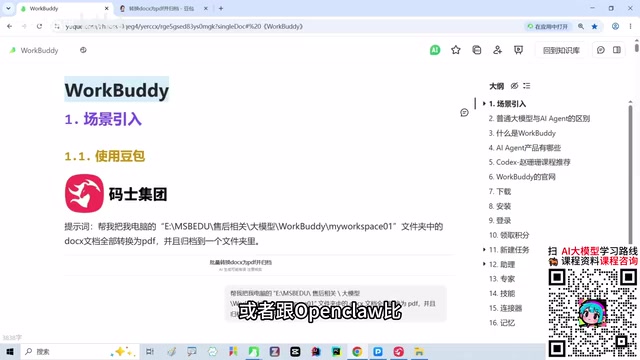
The instructor is refreshingly candid about its positioning: compared to overseas products like Codex or OpenCloud, WorkBuddy's capabilities are "probably a notch below" — but its advantages lie in three kinds of accessibility: easy to install, easy to use, and no VPN required. It works right out of the box, and it's a domestic tool.
He also offers a thought-provoking industry take: whether domestic or foreign, competing products with aligned feature sets will inevitably converge over time. The landscape won't stay permanently split between "some incredibly powerful, others completely useless." A model's comprehension, reasoning, and execution capabilities will eventually level out — it just takes time. This "convergence thesis" is a general principle of product development, and it's the underlying reason he recommends that everyday users start exploring domestic Agents now.
The core difference between an AI Agent and an ordinary LLM lies in tool-calling capability. An ordinary LLM is fundamentally a text-in, text-out system — its boundary ends at generating words. An Agent framework layers on top of the LLM an additional closed loop of "perceive environment → form a plan → call tools → take action" — enabling it to read and write local files, control a browser, run terminal commands, interact with third-party APIs, and more. This mechanism is typically referred to as ReAct (Reasoning + Acting) or a Plan-and-Execute architecture: the model first reasons through the steps needed to achieve the goal, then sequentially invokes the appropriate tools, observes the results, and decides the next step — looping until the task is complete. Desktop Agent products like WorkBuddy essentially package this framework into an application that ordinary users can deploy directly, eliminating the need to build the toolchain from scratch.
Credits System: A Zero-Cost Way to Get Started
WorkBuddy uses a credits-based model. New accounts receive 2,000 credits upon registration, followed by 100 free credits per day that must be manually claimed. The instructor mentions that after using it for a little over half a month — including a holiday stretch when his computer sat idle — he still had 3,900 credits in his account. For typical learning use cases, he says, "that's definitely more than enough."
Here's a practical cost comparison he ran. He gave both WorkBuddy and Codex the same task: based on an Excel-style screenshot found on Xiaohongshu, design a table with matching formatting.
- WorkBuddy: took about 23 minutes; results were "not quite satisfactory" and didn't fully meet expectations
- Codex: completed in roughly 2.5 to 3.5 minutes; met requirements
There's a real performance gap. But Codex costs around ¥200/month (membership fee plus VPN costs), while WorkBuddy runs entirely on free daily credits. The trade-off: slightly weaker performance, slower execution, and a need for multiple rounds of back-and-forth conversation to get the output dialed in. For users who aren't willing to pay for these tools, it's a reasonable compromise.
Live Demo: From Prompt to Delivered Result
The same task that Doubao could only think about but not act on gets handed to WorkBuddy verbatim: "Help me convert all the doc files in this drive to PDF and archive them in one folder."
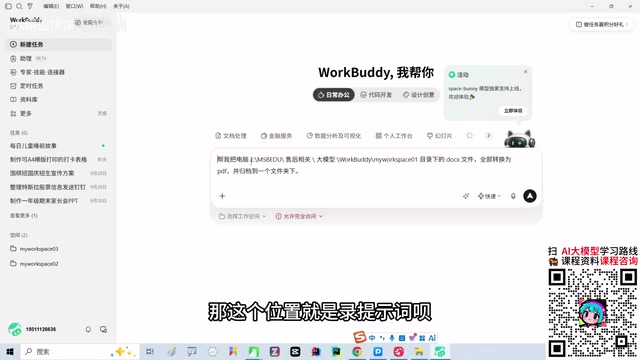
The critical step is authorization. The instructor grants "full access" permissions, and once WorkBuddy has that, it can access the local folder, scan all the documents, and execute the batch conversion. Throughout the process, the interface shows a live credit tally — 0.38 credits at the start of the demo, approximately 1.55 credits by the time the task completes, taking around three minutes in total.
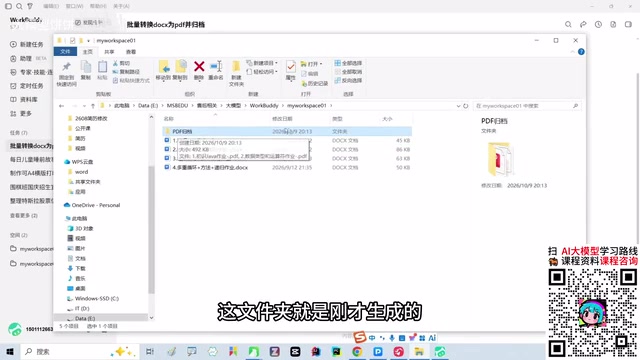
The results are tangible: each file is converted successfully and automatically archived into a newly created folder (timestamps show 8:13 AM). Opening the folder reveals that the Java assignment documents he had previously prepared for students were correctly converted. After completion, a preview is offered — close it if you don't need it.
This is the essential difference between an Agent and an ordinary LLM: an ordinary model gives you an answer; an Agent actually does the work — shifting from "answering questions" to "executing tasks," from "offering suggestions" to "delivering results."
The "authorization" step when an Agent accesses local tasks is critically important, and it reflects real design trade-offs in sandbox and permission models. Full access means the Agent can read, modify, and even delete any local file — so before using it in a production context, it's worth scoping the authorization to only the necessary working directories, avoiding accidental access to system or sensitive personal folders. At a technical level, document format conversion typically relies on LibreOffice, the Microsoft Word COM interface, or Python libraries like
docx2pdf. Which path the Agent takes depends on the current system environment — which is also why execution time and success rate may vary across different machines.
Understanding What an Agent Really Is: A Worker Who Gets Things Done
The instructor offers a down-to-earth analogy: think of various Agents as different "employees," and WorkBuddy is one employee who knows how to get work done.
In practice, don't expect it to nail every step perfectly on the first try. There will likely be a step that doesn't go quite right — and that's where iterative conversation comes in. Tell it what didn't work, ask it to keep refining. Each round of interaction consumes credits, but with enough back-and-forth, you can generally get to the outcome you need.
This habit of "iteratively converging on results through conversation" is the core mental model for getting the most out of the current generation of AI Agents. Their capabilities are still growing — but for everyday office tasks like batch document processing and table formatting, they can already provide real, practical help regardless of whether you have a programming background.
Related articles

Chain of Thought Isn't Just for AI: How Humans Can Use CoT to Improve Thinking Quality
Chain of Thought isn't just a prompt trick for large models. Starting from a Hacker News discussion, this article analyzes why CoT works for human thinking too, breaks down actionable ways to transfer it, and highlights the key differences between human CoT and machine CoT.
Cloudflare Teams Up with OpenAI: Closi…
Cloudflare Teams Up with OpenAI: Closing the Loop from Vulnerability Discovery to Defense with AI
Cloudflare uses OpenAI Daybreak to investigate security vulnerabilities and generate reviewable remediation plans, while developers use Codex to boost coding efficiency and quality.

Orca Multi-Agent Orchestration in Practice: A Guide to Parallel Collaboration with Claude and Codex
Orca is Stable AI's free open-source agent workbench supporting 34 agents like Claude Code and Codex in parallel. Learn its Git worktree isolation, multi-model orchestration, and mobile management.