WorkBuddy Workflow Explained: Master Automation and Remote Assistants in 3 Hours

Break down Tencent WorkBuddy's core features, extension system, and systematic learning path.
Based on a systematic course created over three months by a Bilibili creator and combined with interface screenshots, this article systematically breaks down Tencent's AI office tool WorkBuddy. It first defines its positioning—a multimodal productivity assistant for office white-collar workers, programmers, and creatives—and emphasizes its deep integration with WeChat mini programs and the Tencent Cloud ecosystem. It then analyzes core features one by one: the conversation-as-operation interface logic and the "Allow Full Access" permission setting, the assistant mode that can remotely control a computer through channels such as WeChat/QQ/DingTalk, the project collaboration module for teams, and the division of labor among the most easily confused three: experts (role-based agents), skills (reusable operations), and MCP connectors (cloud extensions). The article also introduces the knowledge plug-in roles of scheduled tasks and the knowledge base, and outlines the three-stage learning path of basic, advanced, and practical sections, pointing out that remote assistants and automation tasks are WorkBuddy's differentiating highlights.
Tencent's WorkBuddy is becoming a rising star in office automation, but the quality of tutorials on the market varies widely. A Bilibili creator spent three months building a systematic course, claiming it can help people understand the complete workflow in 3 hours. Based on that course content and interface screenshots, this article breaks down WorkBuddy's core features and practical techniques.
What Is WorkBuddy? Who Is It For?
WorkBuddyAd is an AI productivity tool within the Tencent ecosystem, positioned as an intelligent assistant "for office white-collar workers, programmers, and design creatives." It supports multimodal interaction (text, images, video), can maintain continuous conversations, and iteratively deliver results.
The interface design alone reveals its target audience: office workers use it to handle documents, Excel spreadsheets, PPTs, and data analysis; programmers use it to develop websites, mini programs, and Agents; creatives use it to generate visual posters and motion effects. Backed by Tencent, WorkBuddy has a natural advantage in connecting with the WeChat mini program and Tencent Cloud ecosystem.
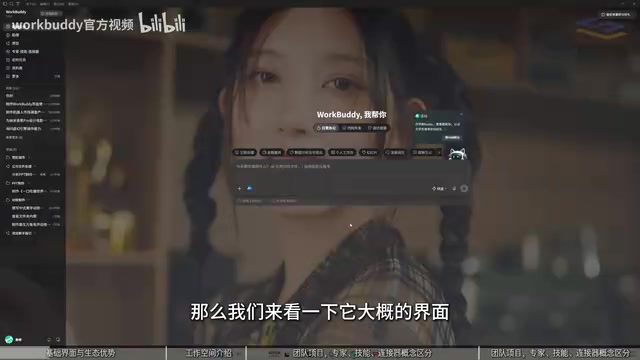
The interface clearly shows WorkBuddy's main functional areas, with the conversation and skills panel on the right
Core Features Breakdown: From Interface to Remote Assistant
Interface Layout and Basic Operations
WorkBuddy's interface design follows the logic of "conversation is operation." You can select a workspace in the upper left corner, and all generated files are saved in the specified directory. The skills panel on the right lists a large number of reusable skills, which users can enable with a single click on a toggle.
One key setting is "Allow Full Access"—it determines whether the AI can directly operate your computer files. When disabled, some features will be unable to access local resources. This permission design provides convenience while also reminding users to pay attention to security boundaries.
Assistant Mode: Remotely Control Your Computer
The assistant feature is a major highlight of WorkBuddy. Users can converse with WorkBuddy through WeChat, QQ, DingTalk, Feishu, or WeCom to dispatch remote tasks. For example, sending "send me a certain file from the computer" on WeChat allows WorkBuddy to execute the operation. This mode is close to the remote control experience of OpenCloud, letting users avoid having to stay in front of the computer.
Agent is a key concept for understanding WorkBuddy's assistant mode. Unlike ordinary chatbots that engage in "one question, one answer," an Agent has the ability to decompose goals, call tools, and execute multiple steps: when a user issues a high-level instruction (such as "organize the project report and send it to me"), the Agent autonomously plans the steps—locating the file, calling the appropriate skill to read the content, sending it back through the messaging channel—and tries alternative approaches when encountering obstacles. WorkBuddy's remote assistant is essentially an Agent process running on the local computer, with instant messaging tools serving only as its command entry point. This also explains why the "Allow Full Access" permission is so important: the Agent needs system-level permissions such as file system read/write and application control to complete closed-loop tasks, and tightening permissions directly limits the range of actions it can perform.
Projects and Team Collaboration
The project module is aimed at team task management. You can create projects, assign tasks to different members (or superiors and subordinates), and set deadlines. Project templates include options such as "Connectors," "Experts," and "Skills," making it easy to quickly build workflows.
Experts, Skills, and MCP Connectors
These three concepts are easy to confuse, and the Bilibili creator offered vivid analogies:
- Experts (role-based agents): Built-in prompts that set the AI as a specific role (such as legal advisor or financial analyst), optimizing the AI's "brain" so that its output is more professional advice.
- Skills: Fixed, reusable operation methods, equivalent to giving the AI "hands and feet" so it can execute specific tasks, such as operating QQ Music, processing PDFs, and generating Markdown.
- MCP connectors: Connect cloud applications or external services to expand the AI's operational scope. For example, operating cloud document data without downloading files locally.
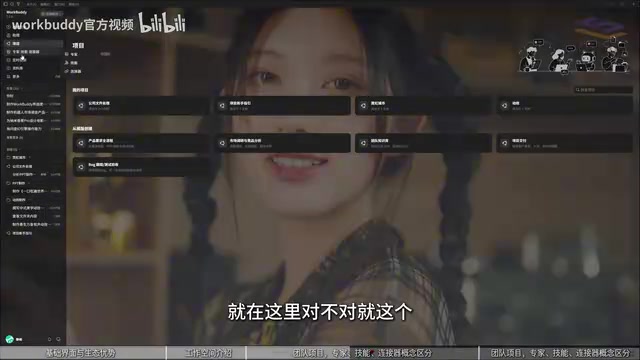
The expert module includes built-in role settings, allowing quick switching between professional perspectives
The Bilibili creator emphasized that these three types of features exist to open up the ecosystem—applications expose specific interfaces to the AI through MCP, ensuring that the AI can only access permitted data.
MCP (Model Context Protocol) is a protocol standard proposed and open-sourced by Anthropic at the end of 2024, aimed at establishing a unified communication interface between AI models and external data sources and tools. You can think of it as the "USB-C port" of the AI world: whether the backend is cloud documents, databases, or third-party SaaS applications, as long as it is encapsulated according to the MCP specification, the AI can call it in a standardized way. In WorkBuddy, the significance of MCP connectors is to turn "can chat" into "can do things"—the AI is no longer limited to generating local text but can directly read and write data in cloud applications. Compared with traditional API integration, MCP's advantages are self-contained interface descriptions and controllable permission granularity. Application providers can precisely specify which fields the AI can access and which operations it can perform, thereby safeguarding data security boundaries while opening up capabilities.
Scheduled Tasks and the Knowledge Base
Scheduled tasks allow users to preset times for automatic operations, such as "turn on the printer on the computer at 10 o'clock." For complex tasks, you can choose a more advanced AI model; for simple tasks, any model will do.
The knowledge base is a "knowledge plug-in." Users upload exclusive materials (such as biomedical data or industry reports), and the AI prioritizes reading from these materials when answering questions, equivalent to a customized search source.
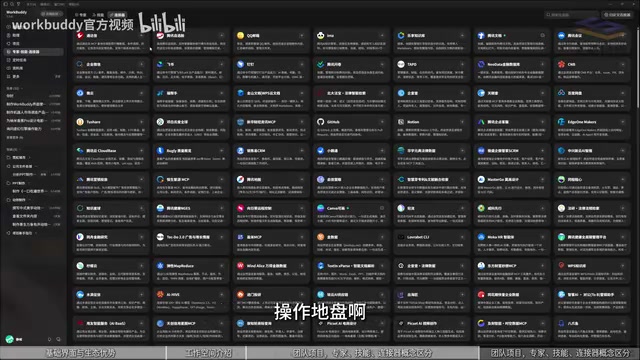
Connectors, experts, and skills form WorkBuddy's extension system
RAG (Retrieval-Augmented Generation) is the core technical paradigm behind the knowledge base feature. Its basic process is: documents uploaded by users are first split into chunks and converted into vector indexes; when a question is asked, the system first retrieves the chunks most relevant to the question from these vectors, then injects them as context into the large model's prompt, and finally the model generates an answer based on these materials. Compared with directly fine-tuning a model, RAG's advantages are low knowledge update cost, traceable sources, and less susceptibility to "hallucinations." WorkBuddy's knowledge base is precisely the productization of this approach—after uploading industry reports or professional data, the AI's answers will prioritize anchoring to these private materials, equivalent to attaching a dedicated knowledge retrieval layer to a general-purpose large model. It is suitable for office scenarios with high requirements for answer accuracy and domain specificity.
Practical Techniques and Learning Path
The Bilibili creator's course is divided into basic, advanced, and practical application sections. The basic section teaches installation and interface understanding step by step; the advanced section covers batch file modification, automatic bug fixing, plug-in installation, and automation tasks; the practical section involves operating websites, mini games, mini programs, PPTs, spreadsheets, images, and videos, emphasizing "monetizing knowledge."
The course also provides a companion green book, resource pack, and courseware to lower the learning barrier. However, the Bilibili creator also admitted that tutorials on the market are a mixed bag and recommended that learners rely mainly on official documentation and systematic courses.
Conclusion
WorkBuddy packages AI capabilities into a "Swiss Army knife" for office scenarios, with remote assistants and automation tasks as its differentiating highlights. Understanding the division of labor among experts, skills, and MCP is the key to mastering the workflow. For professionals hoping to improve efficiency, spending a few hours learning systematically can indeed open up new ideas.
One-line Summary
Break down Tencent WorkBuddy's core features, extension system, and systematic learning path.
Paragraph Summary
Based on a systematic course created over three months by a Bilibili creator and combined with interface screenshots, this article systematically breaks down Tencent's AI office tool WorkBuddy. It first defines its positioning—a multimodal productivity assistant for office white-collar workers, programmers, and creatives—and emphasizes its deep integration with WeChat mini programs and the Tencent Cloud ecosystem. It then analyzes core features one by one: the conversation-as-operation interface logic and the "Allow Full Access" permission setting, the assistant mode that can remotely control a computer through channels such as WeChat/QQ/DingTalk, the project collaboration module for teams, and the division of labor among the most easily confused three: experts (role-based agents), skills (reusable operations), and MCP connectors (cloud extensions). The article also introduces the knowledge plug-in roles of scheduled tasks and the knowledge base, and outlines the three-stage learning path of basic, advanced, and practical sections, pointing out that remote assistants and automation tasks are WorkBuddy's differentiating highlights.
Related articles

The Truth Behind Titanic's Sinking: Key Decisions and Communication Failures in the National Geographic Documentary
National Geographic's The Unsinkable Ship uses survivor testimony to reconstruct Titanic's fatal decisions—from the missing MSG telegram prefix and the broken boiler-room-to-bridge link to how 'unsinkable' thinking delayed damage control and evacuation.

74M-Parameter Open-Source Model Partially Outperforms Jev AI in Testing
Fastino AI's Glider 2.5 models, with just 74M–300M parameters, reportedly outperform Jev AI in some guardrail benchmarks per YouTube testing, run on consumer hardware, and even play Doom. We analyze small models' competitiveness and deployment value on specific tasks.

Gemini 4 Argon Hands-On: Aggressive Pricing, 3D Capabilities Need Coaching
Gemini 4 Argon hands-on: limited-time $2/$10 pricing, million-token output, strong 3D and reverse-engineering work, but weak front-end aesthetics and zero-shot ability need coaching.