WorkBuddy Zero-Basics Tutorial: Master AI Agent Workflows in 7 Days
289-episode WorkBuddy tutorial systematically covers AI Agents from principles to office, design, and development applications.
This 289-episode WorkBuddy tutorial follows the design principle of "understand AI Agents first, then start operating," beginning with Agent working principles and progressively covering nine major modules: installation and configuration, daily office scenarios, Skills, connectors, automated tasks, knowledge bases, AI design and new media operations, and development/deployment. The tutorial emphasizes cognitive frameworks first, using real cases (such as sales data analysis, invoice reimbursement, cross-platform collaboration, and industry report automation) to demonstrate how to distill repetitive workflows into reusable Skills and use connectors to integrate platforms like Feishu and Amap, ultimately making WorkBuddy a super intelligent agent that can work continuously. Suitable for workplace newcomers, office workers, and content operations practitioners for systematic learning.
A tutorial series on Bilibili dubbed the "most comprehensive and detailed" WorkBuddy course spans 289 episodes, marketed as zero-basics, hand-holding instruction that claims to take learners from beginner to proficient in 7 days. The value of this tutorial isn't just teaching which buttons to click in a tool—it uses a complete course thread to thoroughly explain how AI Agents understand requirements, plan tasks, operate computers, and mobilize tools.
For Chinese workplace professionals, WorkBuddy's appeal is direct: it's described as a domestic alternative to Codex, requiring no complex network environment—just phone number verification for free use. It can write proposals, create spreadsheets, analyze data, design posters, write code, and take over browsers to control software—these capabilities are packaged as "one-click results delivered directly." The real question this tutorial aims to answer is: how can ordinary people turn these capabilities into their daily productivity?
Understand AI Agents First, Then Start Operating
Many tool tutorials jump straight into installation and interface, but this course takes the opposite approach. Chapter 1 first explains the development stages and working principles of AI Agents, and how WorkBuddy understands your requirements, plans tasks, operates computers, and mobilizes different tools to complete work.
This step is crucial. Without understanding the difference between an Agent and an ordinary chatbot, learning about connectors, skills, and automated tasks later easily becomes rote memorization of steps. The course positions this chapter as "building a foundation for future course learning," indicating the author believes cognitive frameworks take priority over operational proficiency. After completing this chapter, learners will form a relatively comprehensive understanding of WorkBuddy's working mechanisms—why it can take over browsers and why it can transfer information across platforms.
AI Agent refers to an intelligent system capable of autonomously perceiving its environment, planning tasks, invoking tools, and executing actions to achieve goals. Unlike traditional chatbots (such as early rule-based or simple retrieval dialogue systems), AI Agents typically possess goal decomposition, memory, tool invocation, and reflection capabilities. They use large language models (LLMs) as their "brain" to understand user intent, break complex tasks into subtasks, and autonomously decide which tools (such as browsers, file systems, APIs) to invoke. This architecture enables Agents to handle tasks requiring multi-step reasoning and cross-application collaboration, not just answering single-turn questions. Understanding how Agents work helps learners grasp the roles of connectors, skills, and automated tasks within the Agent architecture.
Installation, Configuration, and Core Concepts: Experts, Skills, Connectors, Automation
Chapter 2 officially enters hands-on practice, covering WorkBuddy's installation, basic configuration, interface layout, permission control, and different working modes. More importantly, this chapter separates several easily confused concepts: experts, skills, connectors, and automated tasks—explaining what problems each is suited to solve.
After completing this chapter, learners can already start using WorkBuddy to operate computers, batch-process local files, and complete some basic work tasks. The course's design logic is to first recognize all the "parts," then enter scenarios.
Connectors are standardized interfaces between AI Agents and external tools or platforms (such as Feishu, Tencent Docs, Amap), allowing Agents to read, write, or execute operations within authorized scope. They typically encapsulate authentication, data format conversion, and error handling, so Agents don't need to concern themselves with underlying API details. Skills are reusable modules encapsulating prompts, tool invocation logic, and knowledge fragments for specific workflows—essentially "operation manuals" for Agents. Agents dynamically load skills at runtime based on tasks, thereby extending capabilities. Automated tasks are mechanisms with preset trigger conditions (such as time or events) and action sequences, enabling Agents to run continuously unattended. Together, these concepts form the foundation of Agent extensibility and automation; distinguishing them helps in choosing the correct abstraction level when designing workflows.
Daily Office Scenarios: From Sales Data to Invoice Reimbursement
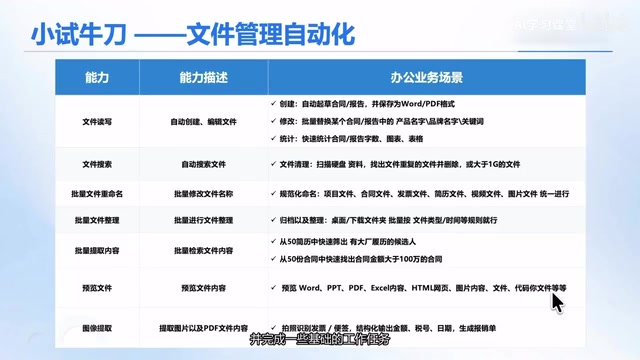
Chapter 3 focuses on daily office work, using real sales data, business materials, contract files, and invoice files as materials to guide learners through data analysis, Excel processing, PPT creation, PDF processing, and general information processing. Specific cases include: having WorkBuddy automatically process Excel to analyze sales data and generate reports, automatically generate PPTs for event planning proposals, batch read and process PDF files, identify invoice information to calculate expenses, and fill in company Excel reimbursement templates.
These tasks are characterized by repetition, time consumption, and clear rules—exactly the zone where Agents excel. The course's goal is to help learners delegate large amounts of repetitive, time-consuming office tasks to WorkBuddy, improving daily efficiency.
Skill: Turning Workflows into Reusable Manuals
Chapter 4 covers something very important in desktop-level Agent skills—Skill. The course compares Skills to "a set of work manuals prepared for WorkBuddy," explaining what Skills are, how they're composed, how they work, and how to install, invoke, and manage Skills.
The practical value of this chapter lies in reuse. After completing it, learners can not only use Skills created by others but also gradually distill frequently repeated workflows from their work into exclusive Skills, and share them with team and organization members. When encountering the same tasks later, there's no need to rewrite prompts or re-explain work requirements to WorkBuddy each time. This is a typical path for turning personal experience into team assets.
Connectors: Let WorkBuddy Work Across Platforms
Chapter 5 explains how to connect WorkBuddy with external tools and platforms such as Feishu, Tencent Docs, Tencent Meeting, and Amap through connectors. The course uses cases like survey questionnaires, document collaboration, HR recruitment, and team planning to demonstrate how WorkBuddy automatically transfers information and executes tasks across multiple platforms.
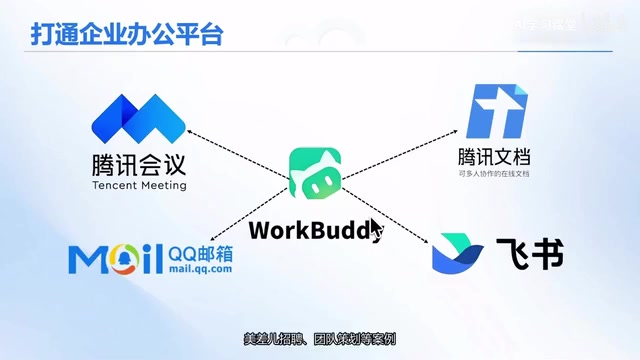
Specific cases include: automatically generating online survey questionnaires, automatically syncing generated documents to Feishu Docs and Feishu groups, automatically collecting user feedback and improving documents based on feedback; automatically downloading resumes from email based on job requirements, automatically scoring them, automatically scheduling meetings and sending email notifications; using Amap MCP Server combined with weather, traffic, restaurants, and budget to automatically complete team-building planning; and using WeChat to remotely control WorkBuddy to work.
After completing this chapter, WorkBuddy is no longer a standalone tool but a super intelligent agent that can link multiple office platforms and complete cross-tool, cross-platform business workflows. This positioning shift is the most critical step in the entire course.
MCP (Model Context Protocol) Server is a standardized server-side protocol for providing context information or tool capabilities to AI models. It allows models to access external data sources (such as databases, APIs, file systems) and tools (such as map services, search) in a unified way. In the course case, Amap MCP Server exposes map, weather, traffic, and other capabilities to WorkBuddy through this protocol, enabling the Agent to invoke external services as if calling built-in functions. MCP aims to solve the problem of fragmented tool integration, enabling plug-and-play between different models and tools and reducing connector development costs. For understanding how WorkBuddy schedules resources across platforms, MCP is one of the key underlying mechanisms.
Automated Tasks: Let the Agent Work for You Continuously
Chapter 6 explains how to set up daily and weekly repetitive work as automated tasks in WorkBuddy. Tell WorkBuddy in advance at what time, at what frequency, and what kind of work to complete—after setup, there's no need to manually give it instructions each time; it will automatically execute according to the set schedule.
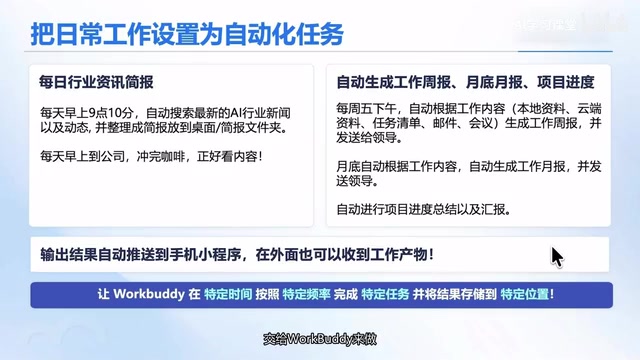
The course builds two cases: a daily industry news report and a weekly work report. Have WorkBuddy automatically search for industry developments daily, generate industry reports and podcasts, and also read computer files, Feishu Docs, and Feishu Meetings to automatically organize weekly work reports. The significance of this chapter lies in transforming "people finding tasks" into "tasks finding people," letting the Agent work continuously.
Industry news report automation typically involves an Agent periodically scraping multiple information sources (such as news websites, industry forums, social media), and generating structured reports through summarization, deduplication, categorization, and trend analysis. This requires the Agent to have browser automation, content extraction, and natural language generation capabilities. In the course, having WorkBuddy automatically search industry developments daily and generate reports and podcasts actually demonstrates a complete pipeline from information collection to content distribution. This automation delegates repetitive information monitoring work to the Agent, freeing human resources for higher-value decision-making. Understanding the underlying trigger mechanisms (such as cron scheduling) and result delivery methods (such as email, document syncing) helps learners customize similar automated tasks according to their own needs.
Knowledge Base: Let WorkBuddy Work Based on Your Materials
Chapter 7 explains how to connect materials and documents to WorkBuddy, enabling it to use the materials or documents you provide to help you work. The course introduces WorkBuddy's built-in resource library and guides learners to integrate Amap Cloud's knowledge base, unifying scattered documents, PDFs, web content, and personal notes into the knowledge base, so WorkBuddy can answer questions, generate proposals, and write reports based on these materials.
The goal of this chapter is for learners to gradually build their own personal or enterprise knowledge bases, enabling WorkBuddy to answer questions and generate content based on professional materials or business knowledge, and continuously improve the knowledge base.
AI Design and New Media Operations: From Product Images to Viral Content
Chapter 8 focuses on AI design, content production, and intelligent new media operations. The AI design section covers cases related to image generation and modification, including event poster design, brand VI design, website page design, e-commerce image output, e-commerce detail pages, and character outfit changes; learners will also learn to integrate third-party image generation models into WorkBuddy and build image generation Skills, e-commerce poster Skills, and marketing copy Skills.
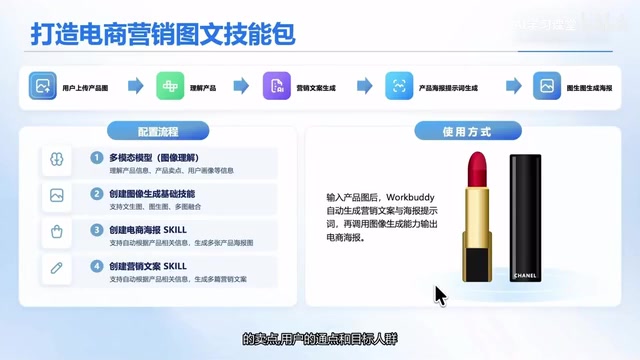
A typical workflow is: a user uploads a product image, WorkBuddy automatically analyzes product selling points, user pain points, and target audience, then automatically generates marketing copy, product posters, and promotional images based on this information. The new media section has WorkBuddy automatically operate browsers to collect information from platforms like Bilibili, Douyin, Xiaohongshu, and Taobao, completing operations such as video downloads, subtitle downloads, content collection, comment collection, and product queries. After completing this chapter, learners can build a complete automated workflow from product analysis and content creation to marketing promotion—suitable for self-media, e-commerce, marketing, and education/training practitioners to focus on.
Development and Deployment: Launch Business Systems Without Writing Code
Chapter 9 explains how to use resources to have WorkBuddy help develop and deploy your own websites and business applications. Using developing an online course platform as an example, the course guides learners through the entire process from requirements analysis, feature planning, page design, and code development to deployment and launch. Even without programming skills, learners can try turning business ideas quickly into real business systems they can use regularly.
The entire course uses a combination of theory and hands-on practice. The ultimate goal isn't for learners to memorize the location of every button, but to truly put WorkBuddy to use and make it a capable assistant.
Who This Tutorial Is For
Looking at the course structure, it's suitable for three types of people: first, workplace newcomers who have never encountered AI Agents and want to systematically build understanding; second, office workers trapped daily by repetitive tasks like Excel, PPT, PDF, and invoice reimbursement; third, self-media, e-commerce, marketing, and education/training practitioners who need to automate content production and platform operation workflows. For developers who already have programming foundations and want to go straight to API documentation, this tutorial may feel slow-paced, but its ideas about Skill encapsulation and connector orchestration still have reference value.
Related articles

Watching Movies in the Terminal: Building an SSH Streaming Service with Codex Multi-Agent Workflow
A creator uses Codex multi-agent workflow to build an SSH-accessible streaming service in the terminal, with planning, cloud async dev, AI-drawn scenes, and synced live channels.

AI Face Licensing: A New Micro-Drama Trend or a Hollywood Trap?
Actors are licensing their faces to micro-drama startups for AI digital doubles to perform. Popular in China, the model raises concerns in Hollywood over lost control and diluted bargaining power.

Amazon's First Digital Photo Frame Is 50% Off for Black Friday: Is the Alexa Frame Worth Buying?
Amazon's first digital photo frame, the Alexa Photo Frame, is nearly 50% off for Black Friday, with prices starting at $114. We analyze why this new product dropped in price just one month after launch, its positioning, who it's for, and buying advice.