Writing Code with Claude Code Means Passing a Network Admin Exam First: The Pain of Configuring AI Programming Tools

Claude Code's real barrier is account and network configuration, not coding ability itself.
The article starts from a Bilibili creator's complaint: he wanted to use Claude Code to help write code, but after watching eight tutorials and writing zero lines, he got tangled up in account registration, network environment, and regional restrictions — joking it felt like a "network admin exam." The author notes that while Claude Code is powerful, its barrier lies in "can you get it running," and configuration costs partly offset the efficiency dividend of AI programming tools. The "dedicated Australian Mac mini + remote connection" idea from comments essentially cloudifies the development environment, fixing the environment and lowering migration costs, but it only solves environment inconsistency across devices — it doesn't exempt account and regional compliance requirements. The article concludes by advising developers to get a minimal viable workflow running before deciding whether to adopt it, so the configuration process doesn't take over.
The Absurd Experience: From "Writing Code" to "Taking a Network Admin Exam"
A Bilibili creator vented: he wanted to use Claude Code to help write code, but after following eight tutorials, he hadn't written a single line — instead he got tangled up in network configuration, account environment, and regional restrictions. He joked, "Are you working on a project or preparing for a network admin exam?"
This scenario is familiar. Claude Code, Anthropic's terminal-based AI programming tool, is genuinely powerful, but its barrier to entry isn't "can you write code" — it's "can you get it running." Account registration, network environment, regional determination — any one of these links can trip up a developer.
The Configuration Barrier Is the First Filter
For many developers in China, using Claude Code smoothly means clearing several hurdles first: registering an account, dealing with regional restrictions, and ensuring network stability. Tutorials run ten-plus minutes, and even after watching them you might not get it running. The creator's complaint of "watched eight tutorials, wrote zero lines of code" hits the pain point exactly: the more powerful the tool, the more the prep work feels like an ops exam.
Going deeper, this barrier changes the usage experience. Developers should be focusing their energy on logic and architecture, but instead they spend time researching accounts and networks. Part of the efficiency dividend of AI programming tools gets eaten by configuration costs.
Regional restrictions and compliance determination: Anthropic's terms of service license usage by country/region, and Claude Code relies on the availability determination for the account's region. The platform typically identifies users by combining signals like account registration location, payment method, and login IP; when the determination fails, it restricts access or requires additional verification. This means "the network can connect" doesn't equal "the service is available" — they're barriers at different levels. The multiple blockers developers in China encounter essentially stem from service availability and compliance requirements, not technical capability issues.
Runtime dependencies of terminal AI programming tools: Claude Code runs as a command-line tool and requires a local Node.js runtime, a usable terminal, valid API credentials, and a stable outbound connection. It has read/write permissions on project directories and actually executes file operations and commands, so beyond "can it be installed," you also need to ensure permissions, key management, and network links all work properly. Stack these prerequisites together, and the configuration process starts to feel more like ops work than writing code.
The Remote Mac mini Approach: Rationale and Boundaries
A comment section idea emerged: get a dedicated Mac mini in Australia, keep the project and development environment on that machine, and when you switch computers, connect remotely and pick up where you left off. This way the environment stays fixed, and you don't worry about interruptions from changing devices.
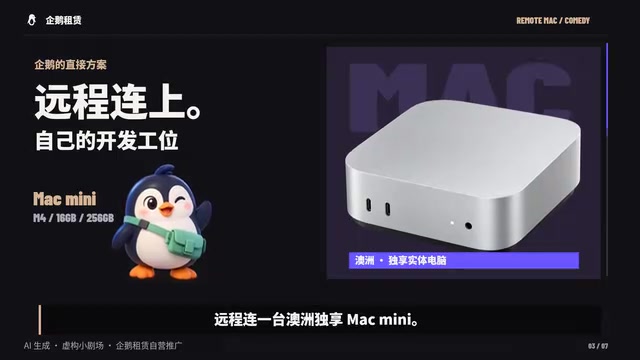
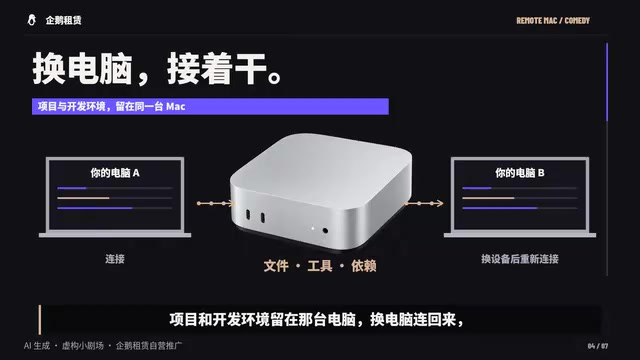
This approach is essentially "cloudifying the development environment" — the local machine only serves as a terminal, with compute and environment placed remotely. The upside is environment consistency and low migration cost; the price is remote connection latency, cost, and whether it actually solves the account problem.
Cloudifying development environments and remote development: Concentrating projects, dependencies, and toolchains on a remote machine, with the local machine acting only as a terminal, is called remote development or development environment cloudification in engineering. Common implementations include SSH remote connections, VS Code Remote, and various cloud development machines. Its core value is environment consistency and reproducibility: team members or different devices connect to the same environment, avoiding "it works on my machine" problems and saving repeated configuration. The costs show up in network latency, the fixed cost and maintenance responsibility of the remote machine, and ongoing dependence on network stability.
The difference between dedicated and shared instances: The "dedicated Mac mini" mentioned in comments means the entire physical or virtual instance is used by a single user only. Compared to shared hosting environments, it offers better isolation and more controllable environments, and its state won't be affected by others' operations. But dedicated only solves the problems of resource ownership and environment stability — it doesn't change the service provider's requirements around accounts, regions, and terms of use.
Switching Devices ≠ Bypassing the Rules
One thing needs clarifying: connecting remotely back to the same computer avoids "environment inconsistency caused by switching devices," not "account and regional requirements." The creator also noted it "is a computer, not a talisman" — account and regional requirements still have to follow official rules.

In other words, the remote approach can optimize the workflow, but it doesn't change platform compliance requirements. Treating a Mac mini as a "compliance shortcut" is a misunderstanding; its value lies in environment stability, not rule exemption.
The Adoption Challenge for AI Programming Tools
The configuration pain of Claude Code isn't an isolated case. More and more AI programming tools are making leaps in capability, but they still leave a lot of friction around usability, compliance, and localization. For developers, choosing a tool isn't just about "how powerful is it" — it's also about "can I use it reliably."
A more pragmatic attitude is: try first, then decide. The creator ended with "try it out first, then decide," and that applies to any AI programming tool. Don't get swept up by the number of tutorials and marketing hype — get a minimal viable workflow running first, then judge whether it's worth bringing into your daily development.
Tools serve people — don't let the configuration process take over.
Related articles

GoHighLevel Conversational AI Adds MCP: Agents Can Call 40+ External Apps
GoHighLevel's conversational AI now supports MCP, enabling agents to call 40+ external apps during chats to book appointments, send payments, and write to spreadsheets. Learn about limitations, configuration, and launch timing.

Why Property Management Software Must Embrace AI and the MCP Protocol
Property management software is shifting to open ecosystems. One system has launched an MCP server and is preparing a cloud connector for AI agents and custom workflows—here's why MCP and open APIs are becoming new selection criteria.

Gemini CLI: A Free AI Coding Assistant — A Powerful Development Tool in Your Terminal
Gemini CLI is a free AI coding assistant with 1,000 daily requests, 60-second install, codebase parsing, app building, auto bug fixing, MCP and GitHub Action support.