xtty: The macOS Terminal That Makes Everyday SSH and Coding Work Easier

xtty is a native macOS terminal focused on everyday SSH work, offering a free version and a one-time-purchase Pro version.
xtty is a native terminal emulator built for macOS, positioned not to replace all-in-one terminals like iTerm2 or Warp but to focus on everyday SSH connections and coding agent workflows. Its core features include batch-connecting to saved hosts, configurable password autofill, ZMODEM-based sz/rz file transfer, tabs and split panes, duplicating tabs to establish independent connections in the same remote directory, broadcasting input to multiple panes, and displaying AI coding agent status. It supports both Apple Silicon and Intel, and uses a free version plus an optional one-time-purchase Pro version. It suits developers and ops engineers who frequently connect to fixed servers, transfer files, and run commands in parallel, but it is still early-stage and faces competition from mature terminals.
For developers and ops engineers, the terminal is one of the tools they face the longest every day. But most terminal emulators only provide a basic command-line interface, and they're often inefficient when it comes to frequent SSH connections, file transfers, and multitasking. xtty, recently launched on Product Hunt, aims to change that—it's a native terminal built specifically for macOS, with a clear goal: let you spend time on your work, not on wrestling with the terminal itself.
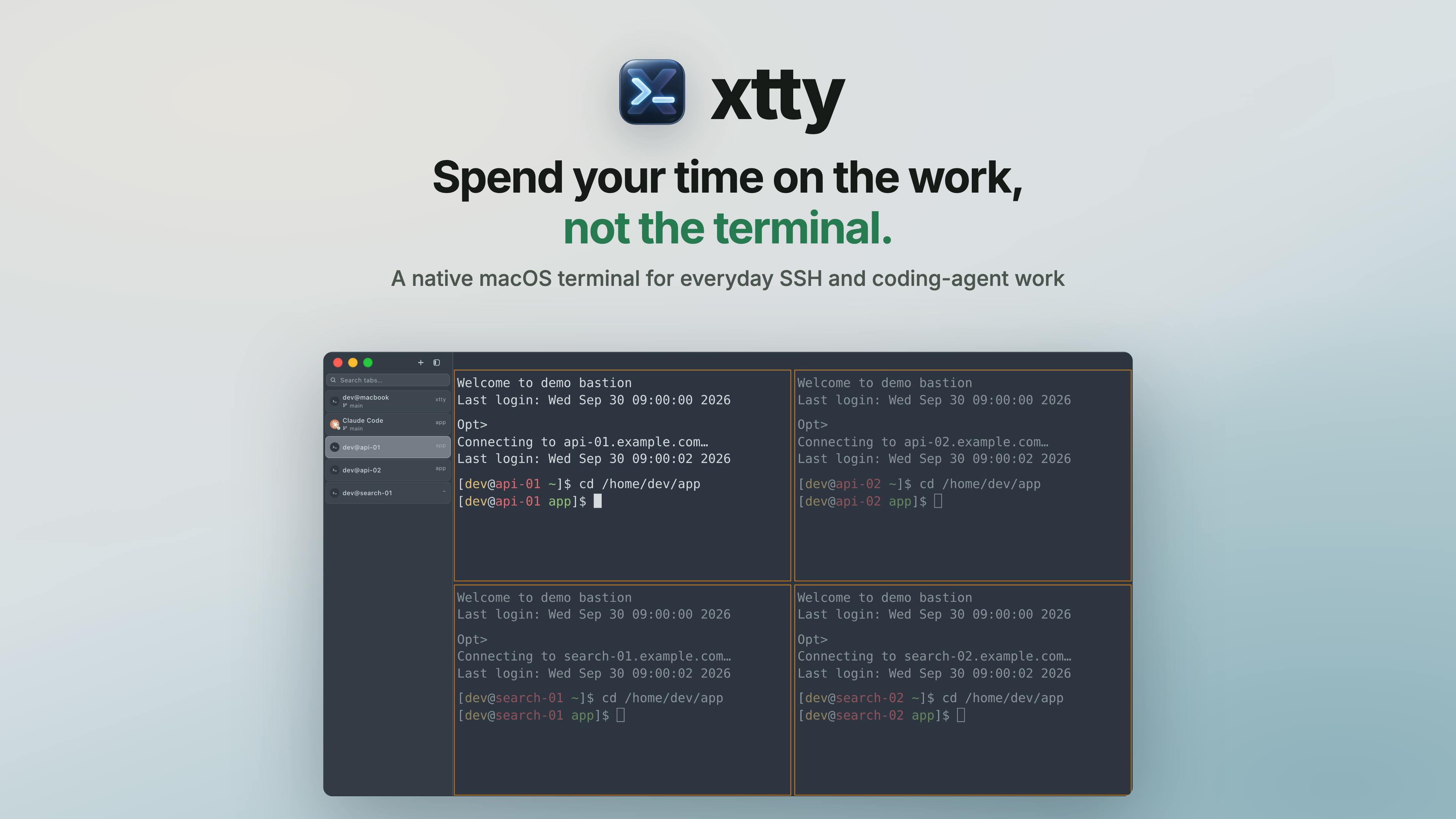
Core Features Designed for Everyday SSH Workflows
xtty isn't positioned to replace all-in-one terminals like iTerm2 or Warp; it focuses on the high-frequency scenario of "everyday SSH and coding agent work." It offers a set of targeted features:
- Batch-connect to saved hosts: Connect to multiple frequently used servers at once, saving you the hassle of repeatedly typing commands.
- Configurable password autofill: Set passwords for saved hosts and have them filled in automatically on connection, reducing repetitive work.
- sz/rz file transfer: Transfer files directly within the terminal via the ZMODEM protocol, with no need to open a separate SFTP client.
- Tabs and split panes: Handle multiple tasks in parallel with flexible layouts.
- Duplicate tab: Open an independent SSH connection in the same remote directory—ideal for scenarios where you need to work on multiple tasks in the same directory at once.
- Broadcast input: Send your input synchronously to multiple panes—very efficient for executing commands in bulk.
- Coding agent status display: For users of AI coding agents, you can view the agent's running status right inside the terminal.
Individually, none of these features is novel, but integrated into a native macOS app and optimized around everyday SSH use, they can genuinely reduce a lot of context-switching overhead.
ZMODEM and sz/rz: ZMODEM is a protocol for transferring files over serial connections (including SSH sessions); sz is used to send files and rz to receive them. Unlike SFTP, it reuses an already-established terminal session and requires no separate connection or client, making it suitable for occasional, small-batch file transfers.
Broadcast input: This refers to synchronously sending characters typed in one pane to multiple terminal sessions in the same window, commonly used to run the same command on multiple servers at once (e.g., restarting services in bulk or unified deployment). When using it, be mindful of differences between target environments to avoid mistakes.
Coding agent status display: Here, "coding agent" refers to an AI coding assistant running in the terminal (such as a command-line code generation/execution agent). Integrating its running status into the terminal lets developers tell whether the agent is waiting for input or executing a task without switching windows.
Native macOS Experience and Pricing Strategy
xtty emphasizes that it is a native macOS app, supporting both Apple Silicon and Intel chips. Native means better system integration, smoother scrolling, and lower resource usage—a plus for developers who keep a terminal open for long stretches.
On pricing, xtty offers a free version along with an optional one-time-purchase Pro version. This model is friendlier to users who dislike subscriptions—buy it outright if you need it, or use the free version to meet basic needs.
Native macOS apps typically refer to programs built with system frameworks such as AppKit/SwiftUI, rather than wrapped in cross-platform runtimes like Electron. Their advantages lie in being closer to the system's event handling and rendering pipelines—scrolling, text selection, and keyboard shortcut response feel more responsive, and memory and CPU usage are usually lower. The trade-off is that they can only run on macOS and must be adapted separately for both Apple Silicon and Intel architectures, or provided as a universal binary.
Who Is xtty For?
If your daily workflow is: connect to a few fixed servers, transfer a few files, run several commands at once, and you want these operations to be more convenient, then xtty is worth a try. Unlike some terminals that pursue extreme customizability, it simplifies common operations. For developers using AI coding agents, broadcast input and agent status display can also bring practical convenience.
Of course, xtty is still quite young—75 upvotes and 2 comments on Product Hunt show it's just getting started. Whether it can find its place in a terminal market crowded with strong players like iTerm2, Warp, and Ghostty depends on future feature iterations and community feedback. But at least it offers a clear idea: a terminal doesn't have to be big and comprehensive—doing everyday high-frequency scenarios well is valuable in itself.
You can learn more and download it via the Product Hunt page.
One-line Summary
xtty is a native macOS terminal focused on everyday SSH work, offering a free version and a one-time-purchase Pro version.
Paragraph Summary
xtty is a native terminal emulator built for macOS, positioned not to replace all-in-one terminals like iTerm2 or Warp but to focus on everyday SSH connections and coding agent workflows. Its core features include batch-connecting to saved hosts, configurable password autofill, ZMODEM-based sz/rz file transfer, tabs and split panes, duplicating tabs to establish independent connections in the same remote directory, broadcasting input to multiple panes, and displaying the running status of AI coding agents. The product supports both Apple Silicon and Intel, and uses a pricing model of a free version plus an optional one-time-purchase Pro version. It suits developers and ops engineers who need to frequently connect to fixed servers, transfer files, and execute commands in parallel, but it is still early-stage and faces competition from mature terminals.
Related articles

Random Pruning of the DPO Computation Graph: 1.4x Training Speedup and Lower Peak Memory
DPO training too slow and memory-hungry? This paper proposes a random pruning framework for the DPO computation graph, sampling independently across position, sequence, and branch dimensions; branch pruning achieves a 1.426x step-time speedup and cuts training time by about 30%, with in-depth attribution of memory and time gains.

Why Does JEPA Underperform MLM in Longitudinal EHR Representation Learning?
New study compares JEPA and MLM for longitudinal EHR representation learning on MIMIC-IV: three JEPA variants train stably without collapse but underperform MLM; target size, not heterogeneity, drives prediction error.

Transfer Learning + Visible Light Communication: A New Approach to Energy-Efficient Indoor Positioning
A study proposes a transfer learning-based visible light communication indoor positioning method, achieving 47% accuracy improvement on the BOSCH factory dataset, 67.5% model efficiency under high noise, and introducing the ME composite metric for energy-efficient positioning in energy-constrained industrial IoT scenarios.