Xuanxing MCP in Action: A Complete Setup Guide for AI-Assisted Android Reverse Engineering

Use MCP protocol to connect Android reverse engineering tools to a large model, enabling AI-driven tasks like ad removal.
This article introduces an experimental setup that combines AI large models with an Android reverse engineering toolchain. Using Xuanxing as the main platform, MCP (Model Context Protocol) exposes the capabilities of the Algorithm Assistant, MT Manager, and other tools to the model, enabling AI to drive app analysis and modification through natural language. The workflow runs on a rooted Android environment with Xposed-based framework support. In the demo, the AI needed nine rounds of conversation to successfully remove ads from an app, highlighting that AI remains unstable for precise reverse engineering and serves more as an assistant than a full replacement. The article emphasizes that these techniques are for legal, educational purposes only.
When AI Meets Android Reverse Engineering
Android reverse engineering has always been a high-barrier discipline, requiring solid understanding of Smali code, resource structures, and algorithm hooking. As large model agent capabilities mature, a toolchain built around MCP (Model Context Protocol) is now attempting to hand this work over to AI automation. In this tutorial, a Bilibili creator demonstrates how to use Xuanxing alongside several tools to let an AI autonomously analyze and manipulate Android applications.
This article documents the configuration workflow and key practical details for educational purposes only. Please ensure any use of these techniques is legal and compliant with applicable regulations.
MCP (Model Context Protocol) is an open protocol led by Anthropic, designed to provide large models with a standardized "tool-calling" interface. The core idea is to wrap external program functionality into "server" endpoints that models can discover and invoke, with the large model acting as the "client" that connects and calls these services through a unified protocol format. This differs from earlier approaches where each AI platform defined its own Function Calling format — MCP aims to establish an interoperability standard that works across platforms and tools. In this context, the Algorithm Assistant and MT Manager each start a local MCP server, Xuanxing acts as the AI client and scans to connect them, and the large model can then drive these otherwise independent Android tools using structured instructions. This is the underlying logic that makes the entire solution work.
Environment and Tool Preparation
The entire workflow runs in a rooted Android environment. The creator uses the Mumu emulator; physical devices also require root access, which is the foundational prerequisite for algorithm hooking and file modification.
There are four core tools, each serving a distinct role:
- Xuanxing: The main platform hosting AI conversations and task orchestration — the command center of the entire workflow.
- SO MCP: Provides the MCP service, acting as the bridge for AI to invoke low-level capabilities.
- Algorithm Assistant: Handles algorithm analysis and hooking. Requires the Elesobos (Xposed-based) framework and must have MCP service enabled in its settings.
- MT Manager: Handles file and resource management. Must be a version that includes MCP support.
The collaborative relationship between these four tools is critical — Xuanxing exposes the capabilities of the Algorithm Assistant and MT Manager to the large model via the MCP protocol, allowing AI to operate these reverse engineering tools just like calling plugins.
The Xposed framework is Android's most influential hooking framework, allowing developers to intercept and modify an application's function calls through "modules" without modifying the APK itself. Elesobos (also seen as a derivative implementation of LSPosed) is a modern variant of the Xposed framework compatible with newer Android versions. The Algorithm Assistant depends on this type of framework because algorithm hooking fundamentally involves "inserting" custom logic when a target application executes certain code — for example, intercepting encryption/decryption functions or capturing plaintext parameters. This requires system-level privileges that the normal application sandbox cannot provide. This is the root reason the entire solution requires a rooted environment: without root, Xposed-based frameworks cannot be installed, and algorithm-level analysis becomes impossible.
Configuring MCP and Model Connections
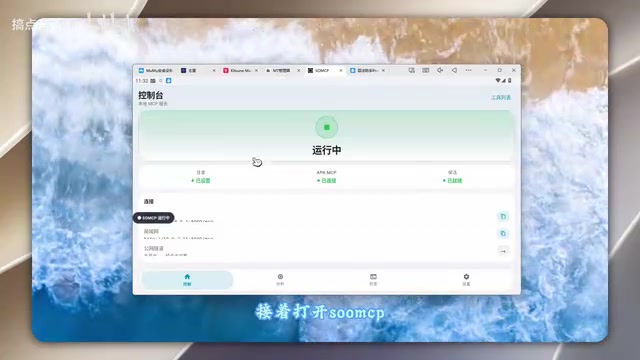
For first-time use, launch MT Manager, SO MCP, and the Algorithm Assistant in sequence, then open Xuanxing last. Order matters because Xuanxing automatically scans for local MCP service addresses on startup.
In the MCP configuration page, the corresponding service addresses are generally auto-detected — simply enable each required service and confirm the connection. Once connected, the next step is configuring the large model.
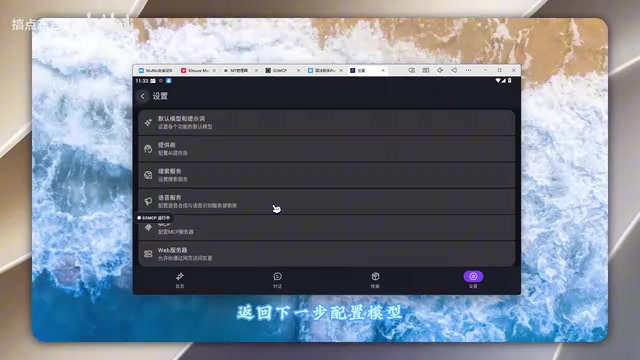
Xuanxing's provider page supports two methods: selecting a preset platform or connecting a custom one. For custom connections, tap the plus icon in the top-right corner, select OpenAI-compatible format as the type, enter a custom name, then fill in your API Key and endpoint URL. Leave the remaining options at their defaults.
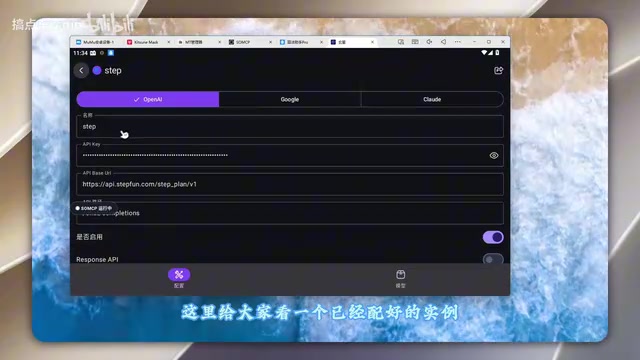
After filling in the details, tap the model list — Xuanxing will fetch the available models from the configured platform and add them directly to your configuration. Scroll down and tap Test; a successful test confirms the model connection is working, and you can return to the home screen to start a new conversation. This step is essentially identical to configuring any OpenAI-compatible client and has a low barrier to entry.
Enabling Skills and Processing an Application
After starting a new conversation, tap the plus icon to enter the extension manager, switch to the Skills tab, and enable the required features one by one. In the creator's version, the relevant skills come pre-configured, eliminating the need for manual setup.
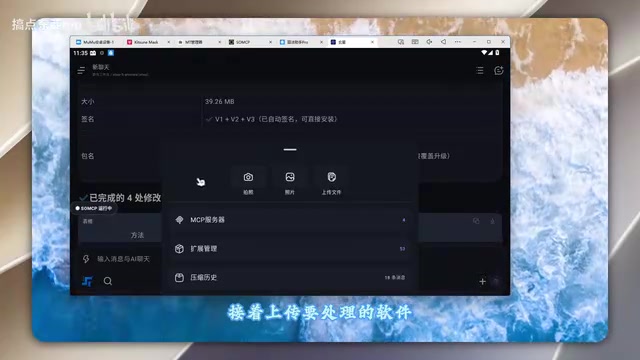
Next, upload the application file to process — it will be opened via MT Manager. The creator's demo task is "removing ads from a specific app." Describe the goal to the AI in natural language, and it will begin autonomously analyzing the app's structure, locating the ad logic, and attempting to modify it.
Notably, the process does not succeed on the first try. The AI encounters issues along the way and sometimes requires multiple follow-up prompts and retries. In the creator's demo, it wasn't until the ninth round of conversation that the AI produced a usable result: an ad-free build of the app. An application that originally displayed ads launched cleanly after processing.
What This Approach Represents
The most interesting aspect of this case isn't the ad removal itself — it's the viable path it demonstrates for AI agents using specialized toolchains to complete complex tasks. The MCP protocol unifies previously siloed reverse engineering tools (file management, algorithm hooking, resource editing) into "skills" that AI can orchestrate, with the large model playing the role of reasoning and decision-making.
However, the limitations deserve clear-eyed acknowledgment. Nine rounds of conversation before success indicates that AI remains unstable for precise reverse engineering operations — it's more of an "assistant" than a replacement for human expertise. For users unfamiliar with reverse engineering fundamentals, there's often no clear path forward when the AI gets stuck. Additionally, the entire workflow depends on a rooted environment and specific frameworks, making it non-trivial for general users to replicate.
A final reminder: Android reverse engineering involves software copyright and end-user license agreements. This article and the original video are purely educational. Do not use these techniques for any infringing or illegal purposes. AI lowers the technical barrier — but it doesn't change the legal boundaries of what you can do with it.
Related articles

Gaussian Process Bandit Optimization: Exploration Strategies and Inference Regret Guarantees
Cumulative regret guarantees in Bayesian optimization fail to reflect final recommendation quality. This article examines a new study that provides inference regret guarantees for Gaussian process bandit optimization through exploration query strategies and fill distance analysis, validated on hyperparameter optimization and control tasks.

The Most Detailed Codex Guide on Bilibili: From Installation to Real-World Practice
The most detailed Codex guide on Bilibili: from app store installation to daily work mode configuration, with a real coffee shop project demonstrating file organization, data extraction, dashboard creation, and other practical tasks. Learn to use Plan Mode and desktop pets to leverage Codex efficiently.

Appearance Compensation in Volume Rendering: Why RGB Accuracy Cannot Guarantee Density Correctness
Volume rendering research reveals that volumetric data perfectly reproducing external RGB views may still contain density errors: appearance compensation can double central density and keep external rays unchanged even when L2 error exceeds 14.52%. Density recovery depends on appearance capacity, spatial resolution, and measurement design.