Your AI Agent Doesn't Need a Bigger Model — It Needs Better Context

AI Agents fail due to broken context, not model size — Redis + MCP builds memory that compounds across sessions.
This article argues that AI Agent failures stem not from insufficient model capability but from broken context. It identifies three classic failure patterns — dead ends from data silos, errors from stale state, and collapsed workflows from latency — and proposes four rules for production-grade context: navigable, fresh, fast, and compound. To address the fragmented data pipelines most teams struggle with, it introduces a two-tier working/long-term memory architecture and demonstrates with Redis + MCP how a coding Agent can automatically retrieve semantically relevant past conventions in a new session and extract durable facts from ordinary conversation.
Why Does Your Agent Keep Getting Things Wrong?
When an AI Agent underperforms, most teams' first instinct is to swap in a larger, more powerful flagship model. But a report from Redis and extensive production experience both point to the same conclusion: Agent failures are rarely caused by a model that isn't smart enough — they're caused by broken context.
In other words, giving your Agent structured, precise context almost always beats upgrading to a massive flagship model. The real problem isn't intelligence — it's getting the right information into the model's hands at the right time. This article breaks down the most common architectural failure patterns in Agents, then walks through a hands-on Redis + MCP example showing how to build a context layer that actually remembers.
Three Classic Context Failure Patterns
Consider a customer service Agent. A user asks about the status of their order — a seemingly simple task that hides three categories of critical failure.
Dead End
The Agent retrieves the support ticket, but the ticket and order records live in separate data silos with no relationship path between them. When the model can't "see" the associated data, it does what language models do best — it hallucinates.
Stale State
The Agent finds the order, but the data comes from an export made 12 hours ago. The package actually shipped this morning, yet the Agent confidently tells the user "it hasn't shipped yet." Data freshness directly determines whether the answer is right or wrong.
Latency
The Agent gets the right data, but only after making eight sequential round-trip calls across three different APIs. By the time it finally responds, the user has already closed the session. Latency alone can bring down an entire workflow.
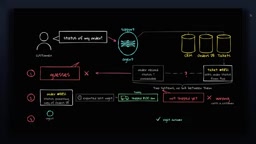
In all three cases, the model's reasoning ability is fine. The root cause is broken context — and this kind of failure often happens without you ever noticing.
Context Engineering ≠ Prompt Engineering
Many people conflate Context Engineering with Prompt Engineering, but they operate at completely different levels.
Prompt engineering is about how you structure the initial instructions you give the model: tweaking wording, adding a few few-shot examples, enforcing an output schema. It's essentially polishing a static string — useful, but it only touches the input layer.
Context engineering is about building the entire runtime environment around the model — a live system that determines what state the Agent can see at every step: which customer record to fetch, which live status to check, and how to deliver all of it fast enough for production. In short: prompt engineering is what you say to the model; context engineering is what you build around it.
The term "Context Engineering" emerged around 2025 alongside the scaling of Agent applications in production. The core insight is this: language models already have plenty of reasoning capacity — the bottleneck is what information the model can actually see at inference time. Traditional prompt engineering is typically offline and static: an engineer writes a template once, and it barely changes at runtime. Context engineering is dynamic and runtime-driven: before every invocation, the system decides what data to fetch, how much, and in what structure to inject into the model's context window. This distinction becomes especially critical in long-horizon Agent scenarios, where a single conversation can trigger dozens of tool calls and each step's input is dynamically assembled from the previous step's output — complexity that a static prompt simply cannot handle.
Four Mechanical Rules for Production-Grade Context
Revisiting the failure patterns above, a context system that's truly production-ready must satisfy all four of these conditions simultaneously:
- Navigable: The Agent must be able to traverse relationships between entities — users, orders, tickets — rather than blindly keyword-searching raw text.
- Fresh: An Agent acting on stale state will only "confidently make mistakes."
- Fast: When a task triggers dozens of sub-queries, query latency compounds directly into a broken workflow.
- Compound: This is what most systems overlook. Today, when an Agent session ends, its context is wiped. Tomorrow, when the same user returns, the model has to relearn who they are, what conventions they use, and where things went wrong last time. A truly efficient production system should get smarter with use, accumulating what it has learned over time.
Why Most Teams Can't Build This
The root cause is organizational fragmentation. Imagine three teams: Team A built a standalone vector database for document search — it works great. Team B wrote their own persistence scripts on a different storage layer — also works great. Team C stitched together yet another set of tools.
The problem is none of them know about each other. Six months later, you have a dozen disconnected data pipelines, no one can guarantee data freshness, and every new Agent spends most of its time rebuilding context plumbing from scratch. This is the reality in most engineering organizations today.
Making Context Compound Across Sessions: Two Types of Memory
For an Agent's context to accumulate over time, it needs two kinds of memory.
Working Memory is the scratchpad for the active task — it holds immediate tool calls and execution state. It's cleared when the session ends.
Long-term Memory stores persistent facts that must survive across sessions and runs: project decisions, environment configuration, debugged edge cases.
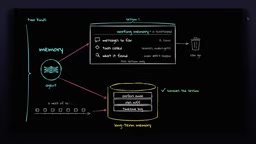
The real challenge is how facts flow between the two. You can't expect users to manually tag every fact, so you need an automated memory layer that parses conversations in the background and extracts durable facts. When a new session starts, it uses semantic search to pull only the historical facts relevant to the current task. The engine also needs to handle deduplication and expiration — discarding transient noise while pinning permanent project rules. Only then can context be navigable, fresh, fast, and compound all at once.
The distinction between working memory and long-term memory is borrowed from human memory models in cognitive science. In Agent system engineering, the two have very different storage requirements. Working memory demands ultra-low latency and high throughput, so it typically lives in process memory or an in-memory database like Redis and is cleared at session end. Long-term memory needs to be persistent and semantically searchable, so it's typically stored as vector embeddings in a database with a vector index, enabling approximate nearest-neighbor (ANN) retrieval by semantic relevance rather than exact keyword matching. Redis Stack, through its built-in RediSearch module, supports both hash storage and vector indexing within the same instance — letting a single Redis deployment serve both memory types and eliminating the architectural complexity of introducing a separate vector database.
Hands-On: Giving Your Agent Memory with Redis + MCP
The author demonstrates this using a DeepSeekAd harness paired with a Flash model. Out of the box, this harness has no cross-session memory — and that's exactly the gap being filled.
The approach is to connect a Redis Agent Memory Server via an MCP Server. Underneath, Redis stores each memory as a hash with an attached vector, enabling semantic retrieval rather than simple keyword matching. Integration requires just a single YAML file: declare an MCP server named redis memory, use the last segment of the URL as the namespace so everything this Agent stores is scoped to this project. Once started, the model queries the MCP server for available tools and receives ten of them — create, search, edit, delete memory, and more.
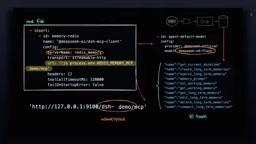
The experiment runs across two sessions. In Session A, the author tells the Agent a few project conventions: use uv for dependency management, ruff for linting, and every function must be pure and return a new tuple. Because MCP is connected, the Agent first checks its memory, finds it empty (a clean start), then calls the tool to create long-term memories, storing those three facts separately in Redis. Querying the memory server reveals the raw hashes for all three entries, complete with text, namespace, user, topic, and the vector used for semantic retrieval.
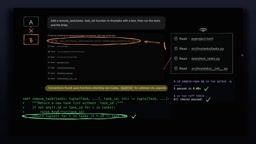
Session B is a brand-new session in the same repository with no chat history. The author asks it to add a remove task function with tests, then run the tests and linter. Before reading any files, the Agent calls the search-long-term-memory tool, retrieves the previous conventions, and then writes the code. The resulting diff is pure functions returning new tuples — an exact match to the described style — and uv run test returns five passing tests.
Two Validation Experiments
The first experiment validates whether retrieval is truly semantic. The author asks the memory server "which linter and package manager does this repo use?" — neither keyword appears in the stored memories — yet the system still returns ruff with the lowest distance. This proves it's doing semantic search, not keyword matching.
The second experiment validates whether memory can grow autonomously. The author pushes an ordinary conversation into working memory (the user mentions a preference for type annotations and descriptive test naming) without explicitly asking for anything to be stored. But the server logs show "extraction completed, one memory extracted" — the Agent automatically extracted the useful information from the conversation and wrote it into Redis-backed long-term memory. The system learns from use and compounds over time.
MCP (Model Context Protocol) is an open protocol proposed by Anthropic in late 2024, designed to define a standard interface for interactions between AI models and external tools and data sources. Before MCP, every Agent framework had its own tool-calling conventions, leading to deep coupling between tool implementations and frameworks that made reuse difficult. MCP standardizes this layer: tool providers (MCP Servers) declare their capability lists in a unified format, and clients (models/Agents) dynamically discover and invoke these tools at runtime, communicating via JSON-RPC. For memory use cases, this means the Redis Agent Memory Server only needs to implement the MCP interface once to be reused directly by any MCP-compatible coding Agent (Claude, DeepSeek, Cursor, etc.) without per-framework adaptation. This is exactly why "integration requires just a single YAML file."
Conclusion: Build a Memory Layer, Not a Bigger Model
Everything in this walkthrough points to one clear takeaway: the quality of the context you provide matters more than the parameter count of your model. To get there, Agents need a solid memory layer — Redis is a great example of one — accessible via an MCP server from any coding Agent. This approach continuously delivers better context to the Agent without sacrificing accuracy or performance, and it gets smarter the more you use it.
Next time your Agent gets something wrong, don't rush to upgrade to a bigger model. First, check whether the context you're feeding it is already broken.
Related articles

Python 3.15 New Feature: Is the sentinel Type Better Than None?
Python 3.15 adds the sentinel type, using named unique sentinel objects to replace None and bare object(), resolving confusion among missing values, explicit emptiness, and invalid input while avoiding type hint failures.

Deep Learning's Three Architectures and the Universal Approximation Theorem: A Complete Guide to MLPs, CNNs, and Transformers
Explaining the inductive bias differences among MLP, CNN, and Transformer, the existence meaning of the Universal Approximation Theorem (UAT), and the role of Taylor expansion in approximation analysis, while clearing up common misconceptions.

GitLab Emergency Patch Release: Analysis of Critical Security Fixes
GitLab releases critical patch 19.5.1, sparking 355 points of discussion on Hacker News. This article analyzes the background, upgrade steps for self-hosted instances, and verification points to help DevOps teams respond quickly to security updates.