Your Data Might Get Bombed? Another Reason to Self-Host
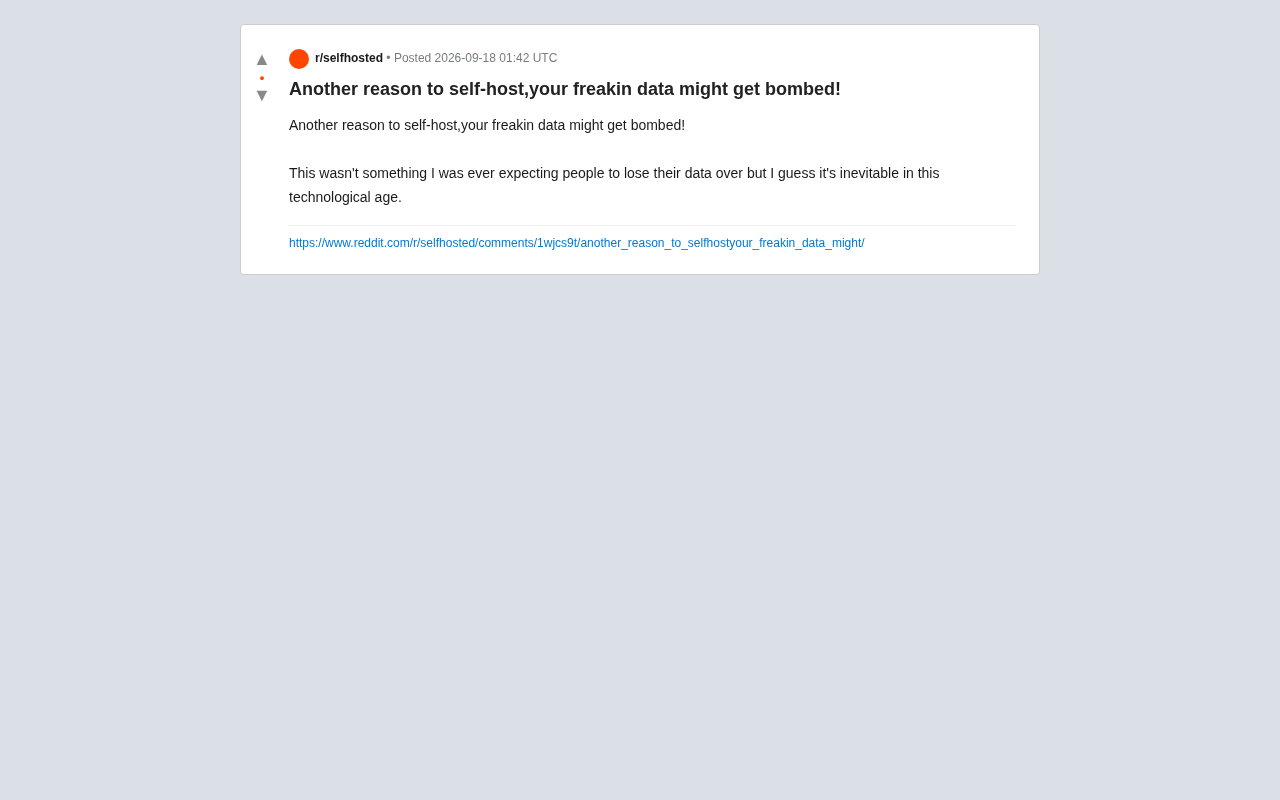
A Reddit post about data getting "bombed" makes the case for self-hosting and the 3-2-1 backup rule.
A Reddit user's joke about data getting "bombed" highlights the physical risks of centralized cloud storage and the uncomfortable truth that cloud users don't truly own their data. The article explores the core value of self-hosting — data sovereignty, privacy, and long-term availability — along with mature open-source tools like Nextcloud, Immich, and NAS systems. It also cautions that self-hosting alone isn't enough: the classic 3-2-1 backup rule (3 copies, 2 media types, 1 off-site) is essential. The ideal strategy combines self-hosting with off-site backups for both privacy and disaster resilience.
A Reddit Post That Got People Thinking
A Reddit user published a post with a title that was equal parts funny and sobering: "Another reason to self-host, your freakin data might get bombed!"
The poster admitted this wasn't a scenario they'd ever imagined people would lose data to — yet in an era of deep technological dependence, the risk suddenly feels very real. That short post touched on a question that self-hosting and data storage communities have long debated: when your data lives on someone else's infrastructure, how much control do you actually have over it?
The Hidden Risks of Centralized Cloud Services
Most everyday users have grown comfortable entrusting their photos, documents, and backups to cloud providers. The model is convenient: access from anywhere, automatic sync, seemingly unlimited storage. But behind that convenience lies complete dependence on third-party infrastructure.
Data centers are not indestructible. Beyond the familiar risks — providers shutting down, accounts wrongly suspended, policy changes — physical disasters are just as real: fires, floods, power outages, and the extreme scenario hinted at in that post. When all your data sits in someone else's server room, the fate of that machine directly determines the fate of your memories and files.
The post resonated because its exaggerated framing cuts through something most people quietly ignore: you don't truly own the data you store in the cloud — you're only renting access to it.
Why Self-Hosting Is Getting More Attention
Self-hosting means running services and storing data on hardware you control — whether that's a NAS at home, an old PC, or a rented dedicated server. In recent years, as open-source tooling has matured, the barrier to entry has dropped considerably.
The core appeal of self-hosting is ownership:
- Data sovereignty: Your data lives on your own devices, free from third-party policies or business decisions
- Privacy protection: Your personal data isn't used for ad profiling or model training
- Long-term availability: No risk of a service suddenly shutting down and leaving your data stranded
The open-source community offers a rich ecosystem of self-hosted alternatives — Nextcloud as a Dropbox/Google Drive replacement, Immich as a Google Photos alternative, and various NAS operating systems for integrated management. These tools make it possible for individuals and small teams to build their own "private cloud."
A NAS (Network Attached Storage) is the most common hardware form in the self-hosting ecosystem. It's essentially a compact server designed for storage, typically living at home or in an office, providing file access, automatic backups, and media streaming over a local network or the internet. Popular products like Synology and QNAP offer graphical operating systems that keep the technical bar relatively low; others opt to build their own using a standard PC with open-source systems like TrueNAS or Unraid. Apps like Nextcloud and Immich can run directly on a NAS or home server — Nextcloud is a fully-featured private cloud drive with file sync, calendars, and collaborative documents, while Immich is built specifically for photo and video management and can replicate the AI-powered organization and timeline experience of Google Photos. The maturity of these open-source solutions has transformed "building your own cloud" from a niche pursuit into something any technically curious person can realistically achieve.
But Self-Hosting Isn't a Silver Bullet
It's worth being clear-eyed here: self-hosting alone does not equal absolute safety. The extreme "data gets bombed" scenario in that post is actually one of self-hosting's weak points too — if all your data lives on a single device at home, a fire, theft, or hard drive failure can wipe out everything just the same.
True data security has never been a choice between "cloud vs. local." It's the classic 3-2-1 backup rule:
- Keep at least 3 copies of your data
- Store them on 2 different types of media
- Keep 1 copy off-site
In other words, self-hosting solves the control problem, while off-site backup solves the disaster resilience problem. The ideal strategy combines both: keep your primary data self-hosted for privacy and autonomy, while distributing encrypted backups across multiple locations — including at least one off-site or cloud copy as a last line of defense.
The 3-2-1 backup rule was popularized around 2005 by photographer and data recovery expert Peter Krogh, and has since been widely adopted in both enterprise IT and personal data management. Its core logic is using diversity to guard against single points of failure: 3 copies ensure you still have redundancy if one is damaged; 2 different media types (e.g., hard drives combined with optical discs, tape, or cloud storage) prevent a single media type from failing in bulk; and the 1 off-site copy protects against localized disasters like fire, flood, or theft. In practice, "off-site" can mean cloud storage (services like Backblaze B2 and Wasabi are commonly recommended in self-hosting communities for their low cost), or a rotating external drive kept at a friend's or family member's home. A typical self-hosting strategy looks like this: a local NAS holds the primary data and real-time backups, while encrypted snapshots are periodically synced to at least one off-site location — forming a complete, resilient system.
From a Joke to a Serious Question About Data Resilience
This post used humor to make a serious point. It's a reminder for every digital-age user to take a fresh look at how they store their data: are your photos, documents, and project files sitting in just one place? If something happened to that place, could you get them back?
For everyday users, there's no need to immediately build a complex self-hosted setup — but at minimum, developing a backup mindset is essential: keep copies of important data in multiple places. For technically inclined users, self-hosting offers a path to reclaiming control over your data, as long as backup and redundancy are treated with equal seriousness.
We often don't recognize the value of data until it's gone. Regardless of which approach you take, the ultimate goal of every discussion on this topic is the same: making your data resilient — capable of surviving and recovering from the unexpected.
Related articles
Three Stages of AI LLM Testing: A Practical Guide from Core Concepts to API Calls
A learning path for testers covering LLM fundamentals, prompt engineering, OpenAI SDK calls, API Key vs Token differences, streaming output, RAG, and Agent systems.
Vercel's Chief of Software Looks Back: The Evolution of Agent Building — From Multi-Agent Chains to File System Agents
Vercel's Chief of Software Andrew recaps the agent-building journey at AI Engineer: from giant prompts to multi-agent chains, monolithic memory, file system agents, and the open-source EVE framework.
Tencent's Open-Source BSK in Action: Letting AI Take Over Your Already-Logged-In Browser
Tencent's open-source BSK (Browser Skill Kit) lets AI take over your real, logged-in Chrome via WebSocket. We break down the architecture, setup, and three key pitfalls from real-world testing.