Yuzu Sync: The rsync Folder Sync Powerhouse on Mac

Yuzu Sync uses the rsync engine and multiple safety mechanisms to make local folder syncing on Mac lightweight.
Yuzu Sync is a Mac menu bar app built around a built-in rsync engine, offering mirror, copy, and two-way sync modes for scenarios like backing up to an external SSD, archiving to a NAS, and keeping a working directory consistent across devices. It uses a three-layer safety design: preview changes before execution; archive replaced or deleted files for 30 days; and identify target disks by UUID rather than name, refusing to sync to a wrong disk with the same name. The app supports task scheduling, requires macOS 14 or later, and received 77 votes on Product Hunt, ranking 9th for the day. It doesn't replace cloud sync services but targets backup and sync needs between local folder pairs.
Mac users often need to keep content consistent across multiple folders—backing up projects to an SSD, syncing photos to a NAS, or keeping a working directory in two-way sync across two devices. There's no shortage of sync tools on the market, but they're either too bloated or hide too many details. Yuzu Sync takes a lighter path: a small menu bar app with a built-in rsync engine that turns mirror, copy, and two-way sync into everyday operations you can preview, schedule, and trace back.
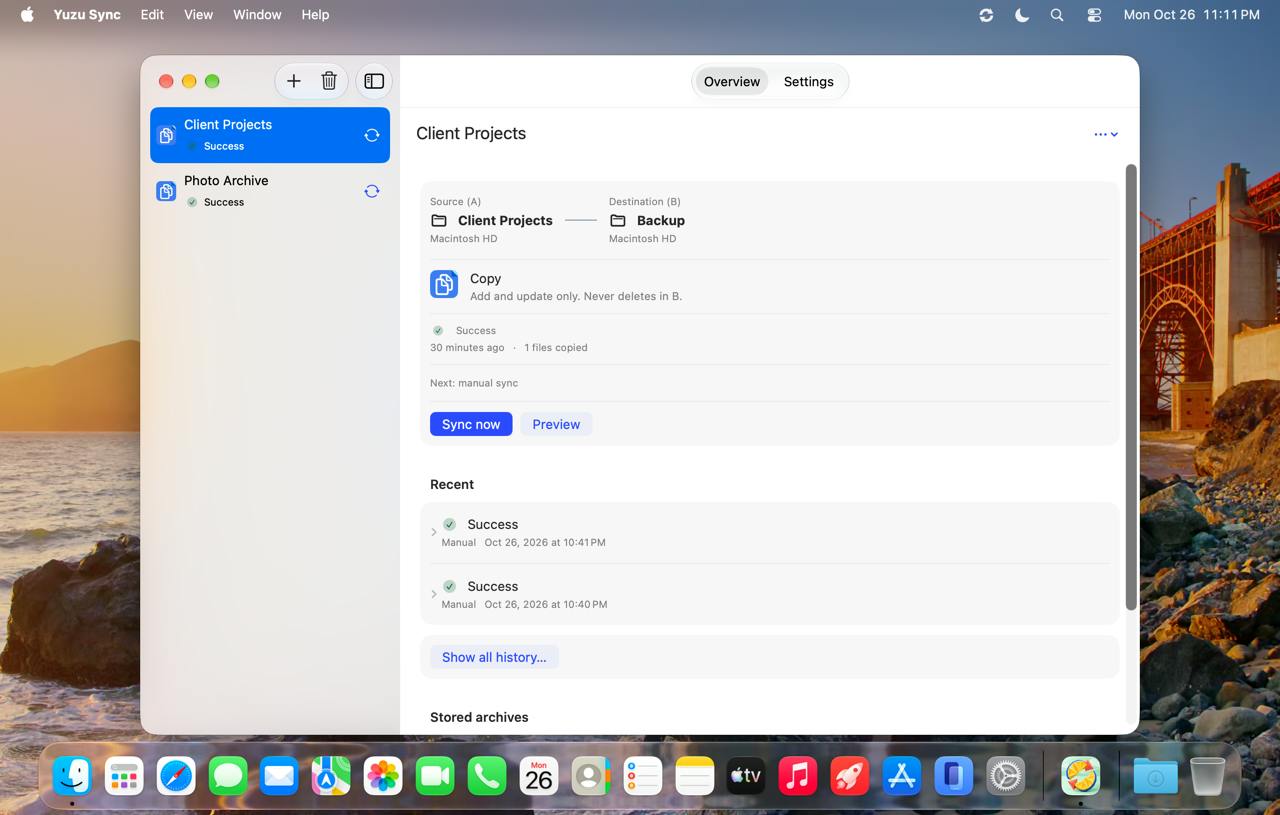
Core Features: Three Sync Modes, One rsync Engine
At its heart, Yuzu Sync is a graphical wrapper around rsync. rsync has been battle-tested in the file sync space for years, but its command-line arguments aren't friendly to ordinary users. Yuzu Sync breaks it down into three intuitive modes:
- Mirror: Makes the destination folder exactly match the source folder, removing any extra files. Ideal for syncing a project to an external SSD for backup.
- Copy: One-way incremental copying only, without deleting existing files at the destination. Ideal for archiving photos to a NAS.
- Two-way Sync: Fills in gaps on both sides, ideal for keeping a working directory consistent across multiple devices.
According to the product page, all three modes run on the built-in rsync engine, meaning it inherits rsync's incremental transfer capability and won't do a full copy every time.
How rsync's incremental transfer works: rsync avoids full copies thanks to a "rolling checksum" algorithm. During sync, rsync doesn't compare file contents directly; instead, it splits the destination file into fixed-size blocks and computes weak and strong checksums, then compares them against the source file as it slides along. Only blocks whose checksums don't match are transferred, while matching blocks reuse the existing data at the destination. This mechanism is especially efficient for scenarios where "a large file has only a few changes," such as virtual machine disk images or large database backups. Yuzu Sync inherits exactly this capability, so all three modes transfer only the differences on repeated runs rather than re-copying the entire folder each time.
Safety Design: Preview First, Execute Later
The biggest worry with sync tools is accidental deletion or overwriting. Yuzu Sync builds two layers of protection here.
The first layer is change preview. Before running any sync task, you can see which files will be added, overwritten, or deleted, then run it once you've confirmed everything is correct. For scenarios like mirror mode that delete extra files at the destination, preview is practically essential.
The second layer is the archive mechanism. According to the official description, Yuzu Sync archives every replaced or deleted file for 30 days rather than silently deleting it outright. That means even if you overlook a file during preview, you have a one-month buffer to recover it. For operations like syncing photos to a NAS, this design significantly reduces the psychological burden.
rsync's --dry-run and deletion semantics: On the command line, rsync can simulate execution with the --dry-run (or -n) flag, reporting only the changes that would occur without actually writing to disk—this is precisely the underlying basis for Yuzu Sync's "change preview" feature. Deletion behavior, meanwhile, is controlled by the --delete family of flags: mirror mode typically corresponds to --delete, which removes files at the destination that don't exist at the source; copy mode doesn't enable deletion and only does incremental appends. Note that rsync's deletion is the logical result of "making the destination match the source" rather than a standalone delete command, so the "to be deleted" files listed in the preview are essentially the extra portion at the destination. Understanding this helps users judge whether the mirror mode preview results match expectations.
Disk Identification: Using UUIDs to Avoid Syncing to the Wrong Disk
External disk letters and names change frequently—today it's called "SSD," tomorrow it might become "SSD 1." If a sync tool only recognizes names, it could write data to the wrong disk.
Yuzu Sync's approach is to remember the disk's UUID rather than its name. When it finds that a currently mounted disk has the same name but a mismatched UUID, it refuses to run the sync. This detail was specifically mentioned in the source material, showing the team treats "syncing to the wrong disk" as a risk worth taking seriously. For users who frequently plug and unplug multiple external drives, this mechanism is far more reliable than relying on volume labels alone.
Volume UUID vs. mount point: On macOS, every disk partition has a universally unique identifier (UUID) generated or written by the file system, viewable via the diskutil info command. It's independent of the volume label (such as "SSD"), which users can change at will. When the system mounts a disk, it actually uses the device node and mount point path, while the volume label is just a display name. When two disks share the same name, the volume label alone can't distinguish them, but the UUID remains unchanged after formatting and is globally unique, making it suitable as proof that "this disk is the same disk configured when the task was set up." Yuzu Sync records the UUID and compares it on mount, essentially performing an identity check at the mount layer, which is more robust than relying on paths or names.
Scheduling and Menu Bar Experience
Yuzu Sync is a menu bar app that lives at the top of the screen and doesn't take up Dock space. You can set schedules for sync tasks so they run in the background on a plan without manual clicking each time.
Product information shows it requires macOS 14 or later. On Product Hunt, it received 77 votes, ranking 9th among products of the day in the Productivity category. This data suggests it has attracted a group of Mac users interested in efficiency tools, but the discussion volume isn't large yet—with only 2 comments.
Who It's For
Yuzu Sync's positioning is clear: it doesn't try to replace cloud sync services like Dropbox or iCloud, but rather solves the problem of syncing between local folder pairs. The target audience includes:
- Developers who need to mirror project directories to an external SSD for cold backups;
- Photography enthusiasts who want to copy photos from a Mac to a NAS;
- Users who want to keep a working directory in two-way sync between two local disks.
If what you need is continuous cloud sync across devices and networks, or team collaboration scenarios, Yuzu Sync isn't designed for those needs. It's closer to a local tool that "makes rsync safer and easier to use."
Conclusion
Yuzu Sync's approach isn't complicated: use the mature rsync engine as the foundation, shore up safety gaps with preview, archiving, and UUID disk identification, then lower the barrier to entry with a menu bar app and scheduling. For Mac users familiar with rsync but tired of writing command-line commands every time, it offers a lightweight middle option. The product's discussion volume on Product Hunt isn't high yet, and whether the actual experience is stable and whether archive recovery is smooth still needs more user feedback to verify.
One-line Summary
Yuzu Sync uses the rsync engine and multiple safety mechanisms to make local folder syncing on Mac lightweight.
Paragraph Summary
Yuzu Sync is a Mac menu bar app built around a built-in rsync engine, offering mirror, copy, and two-way sync modes corresponding to scenarios like backing up to an external SSD, archiving to a NAS, and keeping a working directory consistent across devices. It uses a three-layer safety design: preview changes before execution; archive replaced or deleted files for 30 days; and identify target disks by UUID rather than name, refusing to sync to a wrong disk with the same name. The app supports task scheduling, requires macOS 14 or later, and received 77 votes on Product Hunt, ranking 9th for the day. It doesn't replace cloud sync services but targets backup and sync needs between local folder pairs.
Related articles
Diving into PostgreSQL Internals: A Free, Open-Source Guide to Database Principles
*The Internals of PostgreSQL* is a free online book covering process architecture, storage layout, query processing, MVCC concurrency control, and WAL logging—ideal for DBAs and backend engineers who want to understand database internals.

Hinton Warns Again: We Might Be Better Off Without AI
Geoffrey Hinton's remark that we might be better off without AI sparks Hacker News debate. This article analyzes the two layers of meaning, the shift in tech community attitudes, and counterarguments questioning the "better off" baseline—plus what it means for AI practitioners.

Why The Legend of Zelda: Ocarina of Time Never Fades
Why is The Legend of Zelda: Ocarina of Time still a classic after all these years? This article analyzes its paradigm revolution from 2D to 3D, its relationship with Breath of the Wild, and why its design philosophy remains timeless.