Zed Editor v1.28.0-pre Preview Released: A Look Ahead to the 1.28.x Series

Zed repository shows the v1.28.0-pre pre-release tag, marking 1.28.x entering internal validation.
Zed's GitHub repository shows the pre-release tag v1.28.0-pre for commit 8e1ba5b, tagged by the bot account zed-zippy with a GitHub-verified signature; the commit message points to a 1.28.x preview prepared for team member @JosephTLyons. The page only discloses the tag name, commit hash, timestamp, and 2 Assets, with no changelog or feature descriptions, so specific changes require the official release notes or a diff comparison. The article emphasizes that the significance of the tag lies in the time point rather than the content: development on 1.28.x is proceeding normally, the preview is aimed at testers willing to take risks, and ordinary users should continue to wait for the official 1.28.0 release.
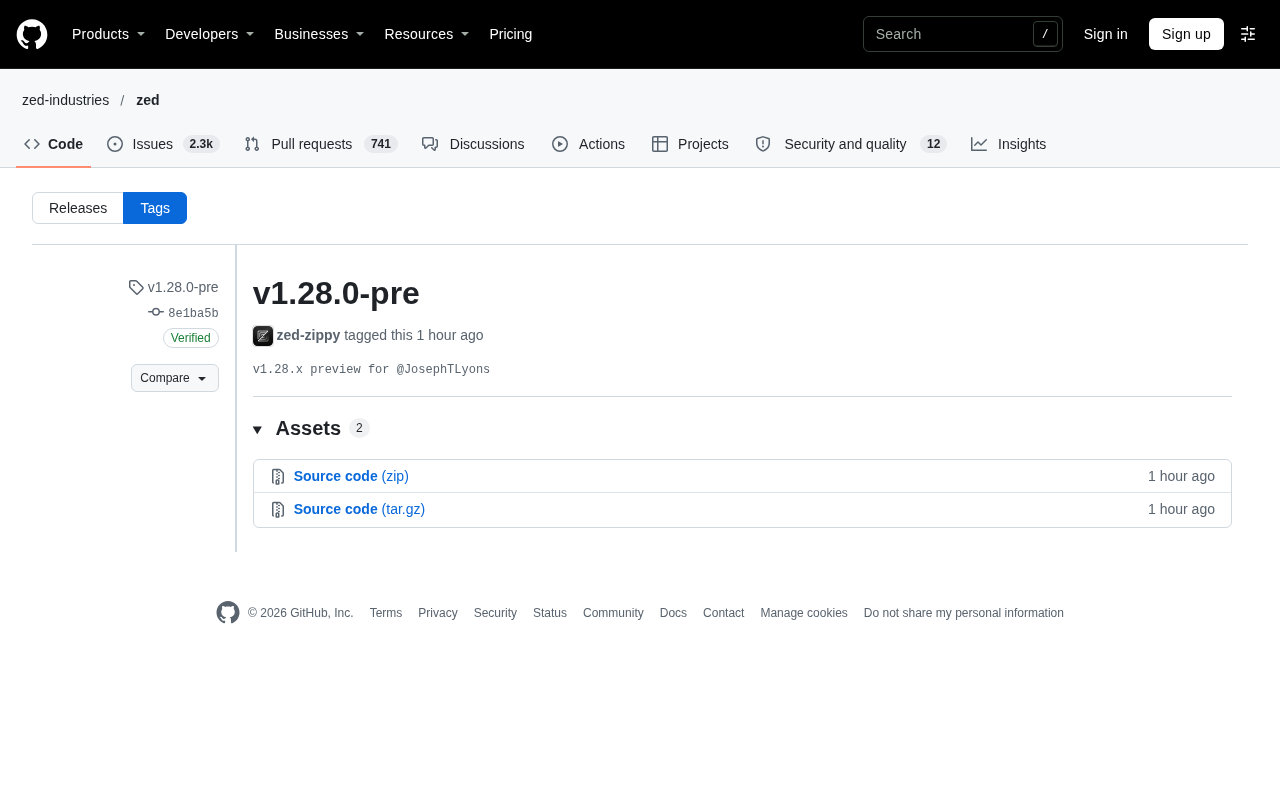
A new pre-release tag v1.28.0-pre has appeared in the GitHub repository of the code editor Zed, corresponding to commit 8e1ba5b. This is a typical pre-release action, meaning that development work on the 1.28.x branch has entered a stage where it can be validated externally.
What a pre-release signal typically means
The information visible from the repository page is quite limited: the tag was created by zed-zippy, the commit has a GitHub-verified signature (GPG key ID: B5690EEEBB952194), and the commit message mentions that this is a v1.28.x preview prepared for @JosephTLyons. The page also shows 2 Assets entries.
In Zed's release process, such pre tags usually serve several purposes: allowing contributors and internal testers to validate build artifacts in advance, paving the way for the official release, and locking the scope of changes within the 1.28.x series. @JosephTLyons is one of the core members of the Zed team, indicating that this preview has a clear internal testing purpose rather than being an official update for ordinary users.
Pre-release tag is a common release management mechanism in the Git and GitHub ecosystem. Under the Semantic Versioning (SemVer) specification, versions with suffixes such as -pre, -beta, and -rc are considered "lower than" the corresponding official version, and package managers and update channels typically exclude pre-release versions from automatic upgrades for stable users based on this. GitHub's Release page also provides a "Set as a pre-release" checkbox; once checked, the version will not appear in the repository's "Latest release" marker, nor will it be selected by default by most dependency auto-update tools. Therefore, applying a pre tag is both an external signal and a technical isolation mechanism, allowing build artifacts to be downloaded and validated without disturbing users on the stable channel.
Zed's release cadence is also worth mentioning: Zed adopts a relatively high-frequency iteration approach, with stable and preview versions (Zed Preview) distributed in parallel, and the preview channel available to users who want to experience new features early. The practice of automatically tagging and generating build artifacts by bot accounts (such as zed-zippy) in the repository is a typical CI/CD automated release pipeline, reducing inconsistencies caused by manual operations.
What can be inferred from the commit information
GitHub's verified signature only proves that the commit indeed comes from the corresponding account on GitHub; it does not directly indicate the quality of the code content. The commit message itself does not include a changelog, new feature descriptions, or a list of fixes, so what exactly changed will require the official release notes or a diff comparison to confirm.
The only facts that can be confirmed at present are: the tag name, commit hash, timestamp (November 4, 15:12), verification status, and the person responsible for tagging. Any speculation about "what features were added" lacks supporting material.
GitHub verified signature means that a Git commit or tag has been signed with a GPG, SSH, or S/MIME key, and GitHub can verify the signature against the public key registered to that account. What it guarantees is that "this commit was indeed created by the holder of the private key behind that account, and the content has not been tampered with since signing" — it is proof of origin and integrity, and has nothing to do with whether the code is correct or has been tested. The GPG key ID given in the article is used to identify the specific signing key. It is important to understand this: the verified badge is often misread as "code quality is guaranteed," when in fact it only answers two questions: who committed it and whether it has been modified.
Commit hash, such as 8e1ba5b, is the prefix of the SHA-1 digest computed by Git over the commit content. It is unique and can be used to precisely locate a specific commit. Using git show 8e1ba5b or the repository page's compare view, you can view the specific diff of that commit relative to the previous version, which is also the correct entry point for subsequently verifying the changed content.
Practical significance for users
For ordinary users, v1.28.0-pre is not a version that should be installed immediately. Pre-release builds often contain changes that are not yet stable and are suitable for developers willing to take risks and provide early feedback. If you are using the stable version of Zed, you can simply continue to wait for the official release of 1.28.0.
For those following Zed's evolution, the appearance of this tag indicates that development on 1.28.x is proceeding at a normal pace. What is worth watching next are the changes listed in the official release notes and the specific build artifacts (installation packages for different platforms) provided in Assets.
Assets (build artifacts) are the downloadable files attached to a GitHub Release page, typically including installation packages, archives, or checksum files for various platforms. For a cross-platform editor, Assets often cover macOS (Intel and Apple Silicon), Linux (deb/rpm/AppImage, etc.), and multiple Windows architectures, so the number of entries varies with the supported platforms. The "2 Assets" mentioned in the article is a relatively small number, which may be related to only some artifacts being uploaded during the pre-release stage, or artifacts being distributed in other ways (such as an auto-update server). To actually validate a preview version, you should choose the package from Assets that matches your system, and note that pre-release builds generally do not guarantee compatibility with configurations and plugins.
Conclusion
The value of this information lies in the "time point" rather than the "content": Zed's 1.28.x series has entered pre-release validation. Filling in feature details requires waiting for the official release notes; this article makes no guesses about undisclosed changes.
Related articles
 Tech Frontiers
Stylome Bot Slammed as Useless Junk: Why Do AI Detection Tools Keep Failing?
Reddit users test the Stylome AI detection bot: Gemini-rewritten text judged human-written, consistently low confidence. An analysis of AI text detection's technical dilemmas, privacy concerns, and credibility crisis in community governance.
 Tech Frontiers
When AI Becomes a Productivity Divide: Clarity or "AI Psychosis"?
A civil engineer's deep use of agentic AI boosted efficiency but bred contempt for peers who refuse to learn. Is this clarity or AI psychosis? An analysis of the cognitive and psychological challenges behind the AI productivity divide.
 Tech Frontiers
Opus 5.5 Benchmark Scores Climb, Community Says Its "Weights Are Blessed"
Reddit community discusses Opus 5.5's rising scores on the Benchmaxxing Bench, with users describing its performance as "weights are blessed." This article interprets the community reaction and cautions against conflating benchmark scores with real capability.