Zed v1.21.0 Released: BYOK Support for Claude Opus 5.5 & GPT-6, Major Rendering Performance Improvements

Zed v1.21.0 brings BYOK support for the latest AI models, rendering improvements, and many bug fixes.
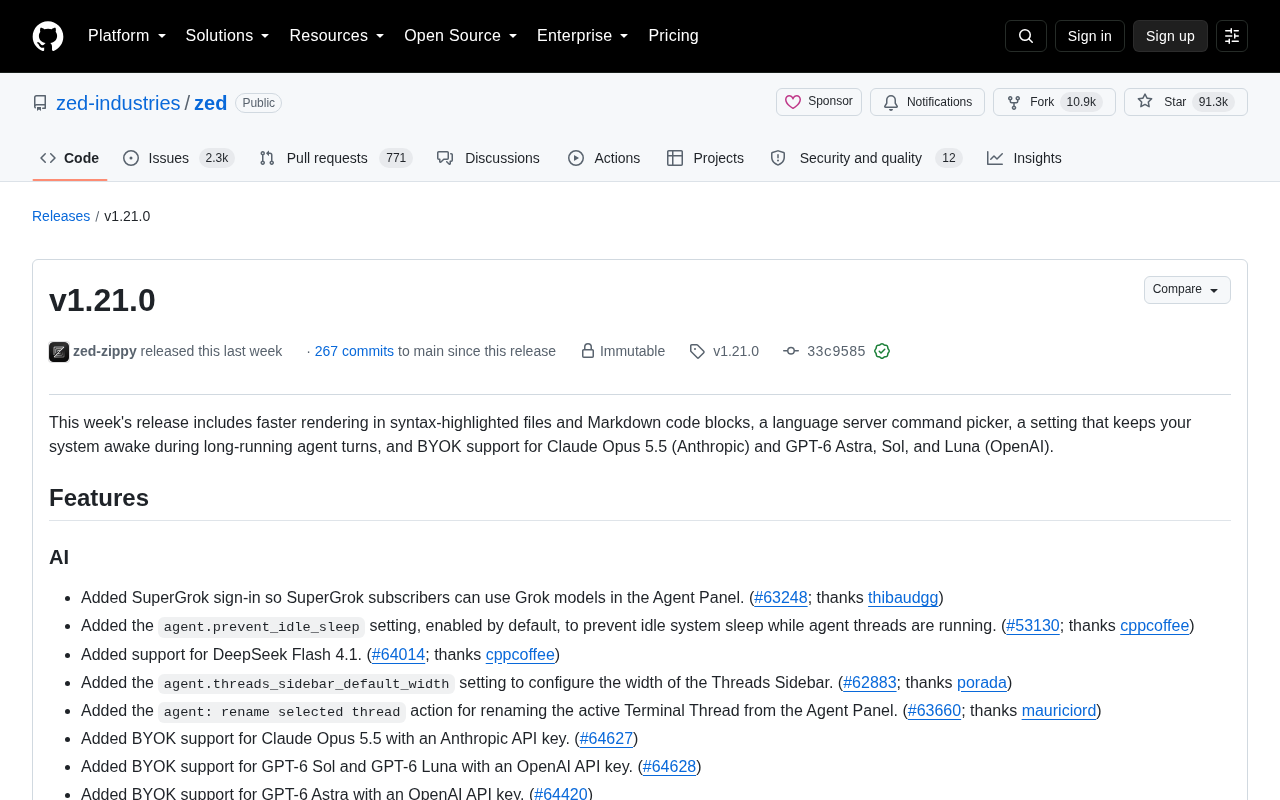
Zed v1.21.0 is a balanced release delivering both new features and stability improvements. On the AI front, it adds BYOK support for Claude Opus 5.5, three GPT-6 variants, DeepSeek Flash 4.1, SuperGrok, and Z.ai GLM, plus a new `agent.prevent_idle_sleep` setting to keep long Agent tasks from being interrupted by system sleep. Rendering performance is improved for syntax-highlighted files and Markdown code blocks, especially with minimap enabled. Language server support gains a command picker, `showDocument` support, and actionable inlay hints. Numerous bugs are also fixed, including Python non-UTF-8 crashes, Anthropic quota misclassification, and Ollama tool-call image issues.
AI-native code editor Zed has shipped its v1.21.0 update. This release focuses on three key areas: performance improvements for syntax highlighting and Markdown rendering, workflow enhancements in the Agent Panel, and BYOK (Bring Your Own Key) support for a range of the latest large language models. For developers who rely on Zed as their daily driver alongside AI-assisted coding, this is a highly practical update.
One-Stop Access to the Latest Major Models
This update makes its biggest moves on the AI front. Zed has added BYOK support for Claude Opus 5.5 (Anthropic) and three variants of GPT-6 — Astra, Sol, and Luna (OpenAI). Users simply configure their own API keys to call these models directly from the Agent Panel, without waiting for official hosted channels to come online.
Beyond these two major providers, the update also brings in several other model sources: SuperGrok subscribers can now use Grok models in the Agent Panel; support for DeepSeekAd Flash 4.1 has been added; and Z.ai GLM has been integrated via the Mistral provider. This "multi-vendor coexistence" strategy is a hallmark of Zed's product philosophy — giving developers the freedom to mix and match based on cost, speed, and quality rather than being locked into a single ecosystem.
One noteworthy new setting is agent.prevent_idle_sleep, which is enabled by default. It prevents the system from entering idle sleep while an Agent thread is running. Long-running Agent tasks — such as a complex round of automated changes — are often interrupted by system sleep when left unattended, and this toggle directly addresses that pain point. It's a small but very true-to-life quality-of-life detail.
What is BYOK? BYOK (Bring Your Own Key) means users obtain an API key directly from an AI provider and configure it in their editor or tool, bypassing the tool's own hosted subscription channel. The advantages are clear: costs are billed on a pay-as-you-go basis, which is typically more flexible than a subscription model; users can access a provider's latest models the moment they launch, without waiting for a middleware platform to catch up; and it gives users direct control over their API quota and spending limits. For developers who rely heavily on AI coding assistance, BYOK offers finer-grained cost control and the freedom to switch between models without platform restrictions.
Rendering Performance: Getting the Basics Right
As an editor renowned for GPU rendering and high performance, Zed has once again made optimizations at the rendering layer. This update improves editor rendering performance for syntax-highlighted files, with especially noticeable gains when the minimap (code overview) is enabled. The rendering speed of Markdown code blocks in the Agent Panel, hover popovers, and Markdown preview has also been accelerated.
These improvements may seem subtle, but they directly affect the day-to-day experience. As AI responses increasingly contain Markdown with large amounts of code blocks, the rendering load on the Agent Panel is actually quite significant — optimizing code block rendering has a tangible impact on smoothness in AI-assisted workflows.
Enhanced Language Server Capabilities
On the language support front, this release adds a language server command picker and support for language servers to open files and URLs via showDocument requests. Additionally, actionable inlay hints can now directly trigger language server actions, shortening the path to certain refactoring or fix operations.
Front-end developers will appreciate one thoughtful touch: when opening a file in an Emmet-supported language, Zed will proactively prompt users to install the Emmet extension. The extension development workflow has also been improved — outdated WASI SDKs are now automatically replaced, and extension compilation issues on Windows ARM64 and with large Tree-sitter grammars have been fixed.
A quick primer on LSP and inlay hints The Language Server Protocol (LSP) is a standardized protocol proposed by Microsoft in 2016. It defines the communication format between an editor (client) and a language analysis service (server), allowing a single language server to be reused by any LSP-compatible editor. The
showDocumentrequest mentioned in this update is an LSP capability that allows the server to proactively trigger the editor to open a file or URL — commonly used in cross-file "go to definition" scenarios. Inlay hints, introduced in LSP 3.17, allow language servers to insert inferred type annotations, parameter names, and other contextual information inline in the code without modifying the source itself. Making inlay hints directly trigger server actions further shortens the loop from "see the hint" to "execute the fix."
Polishing Configuration and Editing Details
A set of configuration options for power users is worth highlighting:
agent.threads_sidebar_default_width: customize the Threads sidebar width;editor.code_lens.foreground: independently customize CodeLens text color;read_only_filesnow supports"...", allowing project settings to extend inherited read-only modes;editor::ToggleCommentsgains acomment_empty_linesparameter to control whether empty lines are included when commenting multi-line selections. Zed's default keymap sets this totrue, while the VS Code keymap keeps itfalse— a thoughtful differentiation that accommodates users from both camps.
Git integration also sees a small improvement: the commit message editor now includes cut, copy, and paste context menu options. On Linux and Windows, the menu key and the cross-platform shift-f10 shortcut for opening the context menu have also been added.
Extensive Bug Fixes for a More Stable Experience
The list of fixes in this release is quite long, covering crashes, rendering issues, and AI workflow problems. Crash fixes include: crashes caused by Python interpreter output containing non-UTF-8 content, crashes from deleting expanded diff blocks in Helix mode via paste, crashes on Linux startup when local XKB keyboard definition files are unavailable, and crashes when typing on the blank side of a merge conflict.
AI-related fixes are equally significant: Anthropic quota exhaustion was being incorrectly classified as a "malformed request" rather than a payment issue; the Inline Assistant could not select an available fallback model when no default model was set; newly launched ChatGPT subscription models were not appearing in the model selector; and Ollama could not access images returned from tool calls — all now resolved.
Several interaction bugs on macOS and Linux Wayland have also been addressed, such as windows being restored to the wrong Space and drag-and-drop residue after cancellation. Overall, this is a solid weekly update that balances new features with stability improvements, continuing Zed's rapid iteration cadence.
Summary
Zed v1.21.0 doesn't deliver any single earth-shattering feature, but every change addresses a real pain point: the latest models are available immediately, Agent long-running tasks aren't interrupted by sleep, rendering is faster, and crashes are fewer. For developers who prioritize responsiveness and a truly AI-native experience, these accumulated details are precisely what continues to build Zed's reputation.
Related articles

Gaussian Process Bandit Optimization: Exploration Strategies and Inference Regret Guarantees
Cumulative regret guarantees in Bayesian optimization fail to reflect final recommendation quality. This article examines a new study that provides inference regret guarantees for Gaussian process bandit optimization through exploration query strategies and fill distance analysis, validated on hyperparameter optimization and control tasks.

The Most Detailed Codex Guide on Bilibili: From Installation to Real-World Practice
The most detailed Codex guide on Bilibili: from app store installation to daily work mode configuration, with a real coffee shop project demonstrating file organization, data extraction, dashboard creation, and other practical tasks. Learn to use Plan Mode and desktop pets to leverage Codex efficiently.

Appearance Compensation in Volume Rendering: Why RGB Accuracy Cannot Guarantee Density Correctness
Volume rendering research reveals that volumetric data perfectly reproducing external RGB views may still contain density errors: appearance compensation can double central density and keep external rays unchanged even when L2 error exceeds 14.52%. Density recovery depends on appearance capacity, spatial resolution, and measurement design.