Zep v4 Launches: Making AI Agents Truly Fluent in Graph Navigation

Zep v4 splits knowledge graph interaction into search and navigation, letting Agents complete graph traversal in a single call.
Zep v4 tackles the inefficiency of AI Agents using knowledge graphs by refactoring graph interaction into two complementary capabilities: search and navigation. Search locates matching nodes; navigation pulls all neighbors and connecting edges from a node in one shot. Unlike the old model—where every hop required an extra API call and the Agent had to implement graph traversal logic itself—v4 completes each question in a single call. Using a ~300-node sales benchmark graph, the article shows that one navigation call for the Revenue Controls Committee returns 12 neighbor nodes and their edges, while the highest-degree hub node has 97 edges. v4 also offers degree-sorted list and bounded subgraph interfaces, and explicitly flags boundary limits so the Agent can distinguish partial views from the whole. These capabilities land in both the Dashboard graph assistant and the Context MCP Server.
AI Agents and knowledge graphs have always faced an awkward reality: the graph is stored well, but the Agent can't use it well. The traditional approach has the Agent pull a truncated edge list, then parse each node individually — every hop means an extra API call, which is inefficient and error-prone. The release of Zep v4 is changing this.
From "Search" to "Navigation": A Paradigm Shift in Graph Interaction
The core idea introduced in Zep v4 is splitting graph interaction into two complementary capabilities: Search is responsible for locating positions that match a query, while Navigation starts from a node and pulls everything directly connected to it.
This sounds simple, but the underlying change is fundamental. Before v4, an Agent that wanted to traverse a graph had to fetch a capped edge list, then parse each node one by one. The problem: every hop required an additional API call, and the Agent had to handle both retrieval and the logical reasoning of graph traversal — an extremely heavy burden.
After v4, each question requires only a single call. The Agent can directly list the most-connected nodes, query a node's neighbors, or pull a bounded subgraph. More importantly, when results hit a limit, the API response explicitly says so — meaning the Agent knows it's seeing a partial view rather than the whole picture.
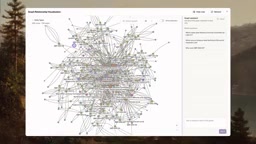
What are "Edge Lists" and "Node Resolution" in a Graph
In graph databases (such as Neo4j or the graph store underlying Zep), data is organized as "Nodes" and "Edges": nodes represent entities (such as the "Revenue Controls Committee" team), and edges represent relationships between entities (such as "sets rules for"). When an Agent queries a node, the API typically returns its neighbor information, but for performance and response-size reasons, that result is "truncated" — only the neighbor node's ID or name is given, without the attributes on each edge (such as relationship type, timestamp, or confidence). If the Agent wants to know "what type is this neighbor, and through what relationship is it connected," it must issue another query for each neighbor. This is so-called "per-node resolution," and it's the root cause of the extra API call required for every hop in the old model. Zep v4's navigation interface packages nodes, edges, and their attributes into a single response — essentially compressing "N+1 queries" into "1 query."
Hands-On Demo: Navigating a Sales Benchmark Graph
In its development project, Zep built a sales benchmark graph of about 300 nodes, covering review cases, approval workflows, teams, and portfolio records.
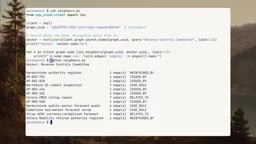
Take the Revenue Controls Committee as an example. This team is responsible for issuing approvals and setting rules for several review cases, so it has a large number of edge connections. A short Python script can complete the whole operation: first use node search to find the committee, then call graph.node.listNeighbors to get its neighbors.
The result — a single call returns 12 neighbor nodes, with each row representing a neighbor and the connecting edge between it and the committee. Among them, the Northwind case itself has 7 edges. In the old model without navigation capabilities, obtaining this information might require a dozen API calls.
Degree Sorting and Bounded Subgraphs: How the Agent Knows What It's Seeing
Zep v4 also provides two powerful tools:
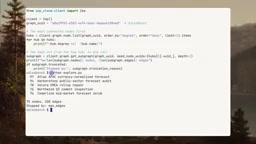
graph.node.list: sorts by degree, prioritizing the most-connected nodesgraph.getSubgraph: expands outward a specified number of hops from the top-ranked nodes in the list
In the demo, the highest-degree hub node is the Atlas APAC forecast case, with 97 edges. The two-hop subgraph pulled 75 nodes and 200 edges, while explicitly noting "stopped after reaching the edge limit."
This "boundary awareness" design is worth noting. The Agent can recognize that what it's currently seeing is a partial neighborhood rather than the complete graph, so it can proactively adjust its strategy — requesting fewer hops or adding filters — instead of mistaking a local view for the global one.
The Meaning of Degree and "Hub Nodes"
In graph theory, a node's "degree" refers to the number of edges directly connected to it. High-degree nodes often play the role of "Hubs": they connect to a large number of other entities and are often convergence points for business processes or key links in information flow. In knowledge graph scenarios, degree sorting has two practical values. One is discovering entry points: when an Agent is unfamiliar with a graph's structure, starting from the highest-degree nodes often quickly reaches core information without blind retrieval. The other is assessing graph density: in the demo, the Atlas APAC forecast case has 97 edges, a number that in itself signals the entity is a complex, cross-team, cross-process node worth exploring first. Note that high degree does not equal high importance — some "noise nodes" can also have high degree due to broad connections, so degree sorting should be used as an exploration heuristic, not the sole criterion for importance.
Dashboard Assistant and MCP Server Launch Together
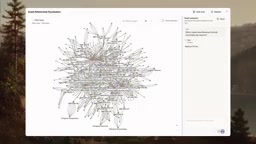
Zep's Dashboard includes a built-in graph assistant that uses exactly the same set of navigation tools. A user can ask "Which cases has the Revenue Controls Committee set rules for?" and then watch every retrieval step execute in real time: search the committee → list neighbors → return 5 cases, while highlighting the evidence chain on the graph.
This assistant is read-only and available to all customers. In the Context MCP Server, the same navigation capabilities are exposed as tools:
- GetNodeNeighbors: lists all entities connected to a given entity and the connecting facts
- GetSubgraph: explores a bounded multi-hop region around a seed entity
Search finds the right location in the graph, and navigation starts wandering from there. Degree-ranked hub nodes, neighbor lists with edge information, and bounded subgraphs that proactively declare their own limitations — these capabilities are all included in the v4 SDK and the Context MCP Server.
MCP and the "Tool Calling" Abstraction Layer
MCP (Model Context Protocol) is an open protocol proposed by Anthropic and increasingly adopted across the industry, used to let AI models connect to external data sources and tools in a standardized way. Its core idea is to encapsulate "capabilities" as individual Tools that models can call; the model initiates calls with structured JSON parameters, and the server returns structured results. By exposing graph navigation capabilities (GetNodeNeighbors, GetSubgraph) as MCP tools, Zep means any MCP-compatible Agent framework can call these capabilities directly without writing dedicated adapter code for Zep. This is precisely the technical landing point of elevating graph operations "from data fetching to tool calling": the Agent no longer treats the graph as a dataset for which it must write its own traversal logic, but as a set of declaratively callable capabilities. The value of this tool-calling abstraction layer is that it lets the model decide "what to do" while the server handles "how to do it efficiently."
Why This Matters to AI Agent Developers
Zep v4 solves a structural bottleneck in the signal chain. When an Agent needs to understand relationships between entities, making graph navigation a first-class citizen means: the Agent no longer needs to implement graph traversal algorithms itself, no longer needs to issue a separate request for every hop, and no longer needs to guess whether it has obtained complete data.
Elevating graph operations from "data fetching" to the abstraction level of "tool calling" lets the Agent focus its energy on reasoning and decision-making, rather than low-level data orchestration. For developers building knowledge-intensive Agent applications, this is an architectural evolution worth watching.
One-line Summary
Zep v4 splits knowledge graph interaction into search and navigation, letting Agents complete graph traversal in a single call.
Paragraph Summary
Zep v4 addresses the pain point of AI Agents using knowledge graphs inefficiently by refactoring graph interaction into two complementary capabilities: "search" and "navigation." Search locates matching nodes, while navigation starts from a node and pulls all its neighbors and connecting edges at once. Compared with the old model, where every hop required an extra API call and the Agent had to implement graph traversal logic itself, v4 lets each question be completed in a single call. Through a sales benchmark graph of about 300 nodes, the article demonstrates that one navigation call for the Revenue Controls Committee returns 12 neighbor nodes and their edges, while the highest-degree hub node has 97 edges. v4 also provides a degree-sorted list interface and a bounded subgraph interface, and explicitly notes in the response whether a boundary limit was reached, enabling the Agent to recognize that it's seeing a partial view rather than the whole. These capabilities are also delivered in the Dashboard graph assistant and the Context MCP Server.
Related articles

How Big Can Stars Really Get? The Physical Limits of the Largest Stars
Red supergiants are the largest stars by volume, with radii up to 2,000 times the Sun, engulfing the inner solar system. But there is no precise upper limit on stellar size—models predict up to 15,000 solar radii. The most massive blue stars are far smaller than red supergiants—biggest and heaviest are two different things.

Apple HomeView Smart Display Full Feature Breakdown: Wall-Mount or Desktop, $299
Apple launches HomeView, a $299 smart display with wall-mount and desktop options, 12MP camera for facial recognition, smart home control, music playback, and recipe step-by-step cooking. Full breakdown of watch faces, apps, privacy, and cooking integration.

Where Did the Promised New Studio Go? Craft Computing Answers After Five Years
Craft Computing's host responds to viewer questions: the new studio promised five years ago was shelved as construction costs soared from $30,000 to $75,000, and was replaced by a 168-square-foot garage conversion.