Zero-Code WeChat Mini Program Launch in 6 Minutes: A Beginner's Guide to Avoiding Pitfalls with WorkBuddy

WorkBuddy tutorial episode one clarifies AI-built Mini Program boundaries: AI handles code and uploads; accounts and review are yours.
In episode one of Bilibili creator "AI Makes Mini Programs" WorkBuddy series, 70 minutes clarify the boundaries and expectations for zero-foundation users building WeChat Mini Programs with AI. The creator notes 90% get stuck on expectations, not tech. AI generates page code, connects cloud services, manages uploads, and submits for review—but requirements, account registration, entity verification, filing, and compliance are the user's job. The article offers a doable formula (info display + form submission + simple queries), flags regulated industries, breaks down three cost accounts, and introduces three entry points plus a six-element prompt template.
Title
Zero-Code WeChat Mini Program Launch in 6 Minutes: A Beginner's Guide to Avoiding Pitfalls with WorkBuddy
Meta Description
Breaking down episode one of Bilibili creator WorkBuddyAd's tutorial series: zero-code WeChat Mini Program generation through AI conversation, clarifying the division of labor between AI and users, five feasible use cases and four no-go zones, three cost calculations, plus three entry points and the six elements of a good prompt—helping beginners avoid qualification and review pitfalls.
The barrier to WeChat Mini Program development is being completely flattened by AI conversational tools. In the first episode of the WorkBuddy series published by Bilibili creator "AI Makes Mini Programs," using a 70-minute, 12-episode format, the creator attempts to answer a specific question: how can someone with zero coding knowledge turn an idea into a genuinely launched WeChat Mini Program?
This is not another "click once and it's generated" feel-good tutorial. The creator pours cold water right from the start—90% of people get stuck not on technology, but on expectations. This episode doesn't teach operations; it only covers boundaries, yet it determines whether the remaining 11 episodes will go smoothly.
1. What WorkBuddy Does and Doesn't Do for You
Understanding the division of labor is the first cornerstone of the entire workflow. The creator breaks this down very clearly:
Four things AI handles
- Generates Mini Program page code—you don't need to understand the project structure, nor do you need to install WeChat DevTools locally
- Connects cloud services on demand—when you need to store data, enable login, or upload images, it will prompt you to confirm, and it handles the configuration
- Manages code upload, skipping the tedious steps of filling in version numbers and writing release notes in DevTools
- Submits for review, generates a trial version, and publishes tasks on your behalf
Four things you must do yourself
- Articulate your requirements: how many store locations, how appointment time slots are arranged—AI can't guess these
- Register a Mini Program account: the trial version lets you scan a QR code to try it out, but long-term operation requires your own account
- Entity verification and filing: WeChat's mandatory requirements—no one can do this for you
- Review compliance: whether the category is correct and whether content is compliant—the responsibility lies with the operator
The creator specifically emphasized an official statement—the Mini Program account always belongs to you. This means you're not publishing inside someone else's shell, and doing this long-term is safe.
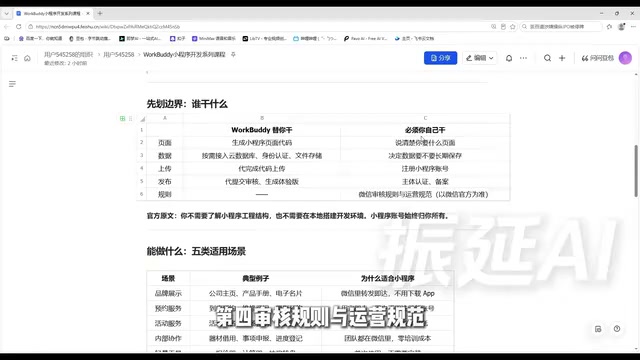
The WeChat Mini Program publishing process includes several mandatory steps, and understanding them helps clarify how far AI can go in doing things on your behalf. Developers must first register a Mini Program account on the WeChat Public Platform to obtain an AppID; then complete entity verification (enterprises need a business license, individuals need an ID card) and select a service category based on the business content. Since 2023, Mini Programs also require ICP filing before they can go live. After code development is complete, upload the code through WeChat DevTools to generate a trial version, submit for review (typically 1-7 days), and manually publish after approval. AI tools can cover operational steps like code generation, uploading, and review submission, but the binding of legal identity—account real-name verification, entity qualifications, and filing information—must be completed by the account holder personally.
2. Five Use Case Categories: Can Your Idea Become a Mini Program?
The official documentation provides five trial use case categories, and the creator paired each with examples:
| Type | Typical Examples | Why It Fits |
|---|---|---|
| Brand showcase | Company homepage, product manual, digital business card | Viewable instantly when shared within WeChat—more polished than a PDF |
| Appointment services | In-store booking, repair registration, photography appointments | Essentially a form plus a record table—use and done |
| Event services | Event registration, on-site check-in, surveys | Scan to enter—lowest distribution cost |
| Internal collaboration | Equipment lending, matter reporting, progress tracking | Teams are already in WeChat—zero training cost |
| Lightweight tools | Quote calculators, calculators, lottery wheels | Single-use scenarios—installing an app is out of the question |
The creator distilled a judgment formula: information display + form submission + simple queries. If you can combine all three, it's doable. Conversely, requirements needing real-time communication, high-frequency interaction, or high-performance rendering shouldn't be forced into a Mini Program.
The value of this formula is that it helps you avoid half the pitfalls before you even start.
3. Four Things You Can't Do—Recognize Them Early and Cut Your Losses
The creator says this part is "not pleasant to hear but must be said upfront":
Qualification barriers in regulated industries. Medical consulting, financial planning, education and training—technically all doable, but without the corresponding category qualifications, they won't pass review. The first step for these ideas isn't generating pages—it's checking category requirements on the WeChat Public Platform.
Review can't be circumvented. Submitting on your behalf doesn't mean guaranteed approval. Content compliance, category matching, and whether there's incentive sharing—the responsibility is entirely on the operator.
Heavy-interaction large applications. Chat rooms, live streaming co-hosting, high-performance games—Mini Programs are designed to be lightweight by nature, and forcing real-time combat will definitely result in a poor experience.
The first version won't be perfect. The AI-generated first version is "usable," not "stunning." Ugly pages and clunky interactions are normal. The right approach is conversational iteration—say what doesn't look good, where it doesn't look good.
WeChat Mini Programs manage service categories through a whitelist system, with different categories corresponding to different qualification requirements. For example, medical categories require a "Medical Institution Practice License," financial categories require relevant financial licenses, and education categories may require a school operating license. If actual functionality doesn't match the selected category, the review will be rejected; if the category itself requires qualifications the user cannot provide, submission is simply impossible. Additionally, Mini Programs prohibit incentive sharing, incentive following, and similar behaviors, and virtual payments are also restricted on Apple's iOS. Therefore, before starting, check the qualification checklist for "service categories" on the WeChat Public Platform to confirm whether your business scope falls within what's permissible—avoid getting stuck at the review stage after development is complete.
4. Three Cost Calculations—Do the Math Upfront
The creator breaks down cost expectations into three accounts—something many tutorials avoid discussing:
Time account: Generation takes minutes; review follows WeChat's pace, measured in days. The mental expectation should be "build fast, wait patiently."
Account account: The trial version has clear limitations. Long-term operation requires registering your own account and completing verification and filing. This step can't be skipped—it's the Mini Program's legal identity.
Cloud service account: Resources are allocated by membership tier, calculated independently per app, and refreshed monthly. Trial version: 10 apps, 5,000 points per app per month; Standard: 30 apps, 25,000 points per month; Advanced: 50 apps, 50,000 points per month; Flagship: 99 apps, 150,000 points per month. Exhausting one app's quota doesn't affect other apps. The creator reminds that specific numbers are subject to what's actually displayed in your account—don't treat them as promises.
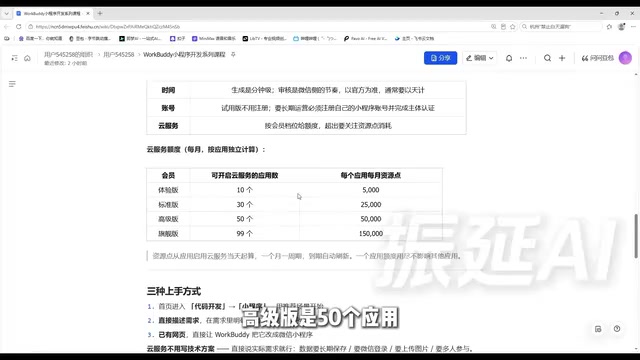
WorkBuddy's cloud service uses a "resource point" metering model, where resource points offset operations like cloud database reads/writes, cloud storage uploads/downloads, and cloud function calls. Different membership tiers allocate resource points monthly, calculated independently per app and refreshed each month. Once exhausted, that app cannot continue using cloud services for the month, but other apps are unaffected. This design suits parallel multi-app development, but it also means heavily used apps may exhaust their quota early. The creator reminds that specific numbers are subject to what's actually displayed in your account because the platform may adjust quota rules—users shouldn't treat the numbers in the tutorial as long-term commitments.
5. Three Entry Points and One Copy-Paste-Ready Prompt
Entry point one: Go to code development from the homepage, select Mini Program, and pick a recommended scenario close to your needs to modify. Suitable for people who haven't figured out their requirements yet—let the platform give you a starting point.
Entry point two: Describe your requirements directly—the most flexible and most commonly used, but with a hard requirement: you must explicitly write the words "WeChat Mini Program" in your requirements. Writing "help me make an appointment tool" versus "help me make a WeChat Mini Program for appointments" may result in one being a webpage and the other a Mini Program.
Entry point three: If you already have a webpage, have it converted directly into a WeChat Mini Program—especially suitable for those who've built H5 event pages.
Regarding cloud services, the creator offers a practical tip: no need to write technical specs—just speak plainly: "data needs to be stored long-term," "needs WeChat login," "needs image upload," "needs multi-person participation." It understands, and it will prompt you to enable things when needed.
The creator also provides a copy-paste-ready prompt template that contains six elements: who uses it, what they need to do, what pages are needed, whether login is needed, whether data storage is needed, and what style. Each of these six elements directly affects the generated result, and episode two will break them down one by one.
6. The Real Value of This Episode
The entire course is split into two tracks: the main track with six levels, each episode 9-10 minutes, walking through the complete journey from idea to launch; and the skills track with six levels, each episode 2-3 minutes, interspersed after corresponding main track episodes, teaching one skill you can pair with a copy-paste-ready prompt.
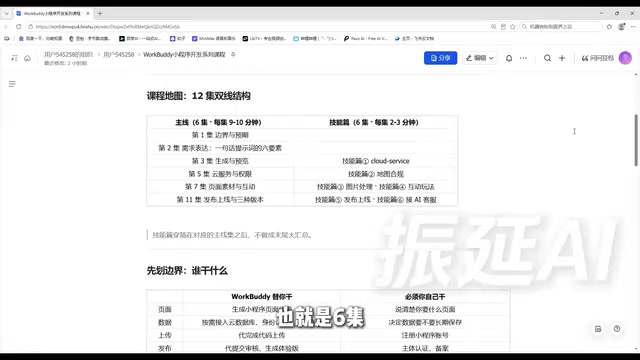
Episode one has no operations at all, yet it's the foundation for the remaining 11 episodes. The creator's summary is crisp: code and uploading are AI's job; account and review are yours. What's doable: information display, form submission, simple queries. What's not: bypassing qualifications and heavy-interaction large applications. Generation is fast, review is slow, and long-term operation requires your own account. Three entry points to get started; for cloud services, speak plainly.
Knowing which category your requirements fall into, how much time it will take, and whether qualifications are needed will make every subsequent step more stable. This is probably the least likable yet most essential episode to watch first among all "zero-foundation tutorials."
One-line Summary
WorkBuddy tutorial episode one clarifies the boundaries of AI-built Mini Programs: AI handles code and uploading; accounts and review are up to you.
Paragraph Summary
In episode one of Bilibili creator "AI Makes Mini Programs" WorkBuddy tutorial series, 70 minutes clarify the boundaries and expectations for zero-foundation users building WeChat Mini Programs with AI. The creator points out that 90% of people get stuck on expectations, not technology, and specifies that AI handles generating page code, connecting cloud services, managing uploads, and submitting for review—but requirement description, account registration, entity verification and filing, and review compliance must be done by the user. The article provides a judgment formula: information display + form submission + simple queries is doable; real-time communication and high-performance rendering are not suitable; regulated industries like medical, finance, and education face qualification restrictions. Costs split into three accounts—time, account, and cloud services—and three entry points plus a six-element prompt template are introduced.
Related articles

Random Pruning of the DPO Computation Graph: 1.4x Training Speedup and Lower Peak Memory
DPO training too slow and memory-hungry? This paper proposes a random pruning framework for the DPO computation graph, sampling independently across position, sequence, and branch dimensions; branch pruning achieves a 1.426x step-time speedup and cuts training time by about 30%, with in-depth attribution of memory and time gains.

Why Does JEPA Underperform MLM in Longitudinal EHR Representation Learning?
New study compares JEPA and MLM for longitudinal EHR representation learning on MIMIC-IV: three JEPA variants train stably without collapse but underperform MLM; target size, not heterogeneity, drives prediction error.

Transfer Learning + Visible Light Communication: A New Approach to Energy-Efficient Indoor Positioning
A study proposes a transfer learning-based visible light communication indoor positioning method, achieving 47% accuracy improvement on the BOSCH factory dataset, 67.5% model efficiency under high noise, and introducing the ME composite metric for energy-efficient positioning in energy-constrained industrial IoT scenarios.