Zero-Cost Claude Code in China: Setup and Hands-On Guide

A hands-on tutorial and explainer on connecting Claude Code to the domestic open-source model LongCat for free.
Based on a Bilibili creator's hands-on video, this article explains how to use the terminal AI Agent tool Claude Code at zero cost in China. It compares CLI and IDE plugin installation, focuses on replacing the official paid subscription with Meituan's open-source LongCat Flash Thinking (register for free tokens, create a key, edit settings.json and claude.json to skip official login), and demonstrates the "let the AI ask for requirements" trick to build a to-do web tool.
Claude Code is one of the most talked-about terminal AI Agents right now — it can write code, handle copywriting, and automate everyday tasks. But users in China typically face two barriers: complicated installation and configuration, and the high cost of the official subscription. Bilibili creator "AI 编程小助手" (AI Coding Assistant) released a hands-on tutorial showing how to connect Claude Code to the domestic open-source model LongCat for free, enabling zero-cost use. This article is based on that video and summarizes the key steps and the reasoning behind them.
Why Claude Code Is Worth Trying
Claude Code is essentially an AI Agent that runs in the terminal. Unlike ordinary chat models, it can directly read and write files, execute commands, and modify codebases — a programming assistant that does real work. Because of this, it places high demands on the underlying model's agent capabilities — the model can't just generate code off the top of its head, or it will easily introduce a flood of bugs.
The creator points out that Claude Code's use cases go beyond development to include writing copy and operating the computer to handle tedious daily work. That's why it's called "the hottest AI Agent tool."
The core difference between an AI Agent and a large language model is "the ability to act." An ordinary chat model can only generate text, whereas an Agent can call external tools, read and write the file system, execute terminal commands, and adjust its next action based on the results — forming a "perceive–decide–execute" loop. Claude Code packages this capability into the terminal environment, which is why it requires the underlying model to have stable multi-step reasoning and tool-calling (function calling) capabilities. A model without agent training tends to produce hallucinated commands or destructive operations on long-chain tasks — which is why Agent tool evaluations often focus on "task completion rate" rather than language quality alone.
Two Installation Methods: Command Line and IDE Plugin
The video divides installation into two camps. The first is the native CLI approach. On Windows, for example: open PowerShell, paste the install command, and wait for it to finish. But you can't use it directly yet, because the Claude Code install path is missing from the environment variables. You need to go to the user environment variable's Path entry, add the directory where Claude Code resides, restart PowerShell, and then you can invoke it.
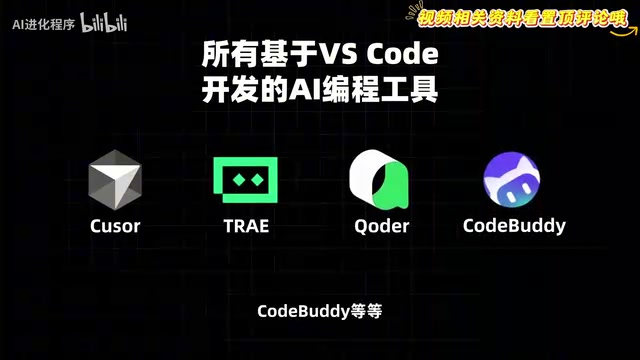
The second is installing via an IDE plugin. All AI coding tools built on VS Code — Cursor abroad, and Trae, Coder, CodeBuddy and others domestically — let you search for and install Claude Code in the plugin marketplace, then open it inside the software. For users unfamiliar with the command line, this path is friendlier.
The Core Step: Replacing the Official Subscription with LongCat
Installation is only the first step — configuring the LLM API is the key. If you have an official Claude account with a paid plan, you can simply log in and authorize via the web page as prompted. But the creator estimates that "99% of people don't have" an official subscription, so the focus is on the alternative.
According to the video, Meituan's open-source model LongCat Flash Thinking 2601 is already adapted to Claude Code and is currently free, with a substantial daily token quota per person. The model has 560 billion parameters and specializes in agent capabilities and deep thinking. The creator emphasizes that LongCat has a built-in deep reasoning mode: before acting, it breaks down complex logic and then generates code — which matters a lot for a tool like Claude Code that actually edits code and runs the terminal.

Breaking Down the Configuration Steps
The workflow is roughly as follows: open the LongCat API platform, register and log in, and you'll see a free grant of 500,000 tokens, refreshed daily; you can also click to apply for more quota by filling in your industry and use case — the creator says they got 5 million tokens. Then create a new key under the API Keys menu on the left and copy it, then open the API documentation page, where the official configuration info for connecting to Claude Code is already written out.
Next, open the .claude folder in your user directory, edit settings.json, paste in the configuration, replace the key with the value you just copied, and change the model name to LongCat's flash thinking version. After that, find claude.json in your user directory and add a new configuration item at the end to skip Claude's official login authentication — without this item, it will keep asking you to log in to the official account.
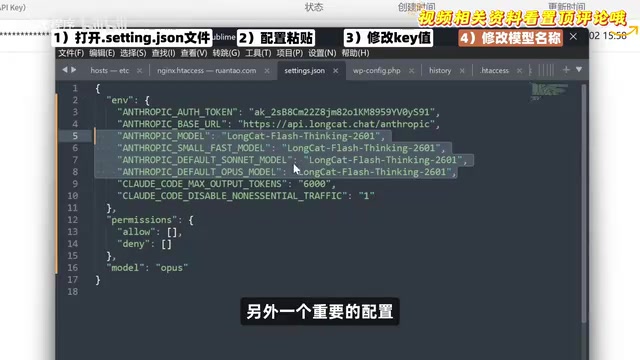
Finally, create a project directory on the desktop, switch into it in PowerShell, and run the Claude command to start chatting. When the creator asked the model "who are you," it answered that it was the official Claude model — but it was actually consuming LongCat tokens, as shown by the usage record on the API platform.
An API Key is the credential for calling an LLM service — essentially a secret string tied to an account and billing quota. Claude Code doesn't have a built-in model; it forwards requests through an endpoint compatible with the Anthropic API protocol, so as long as a third-party model platform provides an interface in the same protocol format, it can "pose" as the official backend. This approach is usually called API relay or protocol-compatible access. Note that with relay, requests pass through a third-party server, so conversation content and code snippets leave your local machine — assess privacy risks when sensitive data is involved. Token billing, rate limits, and model versions are all controlled by the third-party platform, and stability is not equivalent to the official service.
settings.json and claude.json are both local configuration files for Claude Code, typically located in the .claude directory under your home folder. The former mainly carries runtime parameters such as the model endpoint address (base URL), API Key, and default model name; the latter records metadata such as account login status, project history, and global preferences. Back up the original files before modifying them, and make sure the JSON syntax is correct — an extra comma or a missing quote will prevent the tool from starting. In addition, field names may change between Claude Code versions; if authentication or model calls fail after an upgrade, first check whether the configuration files were overwritten or whether fields have been deprecated.
Hands-On: Building a Small Tool with "Reverse Questioning"
The most interesting part of the video is developing a to-do web tool. The creator uses a trick: instead of directly telling the model which features to build, they let it ask them questions and confirm requirements through multiple-choice prompts.
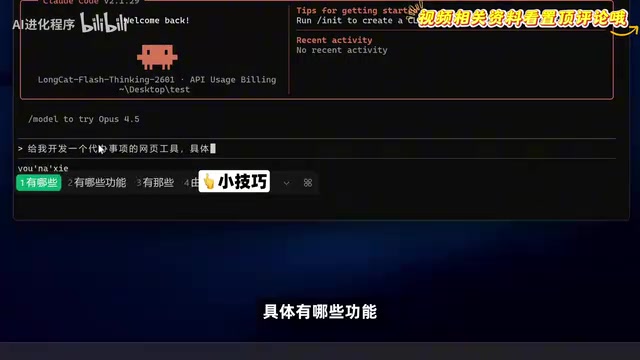
After thinking, the model first asks about core features (multiple choices via spacebar), then sequentially asks about data storage, UI style, and advanced features. If the options aren't enough, you can also type your own. Once requirements are confirmed, the model develops fully automatically and quickly completes the web-based to-do tool, with all previously confirmed features implemented. This "let the AI ask, you choose" interaction lowers the barrier to describing requirements and reduces back-and-forth revisions.
Web Experience and Applicable Boundaries
The creator adds that LongCat's Flash Thinking model is also available on the official website, where you can experience its "heavy thinking" capability more intuitively: after enabling deep thinking, the model invokes 8 thinkers to reason independently and then aggregates the results — suitable for breaking down complex problems.
It should be noted that the above information comes from a single creator's video demo; LongCat's free quota policy, model names, and configuration details may change as the platform updates, so refer to the official documentation. For users in China who want to try Claude Code at zero cost, this path offers an actionable starting point, but before using it in production, you should still verify stability and data security boundaries yourself.
"Multiple thinkers reasoning in parallel" is one type of inference-time scaling: before giving a final answer, the model generates multiple independent reasoning paths and then merges the results through aggregation or voting. This approach improves accuracy on complex math, logic, and planning tasks at the cost of more tokens and longer response times. Understanding this helps you choose modes wisely — no need to enable deep thinking for simple everyday Q&A, while requirement breakdown and architecture design are better suited to it, avoiding unnecessary waiting and quota consumption.
One-line Summary
A hands-on tutorial and explainer on connecting Claude Code to the domestic open-source model LongCat for free.
Paragraph Summary
Based on a Bilibili creator's hands-on video, this article explains how to use the terminal AI Agent tool Claude Code at zero cost in China. It first explains how Claude Code differs from ordinary chat models by reading/writing files and executing commands, then compares CLI and IDE plugin installation methods, and focuses on replacing the official paid subscription with Meituan's open-source model LongCat Flash Thinking: register on the API platform for free tokens, create a key, modify settings.json and claude.json to skip official login authentication, and you can chat normally. The hands-on section demonstrates the "let the AI ask for requirements" interaction trick to quickly build a to-do web tool, and notes that free policies and configuration details may change, so verify before production use.
Related articles

WorkBuddy Full Guide: How an AI Coworker Takes Over Workplace Automation
What is WorkBuddy? This article analyzes the core capabilities of this full-scenario AI agent: autonomous execution with deliverable results, local file processing, multi-agent parallelism, and workplace automation workflows, helping you judge its essential difference from ordinary AI chat tools.

The Truth About AI Agents: A Hundred Lines of Code + an LLM, Deconstructing the Agent's Underlying Logic
AI agents aren't a new AI species—just a language model plus tools, a loop, and a goal. Here's the underlying logic: how 100 lines of Python hit a 75% fix rate, why the harness beats the model, and Gartner's "agent washing."

AI Agent Deployment: Three Things Developers Should Do
AI Agent deployment doesn't require rushing into multi-agent systems. This article outlines an actionable deployment path and engineering acceptance thresholds for developers, covering human baselines, bounded single-agent scope, and a controlled code-modification loop.