Multi-Purpose Home Server Build Guide: Streaming + AI Inference + App Hosting on One Machine

A complete guide to building a multi-purpose home server for streaming, AI inference, and app hosting on a $500 budget.
This guide breaks down a real Reddit user's plan to build a multi-purpose home server handling Jellyfin streaming, Pi-hole ad blocking, web app hosting, and local LLM inference via Ollama. It covers hardware selection including dual RTX 3060 GPUs, CPU and memory considerations, multi-GPU parallelism for AI workloads, and whether a VPS is needed when Cloudflare Tunnel can provide free public access.
Why More Developers Are Choosing to Self-Host
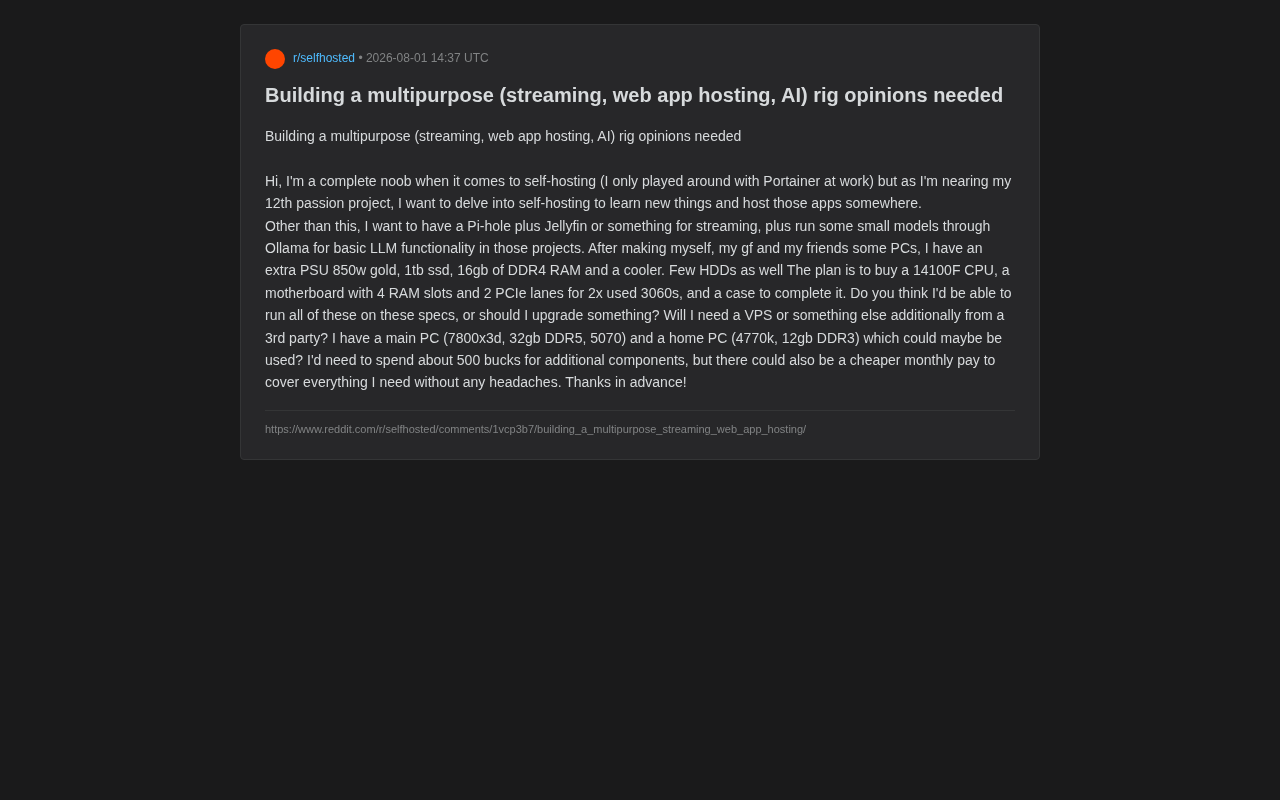
With the rise of personal projects, home media needs, and local AI inference, more and more tech enthusiasts are considering building an all-in-one home server. Recently, a Reddit user shared their build plan: they want a single machine to handle Web app hosting, Jellyfin media streaming, Pi-hole ad blocking, and running small local LLMs through Ollama, and asked the community for hardware configuration advice.
This is a very typical use case—it represents the mainstream scenario in today's self-hosting space: learning ops skills and hosting side projects, while also enjoying media entertainment and privacy protection, all with compute headroom reserved for AI capabilities.
What Is Self-Hosting? Why Is It Making a Comeback?
Self-hosting refers to individuals or organizations running internet services on hardware they own or control, rather than relying on third-party cloud platforms (like AWS or Google Cloud). Several forces are driving this trend: first, growing privacy awareness—users don't want personal data (photos, documents, browsing history) stored on someone else's servers; second, cost considerations—over the long term, the total cost of ownership (TCO) of a self-built server can be lower than ongoing cloud subscription fees; third, the motivation to learn—building and maintaining a server develops practical skills in Linux system administration, network configuration, and container orchestration. Reddit's r/selfhosted community has over 400,000 members, reflecting the vibrant growth of this space.
This article takes a deep dive into the configuration logic and common pitfalls of this type of multi-purpose server, based on this real-world case.
Hardware Configuration Breakdown: Is This Build Sufficient?
The Planned Core Hardware List
Here's what this user already owns and plans to purchase:
- Already owned: 850W Gold-rated PSU, 1TB SSD, 16GB DDR4 RAM, CPU cooler, several mechanical hard drives (HDDs)
- Planned purchases: Intel i3-14100F CPU, motherboard with 4 RAM slots and 2 PCIe lanes, two used RTX 3060 GPUs, and a case
- Budget: Approximately $500 for additional components
The overall approach is sound: SSDs for the OS and applications, large-capacity HDDs for media storage, and dual GPUs for AI inference workloads. But several details are worth examining more closely.
CPU and Memory: Potential Bottlenecks
The i3-14100F is an entry-level quad-core processor that's more than adequate for running Jellyfin, Pi-hole, and a few lightweight web applications. However, it's important to note that the 14100F lacks integrated graphics (the F suffix), meaning Jellyfin's hardware transcoding will rely entirely on the discrete GPUs (the 3060's NVENC encoder can handle this just fine).
About the i3-14100F's positioning: The Intel i3-14100F belongs to the 14th-gen Core (Raptor Lake Refresh) entry-level lineup, featuring 4 Performance cores (P-Cores) with 8 threads, a 3.5GHz base clock boosting to 4.7GHz, and a 58W TDP (89W maximum turbo power). The "F" suffix indicates no integrated UHD graphics, which saves a small amount of cost in a discrete GPU configuration but means the system cannot output any display without a dedicated GPU. For a server scenario, this CPU's single-core performance is sufficient for most web applications and container scheduling tasks, but 4 cores/8 threads may become a bottleneck when handling many concurrent connections or multiple active containers simultaneously. It's worth noting that the similarly-priced AMD Ryzen 5 5600 (6 cores/12 threads) performs better in multi-threaded scenarios, and the AM4 platform has abundant used motherboard options—making it a viable alternative.
The bigger concern is memory. 16GB DDR4 is clearly tight for a "streaming + ad blocking + multiple web apps + local LLM" combination. When Ollama runs models, even a quantized 7B parameter model consumes significant RAM and VRAM resources. An upgrade to at least 32GB or even 64GB is recommended—fortunately, the motherboard reserves 4 DIMM slots, making future expansion straightforward.
Dual RTX 3060 GPUs: The Core AI Inference Compute
Two used RTX 3060s (12GB VRAM versions) are the highlight of this build. The combined 24GB of VRAM is enough to run 13B or even larger quantized models, and enables reasonably smooth local LLM inference through Ollama.
Technical details of multi-GPU parallelism: The 12GB RTX 3060 uses a 192-bit memory bus with GDDR6 chips. In LLM inference scenarios, VRAM capacity directly determines the model size that can be loaded. Multi-GPU parallelism in AI inference has two main modes: Tensor Parallelism splits a single model's layers across multiple cards, reducing per-card VRAM requirements but increasing inter-card communication overhead; Pipeline Parallelism assigns different layers of the model to different cards. Ollama's underlying llama.cpp supports distributing model layers across multiple GPUs (controlled via the --gpu-layers parameter), but consumer platforms lack NVLink and other high-speed interconnects—inter-card communication through the PCIe bus creates bandwidth bottlenecks that prevent dual-card efficiency from reaching the theoretical 2x improvement. In real-world testing, dual 3060s in a PCIe 3.0 x16+x4 configuration typically achieve 40-70% inference speed improvement over a single card.
Two caveats to keep in mind: first, the motherboard must genuinely support dual PCIe graphics cards (many consumer-grade B-series motherboards significantly reduce bandwidth on the second PCIe slot); second, multi-GPU support in Ollama should be verified in advance, as not all models automatically distribute across cards.
Ollama and Local LLMs: Why VRAM Matters So Much
Ollama is an open-source tool designed specifically for running large language models (LLMs) locally, greatly simplifying the process of downloading, configuring, and running models—users can start a conversation with a single command (e.g., ollama run llama3). Technically, Ollama wraps inference engines like llama.cpp and supports GGUF-format quantized models. "Quantization" refers to compressing model weights from their original 32-bit floating-point numbers to 4-bit or 8-bit integers, dramatically reducing VRAM usage and computational requirements at the cost of slight precision loss. For example, Meta's Llama 3 8B model originally requires about 16GB of VRAM, but after 4-bit quantization only needs about 5GB, making it runnable on consumer GPUs. For the dual RTX 3060s in this build (24GB total VRAM), you can even attempt running low-precision quantized versions of 70B parameter models—inference will be slower but entirely usable.
Core Services Explained: Jellyfin and Pi-hole
Jellyfin: Your Private Netflix
Jellyfin is a completely open-source, free media server software, similar in function to commercial products like Plex and Emby, but without any paywalls or telemetry data collection. It organizes movies, TV shows, music, and photos stored on local hard drives into a Netflix-like interface, accessible via browser, mobile apps, or smart TV clients for anytime, anywhere playback.
Jellyfin's core technical challenge is "transcoding"—when a client device doesn't support the source video's encoding format (e.g., HEVC/H.265) or the resolution is too high, the server must convert the video to a compatible format in real time. This process is extremely compute-intensive; CPU software transcoding can max out a quad-core processor, while GPU hardware encoders (like NVIDIA's NVENC) offload this burden to the graphics card, dramatically reducing CPU usage. In this build, the RTX 3060's NVENC encoder can handle multiple simultaneous 4K transcode streams with performance to spare.
Pi-hole: A Network-Level Ad Firewall
Pi-hole is a network-level ad blocking tool that works completely differently from browser extensions (like uBlock Origin). It operates as the LAN's DNS server—when any device on the network initiates a domain name resolution request, Pi-hole matches the requested domain against a maintained blocklist (containing known ad servers, trackers, and malicious domains). Matched requests are returned with an empty address (0.0.0.0), blocking ad loading at the network level.
Its greatest advantage is coverage across all devices on the network—including smart TVs, IoT devices, and in-app ads on phones—without needing to install blocking software on each individual device. Pi-hole itself is extremely lightweight, capable of running smoothly even on a Raspberry Pi, with virtually negligible server resource consumption.
Do You Need an Additional VPS?
The user raised a key question: Besides this self-built machine, is a third-party VPS also needed?
The answer depends on two factors:
Public Internet Access and Network Stability
If you want to publish web applications to the internet, residential broadband typically faces issues like dynamic IPs, ISP-blocked ports 80/443, and limited upload bandwidth. Two mainstream solutions exist:
- Pure self-hosting + tunneling: Use tools like Cloudflare Tunnel, Tailscale, or frp to securely expose services without a public IP. This is the lowest-cost path, suitable for personal projects and demos for friends.
- VPS as reverse proxy: Rent a cheap VPS (a few dollars per month) as the entry point, tunneling back to your home server. This provides a stable public IP and domain while keeping heavy workloads local.
Cloudflare Tunnel deep dive: Cloudflare Tunnel (formerly Argo Tunnel) is a free service from Cloudflare that allows users to securely publish internal services to the internet without exposing a public IP or configuring port forwarding. It works by running a lightweight daemon called "cloudflared" on the local server, which proactively establishes encrypted outbound-only connections to Cloudflare's global edge network. When external users access your domain, traffic first reaches Cloudflare's CDN nodes, then is relayed back to your local server through the established tunnel. The security advantages of this architecture are significant: the home router needs no inbound ports opened, effectively preventing port scanning and DDoS attacks; it also automatically provides Cloudflare's SSL certificates, WAF firewall, and DDoS protection. The downsides are that all traffic passes through Cloudflare, potentially adding slight latency (typically 10-30ms), and you must trust Cloudflare as a middleman that can see decrypted traffic.
For a use case of "myself, my girlfriend, and friends," free solutions like Cloudflare Tunnel are more than adequate—no need to purchase an additional VPS in the short term.
Can Old Equipment Be Repurposed as a Server?
The user also has a main gaming rig (7800X3D + RTX 5070) and an old machine (4770K + DDR3). The old machine's DDR3 platform is too outdated with a poor power-to-performance ratio, making it unsuitable as a long-running server node—though it could serve as a learning environment or temporary test machine. The main gaming rig should remain independent to avoid server workloads impacting daily use.
Practical Advice for Self-Hosting Beginners
As someone who openly admits to having "only played with Portainer at work," this user's planning is already quite pragmatic. Here are some additional recommendations:
- Software stack selection: Consider building on Proxmox or Docker + Portainer as your foundation, using containers to isolate each service for easier management and migration.
On choosing between Proxmox and Docker: Proxmox VE is a Debian-based open-source virtualization platform that integrates both KVM virtual machines and LXC container isolation technologies, with a web management interface. It's particularly well-suited for home server scenarios because users can create multiple isolated virtual environments on a single physical machine: for example, one LXC container running Pi-hole, one VM running Windows for specific applications, and another VM with Docker running all remaining services. Docker is an application-level containerization solution that packages applications and their dependencies into images, achieving "build once, run anywhere." Portainer is a graphical management tool for Docker that lowers the command-line barrier. The two approaches can be combined: Proxmox as the underlying virtualization layer managing hardware resource allocation, with Docker running specific application services inside its VMs or LXC containers. This layered architecture facilitates backup, recovery, and migration in case of hardware failures.
- Take it step by step: Get mature applications like Pi-hole and Jellyfin running first, then gradually introduce Ollama and your own web projects—avoid stacking everything at once, which makes troubleshooting extremely difficult.
- Prioritize memory upgrades: Within the $500 budget, upgrading memory from 16GB to 32GB/64GB often delivers better value per dollar than any other single investment.
- Power and noise: Dual 3060s under full load consume significant power. The 850W PSU is adequate, but consider electricity costs and cooling noise for 24/7 operation.
Conclusion
The overall approach of this build is solid—pairing an entry-level CPU with dual RTX 3060s to address media, privacy, and AI needs simultaneously represents a classic home server configuration today. The real areas requiring attention are memory expansion and multi-GPU compatibility. As for whether a VPS is needed: for personal and small-scale use, tunneling tools can save you that expense entirely. The joy of self-hosting lies in building from scratch and iterating progressively—this all-in-one server is undoubtedly an excellent starting point for learning.
Key Takeaways
Related articles

KlientFlow Review: A Follow-Up Reminder CRM Designed Specifically for Freelancers
KlientFlow is a lightweight CRM built for freelancers, focused on follow-up reminders rather than data logging. This review analyzes its positioning, features, use cases, and limitations.

AI Engineer Growth Roadmap: From Programming Fundamentals to RAG and MCP Agent Development
A systematic AI engineer learning roadmap covering programming, math, ML, and data engineering foundations, plus frontier AI technologies like LLM, RAG, Agents, and MCP with free open-source resources.

The State of Pawn: The Survival Question for a Niche Game Mod Ecosystem
Pawn scripting language still has active ecosystem updates in 2026. From SA-MP to Open.mp, Pawn Studio and PawnPlus reveal the survival logic of niche game mod languages.