15 Biggest Tasks People Hand to AI: Image Generation and Writing Far Outpace Email
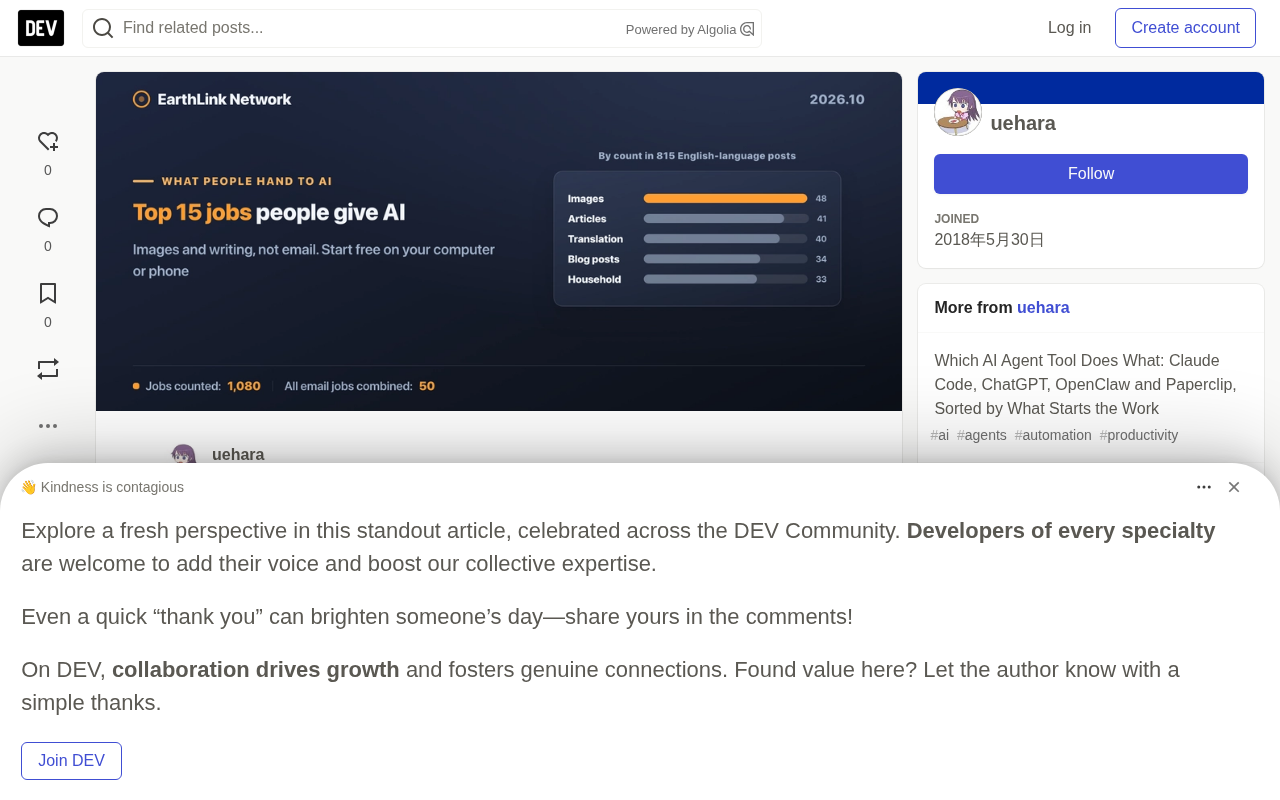
Based on a survey of 815 posts, image generation and writing are AI's most popular uses, and most tasks can be started for free.
A survey of 815 English-language posts shows image generation (48), article writing (41), and translation/proofreading (40) are the tasks people most often hand to AI, while writing emails ranks only 15th, with all email tasks totaling 50. The article notes AI runs in the cloud, so an existing computer or phone is enough to start for free, and the line between free and paid lies in usage volume, available models, and unattended operation. Free plans suffice for most everyday writing, summarizing, and queries, while paid plans (about $8 to $20 per month) mainly buy stronger models and scheduled unattended capability. It also lists ten zero-cost tasks, five steps from free to unattended, monthly cost estimates for three user combinations, five safety settings before handing over business data, and cost trade-offs for local running and always-on machines.
Survey Reveals: Image Generation and Writing Are AI's Most Popular Uses
What work do people actually hand off to AI? A survey based on 815 English-language posts delivers a surprising answer: image generation (48 mentions), article writing (41), and translation/proofreading (40) firmly hold the top three spots, while the traditionally assumed high-frequency scenario—writing and sending emails—ranks only 15th (20 mentions). All email-related tasks combined amount to just 50 mentions, on par with the single category of image generation.
This data comes from real user shares on Reddit, Hacker News, Dev.to, and Medium. The researchers excluded 539 software development tasks and ranked the remaining 1,080 non-programming tasks. One detail worth noting: about 85% of the Reddit content in the sample came from communities discussing AI applications, and many authors are developers, so the data reflects the preferences of early active users rather than the entire market. Even so, the top four categories remained unchanged after Japanese-language posts were included, indicating that the dominance of image and writing tasks is consistent across languages.
Free to Start: Your Existing Computer or Phone Is Enough
AI runs in the cloud, and you don't need to pay for hardware or a subscription to get started. ChatGPT, Claude, and Gemini all do their computation on their respective companies' servers; your device only displays the interface and performs local operations the AI requests, such as reading and writing files or driving a browser.
The system requirements published by vendors are mostly satisfiable by devices from several years ago: Claude Code requires macOS 13+ or Windows 10+, with 4GB of RAM; the ChatGPT Mac app requires macOS 14+; the browser version of Gemini has no special restrictions. A practical rule of thumb: a Mac from 2018 or later, or a Windows 11 PC, with 8GB of RAM. A phone is enough to handle one request at a time and to check and approve AI output.
Free plans do have usage limits. Claude's free tier resets its quota every five hours; Gemini's free tier has both five-hour and weekly caps, and neither publishes specific numbers. ChatGPT's free tier has no cap on everyday text chat, with limits concentrated in features like image creation, file uploads, and deep research. If you mainly ask text questions, you'll rarely hit the ceiling; but if you process a lot of images and files, the free plan may not be enough.
Where the Real Line Between Free and Paid Lies
The difference between free and paid shows up in three areas: usage volume, available models, and unattended operation. The smartest models are paid-exclusive: ChatGPT's free and Go tiers use the fastest, lowest-cost models, with stronger models starting at Plus; Claude's free tier offers Sonnet and Haiku, with the stronger Opus starting at Pro; on Gemini's free tier most questions are answered by lightweight models, and manually selecting a higher model requires payment.
For everyday writing, summarizing, and queries, free plans are usually sufficient. But for smarter answers and more natural writing, you need a paid plan: ChatGPT Plus ($20), Google AI Pro ($19.99), or Claude Pro ($20). ChatGPT Go ($8) uses the same lightweight models as the free tier.
Unattended operation is the main reason to pay. ChatGPT's free tier allows at most 3 scheduled tasks, at most once per day, and the time window is a vague range like "morning" or "evening." Precise timing and hourly runs require payment. For tasks like news collection that aren't sensitive to delivery time, the free tier may already be enough.
Project is a container feature in some AI chat products (such as Claude) used to organize long-term context. Within a Project, users can preset system instructions (for example, "You are a tech columnist") and upload multiple reference files (such as style guides and samples of past articles); every subsequent conversation within that Project automatically carries these instructions and files as background knowledge. Compared with the approach of re-pasting background material for each ordinary conversation, this significantly reduces repetitive input and keeps output style consistent. Free tiers usually limit the number of Projects you can create (for example, Claude's free tier allows 5), while paid tiers relax or remove the limit. Files in a Project are also subject to the data training policy, so check your privacy settings before placing client materials in one.
Ten AI Tasks You Can Start at Zero Cost
The article lists 10 specific tasks and how to start them for free. For writing articles and blog posts, you can put style notes and 3-5 past articles into a Project (a space for storing instructions and files; Claude's free tier allows 5), then request a draft. For deep research, Gemini Deep Research is free, and ChatGPT's free tier has a limited version.
For news collection, you can ask every morning for "news about X, with sources." For a morning briefing, show the AI your calendar and email each morning and ask about today's priorities. Email tasks can be done free in the US via Gmail's "Help me write" (personal accounts), or by connecting Gmail to Claude's free tier—but you always press the send button.
For meeting notes, you can use the summary feature built into your meeting app, or paste the transcript into a free chat. For social media posts, you can have AI write the text and images, then schedule the post for free in Meta Business Suite after checking it. For bookkeeping, you can paste photos of receipts and ask for entries, but accounting software is a separate bill. For Instagram data, you can screenshot the Insights page each month and paste it to the AI. For customer chats (WhatsApp), you can paste customer messages and ask for draft replies, which you then send.
Five Steps from Free to Unattended
The first step is asking for free: you make a request, the AI does the work, you use the result and send it yourself, at zero cost. The second step is scheduled runs on a paid plan: tasks execute at set times, or trigger when an email arrives, at a cost of about $8 to $20 per month. This is the main starting point for unattended operation.
The third step introduces an AI work system: customer messages become tasks, an AI worker drafts, and a human approves before sending. The software itself is free, but the AI inside runs on your paid plan and will quickly consume your usage limits. The fourth step is handing over approval authority: for tasks with fixed patterns, you allow the AI worker to send directly without asking, one task type at a time. The fifth step is moving to pay-per-use: only applicable to businesses answering thousands of customers unattended, billed per reply with a spending cap.
Costs rise because a single run of an AI work system reads far more text than a direct request. In the author's own Paperclip setup, the median of the most recent 185 runs read about 460,000 tokens. The subscription bill stays the same, but you hit usage limits faster, forcing you to upgrade or move to pay-per-use.
Monthly Cost Estimates for Three Combinations
For a self-employed person (blog, social media, morning briefing, bookkeeping), the minimum cost is just accounting software (from $27). Add Claude Pro at $20, and the briefing arrives every morning, with blog and bookkeeping drafts requestable more frequently. Social media scheduling stays free in Meta Business Suite.
For a small shop (WhatsApp customer service, Instagram posts and data, bookkeeping), the minimum cost is likewise just accounting software, paired with the free greetings and offline messages of the WhatsApp Business app. If you want AI to draft and you to approve, you need a free AI work system, a paid plan (such as Claude Pro at $20), an always-on computer (or a rented server), and per-message billing after WhatsApp's 1,000 free replies per month.
For an office worker (email, meeting notes, research, writing), the minimum cost is zero, provided the company pays for the meeting app and you use free AI. Covering all four with one plan, Google AI Pro at $19.99 offers AI within Gmail, Meet notes, and research features—but only for personal Google accounts. Before putting work email into a personal AI account, be sure to check your employer's rules.
Safety Baseline: Five Settings Before Handing Over Business Data
Some personal AI plans train models on your conversations by default unless you turn it off. Before showing client data to AI, the first setting is to turn off "train on my data." In ChatGPT, turn off "Improve the model for everyone" under Settings → Data Controls; in Claude, turn off "Help improve our AI models" under Settings → Privacy; in Gemini, turn off "Keep activity" in Activity.
Second, replace client names, phone numbers, and addresses before pasting, using "Client A" or "555-XXXX" instead. Google says human reviewers may read Gemini conversations, and even with Activity off, conversations are retained for 72 hours. Third, use temporary chats for one-off questions; ChatGPT's temporary chat is not used for training. Fourth, don't like or dislike conversations containing business data; Claude retains the data of conversations you rate for 5 years. Fifth, when connecting accounting or chat apps, grant only the necessary permissions and remove connections you no longer use.
Running AI Locally: Optional, Not Required
If you want data to stay in-house or to lower per-use costs, you can run a local large model on your own machine. Ollama and LM Studio are free and require Apple silicon (M1 or later) and macOS 14+. LM Studio recommends 16GB of RAM; an 8GB Mac can work "as long as you stick to smaller models and moderate context."
Memory mainly determines how large a model you can run. Current default downloads: Llama 3.2 3B is 2.0GB, Qwen3 8B is 5.2GB, Gemma 3 12B is 8.2GB, and Gemma 3 27B is 17GB. On speed, according to user benchmarks collected by the llama.cpp developer (7B model, 4-bit quantization), an M1 runs about 14 tokens per second, and an M2 or M3 about 21.
The weakness of small models is safety. OpenClawAd's documentation warns that "smaller or highly quantized models are more vulnerable to prompt injection attacks" and recommends large models for any agent that uses tools. If you can't run a large model locally, cloud models are the safer choice for tasks where AI needs to read strangers' text and then act (such as a customer service desk).
Always-On Machine: Buy a Mac mini or Rent a Server
To keep an AI work system running after your laptop is closed, you need a device that stays on day and night. Comparing over three years: a Mac mini (M6, 16GB RAM, 256GB storage) costs $899, draws 4 watts idle, and at the US residential average electricity price of 17.99 cents/kWh, its monthly power cost is about $0.52, for a three-year total of about $918. Renting a small server with 2GB of RAM: Vultr at $10 per month ($360 over three years), DigitalOcean and Akamai at $12 per month ($432 over three years).
Compared with a $12 server, the Mac mini's break-even point is about 78 months (6.5 years); compared with Vultr's $10 server, about 95 months. If the software needs 8GB of RAM, comparing against an 8GB server (DigitalOcean or Akamai at $48 per month, Vultr at $40 per month), the break-even point drops to about 19 to 23 months.
Renting a server doesn't fully replace a Mac. OpenClaw's documentation notes several situations that require a Mac mini: using iMessage or macOS apps, needing a home network address (some websites reject data center addresses), and needing a browser that stays logged in with a visible screen.
Behind the Data: What These Rankings Mean
The top four tasks—images, articles, translation/proofreading, and blogs—total 163 mentions, while all email tasks total 50. Grouped by domain, documents and materials (158), information gathering and research (148), and personal life and learning (147) are the three largest domains. Social media, blogging, and PR (86) and marketing analytics (82) follow closely.
By how tasks are initiated, two-thirds (720 of 1,080) are initiated by a person asking each time. Scheduled initiation accounts for 197, something arriving (email, message, file) triggers 66, and messaging an always-on AI worker accounts for 66. This shows that at the current stage, AI is more a "on-call" tool than a fully autonomous employee.
The data collection method itself is also worth noting: each task was labeled by AI (Claude), then countered by a second AI, and a third AI randomly reviewed 40 tasks without finding obvious errors (7 were borderline). "In use" is the author's own claim; the researchers did not verify whether each setup actually runs. These limitations remind us that these numbers depict a picture of early adopters' behavior, not the whole picture.
Background Notes
Prompt Injection is a class of security attacks against large language model applications: an attacker disguises malicious instructions as ordinary content (such as web page text, email bodies, or document paragraphs) and feeds them to the AI, inducing the model to ignore its original system instructions and perform operations the attacker intends—for example, leaking system prompts, invoking tools to send data, or executing unauthorized actions. When an AI agent has the ability to read external text and autonomously invoke tools (send email, operate a browser, read and write files), the harm of prompt injection escalates from "outputting inappropriate content" to "actually performing dangerous actions." The smaller the model and the higher the quantization, the weaker its robustness to such adversarial input typically is, so agent tasks involving tool calls should use larger, safer cloud models.
One-line Summary
Based on a survey of 815 posts, image generation and writing are AI's most popular uses, and most tasks can be started for free.
Paragraph Summary
A survey based on 815 English-language posts shows that image generation (48), article writing (41), and translation/proofreading (40) are the tasks people most often hand to AI, while writing emails ranks only 15th, with all email tasks totaling 50. The article notes that AI runs in the cloud, so an existing computer or phone is enough to start for free, and that the line between free and paid lies in usage volume, available models, and unattended operation. Free plans suffice for most everyday writing, summarizing, and queries, while paid plans (about $8 to $20 per month) mainly buy stronger models and scheduled unattended capability. The article also lists ten tasks you can start at zero cost, five steps from free to unattended, monthly cost estimates for three user combinations, five safety settings before handing over business data, and the cost trade-offs of local running and always-on machines.
Related articles

M&M's Spent Millions Replacing Artificial Blue Dye — Why Is It So Hard?
Mars spent millions trying to replace artificial blue dye in M&M's with spirulina, but thick material clogs pipes and residue risks mold, forcing a full production-line rebuild. Here's the engineering behind the reformulation.
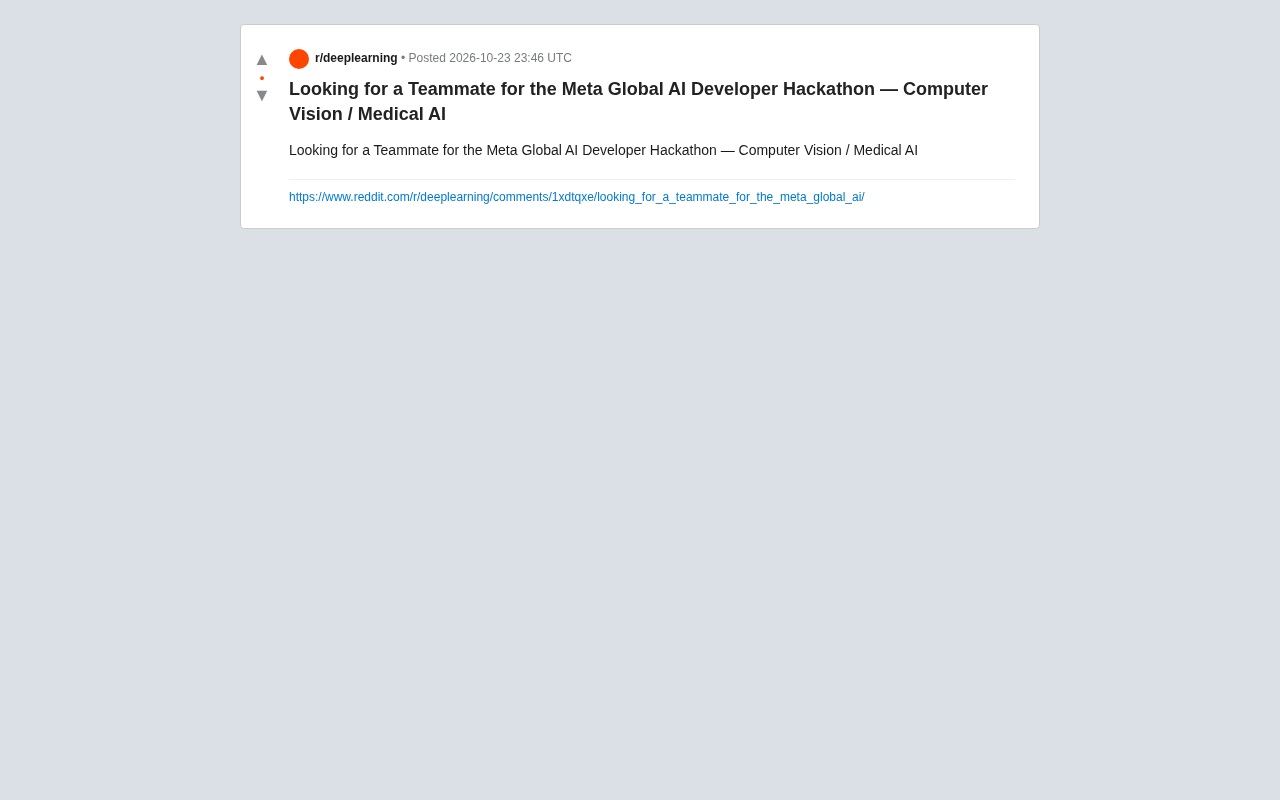
Teammate Wanted for Meta Global AI Developer Hackathon: Computer Vision & Medical AI
A Reddit developer seeks teammates for the Meta Global AI Developer Hackathon, focusing on computer vision and medical AI. This article analyzes the track logic, skills-complementarity needs, and topic selection strategy behind this teaming signal.
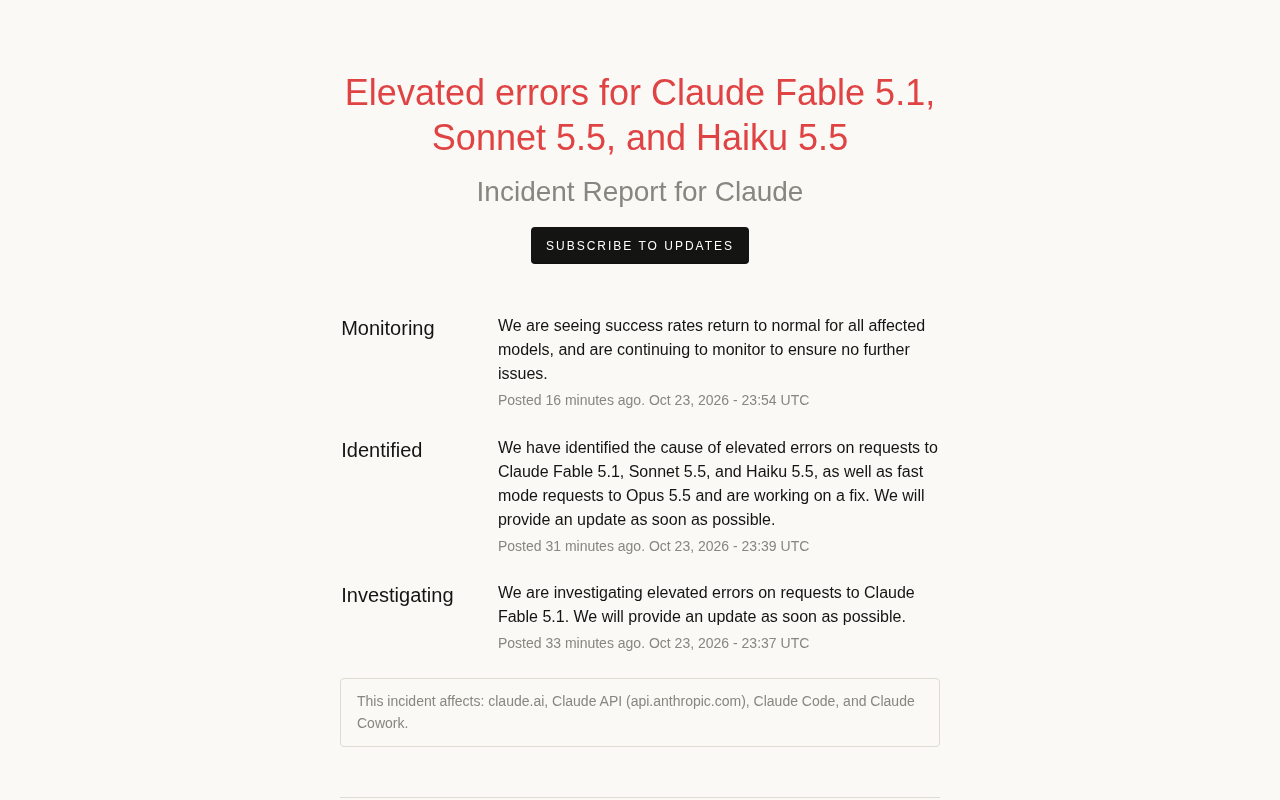
Multiple Claude Models Hit by Errors: A Postmortem of Fable 5.1, Sonnet 5.5, and Haiku 5.5
Claude Fable 5.1, Sonnet 5.5, Haiku 5.5, and Opus 5.5 fast mode saw elevated errors; Anthropic identified and resolved the issue in 17 minutes. This postmortem covers the timeline, the technical reasons for the multi-model cascading failure, and practical lessons for retry and degradation strategies.