20-Minute Hands-On Guide: Deploying DeepSeek-R1 Locally with vLLM

Complete vLLM workflow and version-alignment tips for deploying DeepSeek-R1 distilled on Ubuntu.
Based on Bilibili creator Mike's practice, the article covers deploying DeepSeek-R1 distilled with vLLM instead of Ollama for enterprise use. It compares the two, highlights vLLM's KV cache, throughput and multi-GPU advantages, gives a verified environment (Ubuntu 24, A10, Python 3.10, CUDA 12.4, vLLM 0.7.x), and walks through Miniconda, NVIDIA driver, CUDA Toolkit, PyTorch/vLLM install, plus model download and inference testing.
Deploying enterprise-grade large models is a completely different matter from running a local demo. Ollama is great for quick personal experimentation, but once you need to support concurrent requests in production or do multi-GPU parallelism, vLLM is almost unavoidable. Bilibili creator Mike shares a complete from-scratch workflow for deploying the DeepSeek-R1 distilled version on an Ubuntu cloud server, covering Miniconda environment setup, NVIDIA driver installation, CUDA toolkit configuration, and vLLM inference verification — the full chain. The value of this workflow lies in its clear version correspondences at every step, making it hard to fall into pitfalls if you follow along.
Why Choose vLLM Over Ollama
According to Bilibili creator Mike's analysis, vLLM's core advantages span several areas. First is efficient KV cache management, which significantly reduces wasted VRAM — critical in VRAM-constrained scenarios. Second is throughput: through batching and continuous batching of requests, both inference speed and concurrency capacity improve markedly. Third is seamless integration with the HuggingFace ecosystem — models load without extra adaptation. Fourth, vLLM supports multi-GPU distributed inference, boosting large-model handling capability via model parallelism strategies. Finally, as an open-source component, vLLM has an active community and ecosystem, making it easier to find solutions when problems arise.
For small and mid-sized teams, these features mean supporting more requests with lower hardware cost rather than stacking GPUs.
KV Cache (Key-Value Cache) is a core mechanism in autoregressive inference for large models. When generating each token, the model needs attention computation results based on all previous tokens; recomputing every time would bring enormous redundant overhead. The KV cache stores the Key and Value tensors of historical tokens in VRAM, so the decoding phase only computes attention for the new token, greatly reducing computation. But the cache itself consumes large amounts of VRAM, and traditional implementations suffer from low utilization due to memory fragmentation. vLLM's proposed PagedAttention borrows the idea of virtual memory paging from operating systems, dividing the KV cache into fixed-size blocks allocated on demand, significantly reducing VRAM waste — precisely its key advantage in VRAM-constrained scenarios.
Continuous Batching is the other pillar of vLLM's high throughput. Traditional batching must wait for an entire batch of requests to finish before processing the next batch, so short requests get dragged down by long ones. Continuous batching dynamically schedules at each iteration: completed sequences are immediately removed from the batch, and newly arriving requests fill the vacancies, keeping the GPU at high utilization. Combined with PagedAttention, vLLM can handle several times the concurrent requests of a naive implementation on the same hardware — which is why small and mid-sized teams can achieve production-grade throughput at lower cost.
Environment Setup: Version Alignment Is the First Hurdle
The creator's test environment was: Ubuntu 24, A10 GPU (16-core CPU), vLLM 0.7, Python 3.10, NVIDIA driver 12.4, CUDA 12.4. This configuration's hallmark is "good enough" — the A10 isn't a high-end card, but it's more than sufficient for a 1.5B-parameter distilled model.
One point deserves special attention: vLLM only supports Linux and requires GPU resources. With only a CPU, the CPU must support specific instruction sets, or it won't run. The creator suggests readers who want local deployment follow this exact environment configuration to avoid compatibility issues from version mismatches.
Miniconda Installation and Mirror Configuration
The first step is installing Miniconda to manage virtual environments. After creating a directory, the creator downloads the installer via the official script, runs the installation, then deletes the installer file. Next, initialize the Bash and ZSH config files and use the source command to make the configuration take effect.
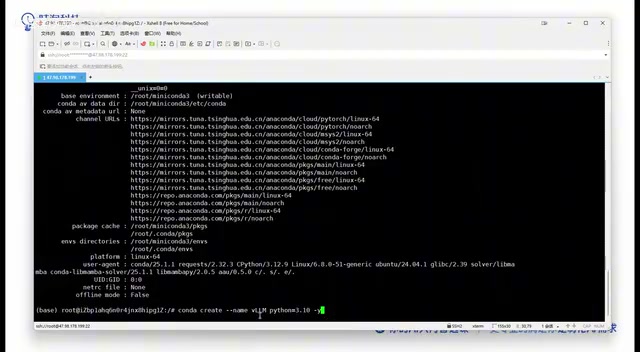
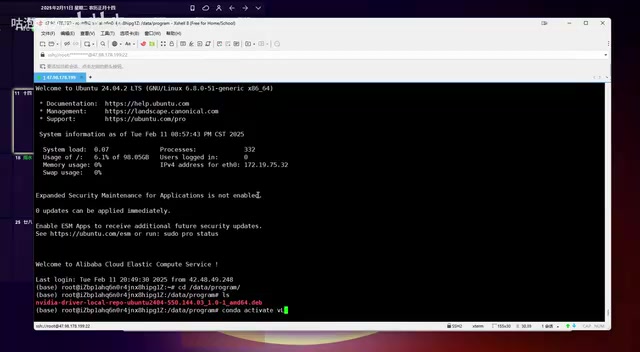
After installation, the mirror source needs to be changed. The default overseas source is slow; the creator configured the Tsinghua mirror address in the .condarc file, then used conda info to confirm the mirror address had changed. Then create an isolated environment with conda create -n vllm python=3.10 and activate it with conda activate vllm. The point of a virtual environment is isolating Python versions and dependencies across projects — crucial for subsequently installing CUDA and PyTorch.
GPU Driver and CUDA Toolkit Installation
Cloud servers don't come with NVIDIA drivers preinstalled — a step many beginners overlook. The creator first runs apt update and apt upgrade to refresh package repositories, then installs necessary dependencies like build tools. To avoid conflicts with the open-source Nouveau driver, Nouveau must be disabled in the system configuration (adding blacklist and option entries).
The driver download must precisely match the OS, GPU model (Data Center Tesla / A10), and CUDA version (12.4) on NVIDIA's official site. The creator suggests using an external download tool to grab the DEB file and then uploading it to the server — much faster than downloading directly on the server. If the installation prompts about a missing GPG Key, just copy and run the corresponding command as instructed and retry. After installation, restart the server; if nvidia-smi shows GPU status information, the driver is in place.
CUDA Toolkit installation works the same way. The creator chose CUDA 12.4.0, selected Linux + x86 + Ubuntu on the official site (pick the highest version when no 24 version is available), and downloaded the runfile. This file is about 4.14GB; downloading with a tool like Xunlei and then uploading is recommended. Note during execution: the driver package is already installed, so choose not to reinstall the driver during setup — install only the CUDA Toolkit and documentation. After installation, configure environment variables in .bashrc and run nvcc --version to confirm the version.
Nouveau is the open-source NVIDIA graphics driver bundled with the Linux kernel. It lets the system recognize the GPU and output basic display, but doesn't support CUDA compute and occupies GPU device nodes. Before installing the official proprietary driver, Nouveau must be disabled; otherwise conflicts may cause driver installation failure or prevent the system from entering the graphical interface. Disabling is typically done by creating a config file under /etc/modprobe.d/ with blacklist nouveau and options nouveau modeset=0, then running update-initramfs -u to update the kernel image and rebooting. Cloud servers usually have no graphical interface needs, so disabling it doesn't affect daily use.
CUDA Toolkit and the NVIDIA driver are components at two different layers: the driver handles communication between the OS and GPU hardware, while the CUDA Toolkit provides the toolchain for compiling and running GPU programs (such as the nvcc compiler and CUDA runtime libraries). The two have a version compatibility relationship — the driver version must not be lower than the minimum version required by the Toolkit. When installing the runfile, if the driver is already installed separately, uncheck the driver installation option to avoid reinstalling and overwriting the existing driver. After installation, set PATH and LD_LIBRARY_PATH in .bashrc, otherwise nvcc and related dynamic libraries won't be found.
PyTorch and vLLM Installation
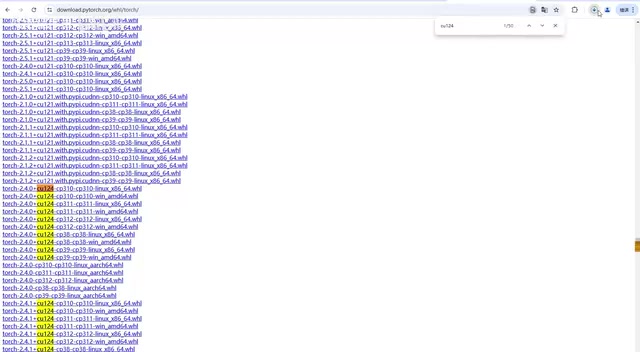
The PyTorch version must correspond to CUDA 12.4 and Python 3.10. Filter by CU124 and CP310 on the PyTorch official site, and download the Linux version. The file is about 760MB; external download followed by upload is again recommended. Before installing, remember to run conda activate vllm, because pip-installed packages need to run in the correct Python environment.
Finally, run pip install vllm; the creator installed version 0.7.2. After installation, verify with vllm --version — if output is normal, the platform is recognized successfully; if it errors with "vllm is running on unspecified platform", the environment has problems, subsequent steps will inevitably fail, and you need to go back and check the earlier installation.
DeepSeek-R1 Model Download and Inference Test
The full DeepSeekAd-R1 has roughly 67 billion parameters, with over a dozen files at 4-5GB each — essentially undeployable on a personal computer. The creator recommends using the distilled model (DeepSeek-R1-Distill), which preserves the large model's reasoning capability with far fewer parameters, more practical for resource-constrained scenarios.
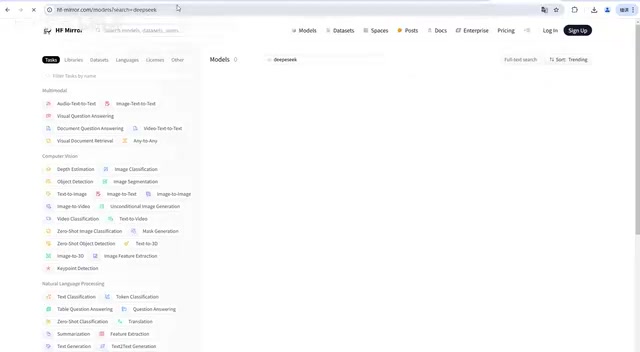
HuggingFace requires a proxy to access, so the creator used the hf-mirror site to search for models. The final choice was the DeepSeek-R1-Distill Qwen 1.5B version, with a file of only about 4GB — low deployment pressure. After downloading, create a data/modelscope directory on the server to store the model files.
The inference test is done with a short Python script: specify the local model path, initialize the tokenizer, set a prompt (such as "Why is the sky blue"), load the model, and output the result. After running the script, the model returns a DeepSeek-style reply normally, confirming the entire deployment pipeline works. The creator also offers a complete manual covering Qwen models, DeepSeek, and LangChain-based integration examples, available in the comments section.
Knowledge Distillation refers to using the outputs of a large model (teacher) to guide training of a small model (student), so the student approaches the teacher's reasoning performance with a greatly reduced parameter count. The original DeepSeek-R1 has 67 billion parameters, demanding enormous VRAM and compute; the distilled version uses a smaller base model (such as Qwen 1.5B) as the carrier, fine-tuned on reasoning data generated by R1 to retain chain-of-thought and reasoning ability. Parameters drop from 67B to 1.5B, and model files shrink from tens of GB to about 4GB, enabling deployment on a single consumer-grade or entry-level data center card — at the cost of a lower ceiling on complex reasoning tasks. Choosing the distilled version is a common trade-off between cost and capability.
HuggingFace is the world's largest open-source model hosting platform, and direct access from China is often network-restricted. hf-mirror is its mirror site, offering the same model repository structure and download interface, significantly improving download speeds. When using the mirror, you can set the environment variable HF_ENDPOINT=https://hf-mirror.com so huggingface-cli or transformers automatically route through the mirror, or search and manually download model files on the web. After downloading, keep the model directory structure intact (including config files, tokenizer files, and weight files) so the inference script can load it correctly.
Key Reminders
Every step of this workflow depends on precise version alignment. Python 3.10, CUDA 12.4, the corresponding PyTorch version, and vLLM 0.7.x — any mismatch can trigger a chain of problems. Also, the vllm environment created with the -n flag easily reverts to the base environment after a restart or switch; always confirm the current environment state before operating. For enterprises wanting to apply large models at scale, vLLM's throughput and parallelism capabilities are worth the time investment to set up.
One-line Summary
A complete vLLM workflow and version-alignment tips for deploying DeepSeek-R1 distilled from scratch on an Ubuntu cloud server.
Paragraph Summary
Based on Bilibili creator Mike's practice, the article lays out the complete pipeline for deploying DeepSeek-R1 distilled with vLLM instead of Ollama in enterprise scenarios. It first compares the two, noting vLLM's advantages in KV cache management, throughput, HuggingFace ecosystem integration, and multi-GPU distributed inference. It then gives a verified environment combo: Ubuntu 24, A10 GPU, Python 3.10, CUDA 12.4, vLLM 0.7.x. The workflow covers Miniconda installation and Tsinghua mirror configuration, disabling Nouveau and installing NVIDIA drivers, CUDA Toolkit installation, PyTorch and vLLM installation verification, and finally downloading the 1.5B distilled model via hf-mirror and completing an inference test with a Python script. The article repeatedly stresses that precise version alignment and checking environment activation status are key to avoiding pitfalls.
Related articles

Free Unlimited Claude Code Solution: Agnes AI + CC Switch Setup Guide
No paid subscription needed — pair the free AI platform Agnes AI with the open-source tool CC Switch to provide a backend for Claude Code, enabling unlimited free calls to text, image, and video models. This guide covers the full setup, test results, and usage boundaries.

A Complete Zero-Cost Guide to Getting Started with Claude Code for Beginners in China
A beginner's guide to Claude Code for users in China: two installation methods (command line and IDE plugin), full configuration steps for replacing the official API with the free domestic LongCat model, and a hands-on demo of building a small tool with natural language, plus tips.

When the NSA Gets Involved: The AI Supply Chain Crisis Behind Open-Source CVEs and API Key Hijacking
Multiple open-source projects disclosed severe CVEs in one day, PHP flaws alarmed the FBI, and Railway and OpenCode were breached with API keys stolen. This article breaks down the vulnerability window, AI-accelerated exploitation, and the AI supply chain crisis behind the API key black market, with a developer defense checklist.