30-Day AI Agent Roadmap from Zero to Freelancing: Concepts, Hands-On Builds, and Landing Projects

A 30-day three-phase roadmap to go from AI Agent beginner to freelancing through hands-on building.
This article breaks down a 30-day AI Agent roadmap for complete beginners, built around one core principle: build it, don't just study it. Phase 1 (days 1–10) builds conceptual understanding of the Perception-Decision-Action-Memory loop through reverse-engineering existing products. Phase 2 (days 11–20) involves building three Agents on low-code platforms like Coze or Dify: a RAG-based Q&A system, a tool-calling Agent, and a multi-step workflow Agent. Phase 3 (days 21–30) runs a full enterprise-grade pipeline from requirements to deployment. The entire methodology culminates in one deliverable: a live, demonstrable Agent ready to show clients.
AI Agents Aren't Learned — They're Built
A common misconception among beginners is that you need to grind through mountains of theory and hundreds of tutorial videos before touching any real work. But one AI Agent tutorial on Bilibili offers a counterintuitive — and far more practical — conclusion: Agents aren't learned, they're built.
With the right approach, 30 days is enough to go from complete beginner to landing independent projects. With the wrong approach, three months won't even get you through the door. This roadmap breaks the learning process into three distinct phases — Conceptual, Hands-On, and Project — each with clear, concrete deliverables rather than a vague sense of "I think I got it."
Let's break down this 30-day roadmap layer by layer and examine both its logic and its practicality.
Phase 1 (Days 1–10): Conceptual Layer — Get the Fundamentals Right
The goal of the conceptual phase isn't to memorize definitions — it's to genuinely understand how an Agent operates. The tutorial sets a refreshingly direct benchmark: if you can explain the Perception → Decision → Action → Memory loop in your own words, you're good to move on.
These four components form the basic skeleton of any Agent:
- Perception: How the Agent takes in external information (user input, environmental data)
- Decision: How it processes that information to make judgments and plans
- Action: How it invokes tools and APIs to carry out tasks
- Memory: How it stores context to enable multi-turn, continuous conversations
Spend the first 3 days internalizing this framework. Then, rather than continuing to watch more tutorials for the remaining 7 days, head to the Coze marketplace and reverse-engineer existing Agents: What knowledge base does it use? What workflow is configured? What modules are missing? Once you've done that analysis, draw your own architecture diagram. That's when you've graduated from the conceptual phase.
This "reverse deconstruction" approach is far more efficient than passive theory consumption — seeing the structure of a finished product gives you intuition that abstract concept memorization simply cannot.
Phase 2 (Days 11–20): Hands-On Layer — Build Three Agents
With your conceptual foundation in place, it's time to build. The tutorial recommends constructing three distinct types of Agents on platforms like Coze or Dify, each targeting a core capability:
Knowledge Base Q&A Agent — Master RAG
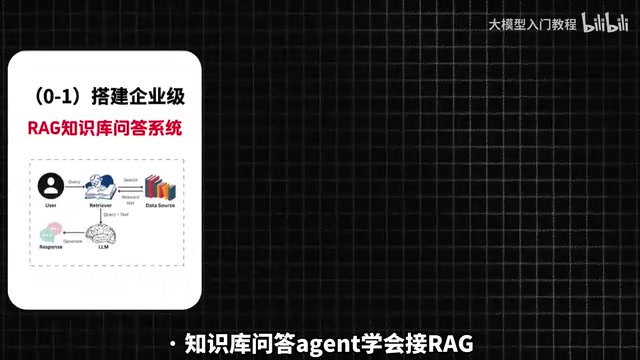
The first project is a knowledge base Q&A system, with the goal of learning how to integrate RAG (Retrieval-Augmented Generation). This is currently the most common application pattern in enterprise-grade Agents — it enables the Agent to answer questions based on private documents rather than relying solely on the LLM's general knowledge.
What is RAG? RAG (Retrieval-Augmented Generation) is a technical architecture that combines external knowledge bases with large language models. When a user asks a question, the system first retrieves the most relevant document chunks from a pre-built vector database, then feeds those chunks as context to the LLM to generate a grounded response. The core value: the model doesn't need retraining to "know" about proprietary company documents, product manuals, or the latest internal policies — and responses are traceable, which reduces hallucinations. For beginners, using RAG on platforms like Coze or Dify typically requires nothing more than uploading documents and configuring a chunking strategy; the platform handles vectorization and retrieval automatically, with no code required.
Tool-Calling Agent — Learn to Call APIs
The second project focuses on tool use — specifically, teaching your Agent to call external APIs. This is what determines whether an Agent can actually do things, like checking the weather, sending emails, or querying a database, rather than just generating text.
What is Tool Calling? Tool Use (also called Function Calling) is the capability that upgrades an Agent from a "chatbot" to an "automated assistant that gets things done." LLMs by themselves can only generate text — they can't directly interact with external systems. Through the Function Calling mechanism, a model can recognize mid-reasoning that "I need to call a specific tool right now," generate a structured call instruction, let an external program execute it, and then receive the result to continue reasoning. Common tools include: weather APIs, calendar writes, database queries, email sending, and web search. Once you understand this mechanism, the Agent's capability ceiling equals the number of tools you can connect — which is precisely why enterprise Agents have high customizability and sustained market demand.
Multi-Step Workflow Agent — Handle Complex Tasks
The third project is a multi-step workflow, designed to develop your ability to manage complex tasks and multi-turn interactions. After completing all three, something shifts — as the tutorial puts it: "You'll realize you're no longer learning how to use Agents — you're actually using them."
That shift from passive learner to active practitioner is exactly what makes the hands-on phase so valuable.
Phase 3 (Days 21–30): Project Layer — Run a Complete Enterprise-Grade Pipeline
The final 10 days are about grounding everything in a real business context. The tutorial challenges you to pick a real-world use case and independently deliver a complete enterprise-grade Agent — running through the full pipeline from requirements analysis → knowledge base construction → workflow design → deployment and testing.
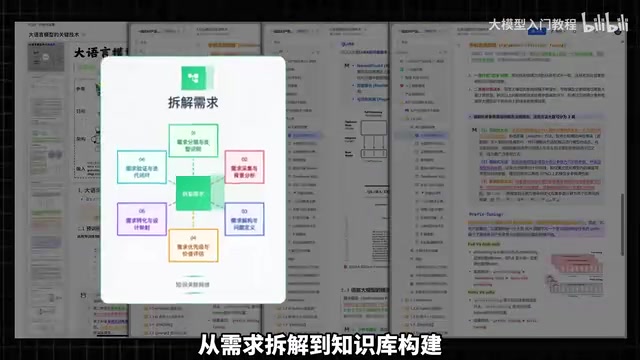
This phase emphasizes end-to-end delivery capability, not just feature stacking. The biggest difference between a practice project and an enterprise project is that the latter demands attention to real requirement boundaries, data quality, and production stability.
After 30 days, the kinds of work you'll be equipped to take on include customer service automation, document processing, and data querying — all areas where businesses are actively looking for help right now. Entry-level gigs start in the hundreds of dollars; enterprise-scale projects start in the thousands, with rates climbing the deeper you go into a specific industry.
Your Only Leverage for Landing Projects: An Agent You Can Demo on the Spot
The entire roadmap comes down to one clear point: you need at least one Agent you can demo on the spot.
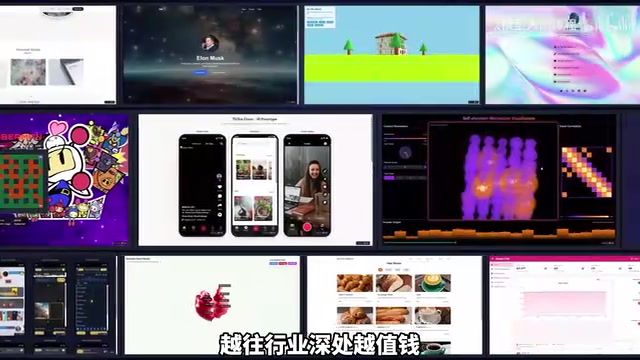
The tutorial hammers this home repeatedly — when someone asks about your capabilities, you drop a link and let the demo speak for itself. That's your leverage. It also explains why the entire methodology pushes "build it" over "study it" from start to finish: a demonstrable product is the most persuasive calling card a beginner can have.
Is This Roadmap Worth Following?
Objectively, the greatest strength of this 30-day roadmap is that it's outcome-driven: each phase has clear acceptance criteria and tangible deliverables, which helps avoid the trap so many AI learners fall into — consuming endless content while producing very little. Using low-code platforms like Coze and Dify as practice environments also genuinely lowers the barrier for complete beginners.
That said, "zero to freelancing in 30 days" is best understood as an ambitious pacing target, not a guarantee — actual progress varies by individual. RAG, API integration, and workflow design are skills you can establish a solid foundation in within 30 days, but reaching the consistency required for stable enterprise delivery takes repeated refinement through real projects.
For anyone looking to break into AI Agent development, this three-phase "Conceptual → Hands-On → Project" structure offers a clear and executable path. And the real key, as always, comes back to the same principle — just start building.
Coze vs. Dify — A Quick Overview: Coze and Dify are currently the two mainstream low-code Agent-building platforms, each with a slightly different positioning. Coze, launched by ByteDance, integrates well with models like Doubao and features a visual drag-and-drop interface — great for rapid prototyping and connecting to common Chinese tools. Dify is an open-source project that supports self-hosted deployment, offers more flexibility, and is better suited for teams with some technical background or stricter data privacy requirements. For beginners, both platforms support workflow orchestration, knowledge base integration, and API calling without writing code; the main differences are in model selection range and deployment flexibility. The choice of platform has minimal impact on your learning path — the focus should remain on using hands-on building to understand the underlying logic of Agents. The platform is just a vehicle.
Related articles
$20/Month vs. $5M/Year: The Fundamental Difference Between Cursor and Blitzy
Cursor at $20/month vs. Blitzy at up to $5M/year: a Grafana 3M-line codebase test reveals how these AI coding tools differ in context, work unit, and production readiness.
Factoriax: A GPU-Parallelized Factory-Building Reinforcement Learning Research Environment
Factoriax is a GPU-parallelized RL research environment inspired by Factorio, focused on long-horizon planning and high-throughput sampling for complex factory-building simulations.
Matt Pocock Skills Deep Dive: Turning AI Coding from Chat into Engineering
Matt Pocock Skills transforms AI coding into an engineering workflow: requirements discussion, SPEC generation, task breakdown, TDD implementation, and code review — solving vague requirements and repeated bugs.