5B-Parameter Moss Image Hands-On: The New King of Low-VRAM Local Image Generation

5B-parameter Moss Image sets a new bar for lightweight open-source text-to-image with high knowledge density, bounding-box layout control, and low VRAM requirements.
Moss Image is a 5-billion-parameter open-source text-to-image model that leads its parameter class in comprehension and flexibility. Out of the box it generates celebrities, anime characters, brand logos, and complex infographics, and its quantized version runs on 4GB VRAM. It supports bounding-box layout control for precise multi-element spatial constraints. Deploy via ComfyUI choosing BF16 or Int8 diffusion models, quantized text encoders, and a lite VAE by VRAM; an 8-step DMD LoRA delivers 3–4x speedup at the cost of negative prompts. Its weakness is no natural language semantic editing, only mask-based inpainting. Community fine-tuned checkpoints have notably improved quality.
The Open-Source Text-to-Image Space Welcomes Another Lightweight Contender
Moss Image packs complex chart generation, celebrity knowledge, anime characters, and even brand logos into a 5B-parameter model—and its quantized version can run on just 4GB of VRAM. Based on a hands-on video, this article covers its capability boundaries, ComfyUI installation process, and practical tips for speed and editing.
Lightweight Positioning: Where Does a 5B Model's Ceiling Lie?
Moss Image is a pure text-to-image generator with 5 billion parameters. Compared to the top models in the current open-source lineup, it's noticeably smaller—the video's author points out that the leading CREA 2 is more than twice its size and does produce better quality, but Moss Image has no rival at its parameter scale, with comprehension and flexibility superior to the 6B Z-Image.
What's truly surprising is its knowledge density. Without any LoRA or reference images, the model can generate celebrity portraits, anime characters, game figures out of the box, and even has decent fidelity for car models and brand names. Text rendering is equally impressive—complex infographics and annotated diagrams can be produced in a single pass, which is what sets it apart from most small models.
Installation and Model Selection: VRAM Determines Configuration
The official recommendation is local deployment via ComfyUI. After updating to the latest version, search for Moss in the templates tab and you'll see two workflows: the SFT version for image generation and the Base version for training and fine-tuning. Regular users should go straight for SFT.
There are three key components to download, and the selection logic all revolves around VRAM:
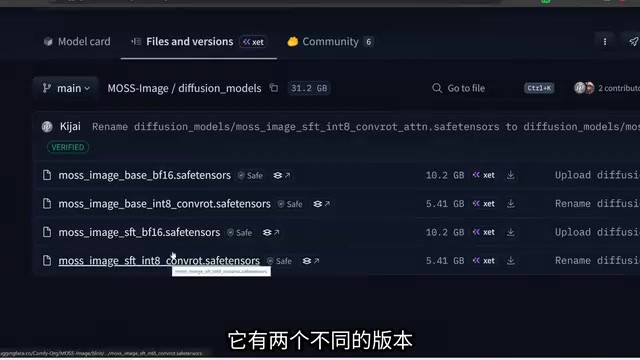
- Diffusion model: The full BF16 version is about 10GB with higher quality, recommended for 8GB+ VRAM; the Int8 ConvRot compressed version is half the size, suitable for low-VRAM devices.
- Text encoder: Available in BF16, Int8, and W4A8 tiers; choose the smallest W4A8 when VRAM is tight—the quality loss is acceptable.
- VAE: Full version and a 250MB lite version; the latter is sufficient for everyday generation.
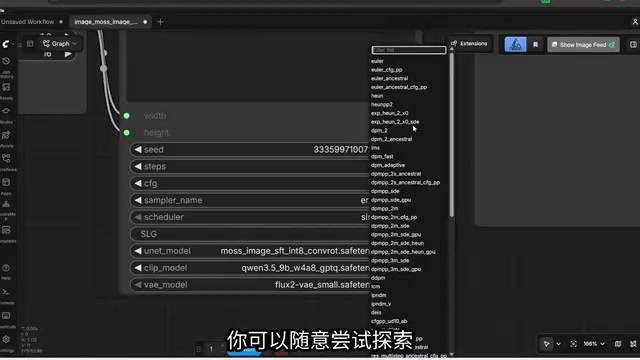
After downloading, press R to refresh the model list, then select the diffusion model, Qwen 3.5 9B text encoder, and Flux 2 Small VAE in sequence to start. The author tested on an RTX 5000 Ada with 16GB VRAM, generating a single 1024×1024 image in about 25 seconds.
On the Role of the Text Encoder and VAE
In a diffusion model workflow, the text encoder converts user prompts into semantic vectors the model can understand; its scale and precision directly affect the ability to comprehend complex descriptions. Moss Image uses Qwen 3.5 9B as its text encoder, whose parameter count far exceeds the diffusion model itself—this is precisely the key to its ability to understand long-tail knowledge like celebrities, brands, and anime characters. Int8 and W4A8 quantization compress VRAM usage by reducing weight bit width; W4A8 means 4-bit weights and 8-bit activations, with quality loss typically within acceptable range.
The VAE (Variational Autoencoder) handles conversion between pixel space and latent space: during generation it decodes the diffusion model's latent output into the final image, and during editing it encodes the input image back into latent space. The lite VAE reduces size through pruning or distillation, with virtually no visible difference in everyday generation, though the full version is more stable for high-resolution or fine-texture scenarios.
Layout Control: Directing Composition Precisely with Bounding Boxes
Moss Image supports bounding-box-based layout control, and this is the feature that sets it apart from small models. Draw regions on the canvas and fill in descriptions for each, and the model organizes the image strictly according to spatial relationships.
In the test case, the author simultaneously specified a woman in a bikini, a red sofa, a coffee table with a plant, a raised right foot, a T-Rex outside the window, a hand holding a cola can, and a Naruto poster on the wall. In the generated result, all elements were in their proper places—the cola logo was even spelled correctly, though it automatically became the Chinese version. This stable execution of multiple elements with multiple spatial constraints is quite rare at the 5B scale.
One caveat: if the interface reports incompatible node versions, you need to enable Nodes 2.0 in settings for the bounding box editor to display properly.
How Bounding Box Layout Control Works
Bounding box layout control is essentially spatial conditioning injection: each rectangular region the user draws on the canvas, along with its text description, is encoded into region masks and positional embeddings, which are sent into the diffusion model alongside the global prompt to constrain the semantic attribution of corresponding regions during denoising. Unlike ControlNet's depth map or edge map guidance, it doesn't rely on reference images but directly describes composition with text plus coordinates—making it better suited for infographics, posters, and diagrams that require precise arrangement of multiple subjects.
This capability places high demands on the model's attention mechanism and the annotation quality of its training data; small-parameter models often struggle to reliably execute multi-region constraints. Moss Image achieving proper placement of multiple elements at the 5B scale suggests its training incorporated large volumes of spatially annotated image-text pairs. When using it, make sure your ComfyUI frontend version supports Node 2.0, otherwise the bounding box editor won't render.
LoRA Extensions and Community Fine-Tuning
The model's built-in knowledge is already rich enough, but stacking LoRAs can further customize style. The video demonstrates integrating an ink-painting style LoRA: insert a Load LoRA node into the model input chain before the sampler, select the weight, and fill in the trigger word—realistic keywords should be removed accordingly, or the style will be canceled out. The mounting method for the layout control workflow is exactly the same.
The community has already begun producing fully fine-tuned checkpoints. CrowMoss, for example, is noticeably better than the original in consistency and visual appeal—just swap it in the diffusion model dropdown to enable. The author predicts that as the fine-tuning ecosystem expands, Moss Image's quality ceiling will continue to rise; the current version is only the starting point.

3x Speedup and Workarounds for Image Editing
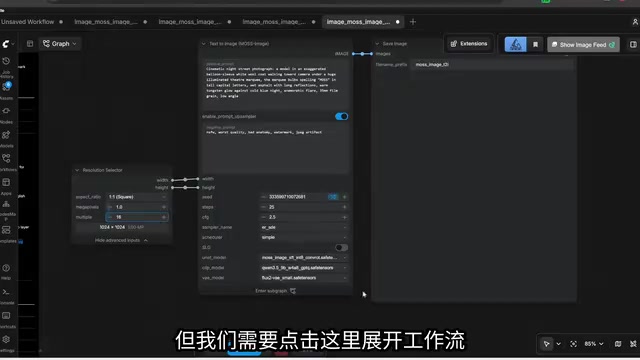
Speed optimization relies on an 8-step DMD LoRA. After mounting, reduce sampling steps from the default 25 to 8 and set CFG to 1, yielding roughly a 3–4x speedup. The trade-off is that negative prompts become completely ineffective at CFG 1; if you still need to exclude certain elements, you can raise CFG slightly by a few decimal places.
Editing capability is Moss Image's weak spot. It doesn't support natural language semantic editing—you can't just say "replace the laptop with a cat" like you can with Qwen Image 2.1. The workaround is traditional inpainting: load the image and hand-draw a mask, use the VAE Encode for Inpainting node to send the image and mask into latent space, replace the sampler's width and height inputs, then fill in a description for what to generate in the masked region. In testing, this successfully replaced a laptop with a sleeping cat, but the flexibility is fundamentally different from semantic editing models.
DMD LoRA and the CFG Trade-off
DMD (Distribution Matching Distillation) is an acceleration technique that distills multi-step diffusion sampling into few-step sampling: it trains a student model to match the output distribution of a teacher model's multi-step sampling, reproducing the effect of 25+ steps in just 4–8 steps. DMD adapters mounted as LoRAs are small and plug-and-play, requiring no retraining of the entire model.
CFG (Classifier-Free Guidance) controls how strongly the generated result adheres to the prompt, typically ranging from 4 to 7. At CFG 1, the model no longer computes the unconditional branch simultaneously, so negative prompts become completely ineffective—but sampling is fastest. If you still need to exclude certain elements, you can raise CFG to around 1.5–2 for a compromise between speed and controllability.
Key Points of the Inpainting Workflow
Inpainting relies on a mask to tell the model which pixels need regeneration. The VAE Encode for Inpainting node encodes the original image, mask, and mask feathering together into latent space; the sampler only denoises within that region while the rest stays unchanged. Replacing the sampler's width and height inputs with the original image dimensions is done to avoid seams or distortion caused by latent space scale mismatches.
Who It's For
Low-VRAM users, creators who need fast batch generation, and technical folks interested in studying knowledge compression in small models can all get value from Moss Image. Users chasing ultimate quality with ample VRAM are still better served by CREA 2. But at this parameter scale, Moss Image currently has no real rival—and the expansion of the fine-tuning ecosystem will only make it stronger.
Related articles

Amphibious Transforming Drone: Beyond 100x Power Savings, What Are the Real Needs?
Is the amphibious transforming drone just a gimmick? Starting from the 100x power difference of the M4 Morphobot, explore real application scenarios and thesis topic ideas, analyzing boundary conditions where pure drones and pure ground robots both fail.

Warhound Raises $200 Million: Genetically Engineered "War Dogs" Paired with Anduril Gear
Warhound raises $200M, backed by Ben Lamm and Palmer Luckey, to genetically engineer dogs for military and law enforcement use and equip them with Anduril gear. This article analyzes its technology direction, funding logic, and ethical controversy.

Claude API Comes to Google Cloud: IAM Integration and SDK Access Guide
Anthropic hosts the full Claude API on Google Cloud with IAM-controlled permissions and unified billing. This guide covers the Vertex AI and Anthropic-hosted entry points, IAM role configuration, and SDK access.