7 AI Open Source Projects That Actually Work: Run LLMs Locally and a Rust-based Photoshop

Seven AI open source projects you can use the same day, broken down by scenario, value, and limits.
The article selects seven AI open source projects from GitHub's weekly trending list that can be installed and used the same day, explaining each problem they solve: Craft Anything understands a website or app's logic and lets AI replicate a new version, gaining 2,200 stars in a day; Photocraft rewrites Photoshop's core capabilities in Rust, free, offline, and compatible with real PSDs; Strata runs models like QN3.8 locally without internet, keeping data on-device; Unslop cleans up the homogenized cheap feel of AI-generated interfaces; MagPi runs a local gateway unifying multiple AI coding tools with automatic quota switching; Laya explores a non-autoregressive decision engine that could greatly cut inference costs; Gestalt X offers iOS hidden system parameter editing. The article concludes by advising choosing based on real scenarios like privacy, quota management, and inference cost rather than chasing hype.
GitHub's trending list refreshes every week, but it's full of vote manipulation, pirated packages, and empty mirrors. This week we've picked out only the AI open source projects you can install and use the same day, breaking down exactly what problem each one solves.
1. Craft Anything: Let AI Understand a Product and Replicate It
The fastest riser this week is Craft Anything, gaining 2,200 stars in a single day. Its workflow is straightforward: you provide a website or app, it first figures out how the other one works on its own, then has AI write a new one modeled on it. The key is that it continuously compares against the original along the way, iterating until similarity is sufficient.
The value of this project lies in turning a "reference implementation" into an executable automated pipeline. For teams that need to quickly validate a product form, it offers a low-cost path to prototype replication. That said, the boundaries of replication and copyright risks still need to be judged by the user.
2. Photocraft: Rewriting Photoshop in Rust
Someone rewrote Photoshop from scratch in Rust, naming it Photocraft. It has the core capabilities—layers, masks, adjustment layers, text, vectors, brushes—and can directly open real PSD files.
The biggest selling point is that it's completely free and completely offline; not a single photo is uploaded. For designers who care about asset privacy, this is more reassuring than many online tools. To be clear, it is not a full replacement for Photoshop, but in lightweight retouching and PSD compatibility scenarios it already has practical value.
PSD is Adobe Photoshop's native layered file format, storing layers, masks, adjustment layers, text, vector paths, and pixel data in a tree structure internally, along with multiple compression and color management metadata. Third-party software that wants to open PSDs usually needs to reverse-engineer this proprietary format, and achieving full compatibility with complex features like layer blending modes and smart objects is very difficult. Therefore, being able to directly open real PSD files is often a key indicator of the practicality of alternative image tools.
3. Strata: Run LLMs Directly on Your Machine
Strata lets you run large models directly on your own computer, with no account registration and no internet connection. Once installed, it can run models like QN3.8, with coding, image understanding, and conversation all done locally.
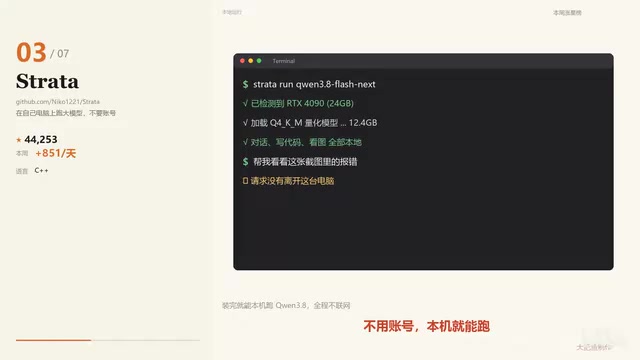
Data never leaving the machine is the fundamental reason it gained over 800 stars in a week. In an era dominated by cloud APIs, local inference brings privacy and offline availability back to the desktop. Of course, running models locally has hardware requirements, and model capabilities still lag behind cloud flagships, but it suits users who are sensitive about data flows or need to work in offline environments.
Local inference means all model weights are downloaded to the user's device and computation is done by the local CPU or GPU, with requests never passing through any cloud server. Common implementations include runtimes like llama.cpp, Ollama, and MLX, which use quantization techniques to compress models into VRAM or memory ranges affordable by consumer-grade hardware. Compared with cloud APIs, the cost of local inference is limited model scale and generation speed dependent on hardware, while the benefits are that data never leaves the device, no internet is required, and there is no per-token billing.
4. Unslop: Cleaning Up the Cheap Feel of AI-Generated Interfaces
Generating interfaces with AI is fast now, but the results are all the same: purple gradients, glowing everywhere, and every button is an emoji. Unslop first identifies these cheap characteristics, then cleans them up screen by screen the way a designer revises a draft.
What it targets is the homogenization problem of AI-generated content. When generation speed is no longer the bottleneck, aesthetics and consistency become the new source of differentiation. The emergence of tools like this shows the community is starting to shift from "can it generate" to "does it generate something good-looking."
5. MagPi: Multi-Model Gateway and Quota Scheduling
MagPi solves a very practical problem: you have a bunch of AI tools on hand, and each one requires configuring models separately and topping up quotas separately. It spins up a local gateway and connects Cloud Code, Codex, and Gemini CLI all together.
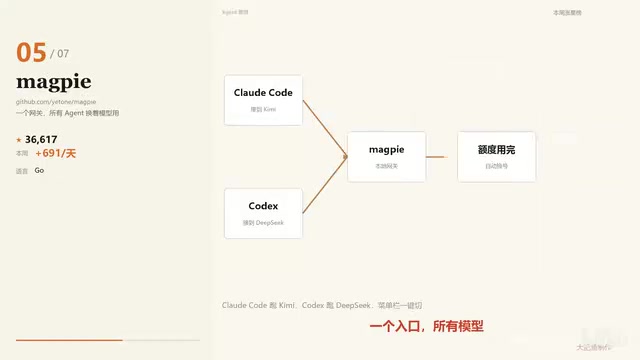
When one provider's quota runs out, it automatically switches to the next account. For heavy users of multiple AI coding tools, this saves the hassle of repeatedly switching configurations and makes quota usage more efficient.
A multi-model gateway is a proxy layer running locally or on a server, providing a unified API entry point externally while routing requests internally to model services from different vendors, and handling authentication, billing, and rate limiting uniformly. For users who use multiple AI coding tools at once, the gateway can centrally manage scattered API keys and subscription quotas, automatically switching to a backup account or backup model when one account's quota is exhausted, avoiding manual config changes.
6. Laya: A Non-Autoregressive Decision Engine
Laya builds a non-autoregressive decision engine, following the so-called System 1 approach. Simply put, it doesn't generate word by word but directly outputs a decision result.

If this path works, inference cost would be an order of magnitude lower than today. The current mainstream token-by-token generation of large models has hard constraints on latency and cost; if the non-autoregressive path can guarantee quality, it would be hugely significant for real-time decision-making scenarios. Currently it remains an exploratory project, and its effectiveness needs to be verified through actual testing.
Autoregressive generation means the model predicts the next token one at a time, with the previous step's output as the next step's input—this is how current mainstream large models work, and latency grows linearly with output length. The non-autoregressive path instead attempts to produce all output at once or in parallel, or map directly to a decision result, thereby bypassing the serial bottleneck of token-by-token generation. Early academic non-autoregressive machine translation used this to greatly reduce inference latency, but how to maintain quality while speeding up has always been an incompletely solved problem for this path.
7. Gestalt X: An iOS System Parameter Editor
Gestalt X is a system parameter editor for iPhone and iPad that can change hidden settings like the Dynamic Island, constant display, and charging limits—eight categories of switches in total.
It rose fast because many people want that bit of customization space the system doesn't provide. Tools like this usually skirt the boundaries of the system, and you need to understand the risks before use, but the demand itself is real.
How to Choose: By Scenario, Not by Popularity
These seven projects cover replication, design, local inference, interface cleanup, multi-model scheduling, inference architecture, and system customization. Rising stars are only a reference; whether it's usable you still have to try yourself. If you care about privacy, look first at Photocraft and Strata; if you're troubled by multi-platform quotas, MagPi is more on point; if you want to explore the room to push inference costs lower, Laya is worth watching.
The value of open source projects ultimately shows in installing and using them the same day. The lists and data are just entry points; the real criterion is your own usage scenario.
Related articles

Figma Workplace Scandal: Employee Sues CEO for Forcing Confrontation with Harasser
Figma and its CEO are sued by a current employee alleging sexual harassment and discrimination, and forcing the victim to confront her harasser. This article outlines the background, potential impact, and industry reflection.

Jensen Huang and Nvidia: Elite Privilege Behind the Revolving Door of Business and Politics
An opinion piece uses Jensen Huang's reappointment as Nvidia CEO to examine business-government ties and elite impunity, questioning free-market ideals and AI industry governance.
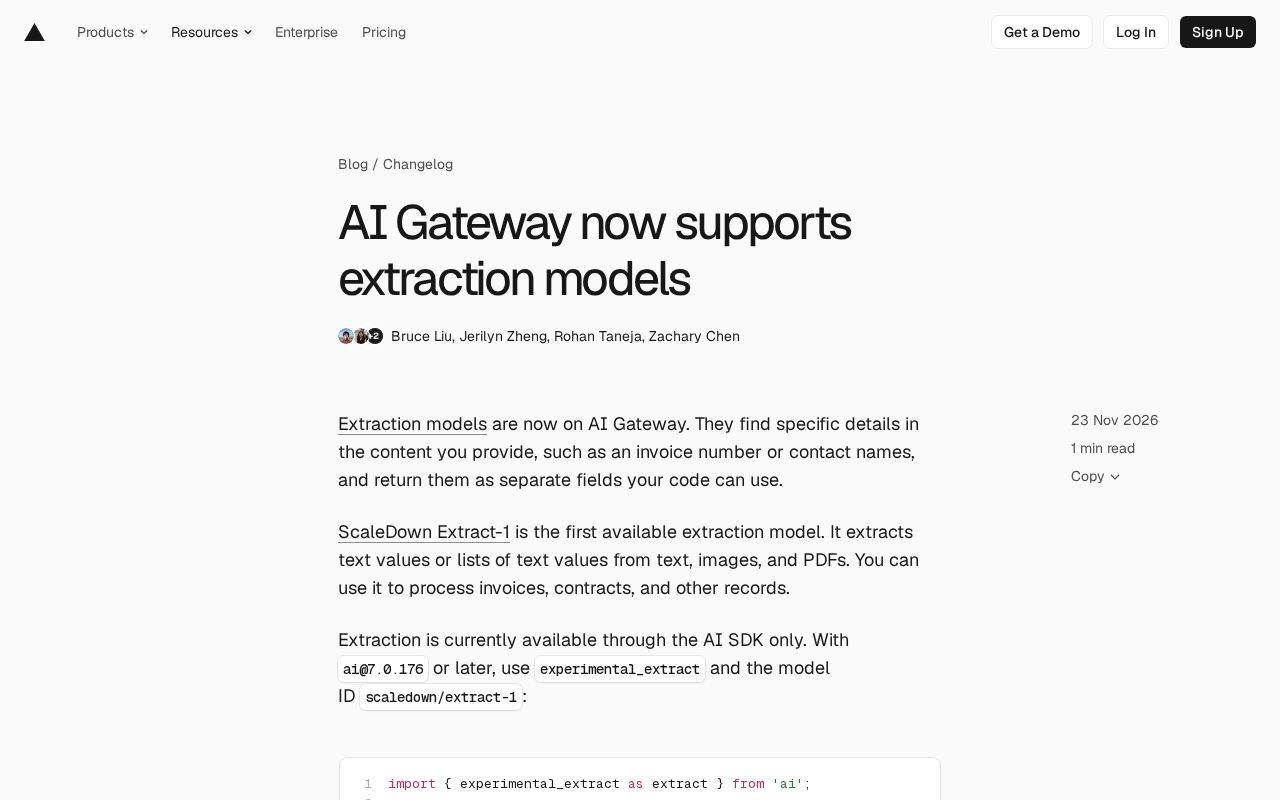
AI Gateway Launches Extraction Models: Precisely Pull Structured Fields from Invoices and Contracts
AI Gateway adds extraction models, debuting with ScaleDown Extract-1, which pulls fields like invoice numbers and contacts from text, images, and PDFs, returning confidence scores and character offsets via AI SDK's experimental_extract.