9 Proven Methods to Make Hermes Agent Actually Work for You

9 real-world methods to turn Hermes Agent from a chatbot into a productive AI employee.
A power user with hundreds of hours on Hermes Agent shares 9 core practices: choosing the right model (Opus for reliability, ChatGPT for value, GLM for budget), running multiple Agents for failover, avoiding over-isolation, leveraging Tailscale for cross-device control, and using reverse prompting with Kanban to build a sustainable AI workflow.
AI Agents are evolving from a buzzword into a genuine productivity tool. A power user with hundreds of hours on Hermes Agent shared lessons from four months of real-world use. His core message is blunt: Use Hermes Agent right, and it's a full-time AI employee. Use it wrong, and it's just another chatbot. This article breaks down his framework, covering model selection, multi-agent redundancy, cross-device coordination, and more.
What is an AI Agent? The key difference between an AI Agent and a regular chatbot lies in autonomy and tool-calling capability. A traditional chatbot is essentially a Q&A system — each conversation is isolated, and it can't execute complex multi-step tasks. An AI Agent, by contrast, has goal-oriented planning (Planning), the ability to call external tools (Tool Use), and persistent memory (Memory). It can decompose a high-level objective into sub-steps, execute them sequentially, and dynamically adjust based on intermediate results. This architecture is known as the ReAct (Reasoning + Acting) framework. That's why the same large language model can perform dramatically differently in Agent mode versus standard chat mode — a model's ability to "not give up and keep pushing" becomes a critical evaluation dimension.
It All Starts With Choosing the Right Model
The most common question is: which model should you use with Hermes? The author offers a clear, menu-style recommendation.
The top choice is Opus. He calls it "the strongest agentic model to date" and doesn't hide the cost — over the past month, he spent roughly $1,400 on Opus alone, averaging about $40 per day. Why is it worth it? He uses a vivid analogy: give Opus a task, and even if it breaks a leg halfway through the marathon, it will crawl to the finish line. Other models stub their toe and immediately give up.
Why is Opus so expensive yet worth it? The Claude Opus series (developed by Anthropic) is widely recognized in the AI Agent space for its stronger instruction-following and task persistence. This comes down to two technical dimensions: context window management and long-chain reasoning stability. In long tasks, a model must maintain goal consistency across tens or even hundreds of thousands of tokens without experiencing "goal drift" or abandoning the task midway. Opus excels here thanks to its larger parameter count and more refined RLHF alignment training — but at a steep price (approximately $15 per million input tokens). Long Agent tasks consume enormous amounts of tokens; a single complex task may invoke the model dozens of times, each time carrying the full context. That explains why the author's monthly spend reaches $1,400.
For serious businesses targeting revenue, this certainty of task completion is a core value that money can barely buy.
The mid-tier choice is ChatGPT. ChatGPT 5.5 and later versions work well with Hermes. While not as reliable as Opus, it's fully usable. Versions before 5.5 are "pretty bad." For users already subscribed to ChatGPT, this is a zero-extra-cost option.
The ultra-budget pick is GLM 5.2. It costs a fraction of the alternatives. More "mechanical," but it gets the job done.
The decision logic is clear: running a real revenue-generating business online? Go with Opus and buy certainty. Already subscribed to ChatGPT? Plug it right in. Purely optimizing for cost? GLM 5.2.
Always Run At Least Two Agents Simultaneously
The author emphasizes this is something every user should do: don't run a single Agent alone.
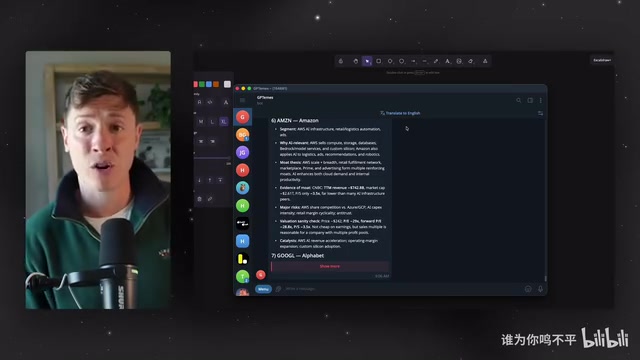
His primary Agent is named Hermes (running Opus), and the second is GPTmes (running ChatGPT). Why do you need a second, third, or even fourth Agent? The answer is failover.
The Engineering Logic Behind Multi-Agent Systems Multi-Agent architecture (Multi-Agent System) draws from traditional software engineering concepts of High Availability and Redundancy. In production-grade AI systems, single points of failure are the biggest operational risk — API rate limits, expired tokens, network timeouts, and model service outages can all interrupt an entire workflow. By deploying multiple Agent instances and giving them the ability to monitor each other (similar to Kubernetes Pod health checks and automatic restart mechanisms), overall system availability can improve from roughly 95% with a single Agent to approximately 99.9% in a multi-Agent architecture. This design has become standard in enterprise-level AI infrastructure. The author brings this into a personal workflow, essentially applying DevOps reliability engineering principles to AI Agent management.
Agents aren't perfect — they fail at different moments. Just the day before, the author's ChatGPT account token expired, causing GPTmes to go down. If that were his only Agent, he'd be stuck. But with multiple Agents, they can monitor and repair each other. He simply dropped a screenshot of the error to his main Agent Hermes, said "GPTmes is down, fix it," and Hermes automatically brought it back online.
There are two ways to set up a second Agent: either tell your existing Agent directly to "create a new Hermes profile powered by ChatGPT," or go into the Hermes dashboard's profiles page, click Create in the top right, and follow the guided flow to choose a model and name. If resources allow, you can even use a different product (such as OpenClawAd) as a backup — this way they can monitor each other's uptime while you benefit from the unique features each platform offers.
Overcoming Security Anxiety: Stop Over-Isolating
The third method addresses a common misconception: many users buy a dedicated computer for their Agent, register separate Gmail and iMessage accounts, and completely isolate it from their personal setup.
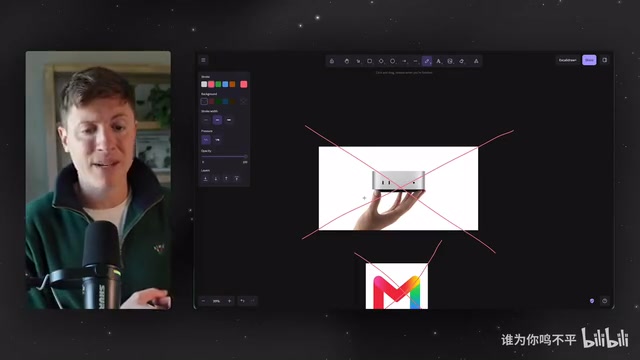
The author considers this a huge mistake that only creates unnecessary friction. The underlying concern is security — "If I give it Gmail access, will my emails leak? If I give it iMessage, will it send random messages?"
A Rational View of Security Boundaries This point touches on a core debate in AI security: the tension between the Principle of Least Privilege and operational efficiency. Modern LLM-based Agents are fundamentally different from malware — they have no autonomous intent, no drive to "overstep," and only act on instructions within a defined chain. That said, this doesn't mean zero risk: Prompt Injection attacks are a real threat, and malicious web pages or files could potentially "hijack" Agent behavior through embedded content. A pragmatic security strategy, therefore, should preserve human confirmation steps for sensitive operations (like sending emails or executing code), rather than building friction through account isolation. This is a rational balance between risk and efficiency — not a dismissal of security.
The author's response is direct: AI is not a sentient entity — it only does what you explicitly tell it to do. You ask it to gather AI news; it won't turn around and email your mom. He asks: how many people do you actually know who've had a real security incident with Hermes? The answer is almost certainly zero. So, with personal responsibility and thoughtful consideration of what instructions you give your Agent, just install it on your main machine and connect it to your primary accounts. Don't wrap every action in 20 layers of isolated accounts. This is a clear-eyed trade-off between self-accountability and efficiency — a bold stance that will inevitably spark debate.
The Three Platforms and Their Roles
The author divides Hermes usage into three scenarios:
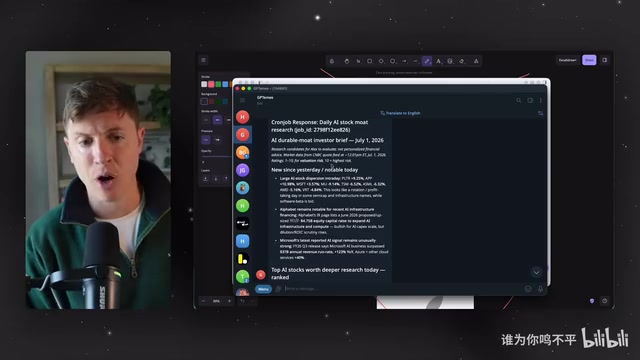
- At your desk → Hermes Desktop: He calls it "the best AI Agent experience on the planet." You can quickly switch between multiple profiles, view all cron jobs, pin and pop out different sessions, and talk to multiple Agents simultaneously.
- Out for deep work → Telegram: Used for handling multi-threaded tasks on mobile. The new version of Telegram supports rich message formatting — tables, bold text, paragraphs, and more. You can set up cron jobs, such as daily AI-related stock research delivered as a formatted table with ratings, so you wake up to organized, ready-to-read information.
- Out for quick tasks → iMessage: An out-of-the-box experience. The author adds Hermes as a contact and pins it, issuing quick instructions anytime through the most convenient app at hand.
Performance Optimization: Regularly Audit Your Cron Jobs
Many users complain that their Agent gets slower and dumber and always seems busy. The author believes the number one culprit is cron jobs.
The Technical Mechanics and Cost Trap of Cron Jobs Cron is a long-standing scheduled task scheduler in Unix/Linux systems, with its name derived from the Greek word "Chronos" (time). In the context of AI Agents, Cron jobs mean the Agent automatically triggers specific workflows at preset intervals — no human intervention needed. It can pull news every morning, monitor price changes every hour, or generate weekly summary reports. However, uncontrolled Cron job proliferation is a common form of "technical debt" in AI workflows: each job requires loading the full context (system prompt + history + tool definitions) when it runs, and token consumption grows linearly — or even exponentially — with the number of tasks. Regularly auditing and pruning redundant Cron jobs is essentially an "entropy reduction" operation for your AI infrastructure, with the same engineering value as periodic code refactoring.
These tasks run in the background — easy to create, hard to kill, just like laws and regulations. A pile of cron jobs you've long forgotten are still running, slowing your Agent down and consuming far more tokens than expected. The fix is simple: click the cron button in the Desktop app to see the full list, and every week go in and pause the ones you no longer need. You'll see an immediate performance boost and save on usage and cost.
Tailscale: Let Your Agent Take Over Your Entire Device Fleet
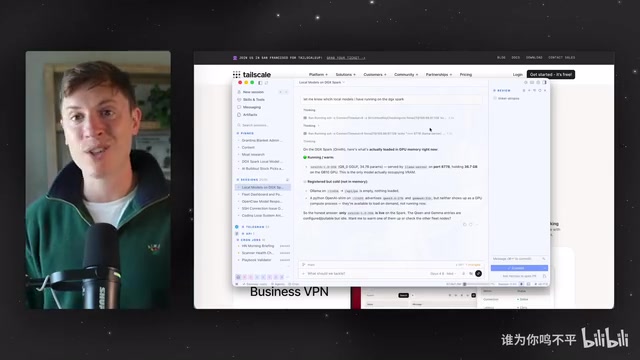
For users with multiple devices — computers, phones, a Mac mini, a DGX Spark — the author strongly recommends the free tool Tailscale.
Tailscale and Zero Trust Network Architecture Tailscale is a modern VPN tool built on the WireGuard protocol. Its core philosophy derives from Google's internal BeyondCorp security model and is a canonical implementation of Zero Trust Network architecture. Unlike traditional VPNs that build tunnels at the network perimeter, Tailscale uses a P2P (peer-to-peer) approach, assigning each device a fixed virtual IP (typically in the 100.x.x.x range) for direct encrypted communication — no centralized server relay required. For AI Agent workflows, Tailscale solves a critical problem: how to let an Agent running on Device A securely access local services on Device B (such as a locally running LLM, a database, or a dev server). Compared to traditional intranet-tunneling solutions like ngrok, Tailscale offers persistent stable connections, end-to-end encryption, and granular access control policies (ACL) — free for individual users, making it an ideal infrastructure layer for AI multi-device workflows.
Tailscale creates a private network across all your devices, enabling Hermes Agent to move between them. The author runs five computers with no monitors attached — his main Agent on Mac Studio connects to them all via SSH to check locally running models, download new ones, and transfer documents between machines. This is the moment an Agent truly becomes an "AI employee": quietly working on your other computers while you focus elsewhere. Bonus: within the same Tailscale network, you can access your computer's localhost from your phone, making it easy to test apps on mobile at any time.
Reverse Prompting and Kanban: Letting the Agent Find Its Own Work
The final two methods are about workflow design. The author believes Hermes is so capable that most users can't fully imagine what it could do — so he invented reverse prompting.
The Cognitive Science Behind Reverse Prompting Reverse prompting is a workflow design pattern that transforms an AI from a "passive responder" into an "active discoverer." Its intellectual roots trace back to the Socratic Method. In traditional usage, users need to clearly know what they want to ask — itself a high-cognitive-load prerequisite. Reverse prompting addresses this by having the Agent ask proactive questions, leveraging its understanding of your goals, current task state, and available tools to help you "discover" tasks you haven't yet thought to delegate. This closely mirrors the diagnostic interview approach used in management consulting. Combined with Kanban — a visual task management method originating from Toyota's production system that makes task flow states (To-Do / In Progress / Done) explicit — this workflow achieves a closed loop of human-AI collaboration: humans handle prioritization decisions, the Agent handles execution and tracking, forming a sustainable productivity system.
Every morning, run a "morning interview" — let the Agent turn the tables and ask you a series of questions about today's priorities, ongoing tasks, and current stressors. The Agent then determines what it can take off your plate, what can be automated, and what requires your authorization before acting. This process takes just five minutes but surfaces two or three new delegatable tasks every day.
The complementary ninth method is Kanban. Tasks surfaced from the morning interview go directly into the Kanban board in the Hermes dashboard (open the web interface by typing hermes dashboard in your terminal, then click Kanban in the lower left). You can add tasks, drag them through stages, assign them to your Agent, and let it take over execution — keeping your entire day organized in one place.
Conclusion: Manage Your AI Agent Like an Employee
The underlying logic across all nine methods is consistent: treat your AI Agent like a real employee, not a toy. Choose a reliable model to ensure task delivery, build redundancy with multiple Agents, break free from excessive security isolation, assign the right platform for each scenario, perform regular performance maintenance, connect your devices with Tailscale, and establish sustainable workflows through reverse prompting and Kanban — every single method points toward the same goal: evolving the Agent from "can chat" to "can work and get things done."
For anyone exploring how to deploy AI Agents in practice, these lessons distilled from hundreds of hours of real-world use are far more valuable than any feature list.
Key Takeaways
Related articles

Vibe Coding Full-Stack in Practice: AI Programming from Beginner to Enterprise Deployment
From Cursor to Claude Code, this Bilibili AI programming course uses four progressive projects to cover full-stack development, open-source secondary development, and team collaboration. The article analyzes the shock to frontend roles, the efficiency shift from 50 people to 5, and the methodology required for enterprise-grade projects.

David Blaine's Global Quest for Real Magic: From South Africa to Japan and India
David Blaine travels to South Africa, Japan, and India in his Do Not Attempt special, documenting Spinning drivers, black mamba rescuers, iaijutsu masters, and ascetics—exploring the boundary between magic and real human极限 challenges.

Is a Touchscreen MacBook Coming? Vergecast Reveals Apple Executive's Response
Vergecast podcast reveals a conversation between a reporter and Apple executive John Ternus about a touchscreen MacBook and Apple Pencil support. Ternus says iPad is the best device for a stylus, while the reporter bets MacBook will eventually support Apple Pencil.