9 UI Skills for Claude Code in Practice: Getting Professional-Grade Frontend Design from AI

Claude Code's Skills plugin system lets AI generate industry-standard UI, from color palettes to interactive animations.
This article explains how to use Claude Code's Skills plugin system to improve the quality of AI-generated frontend UI. Skills are pre-configured design modules — installable at user or project scope — that handle everything from color palettes to font pairings. The piece breaks down 9 key Skills: UI UX Pro Max bundles 190+ color schemes and 70+ font pairings; shadcn/ui targets dark-mode and minimalist designs; a motion graphics Skill handles transition animations; and Web App Testing acts as a final UI/UX quality check. The author's comparison tests show Skills raise the floor and consistency of AI-generated interfaces, but clear design briefings and iterative refinement are still essential.
Why AI Developers Need to Master UI Skills
Using AI to write code is nothing new, but many developers run into a common frustration: AI-generated frontends are often "functional but ugly" — jarring color choices, off gradients, misaligned layouts. The source material for this article comes from a Tamil-language tech YouTuber's tutorial, and the core message is clear: by leveraging Claude Code's Skills plugin system, you can get AI to produce UI/UX that approaches industry standards, rather than just barely-working pages.
Skills are essentially pre-configured design standards and capability modules for Claude Code. Instead of describing from scratch what color scheme or font pairings you want, you simply invoke the relevant Skill and the AI generates the interface according to its built-in design system. For backend or full-stack developers who aren't strong on visual design, this is a significant productivity boost.
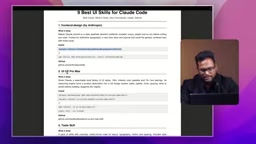
Installation and Scope: user scope vs. project scope
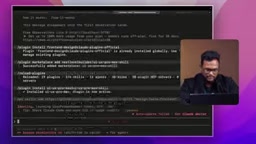
The video demonstrates installing Skills via a plugin approach, with some capabilities installed into projects via npx. During installation, Claude Code will ask about the installation scope:
- user scope: Takes effect across any project and any session. The author personally defaults to this, reasoning that "no matter where I start a session, I want this UI capability available."
- project scope: Only active within the current project, suited for project-specific design systems.
A useful detail: when a Skill is installed at project scope, you can use slash resume after exiting and re-entering the project to restore the session, and the Skill will be reloaded. Once loaded, the AI will proactively prompt you — "Skill loaded, but briefing is missing — what do you want to build? What type of page? Who is it for?" — meaning you need to provide a clear design intent rather than expecting it to improvise.
Claude Code's Skills plugin system is fundamentally a prompt engineering encapsulation mechanism. Each Skill corresponds to a pre-written set of system-level instructions (system prompts or tool configurations) that include design specifications, code style constraints, component selection guidance, and more. When you invoke a Skill, these instructions take effect within the current session's context — essentially pre-installing a domain expert's "behavioral rules" into Claude. This also explains why Skills need a clear briefing to perform at their best: the Skill provides the "how" framework, while "what" still depends on the developer supplying a clear design intent and business context. The npx installation method typically means the Skill writes a configuration file to the project root, making it shareable and reusable in CI/CD or team collaboration scenarios.
Breaking Down the 9 Core UI Skills
Frontend Design and UI UX Pro Max
The first is Frontend Design, which offers multiple design style presets including aesthetic, brutalist, luxury, and playful. The author notes this is an officially Anthropic-provided capability with solid out-of-the-box quality.
The more popular one among creators is UI UX Pro Max. It comes with 190+ industry color palettes and 70+ font pairings. In other words, you never have to hunt for fonts yourself — the Skill tells you which color scheme pairs with which fonts and applies them automatically. The author emphasizes that after using these Skills, "gradients won't go wrong and layouts won't break" — those finicky details are all handled uniformly by the Skill.
shadcn/ui is an open-source component library built on Radix UI and Tailwind CSS. Unlike traditional component libraries (such as Material UI or Ant Design), it uses a "copy into your project" approach rather than "install as a dependency" — component code lives directly in your source tree, where it can be freely modified. This design philosophy makes it extremely popular in projects that demand high customization. It includes a complete design token system with native support for light/dark theme switching, and paired with Tailwind's CSS variable mechanism, it achieves professional-grade minimalist visuals with almost no extra configuration. When a Skill is combined with shadcn/ui, the AI-generated component code directly follows shadcn's design conventions, avoiding the style inconsistencies that come from cobbling things together manually.
Design Taste Frontend
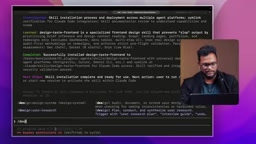
Invoked via slash design-taste-frontend. This Skill leans more toward controlling overall design sensibility and will ask clarifying questions before generating a page. The author demonstrated this using "a landing page for a course targeting Indian developers" as an example, showing how a specific briefing enables the AI to produce a page with a clear purpose.
Motion Graphics and Interactive Animations
One Skill focuses specifically on motion graphics, installed via npx and then invoked within Claude Code. It handles transitions and animation effects — like the typing animation that appears when you enter content on a page. The author uses Apple's iPhone website as an analogy: that silky smooth field transition and interactive feel is exactly the standard this kind of Skill aims for.
Interface Design and shadcn/ui
Interface Design + shadcn/ui is a capability that comes along by default, also installed via npx. It's especially well-suited for dark mode and minimalistic scenarios — if your interface calls for a restrained black-and-white aesthetic, this combination is the best fit.
Web Design Guidelines and Web App Testing
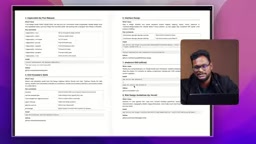
There's also a Vercel-based Web Design Guidelines Skill that provides design references aligned with modern web standards — ready to use out of the box.
The ninth Skill, and the one the author considers most critical for wrapping up, is Anthropic's Web App Testing. Its role is to verify whether your UI/UX is actually up to standard after the design is complete — essentially a quality-check step. The recommendation is to add it at the very end of your workflow.
Real-World Results: With Skills vs. Without
The author ran a direct comparison: an app built with Skills versus one generated the conventional way, examining the difference in final output. He honestly admits the results aren't perfect every time — "the first attempt came out great, the second was noticeably worse" — but overall, using Skills consistently pushed the interface toward a cleaner, more professional minimalist look.
This is a reality worth acknowledging: Skills significantly raise the floor and consistency of AI-generated UI, but they don't guarantee 100% stable output every time. Developers still need to iterate, provide clear design briefings, and use the testing Skill for a final quality check.
Practical Recommendations for Developers
Based on the video content, a few actionable paths emerge: start with Frontend Design and UI UX Pro Max to address color and font issues; pair shadcn/ui for dark-mode or minimalist projects; bring in the motion graphics Skill when you need interactive polish; and use Web App Testing at the end for quality assurance. Default to user scope so your capabilities carry across projects.
One caveat: this article draws from a single-source practical tutorial, and some installation paths and Skill names are based on video demonstrations. Readers are encouraged to cross-reference the latest plugin commands and capability lists against the official Claude Code documentation when putting this into practice.
Related articles

Bilibili's Hit Dify Tutorial: A Practical Guide to Building 20+ AI Apps from Scratch
A distilled guide to Bilibili's top-rated Dify tutorial: Windows + Docker deployment, MySQL connection, five app types, model integration strategy, and publishing.

Agent Skills Beginner's Guide: From Concepts to Multi-Agent Collaboration in Practice
A comprehensive guide to Agent Skills: core concepts, components, the importance of Description, standardization, beginner learning paths, and multi-agent collaboration.

One Neuron Detects Both Cats and Cars? We Reproduced It and Found a New Explanation
The cat-car neuron reinterpreted: researcher Cammarata argues it distinguishes pointy from round, not cats from cars. We reproduced the experiment and found the new explanation holds on most inputs—but cars are the exception. The interpretability debate continues on language models.