A Complete Guide to Local RAGFlow Deployment and RAG in Practice

A complete RAGFlow path from Linux VM + Docker deployment to knowledge base, Agent, Ollama integration, and API integration, based on a Bilibili tutorial.
Based on the outline of a Bilibili series of courses, this article systematically sorts out RAGFlow's deployment and functional context. The tutorial recommends using VMware to set up a Linux virtual machine and then installing Docker to deploy RAGFlow, in order to avoid common problems with Windows Docker Desktop. The core functions of the main interface are divided into four blocks: knowledge base, chat, search, and Agent. File management serves the document parsing and indexing of the knowledge base. The Agent module uses workflow orchestration, and the number of currently supported nodes is limited, making it suitable for linear retrieval-generation processes. Through Ollama, local models can be integrated into RAGFlow to achieve a completely offline RAG chain. The web embedding and API calling section covers HTTP API and Python SDK, making it easy to integrate RAGFlow as a backend service. Finally, it points out that RAGFlow's implementation of MCP differs from the traditional understanding, and the protocol boundaries need to be confirmed before integration. Overall, the course covers a complete implementation path and is suitable as systematic introductory material.
RAGFlow is a RAG engine that has attracted considerable attention in the open-source community recently. There are many tutorials about it, but a complete path that truly sets up the environment from scratch and gets knowledge base and large model conversations running is not common. This series of courses from Bilibili provides a relatively systematic route: starting from a Linux virtual machine, deploying RAGFlow with Docker, then gradually expanding into knowledge bases, Agent workflows, Ollama local model integration, web embedding, and API calls. Based on the course outline, this article sorts out RAGFlow's deployment essentials and functional脉络, and adds some judgment on pitfalls that are easy to encounter in actual implementation.
Why Choose Linux + Docker to Deploy RAGFlow
The tutorial explicitly avoids Docker Desktop on Windows, with the reason that this type of installation "will have all kinds of inexplicable problems." This judgment is not exaggerated in practice—RAGFlow relies on the collaboration of multiple containers (including vector databases, document parsing services, etc.), and path mapping, WSL network forwarding, and resource allocation under Windows can all become failure points.
The author's choice is to use VMware to set up a CentOS or similar Linux virtual machine, then install Docker and deploy RAGFlow within it. For readers unfamiliar with Linux, the course also includes explanations of virtual machine network configuration and common tool operations. This part may seem basic, but it is the prerequisite for whether all subsequent steps can proceed smoothly.
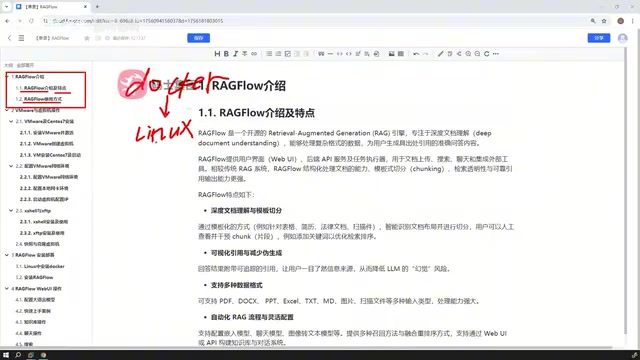
It should be noted that RAGFlow has certain requirements for memory and disk, especially in the document parsing stage. When allocating resources in a virtual machine, leaving some margin is much easier than troubleshooting containers that repeatedly restart afterward.
RAGFlow's containerized architecture: RAGFlow is not a single service but a system composed of multiple containers. Typical components include a web frontend, API backend, document parsing engine (such as DeepDoc), vector database (Elasticsearch or Infinity), MySQL metadata database, and Redis cache. These containers communicate with each other through the Docker network and share mounted volumes to store uploaded files and parsing results. Understanding this helps with troubleshooting: for example, document parsing failure may be due to insufficient memory in the parsing container, and failure to retrieve results may be due to the vector database not starting properly. Therefore, during deployment, ensure that Docker Compose can correctly pull all images and allocate sufficient resources to each container. The official docker-compose.yml already defines service dependencies, but in a virtual machine environment, attention still needs to be paid to port conflicts and volume permissions.
The Four Major Functional Modules on RAGFlow's Main Interface
After deployment is complete and you enter the main page, the tutorial summarizes the core functions into four blocks: knowledge base, chat, search, and Agent. There is also a file management entry, whose role will be reflected in the knowledge base operation section—uploaded documents need to be parsed, split, and indexed here before they can be called by the subsequent retrieval chain.
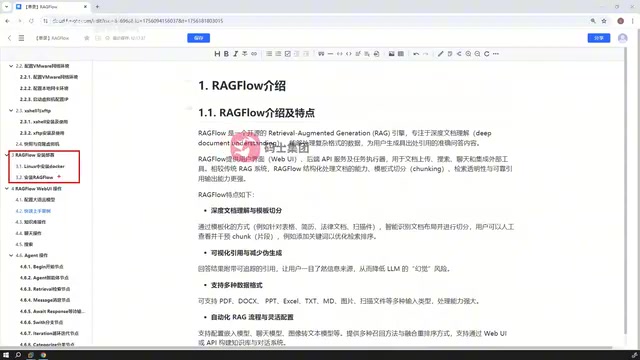
This division actually reflects the basic chain of RAG applications: the knowledge base is responsible for data ingestion and vectorization, chat is responsible for dialogue interaction, search provides pure retrieval capability for verifying recall performance, and Agent orchestrates the above capabilities into reusable processes. Understanding the relationship among these four is more valuable than clicking through each interface once—many people directly adjust the dialogue prompt when knowledge base performance is poor, but the problem often lies in the document splitting or parsing stage.
Agent Workflow: Few Nodes, but Sufficient
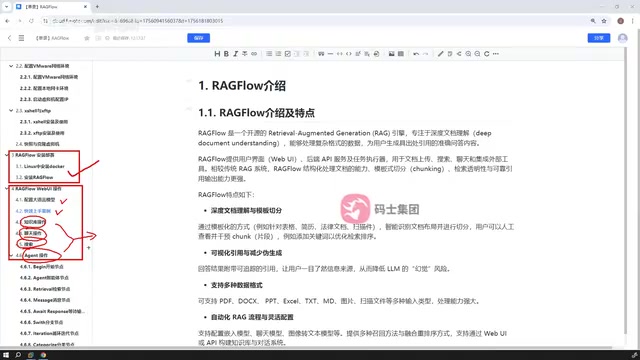
RAGFlow's Agent module adopts workflow-style orchestration, similar in form to the visual processes in Dify or Coze. The tutorial mentions a pragmatic observation: the number of nodes currently supported by RAGFlow is relatively limited. This is neither a disadvantage nor an advantage, but a fact that needs to be judged according to actual business needs—if your process requires a large number of conditional branches and external tool integrations, you may need to evaluate whether node coverage is sufficient; if you are only doing a linear orchestration of "retrieval—generation—output," the existing nodes can basically cover it.
The course provides corresponding cases for each node, and this step-by-step approach is very helpful for understanding the input-output conventions between nodes. In workflow debugging, the most time-consuming part is often not connecting the lines, but figuring out the data structure each node expects.
Node types and data flow in RAGFlow Agent: RAGFlow's Agent workflow consists of several predefined nodes. Common types include start node, knowledge base retrieval node, LLM generation node, conditional branch node, code execution node, and end node. Each node has a clear input-output contract: for example, the retrieval node outputs a list of document fragments, and the LLM node needs to receive a prompt template and context variables. Data is passed between nodes through variable references. This design makes process orchestration visual, but it also requires developers to clearly understand the data structure each node expects. Compared with platforms such as Dify, RAGFlow has fewer nodes and lacks advanced control structures such as loops and subprocesses, so it is more suitable for implementing linear or simple branching processes of "retrieval-augmentation-generation." If the business requires complex logic, you can implement it yourself with code nodes.
Integrating Ollama: Bringing Local Models into the RAG Chain
RAGFlow supports connecting to the Ollama inference framework to use models downloaded locally for knowledge base question answering. This part is more practical for teams that are sensitive to data or want to control costs: both embedding models and generation models can run locally, avoiding calls to external APIs.
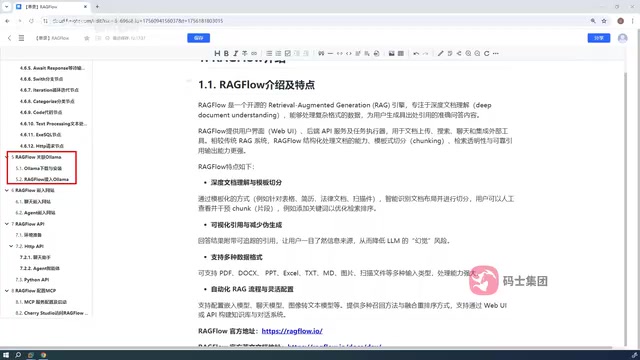
During actual configuration, attention needs to be paid to the division of models—models pulled in Ollama need to be separately specified for dialogue generation and vectorization, and the two are not the same model. The tutorial demonstrates how to apply local models to RAGFlow. Once this path is working, the entire RAG chain can run completely offline.
Ollama's model division and configuration points: Ollama is a local large model runtime framework that supports one-click pulling and running of various open-source models. When integrating Ollama in RAGFlow, two types of models need to be distinguished: embedding models (such as bge-m3, nomic-embed-text) are used to convert documents and queries into vectors, and dialogue models (such as qwen2, llama3) are used to generate answers. Both need to be added separately in RAGFlow's model provider settings, and the API address of the Ollama service needs to be specified (usually http://host IP:11434). Note that when deploying in a virtual machine, accessing the host's Ollama from within the RAGFlow container requires the host's LAN IP rather than localhost, and Ollama must be ensured to listen on 0.0.0.0. In addition, the vector dimension of the embedding model must match the dimension selected when the knowledge base was created; otherwise, retrieval will fail.
From Application to Integration: Web Embedding and API
Chat applications or Agents developed with RAGFlow can be embedded into websites. The course lists this step separately, indicating its importance in actual delivery. For developers who want to attach question-answering capabilities to their own product pages, this is a key step from "able to run" to "usable."
The API section covers two paths: HTTP API and Python SDK, with example code. The choice between the two depends on the calling scenario—frontends or cross-language services use HTTP, while Python backends can use the SDK directly for convenience. For teams that treat RAGFlow as a backend service rather than a standalone product, this part is more valuable than interface operations.
MCP Support: Different from the Usual Understanding
The last part of the tutorial introduces RAGFlow's support for MCP and specifically points out that its implementation is "a bit different from the traditionally understood MCP functionality." This reminder is worth noting: as a model context protocol, MCP has different implementation forms in different projects, and directly applying the understanding from other platforms can easily lead to misunderstandings. The author states that this will be explained in detail in the corresponding chapter. Readers should also first confirm the specific boundaries of the protocol before designing integration solutions in practice.
Introduction to MCP (Model Context Protocol): MCP is an open protocol proposed by Anthropic, aimed at standardizing how large models connect to external tools and data sources. In the traditional understanding, MCP uses a client-server architecture, where the model calls tools or resources exposed by an MCP server through an MCP client. However, different projects have different implementation forms for MCP: some use RAGFlow as an MCP server to provide retrieval capabilities externally, while others let RAGFlow act as a client to call external MCP tools. RAGFlow's implementation may focus on one direction or extend the protocol. Therefore, before integration, consult the official documentation to confirm RAGFlow's role in the current version, supported transport methods (such as stdio, HTTP), and available tool lists, to avoid integration failures caused by cognitive bias.
Overall Evaluation
The value of this course lies in covering a complete implementation path: environment preparation, deployment, feature usage, model integration, and external integration. The eight sections are logically clear and suitable as systematic introductory material for RAGFlow. It should be noted that this article is organized based on the course outline, and specific operational details are subject to the original video demonstrations; RAGFlow iterates quickly, and interfaces and node support may change with versions. Before deployment, it is recommended to check the official documentation to confirm the requirements of the current version.
One-line Summary
Based on a Bilibili tutorial, this article outlines the complete path of RAGFlow from Linux virtual machine + Docker deployment to knowledge base, Agent, Ollama integration, and API integration.
Paragraph Summary
Based on the outline of a Bilibili series of courses, this article systematically sorts out RAGFlow's deployment and functional context. The tutorial recommends using VMware to set up a Linux virtual machine and then installing Docker to deploy RAGFlow, in order to avoid common problems with Windows Docker Desktop. The core functions of the main interface are divided into four blocks: knowledge base, chat, search, and Agent. File management serves the document parsing and indexing of the knowledge base. The Agent module uses workflow orchestration, and the number of currently supported nodes is limited, making it suitable for linear retrieval-generation processes. Through Ollama, local models can be integrated into RAGFlow to achieve a completely offline RAG chain. The web embedding and API calling section covers HTTP API and Python SDK, making it easy to integrate RAGFlow as a backend service. Finally, it points out that RAGFlow's implementation of MCP differs from the traditional understanding, and the protocol boundaries need to be confirmed before integration. Overall, the course covers a complete implementation path and is suitable as systematic introductory material.
Related articles
Domestic AI Coding Plans Compared: How to Choose Between Zhipu, Kimi, and MiniMax
Compare Zhipu GLM Coding Plan, Kimi Code, and MiniMax M-Plan on pricing, points/quota rules, and model changes, plus scenario-based selection advice.

JetBrains Open-Sources AI IDE ThinkRail: Multi-Workspace Parallelism and Spec-Driven Development
ThinkRail is an open-source agentic IDE from the JetBrains Innovation Hub built on Pi, featuring multi-workspace parallelism, Git worktree isolation, spec-driven development, and diff review. Completely free under Apache 2.0.

Higgsfield: How AI Video Is Moving from the 1-Minute to the 10-Minute Era
Higgsfield shares AI video breakthroughs from 1 minute to over 10 minutes, covering Astra's text rendering, external tool use for 3D modeling, voice-to-movie, and productivity gains for small creative teams.