A Practical Guide to Building and Shipping a Complete App with Claude Code from Scratch

A senior engineer demonstrates a professional AI coding workflow by building a YouTube clone with Claude Code from scratch to deployment.
A veteran engineer building a YouTube clone with Claude Code shows how professional AI-assisted development differs fundamentally from vibe coding. The methodology: use plan mode to define MVP boundaries and tech stack constraints (Next.js + Supabase + image kit), configure the front-end design skill and Supabase MCP server upfront, establish a reusable design system to eliminate AI slop, and only then enter feature development. Bugs are communicated with detailed reproduction steps rather than vague descriptions. The author attributes efficient output to three factors: correct early decisions, serious planning, and the right tools.
A software engineer with over a decade of experience walked through the entire development process — from planning to deployment — using Claude Code to build a fully functional YouTube clone. The most valuable part isn't what was built in the end, but how it demonstrates the way professional engineers use AI coding tools — a sharp contrast to the "vibe coding" approach of just piling on code by feel.
The core takeaway is simple: the time you invest in planning, tech stack selection, and configuration before letting AI write a single line of code directly determines the quality of the final output. This article breaks down that reusable workflow, which anyone — engineer or not — can apply to their own projects.
Plan First — Don't Let AI Be the Captain
The author repeatedly emphasized that the most common pitfall when using AI is letting the model "do whatever it wants." Without clear constraints, models like Claude will proactively add features you never asked for, introducing unnecessary complexity and causing you to lose control of the project. The right approach is: you're the captain, AI is the executor.
Before writing a single line of code, you need to think through a few questions: What's the goal? Why are you building this? What does "done" look like? And most critically — where exactly is the boundary of your minimum viable product (MVP)?

One practical tip is to make good use of Claude's "plan mode" (toggled with Shift+Tab). The author recommends voice-dictating what you want, then appending a fixed phrase at the end of the prompt: "Please ask any clarifying questions you need about the requirements, and give me a detailed plan." This prompts Claude to question you first, rather than diving straight into writing code. During this phase, you nail down your tech stack — is it a web app, desktop, or mobile? What backend and frontend frameworks? If you're unsure, just ask Claude to explain the tradeoffs between different options.
For this project, the tech stack was a set of non-negotiable decisions: Next.js + Tailwind for the frontend, Supabase handling all backend capabilities (auth, storage, edge functions), and image kit as the CDN and video player, responsible for the entire media layer — streaming, adaptive bitrate, thumbnails, and captions.
Configuring Skills and MCP Servers
Once the plan is set, the second step is equipping Claude with tools so it can automate as much as possible and minimize manual intervention. The author stressed this should be done at the very start of the project.
First up: Skills. The /skills command lets you see what's already installed. The author specifically installed two key skills: front-end design skill and UI/UX Pro Max skill. Installation is simple — paste the corresponding GitHub repository URL to Claude and let it identify and install the correct skill files. These two skills help the interface avoid that "obviously AI-generated" roughness (what's called AI slop), producing a more professional and consistent design system.
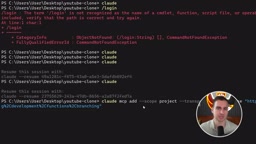
Next: MCP servers. The author connected Supabase's MCP server — running the official command in a separate terminal window automatically adds it, then account authorization is completed via the /mcp command. Once authorized, Claude can automatically modify backend configuration without any manual intervention. Supabase is particularly well-suited as an MVP-level backend; for AI projects with modest user numbers, it's more than sufficient.
For image kit, the author installed two plugins via the /plugin command. He highlighted a habit worth cultivating: many modern frameworks now offer AI Skills, MCP servers, or some form of agent integration — check whether the tools you're using have these integrations before you start building, and install them.
MCP (Model Context Protocol) is an open protocol from Anthropic that allows AI models to communicate bidirectionally with external tools, databases, and services through a standardized interface. Unlike traditional API calls, MCP servers let Claude actively read and write external system state — for example, directly creating database tables or modifying RLS policies in Supabase, rather than just generating code for a human to execute manually. This ability for "AI to directly operate infrastructure" dramatically shortens the development loop, but also means you should carefully evaluate permission scope when granting authorization. Supabase, GitHub, Linear, Stripe, and other mainstream developer tools have all launched official MCP servers, forming the foundation of what's called the "AI-native developer toolchain." Skills are another layer of abstraction — essentially specialized prompts or instruction sets injected into Claude's context, used to continuously constrain the model's output style and decision preferences in a specific domain (such as frontend design standards).
Building the Scaffold and Filling in Keys
After switching to Auto mode, Claude began scaffolding the application. This is where the first point requiring human intervention appeared: image kit's four configuration values were placeholders — requiring the image kit ID, URL endpoint, public key, and private key to be filled in.
These values can be found in the developer settings of your image kit account. The author pasted them directly into the conversation (he acknowledged this isn't best security practice, but Claude can already read project files anyway). With the keys filled in, running npm run dev brought up the development server.
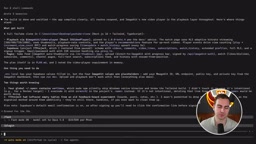
The first test — registration and login — immediately hit a bug: registration appeared to succeed and claimed an email was sent, but the email never arrived, and logging in with the same credentials returned "invalid credentials." The author's approach here is worth learning from — don't panic when you hit a problem; describe the symptoms to Claude in as much detail as possible, including a complete set of reproduction steps. With a clear description, the problem was fixed quickly.
Using a Design System to Avoid That "AI Look"
Before stacking on more features, the author did something professional developers routinely do — but vibe coders typically skip: establishing a design system.
A design system is a collection of reusable components: icons, cards, typography, inputs, headers, and so on. The proper engineering approach is to design these individual components first, then assemble them across pages — rather than letting AI improvise every time.
The author's prompt asked Claude to use the front-end design skill to build a design system with a dark theme, near-black background, a single restrained accent color, high contrast, and compact typography. It would define design tokens and thumbnail cards, then render all components on a /design style gallery page — so they could be reviewed and tweaked individually before being applied to real pages. Once satisfied, everything was applied to the whole project at once. The improvement in interface quality was immediately visible.
"AI slop" at the UI level has a few telltale signs: over-saturated gradients, mixed sans-serif fonts, inconsistent component spacing, randomly varying card corner radii, and pages that each have their own style yet feel disconnected from one another. The root cause is that unconstrained AI "reinvents the wheel" every time it generates a component, lacking unified design tokens as an anchor. A design system pre-defines color variables, spacing scales, font size hierarchies, shadow specifications, and other tokens — converging all visual decisions to a single source of truth. In engineering practice, these tokens typically exist as CSS custom properties or Tailwind configuration, ensuring every component renders consistently on every page. Rendering the design system to a standalone
/designroute is a common "Component Gallery" practice — a lightweight alternative to Storybook — allowing each atomic component to be reviewed and adjusted independently before integration into real pages.
Adding Video, Thumbnails, and Analytics
With the foundation running, the author gradually added YouTube's core experiences. image kit's newly released video player handled a significant chunk of the work: adaptive bitrate streaming, custom branding, playlists, subtitle chapters, and even built-in video analytics — plus a "Copy for LLM" button to make it easy to feed information to AI.
For thumbnails, the feature supports two methods: dragging the progress bar in the upload flow to "capture the current frame" as a cover image, or uploading a custom thumbnail directly. Once uploaded, the cover is stored in image kit alongside the video.
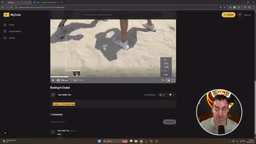
For captions, the player supports AI auto-generation, but the author found that the first generation takes a few minutes and wasn't immediately visible during the demo. He then had Claude do two things: build a creator-facing "YouTube Studio" analytics page (showing views, watch time, subscriber count, likes, comments, etc.), and generate a batch of stub fake user accounts — so he could simulate subscribing to other channels and viewing non-personal account behavior, thereby fully validating the analytics and subscription logic. Video analytics data can be pulled directly from image kit's built-in player capabilities, or fetched via API to display in a custom dashboard.
Adaptive Bitrate Streaming (ABR) is a core technology in modern video platforms. The idea is to pre-encode the same video at multiple resolutions and bitrates, and have the player switch to the optimal version in real time based on current network bandwidth — delivering the highest possible quality while keeping playback smooth. HLS (HTTP Live Streaming) and DASH (Dynamic Adaptive Streaming over HTTP) are the two most widely used ABR protocols today. As a media CDN, image kit handles all video transcoding, segmented delivery, and player SDK work, so developers don't need to build their own transcoding pipeline — which is precisely why the author chose it as the "media layer." For MVP-stage projects, outsourcing this kind of infrastructure to a specialized service provider avoids burning significant time on low-level engineering unrelated to core business logic, consistent with the project's overall strategy of "validate fast, build less."
The Real Value of This Approach
The author acknowledged there's a long list of features that could still be added, but what he wanted to demonstrate was the process itself: how to scaffold a project, integrate key services, choose the right tools, configure skills and design systems, and follow best practices when using AI for large-scale code generation.
The reason he could produce a fully functional application in so few prompt iterations with almost no major roadblocks comes down to three things: making the right decisions upfront, taking the time to plan seriously, and using the right tools. This is fundamentally different from "opening Claude and telling it to just write whatever" — the latter seems faster in the short term, but leads to rework and loss of control in the long run.
For anyone looking to get started with AI-assisted development, the takeaways are clear: don't skip the planning phase, communicate your tech stack to the AI as explicit constraints, install relevant Skills and MCP servers before you start, build your design system before your pages, and when you hit bugs, communicate with detailed reproduction steps — not vague complaints. No matter how powerful the tools get, you should always be the one steering the ship.
Related articles

Qwen 4 First Test Leaks: Performance Rivals Opus 5.5, DeepSeek V4 Series Surfaces
Early Qwen 4 test outputs leak, with front-end generation said to rival Opus 5.5; DeepSeek V4 Mini, Flash, and Pro names appear in a code repo; Ant Group's Ling-3.1-flash surfaces too. Here's the latest on model tiering and on-device lightweight models.

OpenCode Makes DeepSeek V4.1 Flash Free, AI Daily Roundup
AI daily roundup: OpenCode makes DeepSeek V4.1 Flash free, StepFun Step5 Preview and Ling 3.1 Flash open-sourced, Grok Voice 3.0 tops speech leaderboard, Matrix Game 4.0 open-sourced, and the EU opens its first AI Act enforcement probe into OpenAI and Anthropic.

DeepSeek V4.1 Flash 1017 Released: Reasoning and Coding Upgrades, Search and Fetch API Now Available
DeepSeek releases V4.1 Flash 1017 with major gains in reasoning, coding, and agentic tasks, plus web search and fetch APIs at 5 yuan per 1,000 requests. Tencent Hunyuan open-sources High Memory 2.0, Perplexity open-sources multimodal decision models, and MOFCOM seeks comments on AI export catalog.