Adding Web Interaction to DeepSeek's Coding Agent: DeepSeek Harness Desktop + TinyFish in Practice

Add full web interaction to DeepSeek Harness desktop by plugging in TinyFish's MCP server — no code changes required.
DeepSeek Harness desktop is a plugin-centric agentic coding framework where the app is just a host and all core capabilities — model routing, web search, the agentic loop — exist as plugins. Its UI uniquely exposes execution trajectories and cache hit rates. Native web tools are read-only and can't handle logins or clicks; integrating TinyFish's MCP server fills that gap, enabling login, form-filling, scheduled monitoring, and password-free session reuse — with the same approach working across Claude Code, Codex, and Cursor.
DeepSeek Harness Desktop: Plugins Are the Real Story
DeepSeekAd recently released a desktop version of its coding agent framework, DeepSeek Harness. As one of the fastest-growing agentic coding harnesses in the open-source space, it's known for its minimalist design paired with powerful capabilities — and its plugin system and prompt caching implementation are widely regarded as among the best available.
The desktop version doesn't reinvent the architecture. It's essentially a native shell wrapped around the full Harness web app: when you launch the application, it starts a local Harness process in the background, automatically selects a port, and loads the interface in a window. What's genuinely interesting is how it's organized — a useful mental model is: the app is just the host; plugins are the actual product.
Model routing, web search, terminal access, and even the entire agentic loop all exist as plugin packages. Each profile maps to a patch file where you can enable, disable, or configure plugins, and there's a plugin manager sitting above the application layer. The practical implication of this design is clear: adding new capabilities to your agent isn't a code change — it's just dropping a file into the plugin system.
An agentic coding harness is a framework that uses a large language model as its core to autonomously plan and execute multi-step programming tasks. Unlike simple code completion tools, it operates in a "reason–act–observe" loop, repeatedly calling tools (file read/write, terminal commands, web search, etc.) until the goal is achieved. The word "harness" comes from software testing terminology, emphasizing that this is a scaffold for "harnessing" model capabilities into concrete task workflows. Similar frameworks that have emerged in recent years include Aider, Continue, and OpenHands. DeepSeek Harness differentiates itself through its plugin-centric extensible architecture and deep utilization of prompt caching.
Prompt caching refers to caching repeated context prefixes — such as system prompts and already-loaded code files — on the inference server side across consecutive conversation turns or agent loops. Subsequent requests that hit the cache don't need to recompute those tokens, dramatically reducing both latency and cost. Major model APIs including DeepSeek and Anthropic Claude support this mechanism, but most harnesses don't expose cache hit information to users. DeepSeek Harness treats it as a first-class metric, which is one of its distinguishing practical features.
A Unique UI: Making the Agent's Inner Workings Visible
Harness's chat interface looks familiar at first glance, but it fully displays the trajectory for each agent turn: the context you provided, the user message, every step the assistant took, specific tool calls, token counts per step, and timing. This visibility lets you directly observe the agent's internal reasoning logic.
What's even more notable is that it displays the cache hit rate — a metric that virtually no other harness shows. DeepSeek Harness performs impressively here, meaning it effectively preserves the cache and can significantly reduce inference costs.
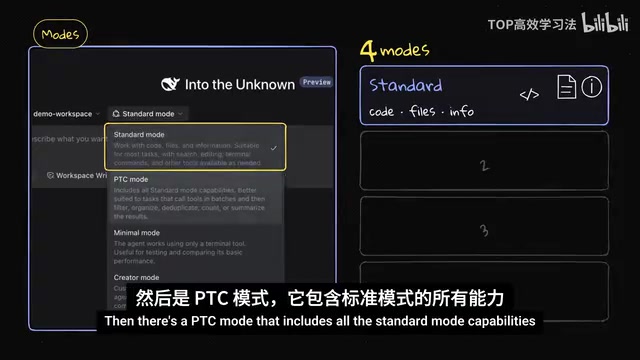
It ships with four built-in modes:
- Standard mode: A general-purpose mode for handling code, files, and information
- PTC mode: Includes everything in Standard, better suited for tasks requiring bulk tool calls, filtering, organizing, and deduplication
- Minimal mode: Similar to Pi — only a few terminal tools included, designed to be built upon
- Creator mode: Allows deep customization of the entire agentic experience for specific needs, conceptually similar to Claude Code's mods feature
The Limits of Native Web Capabilities: Read-Only
Out of the box, DeepSeek Harness ships with two web tools. The first is web search, which runs DeepSeek's own search within model turns. The second is web fetch, which downloads public pages and hands the text to the model — it can fetch any URL you point it at.
But both of these are read-only tools. While fetch can autonomously make requests, it doesn't carry cookies or credentials, and it doesn't render pages the way a real browser does. That means it's great at gathering information, but it can't handle tasks that require logging in or clicking buttons.
There are experimental browser use and computer use plugins from the official team, but they aren't installed by default and require connecting to a local browser. In reality, a huge amount of genuinely useful content lives behind logins and dashboards — an agent that can only search is simply not enough.
TinyFish: Giving Your Agent "Hands" for the Web
The solution to this gap is TinyFish. This article was made in partnership with them to demonstrate how to extend Harness's capabilities. TinyFish is positioned as web infrastructure for agents — a layer that sits between your agent and the live web: the agent decides what it needs, hands the web part off to TinyFish, and gets back clean, structured results without having to wrestle with messy HTML.
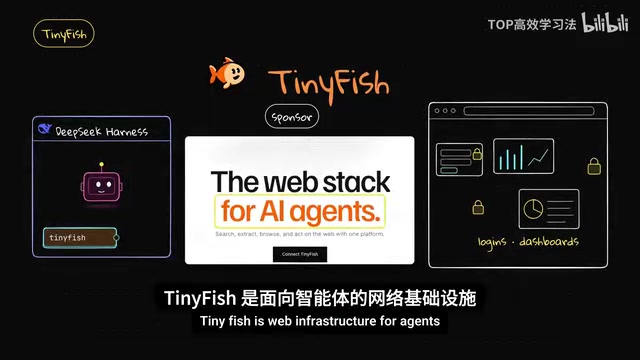
TinyFish provides four products through a single API:
- Web Search: Returns real-time web results
- Fetch: Renders a URL with a real browser and returns clean text (Search and Fetch are free on all plans, at any usage volume)
- Web Agent: Give it a goal in plain English — it automatically navigates, clicks, fills forms, handles logins, and returns structured JSON. Runs on TinyFish's own Mako model, billed per step
- Browser: Provides a cloud browser that can be driven with Playwright, with built-in anti-bot protection and a credential vault so agents can log in without ever seeing your passwords
No credit card is required to sign up and receive trial credits. Search and Fetch are free; wallet credits only apply to Agent and Browser.
MCP (Model Context Protocol) is an open protocol proposed by Anthropic that is becoming the de facto standard in the agentic ecosystem. It defines how a "host" and "MCP server" exchange tool descriptions, call requests, and return results. Any service that implements the MCP server interface can be called directly by any harness that supports an MCP client — no need to write separate integration code for each harness. TinyFish packages its web capabilities as an MCP server; DeepSeek Harness connects to it through its MCP client plugin. This is the technical foundation for why the entire extension approach works with just one plugin file. Playwright is Microsoft's open-source browser automation framework supporting scripted control of Chromium, Firefox, and WebKit — the underlying tool that drives the real browser for clicking, form-filling, and other interactions in the Browser product.
Configuration: Just One Plugin File
TinyFish runs an MCP server, and DeepSeek Harness conveniently has an MCP client plugin. In the desktop profile's patch file, you add the MCP client plugin, set the server name, point it to the TinyFish endpoint, and pass the API key as a header.
The API key doesn't have to be hardcoded in the file — it can be read from an environment variable, so the config file can be safely shared without leaking any credentials. After restarting the app and opening a new session, TinyFish's tools appear alongside all the other tools.
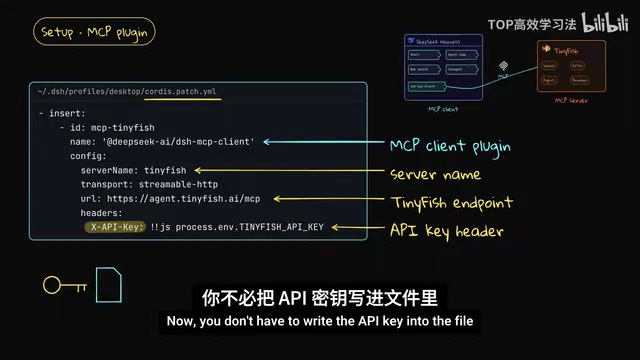
The same approach works for other agentic coding systems like Claude Code, Codex, and Cursor — the official docs provide simple installation instructions.
Live Demos: From Search to Login to Complex Filtering
Search and Fetch: Ask the agent to search for the DeepSeek Harness desktop release and return the results as-is — you get structured, real-time results with titles, links, and summaries. Ask it to fetch the Hacker News homepage via TinyFish and return the top stories — nearly instant, clean text with no messy menus, and very token-efficient.
Login interaction: This is where native tools fall short. On a public test site that publicly posts its own demo account credentials, the agent completed the full flow: opening the page, entering a username and password, clicking login, reading information, then logging out — all returned as JSON. You can watch the agent's browser actions in real time on the right-hand side.
Complex filtering: A more challenging task — go to Hugging Face, filter for text generation models, sort by trending, and return the top five with parameter counts under 30 billion. The prompt was explicit: read each model's listed parameter count and skip anything over 30B. The list had traps: one model's name included "29B" but Hugging Face listed it as 31 billion parameters (should be skipped — the agent correctly skipped it), and another named "27B" actually had 7 billion parameters (should be kept — the agent correctly identified it).
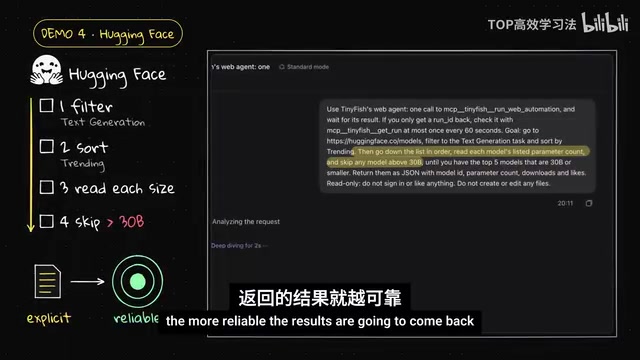
The lesson here: the more explicit your prompt and rules are, the more reliable the results. Cross-checking results against the official Hugging Face API is strongly recommended.
Monitoring and Password-Free Login: Keeping Your Agent Running
Two more capabilities worth highlighting. Monitors: Have TinyFish check the Harness release page every six hours, establish a baseline, and only notify you when there's a meaningful version change — giving you an agent that continuously watches the web for you rather than running once.
Saved Login: Instead of handing your password to the agent, log in yourself in a TinyFish browser session and save it as a profile. From then on, the agent reuses that session directly — no more asking for passwords, and it never sees your password at all.
On cost: Search and Fetch are free, and the agent step costs for both the login task and the Hugging Face filtering task are well under a dollar each. Since these tasks often take a few minutes to complete, it's worth running them in the background — the desktop app displays them as background processes. One thing to keep in mind: if the agent polls frequently to check whether a task is complete, the waiting itself generates token costs. Specifying a reasonable polling interval in your prompt helps.
In agentic workflows, the hidden cost of tokens often comes from waiting loops rather than actual task execution. When an agent needs to wait for a background task that takes several minutes, polling every few seconds triggers a full context pass and model inference each time — and the accumulated token cost can far exceed the task itself. The practical approach is to specify a check interval in your prompt (such as every 30 seconds or 1 minute), or use tool designs that support async callbacks so the agent is only woken up when results are ready, striking a balance between cost and responsiveness.
Extensibility Is the Real Value of an Open-Source Harness
The core logic of this entire demonstration is: through an external plugin, you've added "web interaction" to an already-powerful agentic coding harness — a capability that open-source harnesses and open-source models broadly lack. More importantly, this extension involves almost no code changes and works with any model you choose.
This plugin-centric architecture is the source of DeepSeek Harness's real strength — it hands control over the agent's capability boundaries back to the user, rather than leaving it in the hands of the framework's authors.
Related articles

Frontend to AI Agent Development: A Frontline Architect Explains Career Paths and Opportunities
A frontline AI architect explains the industry changes and practical paths for frontend developers transitioning to AI Agent development: why pure frontend jobs are disappearing, why Agent + full-stack has become mainstream in hiring, and three transformation routes—Agent development engineer, FDE, and remote contracting—along with corresponding learning strategies.

How to Choose an AI Agent Development Course: Five Pitfall-Avoidance Guidelines
A mechanical-engineering career changer's two-year pitfall-tested checklist for screening AI Agent development courses: complete delivery pipeline, resume-worthy projects, real development perspective, update frequency, and coaching feedback—with concrete judgment methods and pitfall-avoidance tips.

Coze AI Agent Building for Beginners: A Zero-Code AI Agent Development Guide
Coze, ByteDance's one-stop AI application development platform, supports zero-code drag-and-drop AI agent building. This article outlines Coze's core concepts, three advantages, differences between the domestic and international versions, and the distinction between agents and apps, helping beginners quickly get started with AI Agent development.