Agent Skills Beginner's Guide: Expanding AI Agent Capabilities Like Building with Lego

Agent Skills lets AI agents load specialized skills on demand — no retraining required.
Agent Skills is an open format proposed by Anthropic that lets general-purpose AI agents gain specialized capabilities by loading skill packages — similar to installing apps on a smartphone. Built around a SKILL.md file, each Skill can also include scripts, data references, and templates. The description field is critical because it's how the model identifies which Skill to invoke. Skills solve three key problems: eliminating repeated training costs, enabling cross-platform skill reuse, and codifying task execution paths to reduce hallucinations. Best practices include writing specific descriptions, keeping content concise, using negative examples, and specifying file paths explicitly.
What Are Agent Skills
Agent Skills is a lightweight, open format for extending AI Agent capabilities through specialized knowledge and workflows. In simple terms, it allows general-purpose agents to iteratively load skills on demand, enabling them to handle complete business development for specific projects.
This standard was originally proposed by Anthropic and later recognized by multiple LLM vendors, gradually evolving into a widely accepted open standard aimed at guiding the development ecosystem for the next generation of AI Agents. Its core value lies in this: by loading different skill packages, an Agent can acquire specialized knowledge and tool-calling capabilities, enabling it to reliably complete specific tasks.
From an engineering perspective, the concept becomes clearer — all large model development today fundamentally relies on underlying models like DeepSeekAd, Claude, GPT, or Doubao. These models are essentially just a "brain" with analytical and reasoning capabilities, but they have no idea what tools, methods, or features you have available. Skills package external capabilities into modules that the model can recognize and invoke.
Within the underlying protocol ecosystem that Agent Skills relies on, MCP (Model Context Protocol) is an important piece of context for understanding how it works. MCP was also proposed by Anthropic and is a protocol for standardized communication between AI models and external tools and data sources. The relationship between Skills and MCP can be understood this way: MCP addresses the communication layer — "how does the model call external tools" — while Skills addresses the content layer — "what specialized knowledge and workflows to package for the model." The two complement each other and together form the extensibility framework of modern AI Agents. Additionally, the rise of the Skills architecture is closely tied to the popularization of code agent tools like Claude Code and Codex — these tools natively support loading external Skills, making cross-platform skill reuse a reality.
Is a Skill a File or a Folder?
A popular claim circulates online: "A Skill is basically just a Markdown file." This description isn't quite accurate.
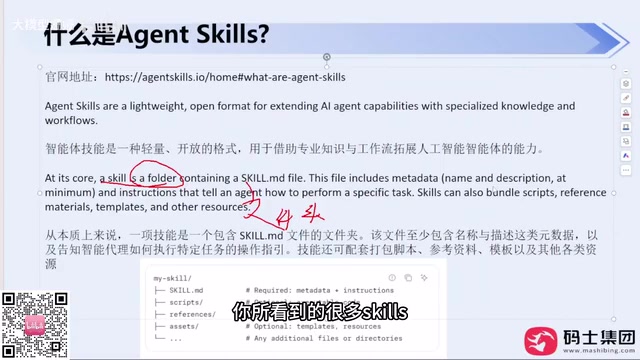
The official documentation makes it clear that a Skill is fundamentally a folder. In addition to the required SKILL.md, it can contain several types of files:
- script: External execution scripts, such as batch commands
- reference: Additional references, such as data files
- Template resources: Static pages, static styles, and other assets
The minimum requirement is just a single SKILL.md — everything else is optional. Many Skills you encounter in day-to-day use are indeed just a single MD file, but that doesn't mean Skills equals a single file — the full directory structure can support much richer capabilities.
Two required metadata fields in SKILL.md are worth emphasizing: name and description. These are the minimum components required when creating a custom Skill or using one from an online marketplace.
Why description Is So Critical
Many developers working with large models are accustomed to defining tools — essentially functions or methods — and attaching a descriptor with a name and description. The description field is extremely important throughout the entire large model development landscape.
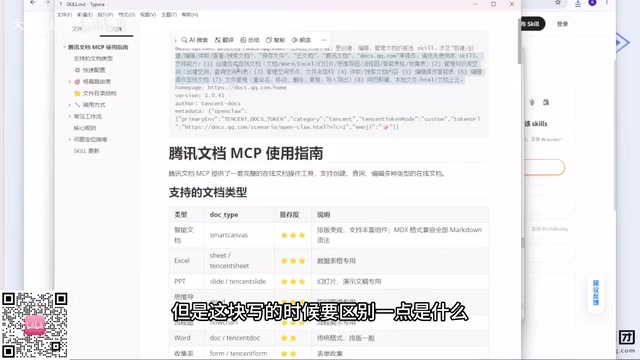
The key point is: description is not written for humans — it's written for the LLM. This is completely different from a project's README, which tells people what the project does and how it's architected. The description tells the model "what function you are actually meant to perform." When the model encounters a specific scenario, it relies on description to discover and invoke the appropriate Skill.
In practice, many people report that their Skills "never get used." The root cause is almost always a poorly written description that doesn't give the model enough signal to determine whether it should invoke the Skill. Treat every description field with care.
From a technical standpoint, when deciding whether to invoke a Skill, the model relies on semantic similarity matching and intent recognition. When a user submits a task request, the model semantically compares the request against the descriptions of all loaded Skills and determines which one best matches the current intent before deciding whether to trigger it. This process is analogous to retrieval in a vector database — the higher the quality and semantic precision of the description, the better the recall rate. As a result, description should be written in language that closely mirrors the actual instructions a user would send, rather than abstract, technical-documentation-style prose. For example, instead of writing "provides code quality optimization services," write "invoke this skill when the user asks to check code conventions, refactor functions, or eliminate duplicate logic" — the latter much more closely matches the actual context the model receives.
Two Analogies That Capture the Essence of Skills
Two everyday analogies can help make this abstract concept concrete.
Analogy 1: A capable assistant. Imagine you're a manager with a smart assistant who has some skill gaps — they can't draft contracts because they don't know law, can't make posters because they don't know Photoshop, and can't book tickets because they're unfamiliar with the booking system. The traditional solutions are to send them to training or hire additional specialists. Both are time-consuming and expensive. Agent Skills offers a third path: package specialized skills into plugins that the assistant can "put on like a backpack" to instantly gain those capabilities. When the job is done, they put the backpack down — no extra overhead.
Analogy 2: Installing apps on a smartphone. Early feature phones could only make calls and send texts. Today, you install Meitu when you want to edit photos, Meituan when you want to order food, a legal app when you want to study law, and a driving exam app when you're preparing for your license test. The phone itself hasn't changed — only the apps installed on it have.
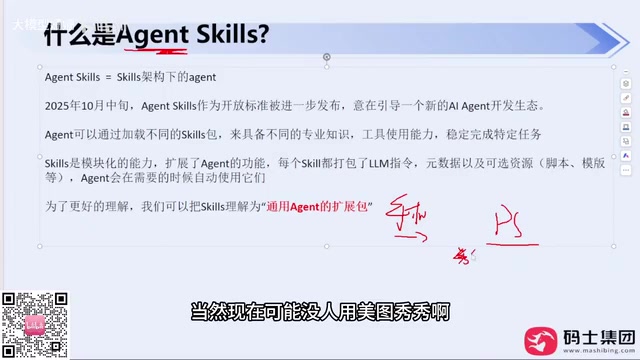
Both analogies point to the same core idea: the Agent's foundation stays the same; only the plugged-in skills change. This is the essence of Skills — moving away from a heavy-asset model and embracing a lightweight, plug-in approach. It doesn't matter what capability an Agent lacks — as long as there's a corresponding Skill, the job gets done. When the Skill is no longer needed, it can be unloaded at any time.
One concept worth clarifying: Agent Skills is fundamentally an "Agent built on a Skills architecture." When designing an Agent architecture, you can choose the Skills architecture or the Multi-Agent architecture — they are different design paths.
What Problems Does Agent Skills Solve?
At a high level, Skills addresses three main pain points:
-
Avoiding repeated training costs: By loading Skills, a general-purpose base model can be rapidly turned into a domain-specific expert Agent, avoiding the enormous cost of training a model to acquire specific capabilities from scratch.
-
Cross-ecosystem skill reuse: Skills use a lightweight file format, allowing them to be packaged once and used across different Agent ecosystems. A Skill you use in Claude Code works equally well in Codex, DeepSeek Harness, or Open Claude — because they all follow the same standard and spec, allowing capabilities to be shared and reused like Lego bricks.
-
Codifying task execution paths:
SKILL.mdprovides standardized operating instructions that lock in the task execution path, allowing the Agent to complete specific tasks reliably like an assembly line, reducing hallucinations and error rates.
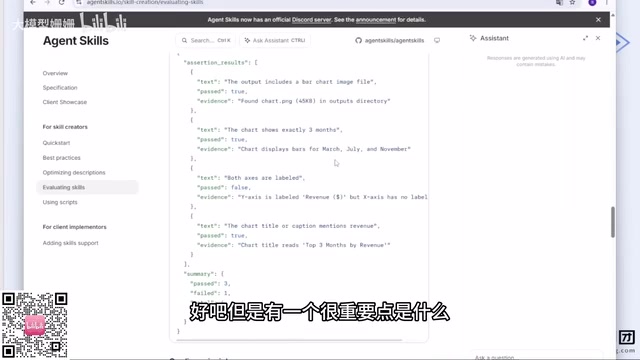
The "codifying task execution paths" feature touches on an important concept in LLM engineering: the combination of Prompt Engineering and workflow orchestration. Without Skills, an Agent must reason through the execution path from scratch every time it faces a task, making it prone to inconsistent behavior due to varying context — what's known as "hallucination." SKILL.md is essentially a structured system prompt that pre-defines the task's boundaries, execution steps, and constraints — effectively providing the Agent with an operations manual. This approach is known in AI engineering as "deterministic constraint" — using explicit rules to compress the model's output space, making results more predictable and stable, enabling the Agent to handle production-grade tasks where consistency is critical.
Practical Principles for Writing Skills
Skills don't follow a rigid fixed standard. The official documentation offers general theory and best practices, but actual writing depends on the specific scenario. A few lessons from experience are worth keeping in mind:
Be as specific as possible in your description. The LLM is not your colleague — there's no shared intuition between you. Avoid vague qualifiers like "preferably" or "try to" — the model doesn't know what you mean by "try to." Spell out concrete requirements, like "write a unit test for every method I write," rather than "try to help me write some tests."
Keep the body concise. While there's no file size limit for SKILL.md, the more content it contains, the more context window it consumes when invoked. If the context window grows too large, the Agent may fail to process it completely or struggle to follow the specifications strictly. The goal is to clearly state what the Skill can do — not to pile on text.
Make good use of negative examples. Include examples of poor output as counter-templates and explicitly tell the model "don't write it this way." The more negative examples you provide, the better the model can judge what doesn't meet requirements during inference, improving output quality.
Specify paths when referencing files. If the Skill references additional folders (data, templates, reference cases, etc.), you must explicitly point to the specific paths in the body. This is because all Skill content consumes the context window, and the underlying mechanism follows a "read as little as possible" principle — if you don't tell the model to read something, it won't go looking for it.
How to Efficiently Use Ready-Made Skills
Scenarios that actually require writing a Skill from scratch are rare — typically only when dealing with a company's specific internal business systems. For general-purpose skills, it's usually better to search open-source marketplaces first.
The number of available Skills on the market is already enormous — some platforms aggregating Claude Skills, MCP Servers, and Agent Skills reportedly host at least hundreds of thousands of entries. Domestic users in China can check out Tencent's Skills Hub, which offers categorization and sorting by Star count, update time, and more, making it fairly easy to use.
The workflow is straightforward: if you want to build data charts, search "chart plotting" and you'll find ready-made Skills supporting multiple chart types and theme presets. Find one that fits your needs and use it directly; if it doesn't quite meet your requirements, modify it from there.
You don't even need to make modifications yourself — you can have Claude Code, Codex, or Hermes Agent rewrite it for you. Hermes Agent mentioned here is built on top of Open Claude
Related articles

Felix Rieseberg Personal Homepage
Felix Rieseberg's personal homepage sparks attention on Hacker News. This article covers the Slack engineer's technical background, the rise and fall of nativefier, and the value of a developer homepage as a tech calling card.

@ai-sdk/vue 3.0.306 Patch Release Syncs with [email protected] Update
@ai-sdk/vue 3.0.306 released, synced with [email protected]. A routine patch release for the Vercel AI SDK ecosystem with no public API changes; the Vue adapter layer stays version-aligned with the core package.

Gemini 4 Argon API Launches: The Era of Million-Token Output Begins
Google launches Gemini 4 Argon with sparse MoE architecture, up to 1M output tokens, and a 68.90% Vals Index score, available across API, AI Studio, and the Gemini app.