AI Agent Beginner's Guide: A Step-by-Step Learning Path for Absolute Beginners

A plain-language explainer on AI Agents with a practical 4-week no-code learning roadmap for beginners.
This article explains what AI Agents are in accessible terms — unlike passive AI chatbots, Agents can autonomously break down tasks, use tools, and deliver finished results, acting as a "digital employee." Using a daily news push workflow as a concrete example, it walks through how Agents operate, then presents a 4-week no-code learning path: weeks 1–2 focus on foundational concepts and prompt engineering, while weeks 3–4 progress from completing a first task to building full automation workflows. The piece also flags three common beginner mistakes to avoid.
What Exactly Is an AI Agent
Over the past six months, AI Agents have been trending across the internet, and nearly every discussion about AI applications revolves around this concept. Yet for many beginners, one fundamental question remains unanswered: what exactly is an AI Agent? How is it different from the AI chat tools we use every day? And can ordinary people actually learn to use it?
In a single sentence: an AI Agent is a "digital AI employee" that can think, remember, and get things done autonomously. This is fundamentally different from ordinary AI tools — regular AI is purely reactive, answering your questions and outputting text. An AI Agent, by contrast, can independently break down tasks, call external tools, execute steps automatically, and deliver a finished result.

Think of it this way: a regular AI is like a "Q&A consultant" — you ask, it answers. An AI Agent is more like a "hands-on employee" — you assign a task, and it sees the whole thing through. This distinction in role is the key to understanding the real value of Agents.
From a technical perspective, an AI Agent's ability to "work autonomously" relies on three core components working together: planning (breaking complex goals into executable sub-task sequences), memory (storing intermediate states and context during execution), and tool use (calling external interfaces like search engines, sending emails, or manipulating files). Regular AI chat tools are "stateless" — each conversation is wiped clean after it ends. An Agent, however, maintains continuity across multiple steps, remembering "where it left off" like a real employee, and adjusting its strategy when something unexpected happens. This is why the industry often uses the term "Agentic Loop" to describe how Agents operate — they continuously perceive their environment, plan an action, execute it, observe the result, and loop back, forming a closed cycle until the task is complete.
A Real-World Example: How an Agent Completes Tasks Autonomously
The concept can feel abstract, but a concrete example makes it much clearer. The original video walks through a typical scenario: you give an AI Agent a single request — "automatically push three trending news briefs with summaries every day."
Once the request is made, the Agent independently handles the entire workflow: it takes on the role of a "news assistant," subscribes to content sources, filters stories, formats the output, and pushes the final result to your phone — all without any human intervention. You only give the instruction; the Agent handles every step of execution.
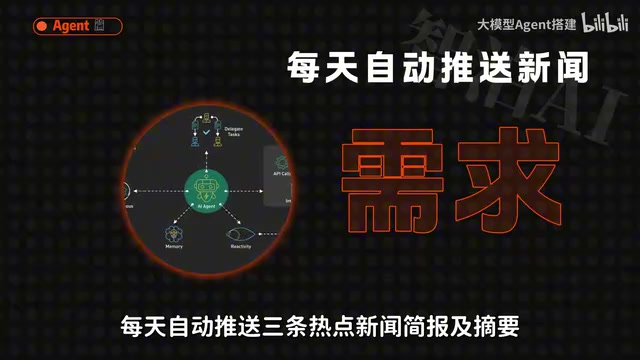
What makes this example meaningful is that it illustrates the most essential capability gap between Agents and regular AI: the shift from "giving you an answer" to "delivering a result." A regular AI might tell you what's in the news today. An Agent can turn "organize and push daily news on a schedule" into an automatically running workflow.
The Agent tools available to everyday users generally fall into a few categories: no-code beginner platforms, enterprise productivity integrations, and more. Most of these tools lower the technical barrier significantly, letting users with zero coding background get started without being intimidated.
For building automation workflows like "scheduled news delivery," popular no-code tools include Zapier, Make (formerly Integromat), Coze, and similar platforms. The core logic of these platforms is connecting "trigger" and "action" nodes through a visual drag-and-drop interface — for example, "every morning at 8 AM" as the trigger, followed by "call news API → use AI to summarize → push to phone" as the action chain. For beginners, understanding this fundamental trigger-action mental model matters more than learning any specific tool, because virtually every automation platform is built on this same underlying logic.
A Step-by-Step Learning Path for Absolute Beginners
Many people worry that they can't learn this without a technical background — but there's really no need to stress. The original author has compiled a free, open-source GitHub learning roadmap designed for Chinese-speaking beginners, with no coding required throughout. The focus is on getting up to speed quickly and boosting workplace productivity. The path is divided into clear weekly phases.

Weeks 1–2: Build a Solid Foundation
The early focus isn't rushing into complex projects — it's building the right foundational mindset. During this phase, you need to accomplish three things: get comfortable with basic tools, understand the core logic of how AI works, and learn which tools are suited for which use cases.
There's also one repeatedly emphasized core skill: asking precise questions. Getting AI to accurately understand and match your actual needs is the single factor that determines how useful your results will be. Many people find AI underwhelming not because of the tools, but because they aren't expressing what they need clearly.
Precise prompting has a dedicated term in the AI world: Prompt Engineering. The core idea isn't about using fancy language — it's about clearly communicating four elements to the AI: your role, the task, the desired output format, and any constraints (like word count, tone, or content restrictions). A well-structured prompt consistently outperforms a vague one-liner by a wide margin. Beginners can start with this simple template: "You are a [role]. Please help me [specific task]. Output in [format]. Note: [constraints]." Repeatedly applying this framework to your real-world needs is the fastest way to develop solid prompting instincts.
Weeks 3–4: Master Practical Skills
With the foundation in place, it's time for hands-on advancement — structured as three progressive steps:
- Step 1: Get familiar with beginner-friendly Agent tools. Pick one that feels comfortable and successfully complete your first real task.
- Step 2: Learn to build custom workflows. Break down complex work into parts and let AI handle routine tasks in batch.
- Step 3: Move into advanced automation — file manipulation, tool integrations — until the entire process runs end-to-end without you lifting a finger.
The logic behind this path follows a natural progression: from "using a single tool" → "building a workflow" → "achieving end-to-end automation" — a curve that maps well to how beginners actually learn and build confidence.
A Few Reminders for Beginners
The original author closes with several common pitfalls that are especially relevant for newcomers.
First, don't chase complex frameworks too early. The market is full of technical frameworks, but for everyday users focused on productivity, diving deep into underlying architectures too soon is rarely worth it.
Second, don't just watch — actually do. AI Agent skills are highly practical. Watching tutorials without hands-on practice only gives you concepts. The reason "completing your first task" is emphasized so strongly is that it converts knowledge into real capability.
Third, don't chase an all-in-one tool. No single tool does everything well. Rather than endlessly debating which one is the best, just pick something comfortable and start getting work done.
For ordinary users, the real value of AI Agents isn't about showing off — it's about handing off repetitive, process-driven daily work to run on autopilot. By following a well-structured, progressive learning roadmap and actually putting it into practice, even a complete beginner has a genuine shot at turning an AI Agent into their own "digital employee."
Related articles

Random Pruning of the DPO Computation Graph: 1.4x Training Speedup and Lower Peak Memory
DPO training too slow and memory-hungry? This paper proposes a random pruning framework for the DPO computation graph, sampling independently across position, sequence, and branch dimensions; branch pruning achieves a 1.426x step-time speedup and cuts training time by about 30%, with in-depth attribution of memory and time gains.

Why Does JEPA Underperform MLM in Longitudinal EHR Representation Learning?
New study compares JEPA and MLM for longitudinal EHR representation learning on MIMIC-IV: three JEPA variants train stably without collapse but underperform MLM; target size, not heterogeneity, drives prediction error.

Transfer Learning + Visible Light Communication: A New Approach to Energy-Efficient Indoor Positioning
A study proposes a transfer learning-based visible light communication indoor positioning method, achieving 47% accuracy improvement on the BOSCH factory dataset, 67.5% model efficiency under high noise, and introducing the ME composite metric for energy-efficient positioning in energy-constrained industrial IoT scenarios.