AI Agent Skills: A Beginner's Guide from Concepts to Structure

A structured breakdown of AI Agent Skills — from core concepts to SKILL.md anatomy — for complete beginners.
Using the programmer profession as an analogy, this article breaks down AI Agent Skills into four components — workflow, reference docs, tools, and static assets — mapped to SKILL.md, references, scripts, and assets respectively. Only SKILL.md is required; the rest are optional. A restaurant branding example illustrates how SKILL.md combines metadata and natural-language instructions. The article concludes by distinguishing Skills from prompts: Skills are standardized, composable capability units that can carry scripts, documents, and assets — making them far more powerful than plain text prompts.
As AI Agent tools like OpenClaude, Claude Code, and Hermes Agent gain popularity, one term keeps coming up: Skills. Most people's understanding stops at "a Markdown file" — but that barely scratches the surface. This article, based on practical course content, breaks down Skills from concept to structure to real-world use, giving beginners a complete understanding of what Agent Skills are.
What Exactly Is a Skill?
A Skill is exactly what the word implies — a capability. The analogy is intuitive: every profession has its own expertise. Students write essays and solve math problems; developers understand requirements, write code, and debug issues. These professional competencies in human careers map directly to an Agent's Skills in the AI world.
In other words, just as people have various skills, Agents have corresponding Skills — they're the same concept carried by different vessels. Once you see it this way, Skills stop being mysterious. They're not a brand-new invention; they evolved from early Prompt reuse practices and now play an increasingly critical role in the AI Agent ecosystem.
The key takeaway for learning Skills is to focus on three things: understanding Skills, customizing Skills, and recommending Skills — starting from first principles and gradually working toward writing Skills that serve your own business needs.
Historically, the precursor to Skills was the "Prompt Template" — developers saved frequently used instruction snippets and reused them on demand. As Agent frameworks matured, a single prompt could no longer handle complex tasks: Agents needed to execute multi-step workflows, call external tools, and read local files. The community gradually converged on a packaging convention — putting workflow descriptions, tool scripts, and reference materials together in one folder. That's the origin of what we now call a Skill. Tools like OpenClaude and Claude Code further standardized the directory structure, turning Skills into shareable, reusable capability units that work across projects and users.
The Four Components of a Skill
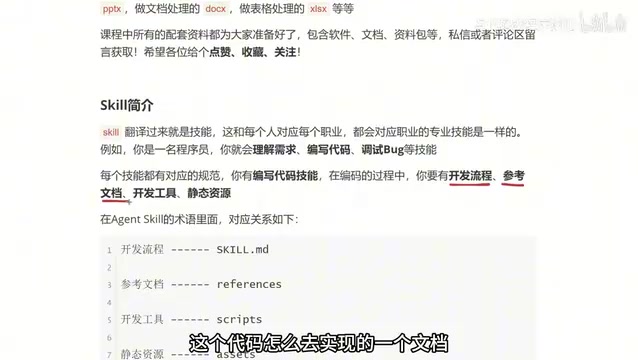
To understand a Skill's structure, the programmer analogy works again. Before a developer writes a single line of code, they need four things: a development workflow, reference documentation, development tools, and static assets.
- Development Workflow: Mapping out the business logic before touching the keyboard — what comes first, what comes next, and how the pieces connect. This is the execution backbone.
- Reference Documentation: API docs, requirements specs, anything consulted during implementation.
- Development Tools: Front-end developers use VS Code; Java developers use an IDE. Like a surgeon's instruments, the right tools make the work faster and more precise.
- Static Assets: Images, audio, video, and other media a project might need.
Bundle these four things into a folder, and you have a complete Skill. This "toolbox" style of organization is precisely what sets a Skill apart from a plain prompt.
Mapping Human Concepts to Agent Skill Terminology
Each of these four concepts maps to a specific file or folder in the Agent Skill structure:
| Human Career Concept | Skill Equivalent |
|---|---|
| Development Workflow | SKILL.md file |
| Reference Documentation | references |
| Development Tools | scripts |
| Static Assets | assets |
One important detail: not every file or folder is required. Only SKILL.md is mandatory. The other three are added based on actual needs. Some Skills need none of the extras; others use all three. What you include depends entirely on what the Skill is designed to do.
This flexible, modular design keeps Skills lightweight while allowing them to scale up for complex scenarios.

The scripts folder typically holds executable script files that the Agent can run directly — Python, Shell, or JavaScript scripts, for example. When processing a task, the Agent can invoke these scripts for data scraping, file conversion, API calls, and other automation, without relying on the LLM to generate code from scratch each time. The references folder stores static reference text: API descriptions, industry glossaries, brand guidelines, and similar materials that the Agent draws on as context during reasoning — essentially a "pocket handbook" for the model. This separation of concerns — workflow logic in SKILL.md, tool capabilities in scripts, knowledge references in references — is the core reason Skills remain maintainable even in complex scenarios.
Anatomy of a Real SKILL.md
The course uses a concrete example — "generate brand-aligned marketing material designs for Evan Restaurant" — to demonstrate the internal structure of a SKILL.md file. The file has two main sections.
Metadata (Top Section)
The top of the file contains metadata: the Skill's name and description. In the restaurant example, the description reads: generate brand-aligned marketing material design concepts for Evan Restaurant — when the user asks to create a poster, pull-up banner, packaging box, or similar material, output the corresponding design concept. This description defines the Skill's core function and the scenarios that trigger it.
Instructions Section
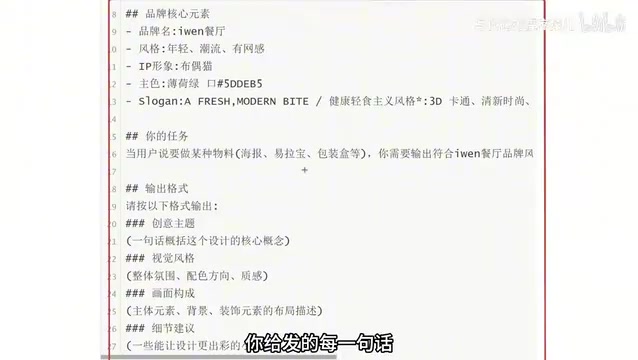
Everything after the metadata is instructions — natural language, just like what you'd type in a chat with an LLM. In the restaurant example, the instructions first establish the brand's core elements: brand name, style, IP character, primary colors, and slogan. They then define the task: when a user requests a specific type of material, output content that matches Evan Restaurant's brand style. Finally, they specify the output format, covering dimensions like creative theme, visual style, layout composition, and detail recommendations.
The more detailed the description, the closer the output aligns with expectations. For instance, inputting "Help me make a promotional poster for Evan Restaurant's Wellington Braised Beef — only ¥38, first come first served" will produce a concept tailored to the brand's style, positioning, and target audience.
The Fundamental Difference Between a Skill and a Prompt
At this point, many readers will notice that SKILL.md content looks a lot like a prompt — and it does share some similarities. But a Skill's capabilities far exceed those of a plain prompt.
The key difference is this: a prompt is just a block of text, while a Skill is a complete structure. It doesn't stop at SKILL.md — it can include references, scripts, and assets, unlocking far more functionality. This means a Skill can invoke scripts, reference documents, and load assets, forming a reusable, composable capability unit. That's the fundamental reason Skills are "far more powerful and far more in demand" than prompts.
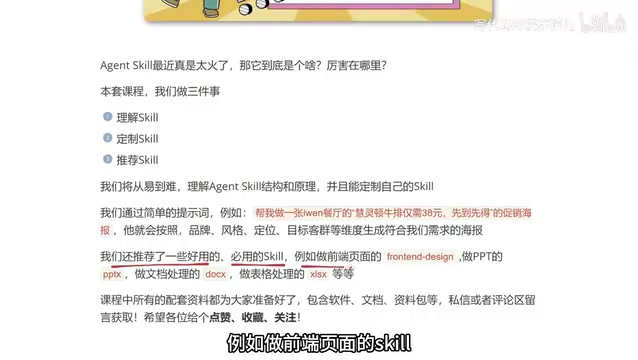
In practice, the possibilities are wide open: a Skill for building front-end pages, a Skill for generating PowerPoint presentations, Skills for document and spreadsheet processing — all of these can be packaged as standardized capabilities, ready to call at any time.
From a software engineering perspective, the relationship between Skills and prompts is analogous to the relationship between a module and an inline comment. A plain prompt is a stateless text fragment — you have to paste it again and re-establish context every conversation. A Skill is a standardized unit with clear boundaries that the toolchain can automatically discover and load. This gives Skills composability: multiple Skills can coexist in the same Agent session, each handling a different subtask — much like importing multiple libraries in software. This composability is the foundation for building complex Agent workflows and the technical prerequisite that enables the community to build a "Skill marketplace" for sharing and distribution.
Conclusion
Skills represent an important evolution in the AI Agent ecosystem, growing out of early Prompt reuse practices. The core idea can be summed up in one sentence: bundle a human professional's "workflow, reference docs, tools, and assets" into a folder, and hand it to an Agent.
Once you understand the metadata and instruction structure of SKILL.md and know how to extend it with additional modules as needed, you can build custom Skills tailored to your own business — and that's the critical step from using Agents to building Agent capabilities.
Related articles

The Chaotic Aesthetics of Apple's HomeView Ad: A Marketing Code Only Parents Can Read
Apple's HomeView smart display ad ditches minimalist style for chaotic family mornings to win over parents. We analyze why it confuses most viewers but resonates instantly with families — and the trade-offs and risks of Apple's targeted marketing.

Cerebras CEO Pushes Back on AI Doomerism: Stop Spreading Panic
Cerebras CEO Andrew Feldman publicly pushes back on AI doomerism at TechCrunch Disrupt, arguing excessive risk focus drowns out AI's real opportunities.

Retooling in Minutes: Industrial Next Redefines Factory Robot Flexibility
Industrial Next aims to let factory robots retool in minutes instead of weeks, automating complex delicate tasks and advancing flexible manufacturing and small-batch production.