AI Coding Keeps Writing Outdated APIs? Context7 MCP Solves Code Lag

Context7 MCP solves AI coding assistants writing outdated code due to knowledge cutoff by injecting the latest documentation in real time.
AI coding assistants often call deprecated APIs or outdated methods due to model knowledge cutoff, causing time-consuming debugging. Context7 MCP Server, based on Anthropic's MCP protocol, lets coding agents dynamically pull context from the latest official documentation and ports during inference, generating non-outdated code. Usage includes downloading the Server, configuring commands in the Agent, and explicitly invoking it in prompts. It suits frameworks and libraries with frequent API updates, but documentation coverage and compatibility still need more verification—a direction worth trying.
AI coding assistants can already help you write code, autocomplete functions, and even refactor modules, but many people have found that they occasionally call deprecated APIs or use outdated method signatures—and it takes ages to get things running. The root of this problem lies in the knowledge cutoff date of large language models, while official documentation and library versions of tech stacks keep evolving.
A solution called Context7 MCP is gaining attention in the AI coding community. According to a related YouTube tutorial video, its core idea is to let your coding agent pull context in real time from the latest official documentation and latest ports, thereby generating code that isn't outdated.

Why Is the Code AI Writes Always Outdated?
Once any large language model finishes training, its parameters are fixed. The framework documentation, API references, and sample code it encountered during training remain frozen at that point in time. New versions, new syntax, and new interfaces released afterward are unknown to the model.
This leads to an awkward situation: your tech stack has already been upgraded to a new version, but the AI still produces code using the old version's patterns. You run it and get errors, and only after digging in do you realize the API signature has changed. The time spent fixing this outdated code can sometimes exceed writing it from scratch yourself.
According to the video, Context7 MCP is designed specifically for this pain point—it doesn't retrain the model, but instead dynamically injects the latest documentation context into the coding agent during inference via MCP (Model Context Protocol).

Knowledge Cutoff Date refers to the last point in time covered by the dataset used during a large language model's training. Once training is complete, the model's parameters are fixed, and any documentation, API changes, or framework updates that appear afterward cannot be automatically known by the model. For example, if a model's training data ends in early 2024, then a library version released in mid-2024 and its API signatures are completely outside the model's knowledge.
It's important to distinguish that the knowledge cutoff date doesn't mean the model cannot handle new information—by injecting the latest documentation via the context window during inference, the model can still generate code based on this real-time information. This is exactly the theoretical basis for solutions like Context7 MCP: don't change the model parameters, but dynamically supplement external knowledge.
How Does Context7 MCP Work?
MCP is an open protocol proposed by Anthropic that allows AI models to connect with external tools and data sources in a standardized way. Context7 MCP Server is a concrete implementation of this protocol: it acts as a middle layer connecting your coding agent with the latest official documentation.
After you configure this MCP Server in your coding agent, the agent can pull the current latest documentation and API references from Context7 when generating code, rather than relying solely on the old knowledge learned during the model's training phase.
This means the code suggestions you get are more aligned with the actual library version you're using, reducing debugging time caused by outdated APIs. The video summarizes this process as "letting the agent fetch the latest documentation context, thereby improving your coding and efficiency."
MCP (Model Context Protocol) is a standardized protocol proposed and open-sourced by Anthropic, designed to establish a unified connection method between AI models and external tools and data sources. You can think of it as the "USB-C port" of the AI world—whether the backend is a database, API, or documentation service, as long as it follows the MCP specification, the model can call them in a consistent way.
MCP uses a client-server architecture: the coding agent acts as the MCP Client, and Context7 MCP Server acts as the MCP Server, communicating through standardized JSON-RPC messages. The Server is responsible for scraping, indexing, and returning the latest API references and sample code from official documentation sources, while the Client injects this context into the current conversation. The advantage of this design is decoupling—updates to documentation sources are entirely maintained on the Server side, and the Agent benefits without retraining or upgrading.
Configuration and Usage Steps
According to the video demonstration, the process of using Context7 MCP is not complicated:
- Download Context7 MCP Server: Obtain the service and prepare it in your development environment.
- Configure in your coding agent: Complete the registration and connection of the MCP Server via a specified command. The video shows a specific configuration command, but the demonstration is mainly verbal.
- Explicitly invoke in the prompt: After configuration, each time you need it, write "use context 7 MCP server" in the prompt, and the Agent will fetch the latest documentation context through this service.
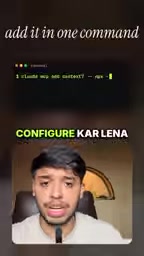
The key to this process is step 3—you need to actively guide the Agent in the prompt to use Context7, rather than expecting it to call it automatically. This adds some operational steps to a certain extent, but also gives you control over the context source.
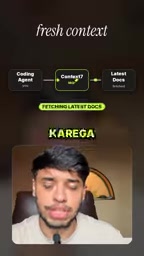
Configuring the Server in a coding agent that supports MCP usually requires editing a configuration file (such as Claude Code's claude_desktop_config.json or Cursor's MCP settings panel), adding the Server's startup command and parameters. The command typically looks like npx -y @context7/mcp-server or specifies a local executable path. After configuration, the Agent will automatically start the Server process when it launches and send query requests to it via the MCP protocol when needed.
It's worth noting that different Agents vary in their level of MCP support and configuration syntax, and some Agents may require manually enabling MCP functionality or installing additional plugins. Therefore, before实际操作, it's advisable to consult the official MCP documentation of the Agent you're using to confirm compatibility and specific configuration fields.
Applicable Scenarios and Limitations
Context7 MCP is best suited for the following situations:
- The frameworks or libraries you use are updated frequently, with rapid API changes (such as frontend frameworks, cloud service SDKs)
- You are already using a coding agent that supports the MCP protocol (such as Claude Code, Cursor, etc.)
- You are willing to actively guide the Agent in the prompt to call external context
However, the information currently available is limited. The video does not show the complete configuration command details, the range of supported documentation sources, or compatibility performance across different Agents. The actual coverage and stability of Context7 MCP still require more independent testing to verify. Its core value proposition—solving AI writing outdated code—has a clear direction, but the engineering implementation effect depends on the breadth of documentation source coverage and retrieval accuracy.
For developers who are frequently tripped up by AI's outdated APIs, this is a direction worth trying.
One-line Summary
Context7 MCP solves the problem of AI coding assistants writing outdated code due to knowledge cutoff by injecting the latest documentation in real time.
Paragraph Summary
AI coding assistants often call deprecated APIs or outdated methods due to the model's knowledge cutoff, leading to time-consuming debugging. Context7 MCP Server is based on Anthropic's MCP protocol, allowing coding agents to dynamically pull context from the latest official documentation and ports during inference, thereby generating non-outdated code. The usage process includes downloading the Server, configuring the command in the Agent, and explicitly invoking it in the prompt. This solution is suitable for frameworks and libraries with frequent API updates, but documentation coverage and compatibility still need more verification—it's a direction worth trying.
Related articles

MiniMax H3 Local Deployment Tutorial: Building an AI Video Workstation with ComfyUI
Complete tutorial for local deployment of MiniMax H3 open-source video model: from hardware spec checks, NVIDIA driver updates, ComfyUI installation to model downloads and workflow configuration — build your AI video generation workstation step by step, including acceleration plugins and prompt resources.

Run a 125-Billion-Parameter LLM on a Home PC? Inside the 25k-Star Strata Local Deployment
GitHub's 25k-star Strata project makes running a 125-billion-parameter LLM locally on a home PC possible. Built on MoE architecture with VRAM/RAM tiering, OpenAI API compatible, deployable with 12GB VRAM and 32GB RAM—data never leaves your machine.

12GB GPU Runs a 125-Billion-Parameter LLM Locally: Strata Hands-On Test
Alibaba's 125B-parameter model runs locally on a gaming PC via the Strata engine: just 12GB VRAM, measured 94 tokens/sec on an RTX 5070 at 2-bit, 260K context, no internet or subscription.