AI Game Development in Practice: Three-Platform Build Publishing and Full Project Retrospective Workflow

Lesson 13 ships a pixel game to three platforms and itch.io, scripting the process and distilling the retrospective into reusable assets.
This article covers lesson 13 of the AI game development series: publishing "Instrument Knight" from an editor prototype to a publicly playable release. It covers Godot's three-platform export (matching template versions, Web using Compatibility renderer with Thread Support off and a 1280x720 viewport), bypass guidance for Windows SmartScreen and macOS Gatekeeper, pre-release feature freeze and full testing, and the fix for a Web packaging blowup where index.html wasn't in the ZIP root—codified via an AI-written packaging script. Version numbers follow semantic versioning, the changelog is generated by AI from git log under Keep a Changelog rules, and store copy must be verified item by item. The retrospective emphasizes producing three AI-feedable assets—project constitution, prompt library, and pitfalls list—with time saved and rework counts filled in by the person, and the constitution kept project-agnostic and under 150 lines.
From Gray Cubes to a Playable Web Page: What the Final Lesson Did
In lesson 13 of the AI game development series, a pixel game called "Instrument Knight" crossed the gap from gray cubes in the editor to a publicly playable version. The core task of this lesson is to officially ship the game: export Windows, macOS, and Web platform builds, upload them to itch.io, and run a project retrospective with AI collaboration to distill lessons into reusable assets for the next project.
Publishing isn't just a matter of clicking an export button. The author breaks the whole process into eleven steps, each with clear acceptance criteria. This engineering-minded approach is exactly what amateur projects most often lack.
Exporting to Three Platforms: Templates, Presets, and the Pitfalls of Each Platform
Godot's export mechanism can be understood through three concepts: the pck file is the "meal," containing scenes, scripts, images, and audio; the export preset is the "packaging specification," one recipe per platform saved in the project root's export_presets.cfg that must be committed to git; and export templates are the "lunchbox," a trimmed-down runtime for each platform whose version must exactly match the editor, or the export will fail outright.
Each platform has its own considerations. Windows exports produce an unsigned exe that may trigger a SmartScreen prompt on first run, so players need to be guided to click "More info" and then "Run anyway." macOS requires a Bundle Identifier, and unsigned or unnotarized apps are blocked by Gatekeeper; this lesson uses a built-in adhoc temporary signature and clearly documents the bypass method on the store page—after being blocked once on double-click, go to System Settings > Privacy & Security and click "Open Anyway." The author specifically stresses not to teach players to disable Gatekeeper via command line, as that reduces the security of the entire machine. The Web version must use the Compatibility renderer, disable Thread Support, and set the viewport to 1280x720.
For small pixel games, the Web version is the most important distribution format—players can jump in and play without downloading, unzipping, or bypassing security prompts, so far more people will give it a try. Desktop versions serve as a supplement, and Windows can optionally embed the pck to package everything into a single exe for easy distribution.
Export templates are trimmed-down runtimes precompiled by Godot for each target platform. They contain no user project content themselves and are only responsible for launching and loading the pck. The Godot editor version and export template version must match strictly (e.g., a 4.3 editor with 4.3 templates), or the export will error out directly. If templates aren't installed locally on first export, the editor will prompt you to download them from the template manager.
A pck file is Godot's resource pack format, equivalent to packing the project's scenes, scripts, textures, and audio into a single container. Desktop platforms can choose to embed the pck into the executable (single-file distribution) or keep it external; the Web platform must keep it external and have it loaded by HTML. Export presets are saved in the project root's export_presets.cfg, recording each platform's package name, icon, renderer, viewport, and other recipe details. Once committed to git, teams and CI can reproduce identical builds.
Gatekeeper is macOS's security mechanism: unsigned or unnotarized apps downloaded from the internet are blocked on first launch with a "cannot verify developer" prompt. Code signing uses a developer certificate to prove the app's origin; notarization submits the app to Apple for automated scanning, and the system only allows it through once it passes. Both require a paid Apple Developer account. Adhoc signing is a local temporary signature that doesn't rely on a certificate; it only bypasses some checks and cannot pass Gatekeeper's full verification, so players still need to be guided to allow it manually.
SmartScreen is Windows's equivalent mechanism: for exes without an established reputation, first run pops up "Windows protected your PC," and users must click "More info" → "Run anyway." The proper way to eliminate this is to purchase a code signing certificate and build up download reputation; small projects typically just document the bypass steps clearly.
Pre-Release Freeze and the Packaging Blowup
Two things must be done before release: confirm the latest acceptance report conclusion is not a failure, close all must-fix issues, and run a full test suite with an exit code of 0; then enter feature freeze, allowing only bug fixes, with new ideas written into a backup document for 1.1.0.
The blowup is very representative: right-clicking and compressing the entire Web folder to upload to itch.io resulted in a page showing only a file listing, with the game failing to run—because index.html wasn't in the ZIP root, but nested one folder deeper. The fix was to have AI write a packaging script that reads the version number from project settings and packages each platform into a versioned ZIP, with the Web package required to verify index.html is at the root and error out if not found. Once this pitfall is codified in a script, it will never be stepped on again at any future release.
Version Numbers, Changelogs, and AI Collaboration on Store Copy
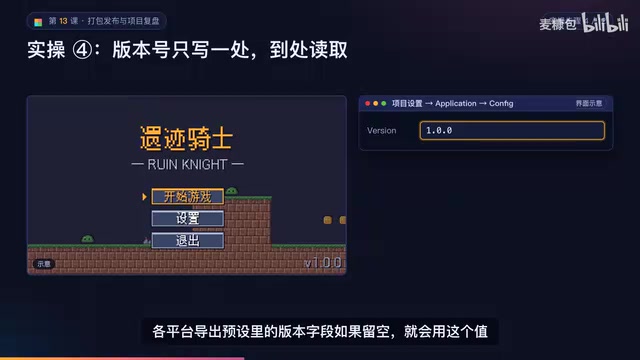
Version numbers have three parts: major, minor, and patch. Development uses 0.x, the acceptance version is 0.9, and the first public release is 1.0.0. Bug fixes only bump the patch number; new backward-compatible content bumps the minor number; incompatible changes like save format changes bump the major number—and whenever a digit increments, the digits to its right reset to zero.
The changelog has AI pull only commits after v0.9.0 from git log and write it in Keep a Changelog style, with requirements to use language players understand, avoid function names and file paths, ignore internal commits like tests and refactors, keep each entry under 30 characters, merge similar small fixes, and append a dev log draft under 150 words. The acceptance criterion is that every entry can be traced back to something in git log, with uncertain items marked as pending confirmation.
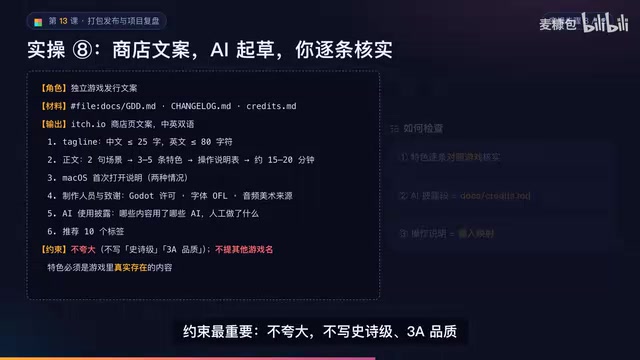
Store copy is also drafted by AI, but with very hard constraints: no exaggeration, no "epic" or "AAA quality," no comparisons with other games, no mentions of other game names, and features must be things that actually exist in the game. After AI returns the draft, each item must be verified against the game, the AI disclosure section must match the Credits document, and the controls description must match the input mapping.
Semantic Versioning (SemVer) follows the convention major.minor.patch: incompatible changes bump the major, backward-compatible new features bump the minor, backward-compatible fixes bump the patch, and whenever any digit increments, the digits to its right reset to zero. The 0.x development version, 0.9 acceptance version, and 1.0.0 first public release in the article are exactly this convention in practice.
Keep a Changelog is a changelog writing standard that advocates human-readable logs over machine-readable ones, grouped by categories like Added, Changed, Fixed, and Removed, and tied to version numbers and dates. Requiring "language players understand, no function names or file paths" is essentially about making the changelog serve players rather than developers.
git log is the commit history of a repository, where each commit has a hash, author, timestamp, and message. Having AI pull only commits after a certain tag (e.g., v0.9.0) scopes the range and avoids mixing early internal commits into the player-facing log.
The Right Way to Retrospect: Produce Three AI-Feedable Assets
The author has a sharp take on retrospectives: they most easily devolve into "learned a lot, AI is great, will keep trying next time" reflections that, when the next project kicks off, contain not a single directly usable sentence. The output of a retrospective should be three files—the project constitution (rules that automatically apply in every conversation), the prompt library (copy and use), and the common pitfalls list (check before writing prompts).
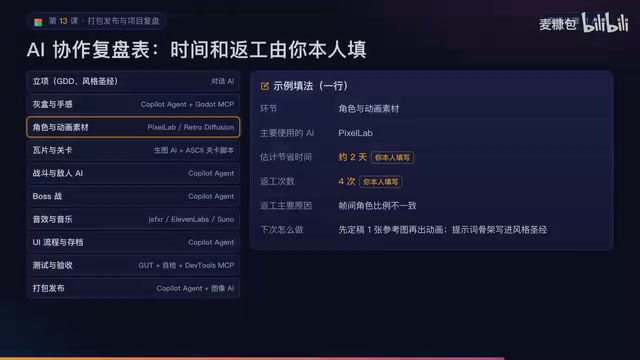
The AI collaboration retrospective table is organized by phase, from project initiation, art and game feel all the way to testing, acceptance, and packaging/release. Each row records which AI was used, estimated time saved, rework count, reasons for rework, and what to do next time. The author stresses that the time saved and rework count columns must be filled in by the person themselves—AI doesn't know real time spent, and the numbers must be based on memory or records, never fabricated by AI.
Concrete examples of distillation: pixel assets reworked three times became a rule in the constitution with its source noted; the time AI modified assertions became "write a failing test first when fixing bugs" in the prompt library; the ZIP nested-folder issue became a sentence in the pitfalls list that can go straight into constraints. The most critical constraint is project-agnosticism—values like 320x180 should be written as placeholders or annotated "side-scroller projects only," because the next project is top-down.
Pitfalls Worth Remembering and Course Acceptance
Beyond packaging and Gatekeeper, there are two new pitfalls: the web version's aspect ratio is off because the viewport isn't an integer multiple of 320x180—setting 1280x720 on itch fixes it; the web version has no sound because browsers require player interaction before playing audio—keeping the click-to-start and not checking autoplay solves it. The retrospective itself has pitfalls too: the project constitution grows ever longer and AI stops following it, so write a source for each rule, keep it under 150 lines, and prune regularly.
The acceptance checklist for this lesson includes: presets committed to git, icons, splash screen, and version number set, index.html in the Web root of all three release packages, debug bridge disabled in the release build, desktop version running on another computer, changelog and version tag, itch.io page public, and retrospective plus three assets completed.
What this lesson really signals is: shipping a game is only the starting point—scripting the release process and distilling retrospectives into reusable rule assets is the key to making the next project faster and better. The author finally notes that the same Copilot serving as designer one moment, programmer the next, and tester after that makes the context increasingly messy—the next lesson will upgrade the retrospective assets into an AI team.
One-line Summary
Lesson 13 ships a pixel game to three platforms and itch.io, scripting the process and distilling the retrospective into reusable assets.
Related articles

9 AI Subscription Plans Compared: The Real Cost Per 100M Tokens Revealed
Bilibili creator tests 9 AI subscription plans from Volcano, Alibaba, Tencent, Baidu, Zhipu, Xiaomi, MiniMax and more, converting them all to real cost per 100M tokens, breaking down fixed-quota vs. three-tier coefficient billing and how caching, time-of-day discounts, and window limits affect actual quota.

Vibe Coding for Beginners: Expressing Intent Instead of Handwriting Code
What is Vibe Coding? A 137-episode Bilibili course defines it: the core is expressing intent, not writing code. This article analyzes Vibe Coding's productivity logic, target audience, and entry expectations to help beginners decide if it's worth learning.

LangChain Beginner's Guide: An Agent Development Roadmap from LangGraph to Deep Agents
Clarify the encapsulation relationship among LangChain, LangGraph, and Deep Agents, and master the learning path and selection logic for agent development frameworks—suitable for beginners in large model development.