AI Hardware with a Model Store: Can Local LLM Deployment Really Be Zero-Barrier?

Model store + device dashboard simplifies local LLM deployment to button clicks, but convenience comes with hardware lock-in.
Local large model deployment has long discouraged everyday users due to high barriers around model selection, environment setup, and VRAM management. Based on a Bilibili creator's real-world experience, this article examines an integrated "model store + device management" solution: manufacturers categorize mainstream models with benchmark data so users can deploy with one click — no command line needed. A backend dashboard displays real-time VRAM usage and service status across devices, eliminating the need for separate monitoring tools. The trade-off is reduced flexibility — niche or cutting-edge open-source models outside the store aren't immediately accessible — and strong dependence on the vendor's proprietary ecosystem.
Why Local Deployment Has Always Turned Away Ordinary Users
You buy a local AI compute device, then realize you have no idea how to actually deploy a model — this is the awkward reality almost everyone faces when trying to run large models locally. Model selection, environment setup, VRAM management, service orchestration — every step has a steep learning curve, and for users without a technical background, it's a complete dealbreaker.
A Bilibili content creator shared his own firsthand experience: after picking up a local hardware compute unit, he hit the same wall of "not knowing how to deploy models." His solution was to use a "model store" mechanism provided by the manufacturer, turning what would normally require command-line tools and scripts into a process that only takes a few button clicks.
The core selling point of products like this is to bring local large models down from "a tool for power users" to "a consumer-ready, out-of-the-box experience." Whether they can truly deliver zero-barrier access is the key question worth unpacking.
The Model Store: Packaging Model Selection and Deployment into One Click
Based on the creator's demo, the centerpiece of this approach is an interface that resembles an app store. The manufacturer categorizes the most commonly used models, provides real-world benchmark data for each, and users don't need to dig into how any model works under the hood.
The store covers a remarkably broad range of capabilities, including speech-to-text, real-time Chinese-English simultaneous interpretation, image recognition (such as boarding pass scanning), text-to-image, text-to-video, and integrations with mainstream models like MiniMax and Flash. For users, understanding "what this model does" and "how it performs in testing" is enough — the rest is handled by one-click installation.
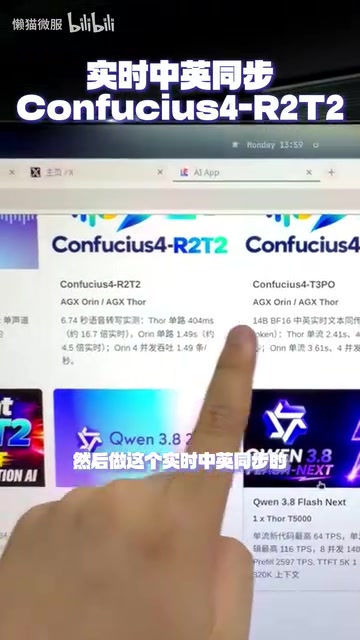
The deployment flow is stripped down to its simplest form: pick the model you want (say, voice conversion), choose which device to deploy it on, and click "Start Deployment" on the right. No software configuration required — "click a button and it works" is the literal experience.
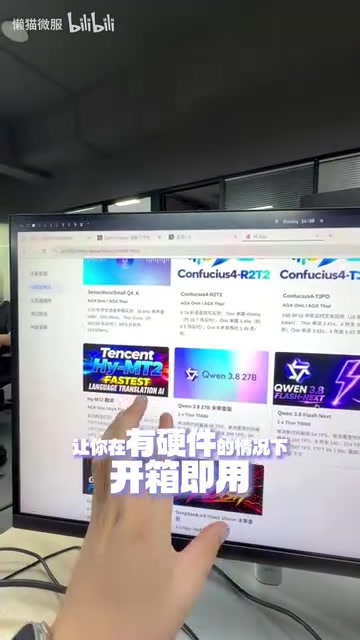
This design philosophy essentially brings the cloud "model-as-a-service" experience to local hardware — users pay for results without spending time on the learning curve.
It's worth noting that MiniMax and Flash, both mentioned in the model store, represent different model types. MiniMax is a multimodal large language model series from the Chinese AI company MiniMax, with capabilities spanning text, voice, and video generation. Flash typically refers to lightweight model variants optimized for faster response times and moderate parameter counts (such as the Gemini Flash series), which are popular in local deployment scenarios due to their lower compute requirements. A model store that includes both "full-capability" and "speed-first" models is designed precisely so that users with different performance needs can find options that match their hardware — without having to understand parameter counts, quantization precision, or other technical details.
Device Management: Full Transparency on VRAM Usage and Runtime Status
After deployment, another practical but easily overlooked feature is device management. The creator demonstrated the backend dashboard: which services are running on each device, how much VRAM each is consuming, and whether they're currently active — all displayed clearly at a glance.
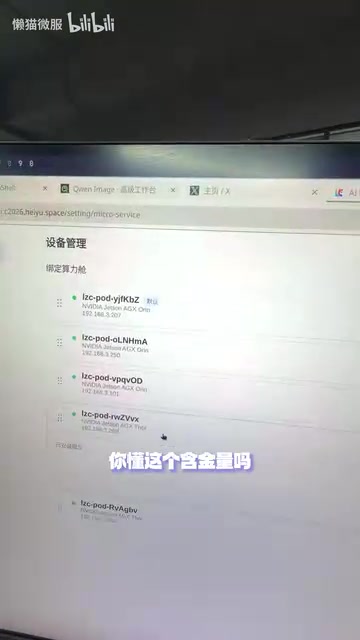
In local deployment scenarios, VRAM is the scarcest resource. Being able to see resource usage and runtime status for all services in a single interface means users no longer need additional monitoring tools or command-line checks to diagnose issues. This is especially helpful for running multiple models in parallel and starting or stopping them on demand.
The manufacturer also makes performance benchmarks for each model on that specific hardware — along with what optimizations the compute unit itself has undergone — openly available to users. This "nothing to hide" approach reduces decision anxiety: you know exactly how fast the hardware you're buying can run.

VRAM management is one of the core bottlenecks in local large model deployment. Unlike regular system memory, VRAM is dedicated high-speed storage on the GPU, and a model's weight parameters must be fully loaded into VRAM to run inference. A typical 7B parameter model, for example, requires roughly 14GB of VRAM when loaded at FP16 precision, while consumer-grade GPUs (such as the RTX 4090) max out at 24GB — meaning running multiple models in parallel can easily cause VRAM overflow and service crashes. In traditional command-line deployments, users have to manually run tools like nvidia-smi to check VRAM usage. An integrated management interface visualizes this information in real time, significantly reducing the operational overhead in multi-task scenarios.
Behind the Out-of-the-Box Experience: A Few Things to Consider Realistically
This approach genuinely solves the most painful part of local deployment — the difficulty of getting started. But it's worth being clear-eyed about what it actually is.
The model store offers a curated set of models that the manufacturer has pre-adapted and tested. Its convenience comes from "narrowing your choices." This means niche models outside the store, or the latest open-source releases, may not be available for one-click installation right away — flexibility takes a hit. The benchmark data is manufacturer-provided, which is useful as a reference, but users are still advised to validate performance against their own real-world use cases.
On top of that, this kind of experience is tightly coupled to a specific hardware ecosystem. Convenience and hardware lock-in are two sides of the same coin: the configuration time you save comes at the cost of depending on a single vendor's software-hardware stack.
That said, from the perspective of lowering the barrier to entry, this direction is unquestionably right. For local large models to reach a broader audience, "can someone get it running with a few clicks" matters more than "how many parameters can it handle." Only when the deployment barrier is flattened can local large models become a practical, everyday tool.
Note: This article is based on a single Bilibili creator's usage experience. For specific product performance and feature behavior, hands-on testing is recommended.
"Hardware lock-in" is nothing new in consumer electronics — Apple's software-hardware ecosystem is the most classic example: closed means smooth, open means flexible. For local AI compute devices, this trade-off is even more pronounced. Manufacturers achieve the "one-click deployment" experience through deep optimization at the driver level and inference framework level (such as inference engines tuned for their own chips) — and these optimizations typically can't be transferred to other hardware platforms. For power users who need to mix devices from multiple vendors, or who want to run any open-source model from Hugging Face, standardized local inference tools (such as Ollama, llama.cpp, and vLLM) remain the more flexible alternative — at the cost of handling environment setup and compatibility debugging yourself.
Related articles

Free Unlimited Claude Code Solution: Agnes AI + CC Switch Setup Guide
No paid subscription needed — pair the free AI platform Agnes AI with the open-source tool CC Switch to provide a backend for Claude Code, enabling unlimited free calls to text, image, and video models. This guide covers the full setup, test results, and usage boundaries.

A Complete Zero-Cost Guide to Getting Started with Claude Code for Beginners in China
A beginner's guide to Claude Code for users in China: two installation methods (command line and IDE plugin), full configuration steps for replacing the official API with the free domestic LongCat model, and a hands-on demo of building a small tool with natural language, plus tips.

When the NSA Gets Involved: The AI Supply Chain Crisis Behind Open-Source CVEs and API Key Hijacking
Multiple open-source projects disclosed severe CVEs in one day, PHP flaws alarmed the FBI, and Railway and OpenCode were breached with API keys stolen. This article breaks down the vulnerability window, AI-accelerated exploitation, and the AI supply chain crisis behind the API key black market, with a developer defense checklist.