AI Now Generates GIFs Directly: The Era of Unlimited Custom Stickers Has Arrived

Images 2.6 lets AI generate frame-by-frame editable GIFs directly, drastically lowering the barrier to sticker creation.
The article covers the GIF generation capability of the image model Images 2.6. Users select "Create Image" in GPT, upload a character reference, and write a prompt with appearance, style, and a mini-story action to generate a GIF. The GIF is an 8-frame sprite sheet, allowing speed adjustment and frame-level comments for local AI edits instead of full regeneration. It also supports real-person performances, WeChat chat logs, dancing stick figures, accurate Chinese text, and a character library. The author sees this as AI image generation entering the time dimension, though character consistency still needs work.
From Text to Animated GIFs: A New Leap in AI Generation
In the past, making a GIF meant opening Photoshop and drawing frame by frame, or using professional animation software. Today, AI can generate GIFs directly, letting even non-designers easily customize their own meme stickers. According to a Bilibili creator, some of his non-designer friends have already started taking orders to customize stickers for others. Behind this is a major update to the image generation model—version Images 2.6.
How to Generate Your First Animated GIF with GPT
The workflow isn't complicated: open GPT, click the plus sign in the input box, select "Create Image," and you can access the capabilities of Images 2.6. The creator demonstrated the full process in one minute, and the key step lies in how you write the prompt.
The first step is to upload a reference image. The creator cut corners the first time and didn't upload one—he just wrote "a big fat blue whale." The AI dutifully drew a blue whale—cute, but far from the character he wanted. So if you want a fixed character to come to life, you must upload the character image first.
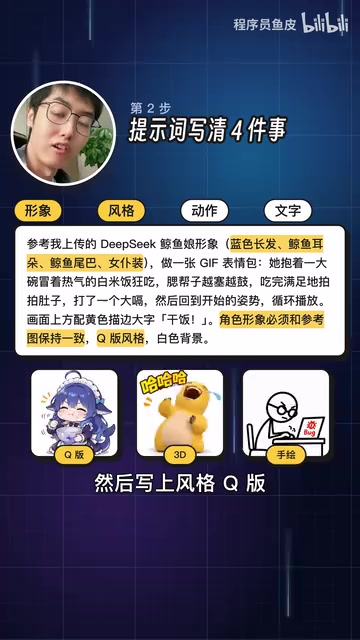
The second step is to specify several things in the prompt: first describe the appearance, such as "blue long-haired whale-tailed maid outfit," and explicitly require consistency with the reference image; then specify the style—chibi, 3D, or hand-drawn all work; and most importantly, the action—be sure to write it as a complete mini-story, like "he hugs a bowl of rice and devours it, then pats his belly and burps." You can also add specified text to the sticker. Click send, and the animated GIF is generated quickly.
Sprite Sheets and Frame-by-Frame Editing: The Underlying Logic of GIF Generation
An 8-Frame Sprite Sheet
After generating the GIF, switch to the sprite sheet view, and you'll find that the GIF is actually composed of 8 frames stitched together. This sprite sheet mechanism makes AI-generated GIFs editable. If it plays too fast, you can easily adjust the speed; if you're unhappy with a particular frame, just add a comment on that frame and let the AI change only that part without regenerating the entire GIF.
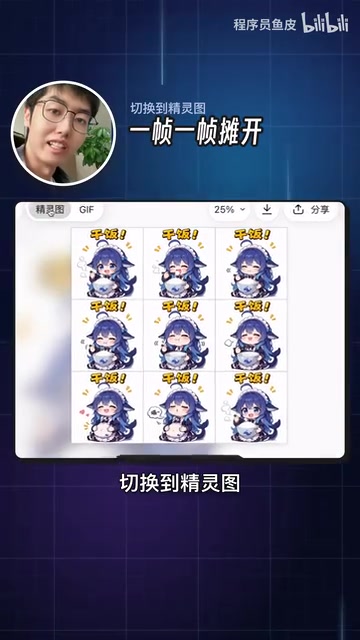
This frame-by-frame feedback mechanism is one of the most practical aspects of this update. Traditional AI image generation often requires repeated "gacha" rolls, but the sprite sheet plus frame-level comments lets users precisely control specific areas, greatly reducing the cost of repeated generation.
The concept of the sprite sheet originated in 2D game development. In the early days, when hardware performance was limited and real-time frame-by-frame animation rendering was impossible, developers pre-drew all of a character's action frames, stitched them into a large image in a grid, and at runtime "cropped" them cell by cell via coordinate offsets—achieving smooth animation at very low cost. This approach is still used today and remains common in web animation, game engines, and CSS animations.
Applied to AI image generation, the value lies in "addressability": the model no longer outputs a single indivisible image, but a neatly structured canvas containing 8 cells. Each cell can therefore be individually located, individually evaluated, and individually redrawn while the rest remain unchanged. It is precisely this spatial discretization that makes interactions like frame-level comments and speed adjustment possible, turning the formerly all-or-nothing gacha-style generation into an editing process that can be iterated locally.
Speed Adjustment and Frame-Level Corrections
For sticker scenarios, playback speed directly affects expressiveness. The sprite sheet mechanism lets users freely adjust playback speed, which is more efficient in practice than regenerating. And the frame-level comment feature is like opening an independent modification channel for each frame—users don't need complex prompts to describe "what to change"; they just leave a comment directly on the corresponding image.
Frame-level correction works because of the generation mechanism of diffusion models. These models typically start from random noise and progressively restore the image through multi-step denoising, with the entire process constrained by prompts and reference images. If the model redraws the whole image, even with identical prompts, slight differences in the random seed will cause the result to drift—character details and composition may all change.
By limiting the modification scope to a single cell of the sprite sheet, the conditions are spatially tightened: the model only needs to re-denoise within that cell, with the rest preserved as known context. This reduces the amount of information needed to "convince" the model and avoids the inconsistency caused by full-image redrawing. So frame-level comments essentially translate the user's natural language feedback into local redraw instructions, replacing complex prompt descriptions with spatial constraints—this is the fundamental reason it's more cost-effective than repeated gacha rolls.
More Use Cases: From Real-Person Performances to Chat Log Generation
Upload a Photo and Star in Your Own Mini-Story
Beyond fixed cartoon characters, the creator also demonstrated uploading his own photo—the AI can make you star in a mini-story. But he joked that the resulting person looked more like his "distant cousin," showing that AI still has room for improvement in character consistency.
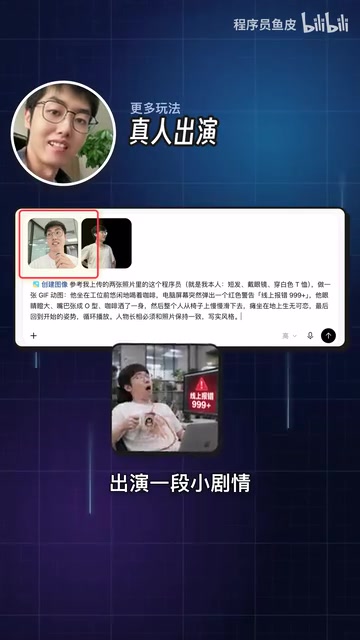
"Real-person performance" relies on character consistency technology, commonly implemented through reference image conditioning, identity-preserving adapters, and locking facial features during generation. The goal of such methods is to keep the same subject recognizable across different poses, expressions, and scenes.
The difficulty is that the stronger the consistency, the lower the model's freedom—actions and expressions tend to become conservative; conversely, loosening constraints easily leads to "face swaps." The "distant cousin" effect described here is a typical manifestation of this tension: overall outline and vibe are close, but facial details shift. For high-tolerance scenarios like stickers, this deviation is acceptable; but for commercial uses requiring precise real-person reproduction, stronger facial constraints or post-correction methods are still needed—this is one of the main limitations of deploying such capabilities today.
WeChat Chat Logs and Stick Figures Dancing
Other use cases include: generating pop-up WeChat chat logs—the creator specifically noted that not a single Chinese character was written incorrectly, indicating significant progress in the model's ability to render Chinese glyphs; and sketching a stick figure on a drawing board, which the AI can make dance. These capabilities expand the boundaries of AI image generation, extending from static images to dynamic content with a temporal dimension.
Character Library: Save Reference Photos and Call Them by Name
The creator also mentioned an efficiency-boosting detail: save frequently used characters in a reference photo library, so you can call them by name in future generations. For creators who need to continuously produce content with the same character, this feature saves the trouble of repeatedly uploading reference images.
The Industry Signals Behind Sticker Freedom
From a tooling perspective, making a GIF used to require learning Photoshop or using professional software—now a paragraph of text is enough. The lowered barrier directly triggers an explosion on the supply side—the creator predicts the sticker zone will soon be taken over by AI as well.
More deeply, the opening up of GIF generation means AI image models are beginning to handle the dimension of "time." The combination of sprite sheet mechanisms, frame-level editing, and speed adjustment is effectively using a static image generation framework to approximate an animation production workflow. For ordinary users, this is sticker freedom; for the content industry, it may be a new transformation in how content is supplied.
Of course, character consistency issues remain—the "distant cousin" joke shows there's still a gap between reference images and generated results. But for scenarios like stickers that don't demand high precision, the current results are already good enough.
One-line Summary
Images 2.6 lets AI generate frame-by-frame editable GIFs directly, drastically lowering the barrier to sticker creation.
Paragraph Summary
The article introduces the GIF generation capability brought by the image generation model Images 2.6. Users simply select "Create Image" in GPT, upload a character reference image, and specify in the prompt the appearance, style, and a complete mini-story action to generate a GIF. The GIF is fundamentally an 8-frame sprite sheet, so playback speed can be adjusted, and comments can be added to individual frames for AI to make local modifications, avoiding full-image re-rolls. Beyond fixed characters, you can upload photos for real-person performances, generate WeChat chat logs, make stick figures dance, get accurate Chinese rendering, and save frequently used characters in a reference photo library for call by name. The author believes this marks AI image generation beginning to handle the time dimension; the lowered barrier will bring an explosion of sticker supply, though character consistency still has room for improvement.
Related articles
DeepSeek SuperAgent Architecture Explained: A New Multi-Task Concurrent Agent Paradigm
DeepSeek Harness proposes SuperAgent architecture: a Router+Worker two-layer team model solving context confusion, loop blocking, and local sleep in multi-task Agents.
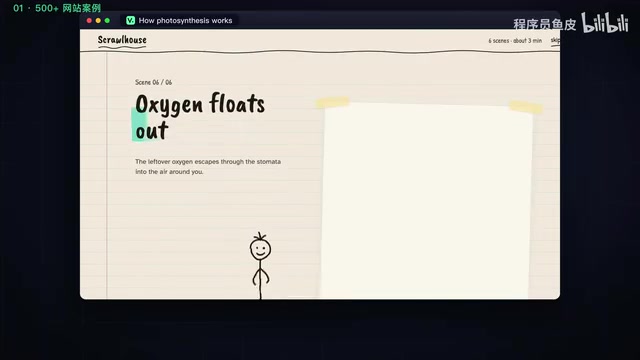
Burned Through 1.3 Billion Tokens and Tens of Thousands of Yuan to Build 500 Websites with AI
Bilibili creator Yu Pi built Vibefather, an AI website template library with 270+ templates and 500+ live sites, consuming over 1.3 billion tokens. Each template includes full prompts and design docs, open-sourced and integrable via Claude Code, Cursor, and more.
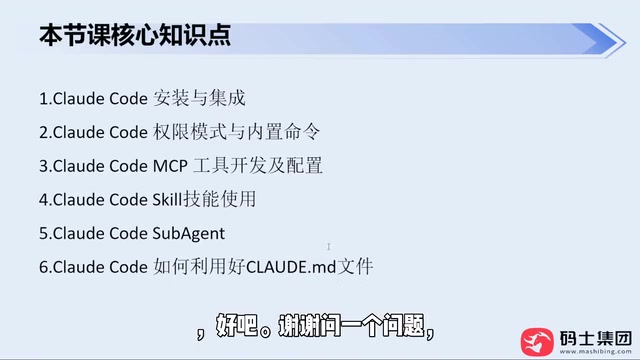
Claude Code Practical Guide: Installation, Permission Modes, and Productivity Tips
Based on a Bilibili creator's hands-on sharing, this guide covers Claude Code installation (NPM recommended), permission modes, slash commands, CLAUDE.md configuration, context management, and practical tips for stable use and avoiding account bans.